System Design: Highly Available AWS Architecture
Building a Highly Available and Scalable Web Application on AWS — from a simple application to a highly available architecture that can grow with demand.
What we are trying to build. A web application that can continue serving users even if an Availability Zone fails. Along the way we will learn how frontend hosting, backend compute, APIs, databases, caching, connection management, asynchronous processing, and microservices fit together.
In this chapter, we will build the architecture step by step. We will see where Multi-AZ design, load balancing, Auto Scaling, database high availability, failure handling, and disaster recovery fit, and why each new component is introduced.
Important: The user counts in this chapter — 10,000 users, 1 million users, and 10 million users — are examples, not hard AWS limits. In real systems, concurrency, requests per second, latency, data size, and workload type matter more than the raw number of registered users.
1. Start with the simplest architecture that can work
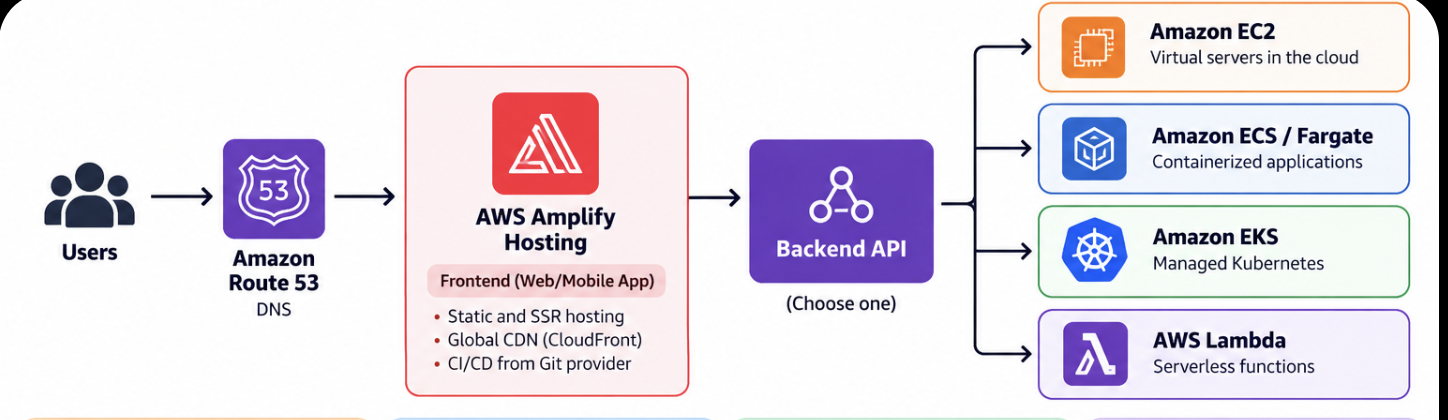
Most applications do not begin with a complicated distributed system. They begin with a very small idea: a user opens a website, the frontend is displayed, and the frontend talks to a backend. At this stage, simplicity is an advantage because it helps the team ship quickly and learn what users actually need.
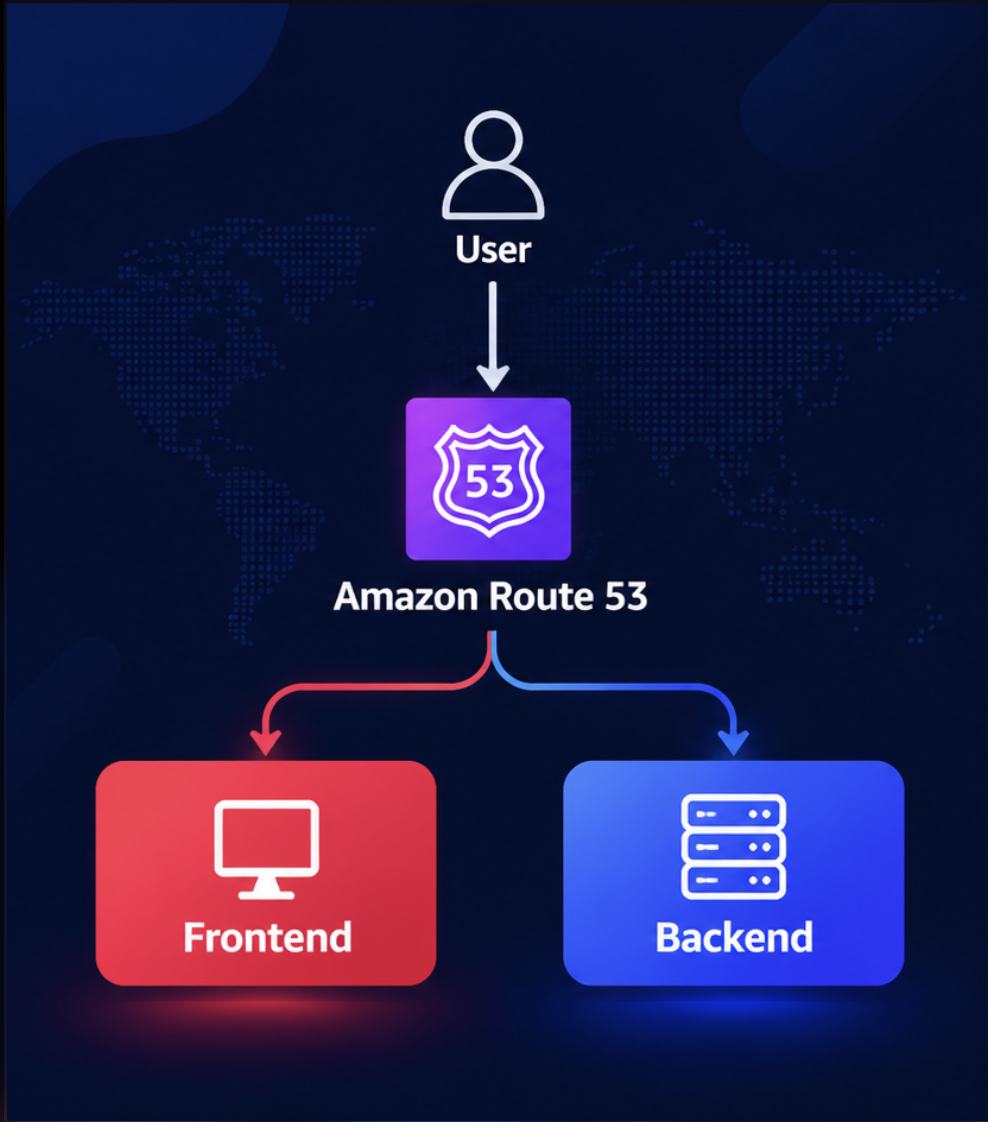
Amazon Route 53 provides DNS. In simple terms, DNS converts a domain name such as example.com into the destination that should receive the request. The frontend contains the user interface, while the backend contains application logic, APIs, and access to data.
As the application becomes more important, however, we need more than a single server. We need to think about high availability, load balancing, Auto Scaling, and what happens when an Availability Zone fails.
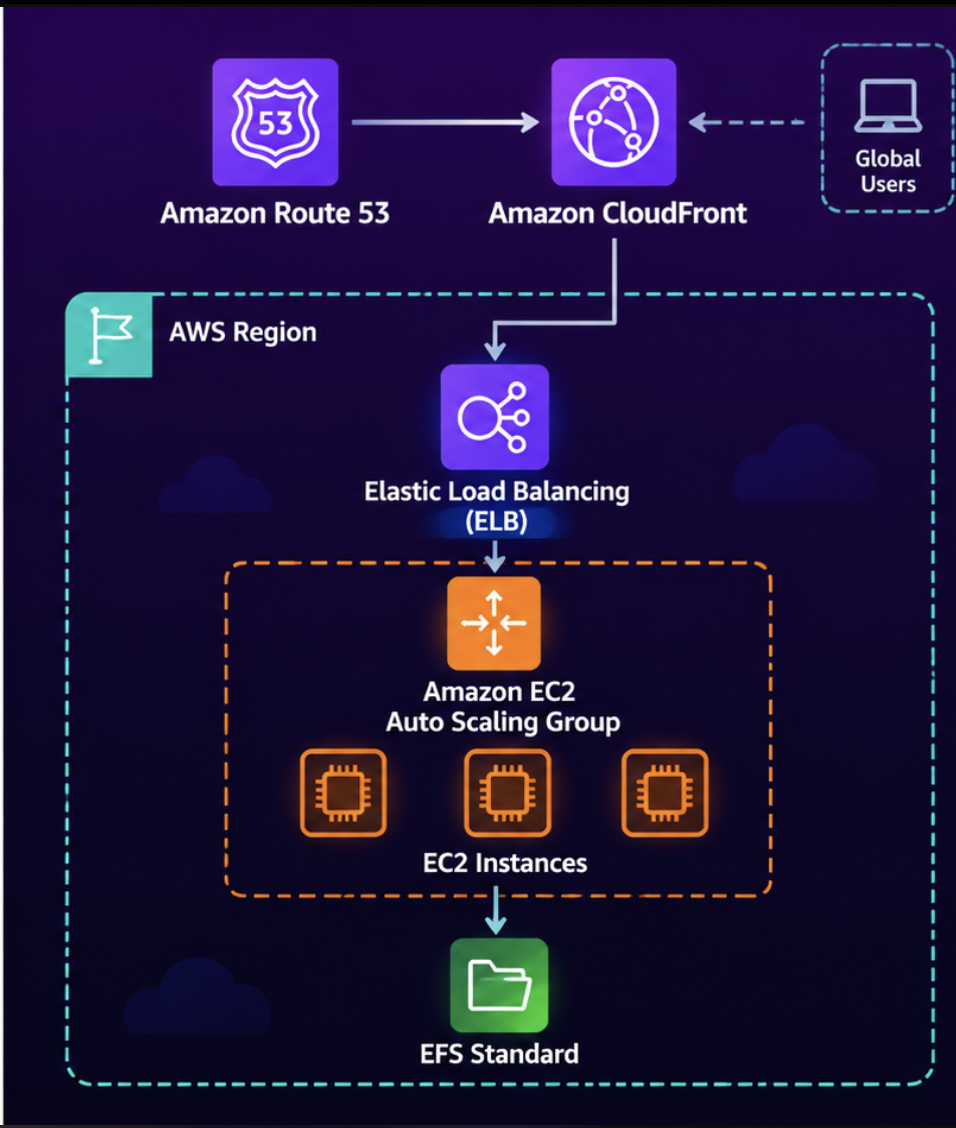
Key idea: Do not start with every service at once. Start with the smallest architecture that safely meets the current requirement, then add complexity when a real need appears.
2. Simplify the frontend with AWS Amplify Hosting
The first place we can reduce operational work is the frontend. Instead of managing web servers ourselves, AWS Amplify Hosting can build, deploy, and globally deliver a web application for us. It is especially useful for frontend frameworks and teams that want fast deployment without managing the underlying hosting infrastructure.
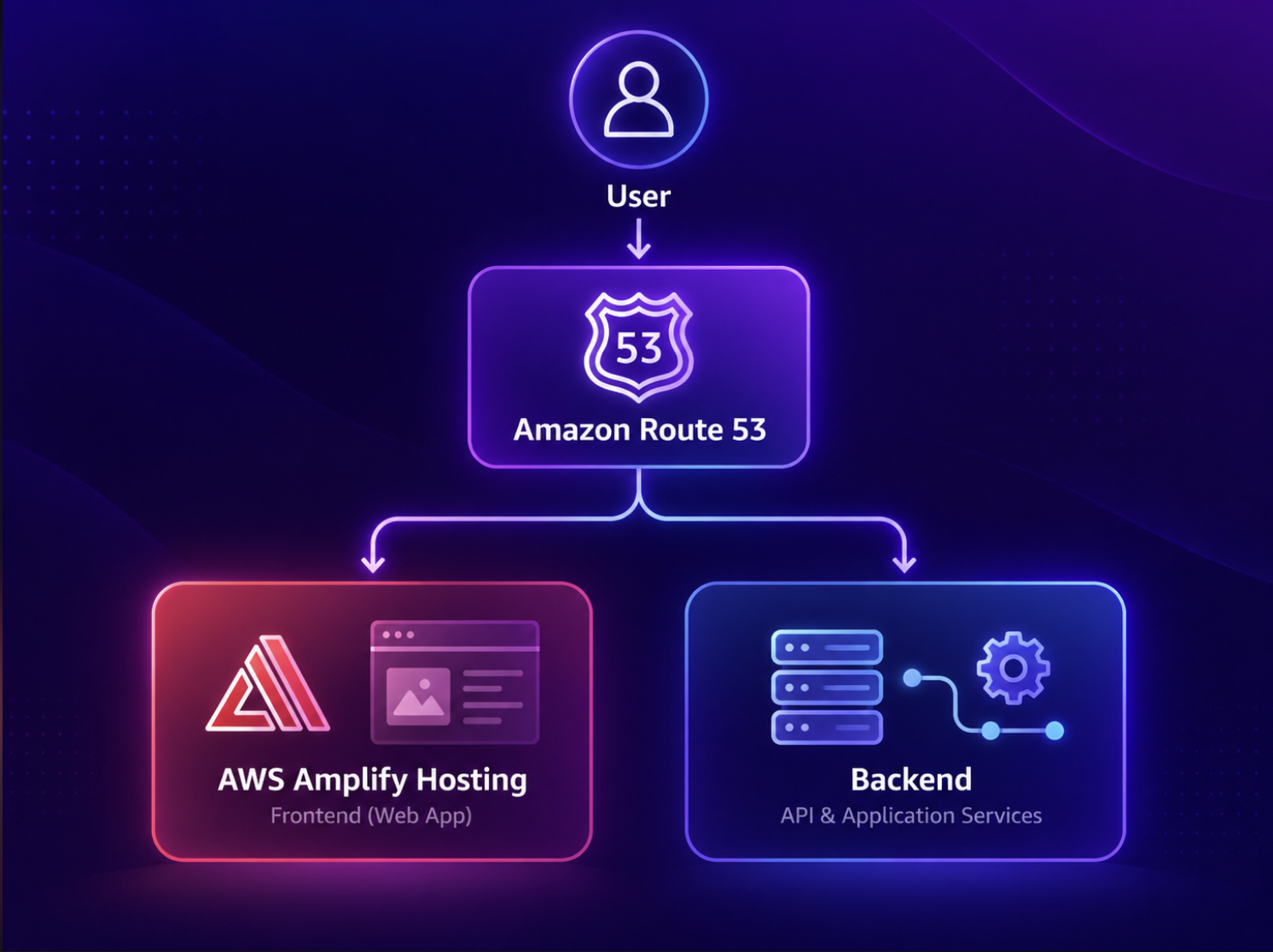
Amplify gives us simplicity and speed, but that simplicity comes from abstraction. AWS manages much of the hosting environment, which means we have less direct control over infrastructure details. That is usually a good trade-off for a small or growing application, but it may become restrictive if the application later needs unusual networking, custom runtime behavior, or highly specialized deployment patterns.
How Amplify Hosting works
The workflow is straightforward. We connect a Git repository, Amplify detects or uses the build settings, installs dependencies, builds the frontend, and deploys the result. The application is then delivered globally through AWS’s content-delivery infrastructure.
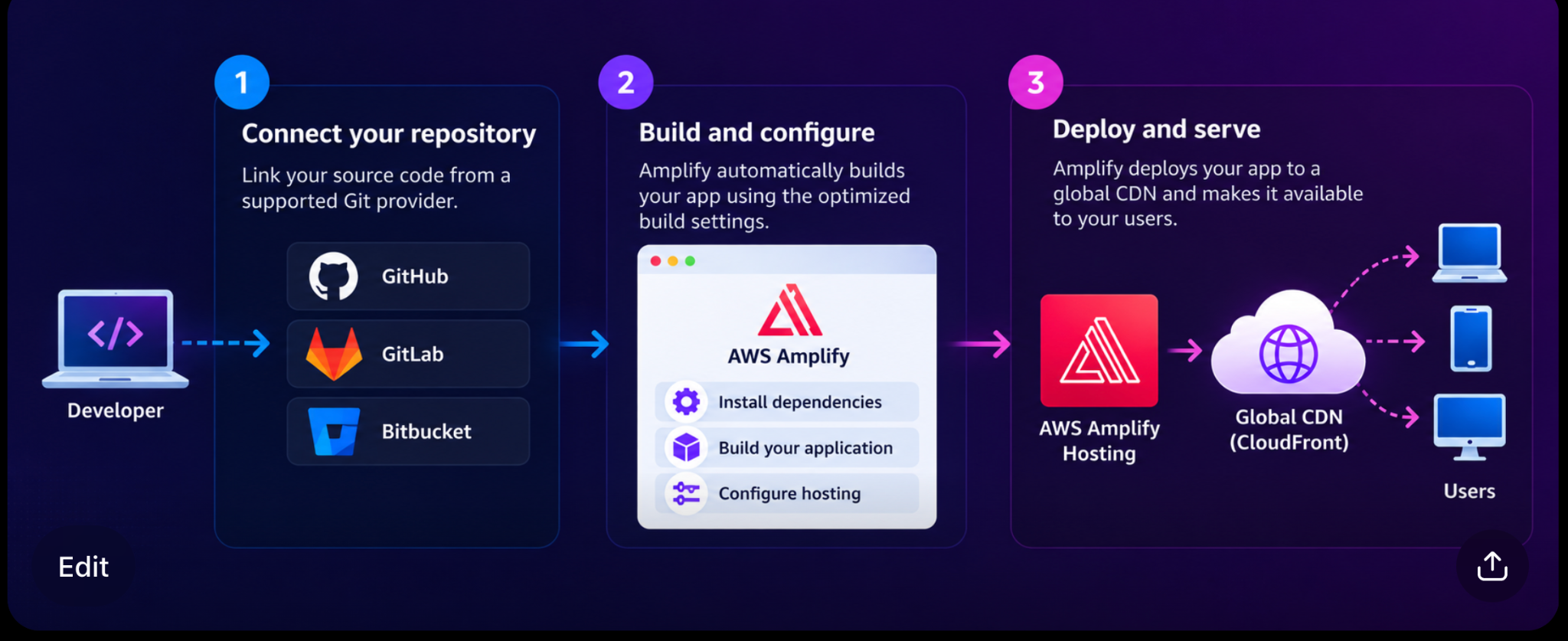
How the request flows: Amplify hosts and delivers the frontend. After the HTML, JavaScript, and CSS load in the user’s browser, that frontend code calls the backend API. Amplify does not need to sit in the middle of every backend request.
Where Amplify can become limiting
Amplify is not a bad choice simply because the application grows. It can scale very well for frontend delivery. The limitations are mainly about control and customization, not about a small fixed user limit.
- You have less control over the underlying hosting infrastructure because many details are managed for you.
- Advanced networking, unusual runtime requirements, or very customized deployment patterns can be harder to implement.
- Framework and server-side rendering support follows the capabilities supported by Amplify.
- Troubleshooting can sometimes be harder because you do not directly manage every infrastructure layer.
- A deeply integrated Amplify application can be harder to migrate away from later.
3. Choose how the backend will run
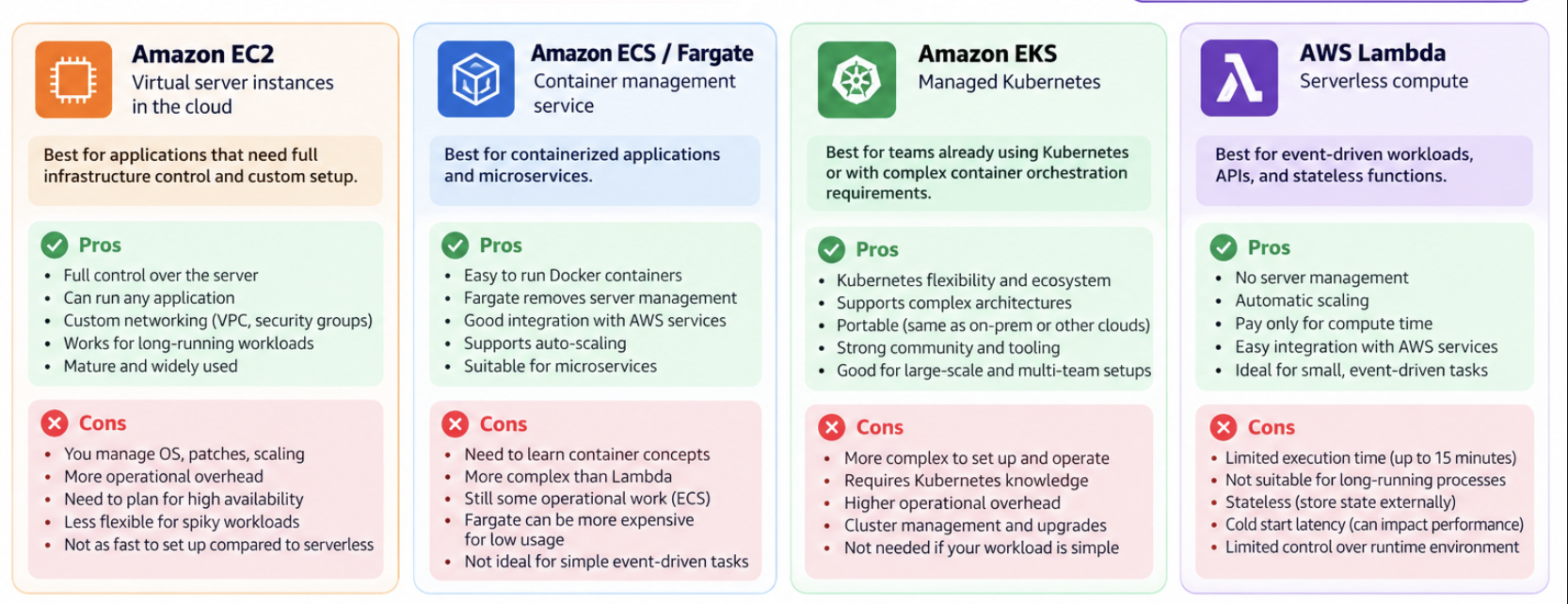
Once the frontend is handled, the next question is where the business logic should run. AWS gives us several compute models. There is no single “best” option. The correct choice depends on how much control we need, whether we use containers, how long the workload runs, and how much operational complexity the team can handle.
Amazon EC2
EC2 is the closest option to a traditional virtual server. We choose the operating system, install software, configure the runtime, and control the networking. This gives maximum flexibility, but it also gives us more operational responsibility. We must think about patching, capacity planning, scaling, and instance lifecycle.
Amazon ECS with AWS Fargate
ECS is AWS’s container orchestration service, and Fargate lets us run those containers without managing the underlying servers. This is a good middle ground for teams that want containers and independent scaling but do not need Kubernetes.
Amazon EKS
EKS is managed Kubernetes. It is powerful when an organization already uses Kubernetes or needs the Kubernetes ecosystem and portability. However, Kubernetes adds operational and learning complexity, so it is usually unnecessary for a simple application.
AWS Lambda
Lambda is serverless compute. We provide functions and AWS runs them when they are triggered. Lambda is very useful for APIs, event-driven jobs, and short-lived work. It removes server management, but it is not the natural fit for every long-running or continuously active workload.
Quick choice guide: Need maximum server control? Think EC2. Want containers without Kubernetes? Think ECS/Fargate. Need Kubernetes? Think EKS. Need short-lived event-driven compute? Think Lambda.
4. Expose backend business logic to the frontend
The frontend runs inside the user’s browser and needs a safe way to call backend services. This is the API layer. The API layer can authenticate requests, route traffic, apply throttling, and decide which backend service should handle each request.
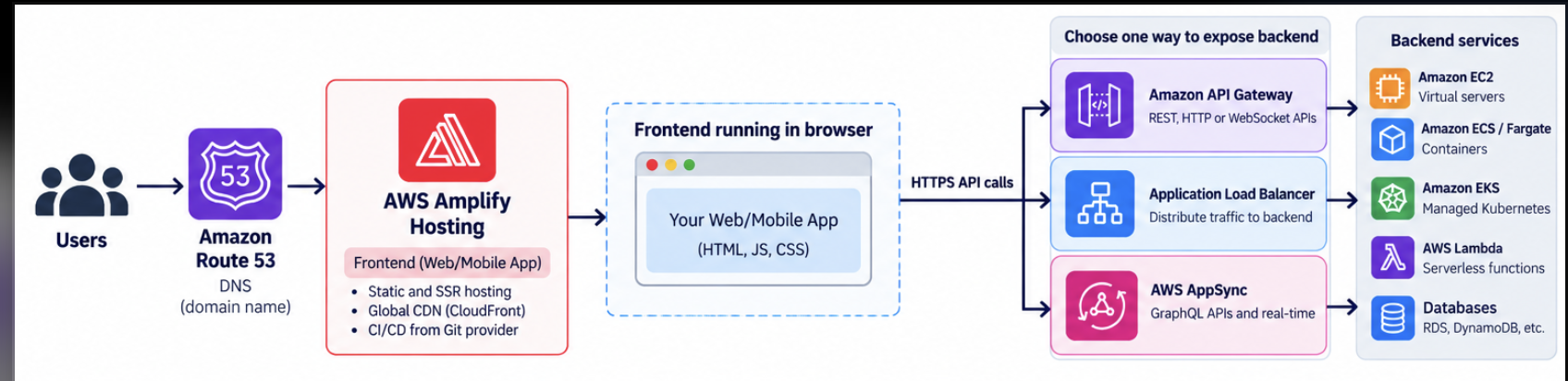
Amazon API Gateway
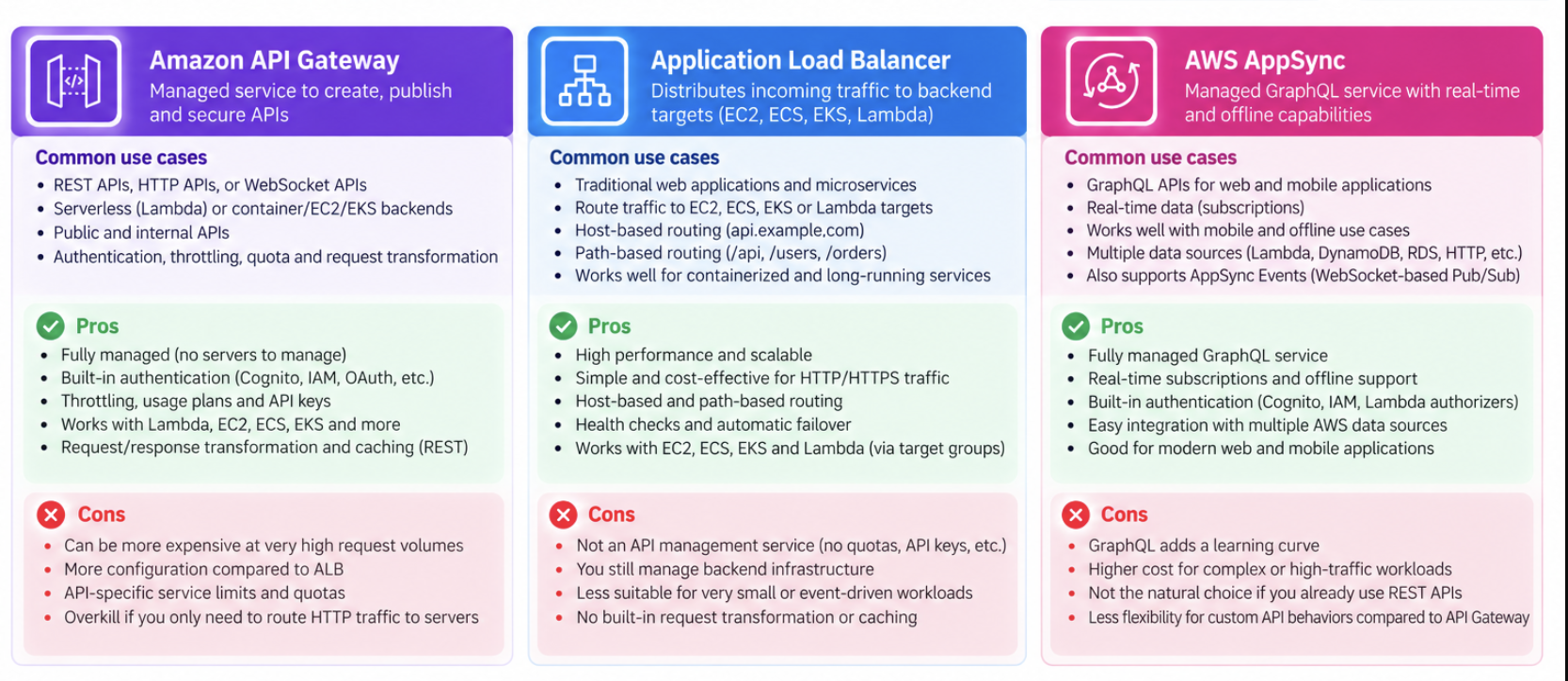
API Gateway is a managed API front door. It is a natural choice for REST, HTTP, and WebSocket APIs, especially when the backend uses Lambda or when the API needs authentication, throttling, quotas, monitoring, or request transformation.
Application Load Balancer
An Application Load Balancer is a strong choice for long-running services on EC2, ECS/Fargate, or EKS. It can route by hostname or URL path, for example sending /orders to one target group and /users to another. It is excellent for traffic distribution, but it is not a full API-management platform.
AWS AppSync
AppSync is useful when the application is designed around GraphQL or real-time data. It can connect multiple AWS data sources behind a managed API and provides features such as authorization and real-time subscriptions.
Quick choice guide: REST/HTTP/serverless API → API Gateway. EC2 or containerized web backend → ALB. GraphQL or real-time application data → AppSync.
5. Choose the database by the data and access pattern
A common mistake is to choose a database only from the expected number of users. A better question is: what does the data look like, and how will the application read and write it? Many applications should begin with SQL because the data is relational and the business needs transactions.
Why start with SQL?
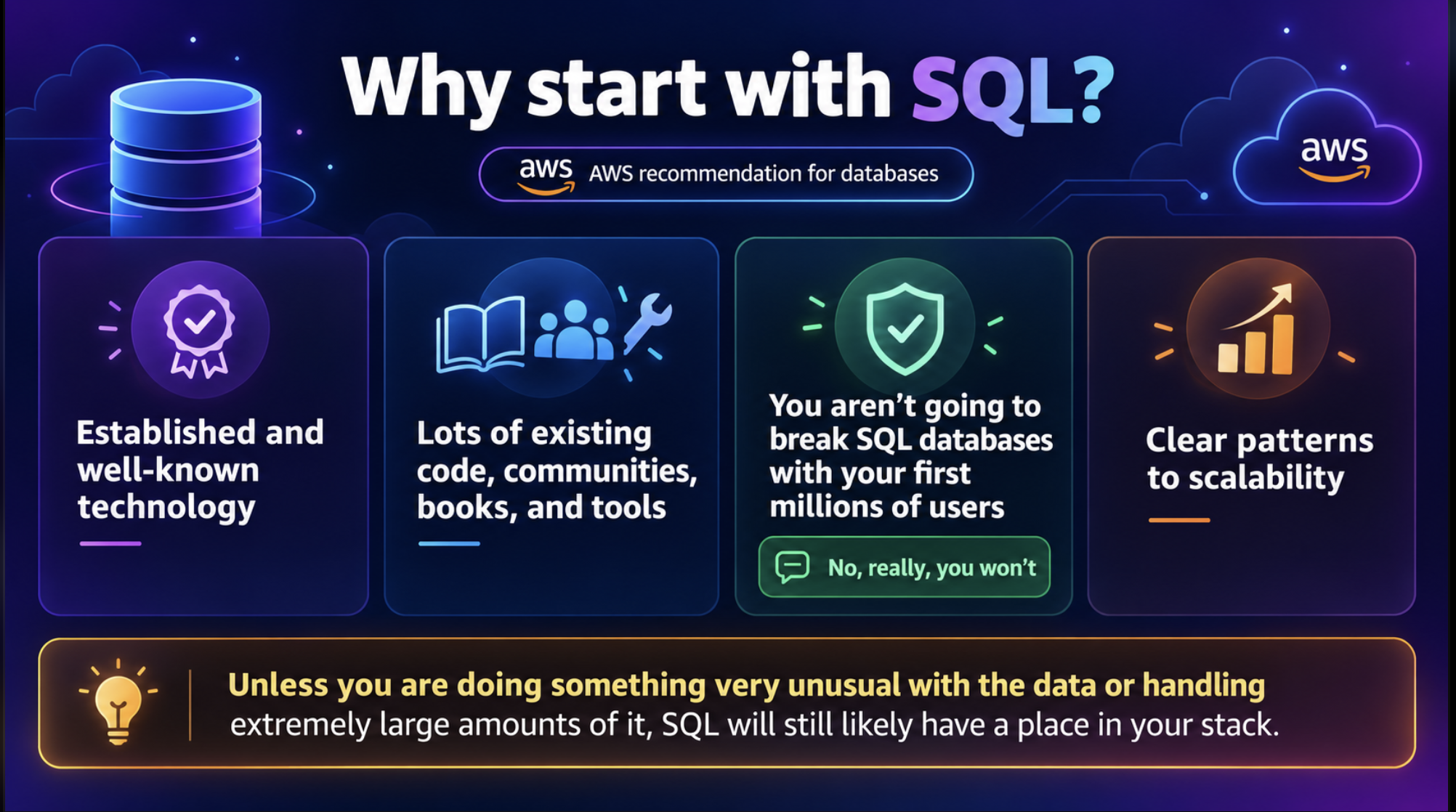
SQL databases have been used for decades. They have a large ecosystem of tools, experienced engineers, libraries, and documentation. More importantly, they are a natural fit for business data such as users, orders, payments, products, and subscriptions.
A well-designed SQL database can scale very far. High traffic alone is not a reason to move to NoSQL. SQL systems can use read replicas, caching, connection pooling, vertical scaling, partitioning, sharding, and Multi-AZ deployment patterns.
Recommended starting point: If relationships, joins, constraints, and ACID transactions are important, SQL is usually the easiest place to begin.
When should you consider NoSQL?
NoSQL becomes attractive when the data model or access pattern does not fit a traditional relational model well. Examples include flexible documents, key-value access, graph relationships, very high event ingestion, and workloads where horizontal partitioning is a core design requirement.
Typical reasons include very low-latency access at high scale, rapidly changing record structures, highly non-relational data, large event streams, or simple predictable queries such as “get order by OrderID” or “get all sessions for UserID”.
On AWS, common NoSQL choices include DynamoDB for key-value and document access, DocumentDB for document workloads, Neptune for graph data, Keyspaces for Cassandra-compatible workloads, and Timestream for time-series data.
Important: Do not choose NoSQL only because you have terabytes of data or thousands of writes per second. Modern SQL systems can handle both. Choose NoSQL when the data model and access pattern clearly benefit from it.
6. Use Amazon Aurora when you need managed SQL with stronger scaling and availability
Aurora is a managed relational database compatible with MySQL and PostgreSQL. It keeps the familiar SQL model but uses a cloud-native architecture that separates compute from distributed storage. This makes it attractive when an application needs stronger availability, more read scaling, and less database administration.
Aurora can use read replicas to scale read-heavy workloads. Its storage is distributed across multiple Availability Zones, backups are continuous, and a read replica can be promoted if the writer fails. Aurora can also be extended across Regions for disaster recovery and global reads.
Think of Aurora as: Managed SQL + distributed storage + easier read scaling + high availability. It is not automatically the cheapest choice for every application.
Aurora trade-offs
Aurora often costs more than a small standard RDS database, its pricing has more moving parts, and its architecture is AWS-specific. It is also important to understand that read replicas mainly help read scaling. A single writer is still common, so very high write volume can eventually become a bottleneck.
Aurora Serverless v2
Aurora Serverless v2 keeps the Aurora database model but automatically adjusts database compute capacity within a minimum and maximum range. This is useful for variable workloads, SaaS applications, development environments, or applications with daily or seasonal traffic changes.
Serverless does not mean “no database engineering”. We still need good schema design, indexing, query optimization, and sensible connection management. Automatic scaling cannot fix an inefficient query.
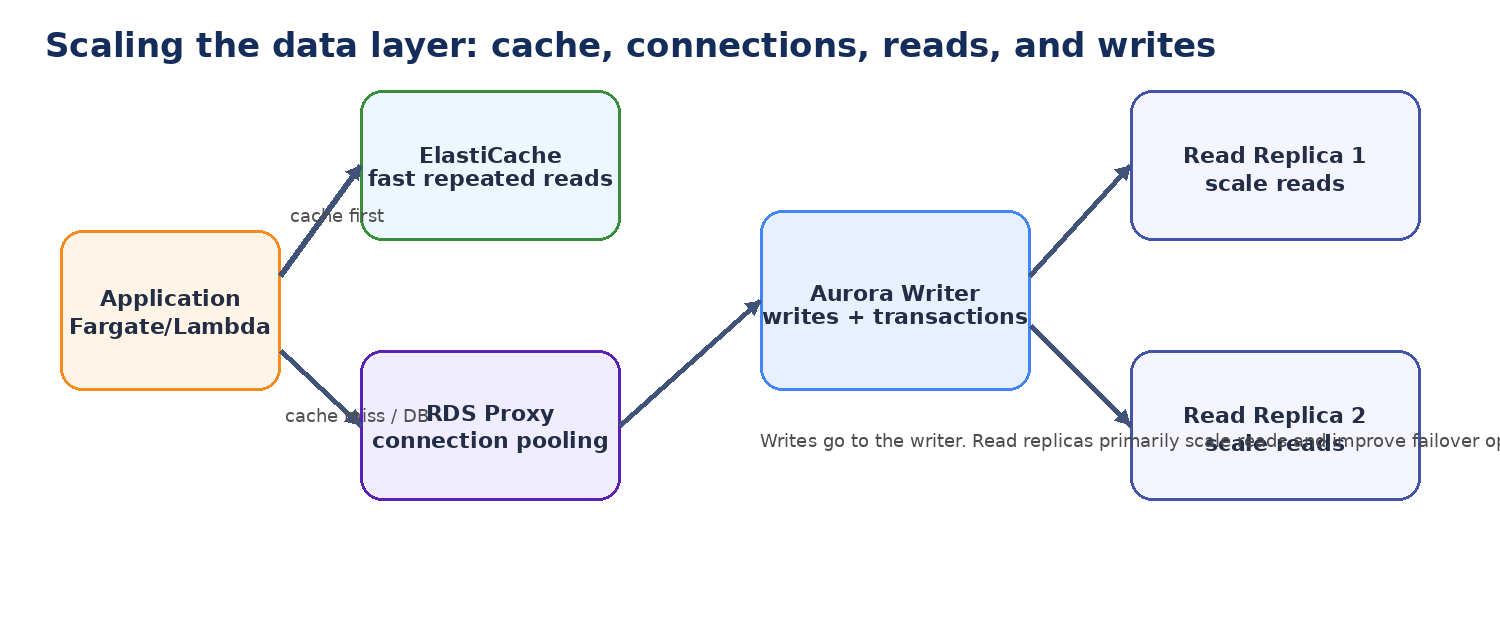
7. The first architecture can scale much farther than 10,000 users
A stack such as Route 53 → Amplify Hosting → Fargate → Aurora Serverless v2 can potentially support far more than 10,000 users if it is designed well. The important point is that bottlenecks become more visible as usage grows.
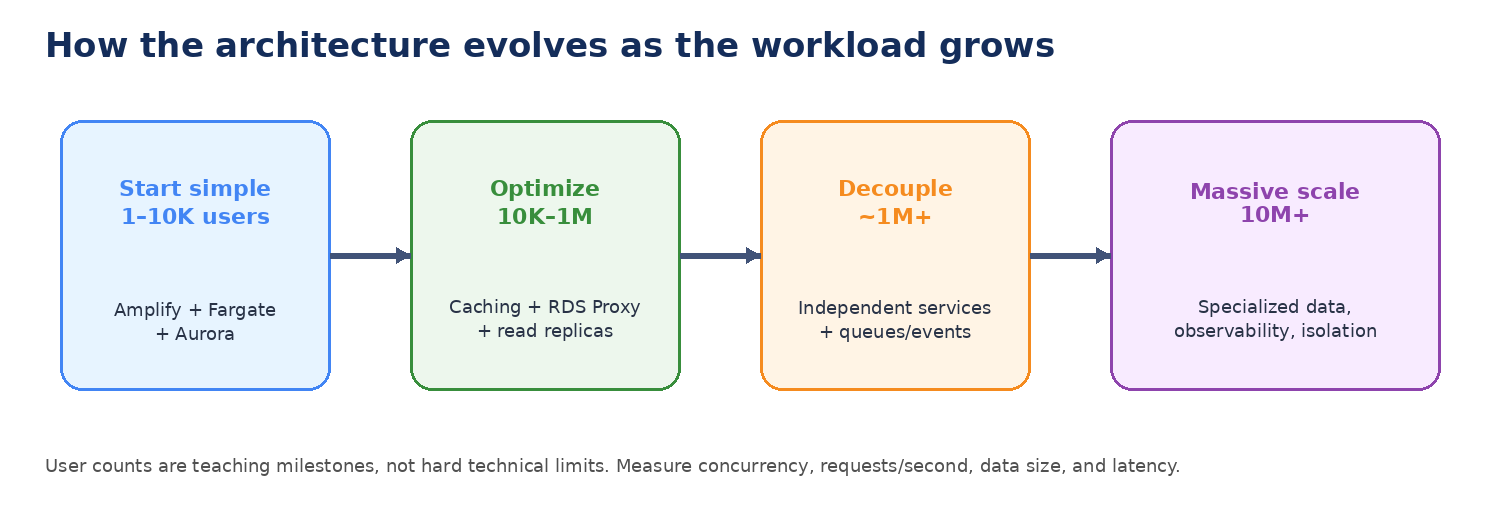
For example, 100,000 registered users does not tell us very much. A more useful workload description is: how many users are active at the same time, how many requests per second they generate, how much data they read and write, and what latency they expect.
As traffic grows, a monolithic backend can create several problems. One busy feature may force the whole application to scale. A slow reporting function can affect checkout or login. Database connections and indexes become larger. Different workloads may need different amounts of CPU, memory, or I/O. A failure in one component can also have a larger blast radius.
8. Scale the frontend by reducing work before adding infrastructure
Amplify Hosting can scale very well because frontend assets are delivered through CloudFront. At larger scale, the frontend bottleneck is often not Amplify itself. The problem is more likely to be inefficient JavaScript, oversized images, poor caching, or too many calls to the backend.
The first scaling improvements are therefore often simple: use Cache-Control headers, compress and optimize images, use lazy loading and code splitting, reduce repeated API calls, reuse data already loaded in the browser, and monitor cache-hit ratio and page performance.
The big idea: Good scaling often comes from doing less work, not from adding more servers.
9. Manage database connections with Amazon RDS Proxy
When Fargate tasks, Lambda functions, or application servers scale out, each instance may try to open database connections. The database can become overloaded by connection management even when CPU usage still looks healthy.
RDS Proxy sits between the application and the database. It pools and reuses connections so the application does not need to create a brand-new database connection for every request. It can also make failover smoother and can integrate with IAM authentication and Secrets Manager.
Key point: RDS Proxy scales database connections. It does not make slow SQL fast, and it does not replace read replicas or database capacity.
10. Reduce repeated database work with Amazon ElastiCache
Many applications repeatedly request the same data. Product details, user sessions, leaderboards, shopping carts, API responses, and expensive query results are common examples. If every request goes to Aurora, the database performs work that may not be necessary.
ElastiCache keeps frequently accessed data in memory. The application checks the cache first. If the data is present, it can return the answer immediately. If the data is missing, the application queries the database and can place the result into the cache for the next request.
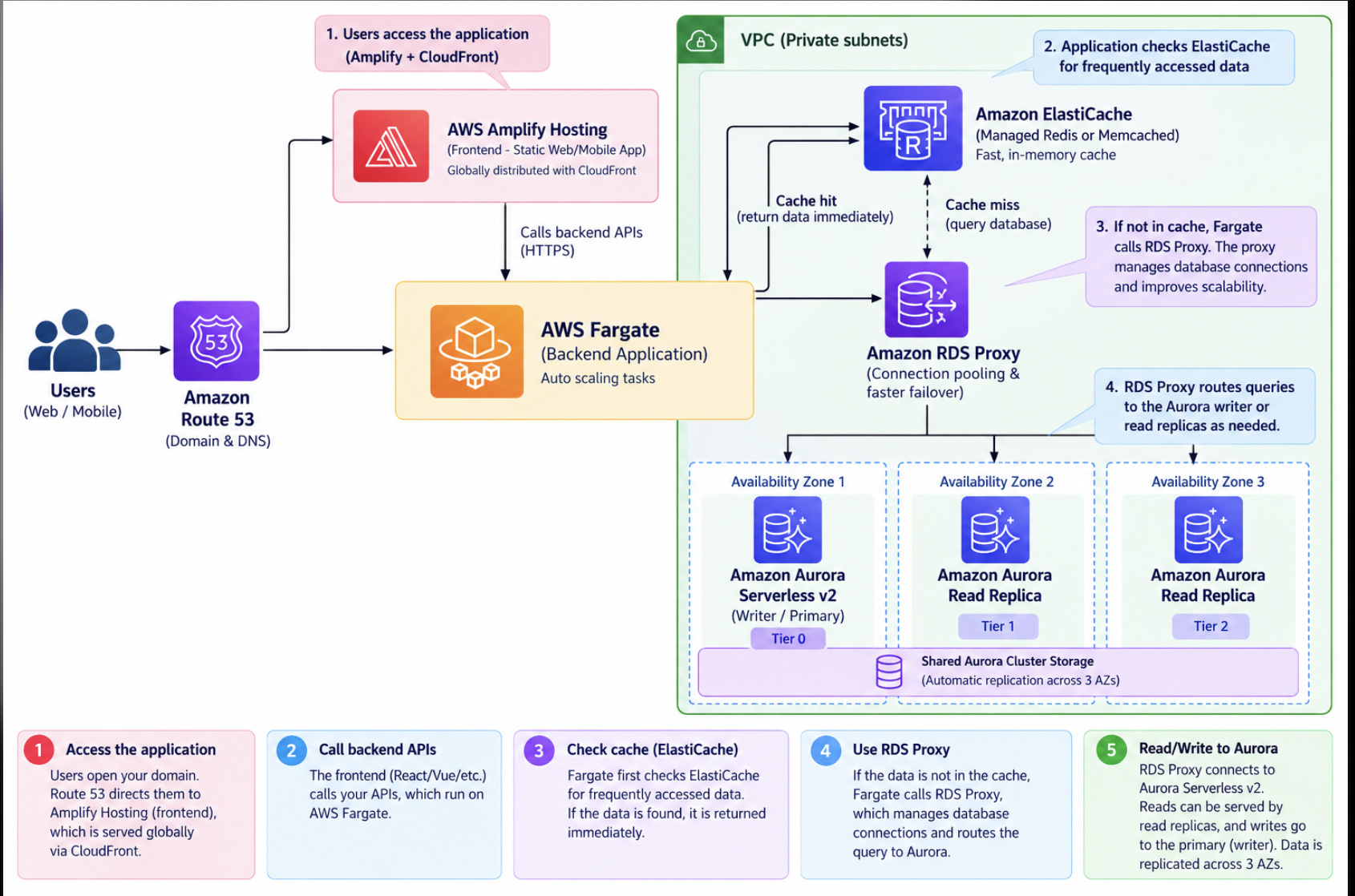
Caching is powerful, but it introduces a new problem: cache invalidation. The team must decide how long data can remain cached and how to avoid returning stale information.
11. At very large scale, the application architecture becomes the bottleneck
Eventually, the challenge is no longer simply whether AWS can add more capacity. Product complexity, deployment risk, team ownership, and failure isolation become just as important as traffic.
A large monolith may contain user management, orders, search, notifications, reporting, payments, and many other features. These features do not always have the same scaling needs. One may be CPU-heavy, another may be read-heavy, and another may mainly process background jobs.
At this stage, teams often begin extracting independent services. Each service can have its own compute model, scaling policy, cache, queue, database, and deployment lifecycle. The reason to create a microservice should be a clear benefit such as independent scaling, ownership, or failure isolation—not simply because the application has reached a particular user count.
12. Decouple services with queues, topics, event buses, and streams
Synchronous APIs are useful when the caller needs an immediate answer. But many tasks do not need to complete while the user is waiting. Sending an email, generating a report, processing an image, updating analytics, or notifying another service can often happen asynchronously.
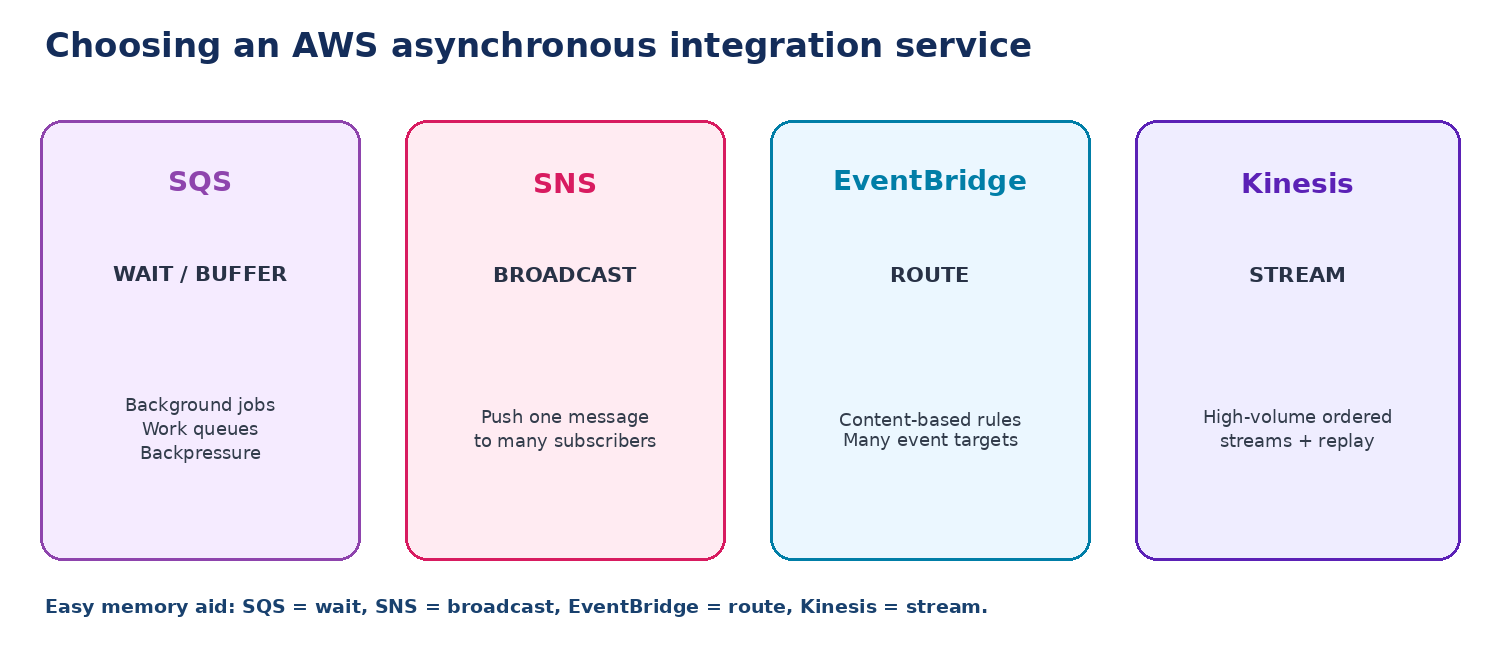
Amazon SQS: buffer work
SQS is a queue. Producers place messages into the queue and consumers process them when they are ready. This is useful for background jobs and for protecting a slower downstream service from traffic spikes.
Amazon SNS: broadcast
SNS is a publish/subscribe service. A producer publishes once and the message can be pushed to multiple subscribers. It is useful for notifications and simple fan-out patterns.
Amazon EventBridge: route events
EventBridge is an event bus. Rules inspect events and route matching events to different targets. It is especially useful when many services need loosely coupled event-driven integration.
Amazon Kinesis Data Streams: stream and replay
Kinesis is designed for continuous high-volume event streams. Multiple consumers can independently process the same stream, which is useful for clickstreams, logs, telemetry, analytics, and real-time processing.
13. Put the pieces together into a microservices architecture
Once the system is large enough, the architecture can contain several independent services. API Gateway or a load balancer routes requests to the correct service. Some services may run on Fargate, some may use Lambda, and each service can use the database or cache that best matches its workload.
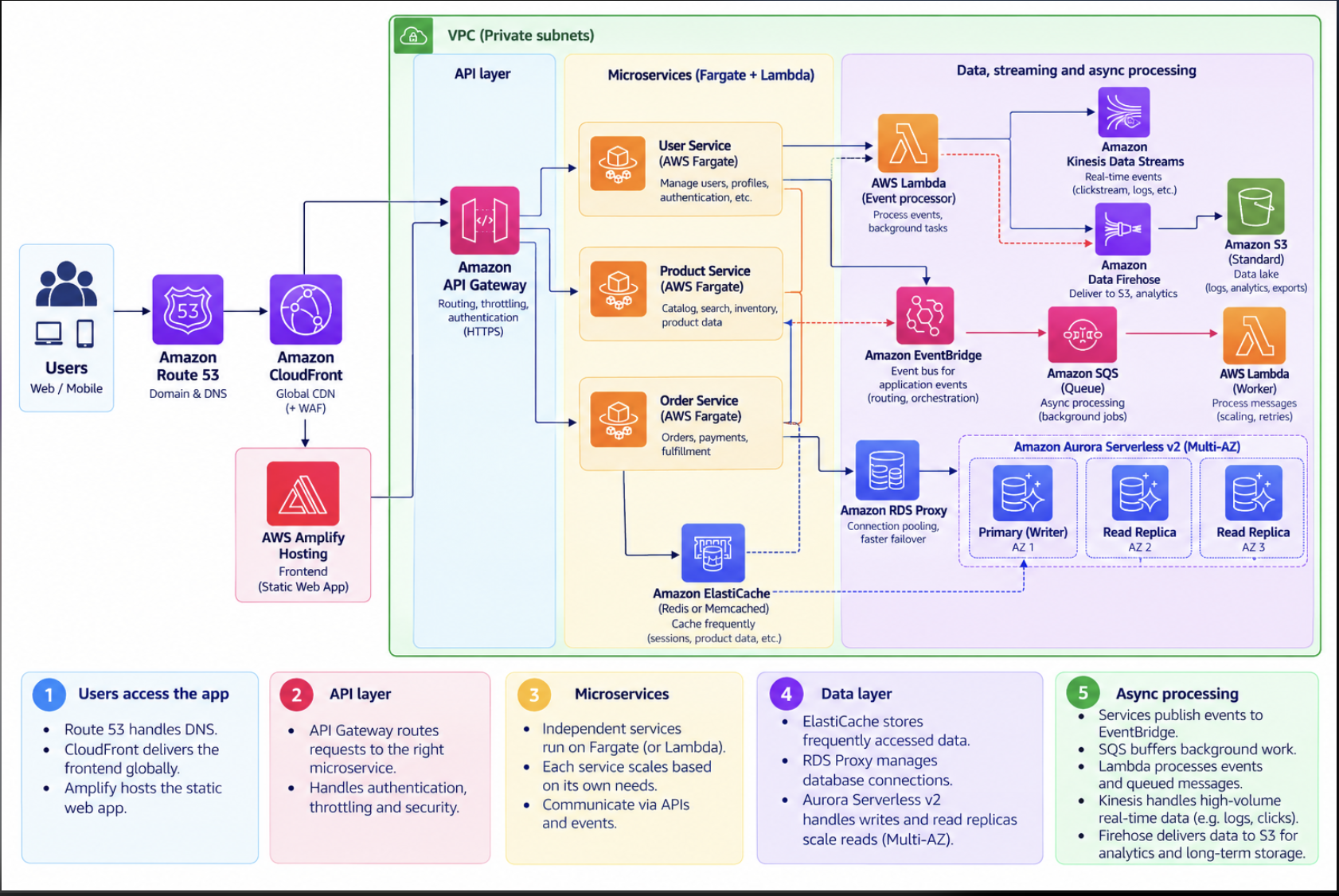
Notice that there is no requirement for every service to use the same technology. One service may use Aurora because it needs transactions, another may use DynamoDB because it needs key-value access, and another may publish events to SQS, EventBridge, or Kinesis. This is sometimes called using purpose-built services.
14. At massive scale, optimize each layer independently
At very large scale, performance analysis becomes continuous. Teams measure latency, throughput, error rates, database behavior, cache hit ratio, service dependencies, and cost. Distributed tracing and strong observability become important because a single user request may pass through many services.
Caching is evaluated at every layer: the browser, CloudFront, the API layer, the application, ElastiCache, and sometimes query results. Database architecture can also become more distributed through read replicas, partitioning, sharding, or multiple purpose-built databases.
Asynchronous processing becomes more important because it reduces coupling and absorbs spikes. Failure isolation also becomes a design goal. Timeouts, retries, circuit breakers, queues, and rate limits help prevent one overloaded service from taking down the entire system.
15. Closing: the principles that matter most
Modern AWS services provide a large amount of built-in scalability and high availability. This means we can start with a relatively simple managed architecture and still have room to grow.
The biggest scaling wins often come from reducing unnecessary work: cache data that is repeatedly requested, avoid needless API calls, reduce the amount of data processed, and optimize database queries before redesigning the entire system.
Refactoring should be deliberate. Moving to microservices, sharding a database, or introducing Kubernetes can solve real problems, but those choices also add complexity. Add them when the workload or team structure proves that the benefit is worth the cost.
Final takeaway: Start simple. Measure real bottlenecks. Use managed services where they fit. Cache aggressively when freshness allows it. Separate workloads only when you gain clear scaling, ownership, or failure-isolation benefits. Good architecture evolves with evidence.