Linux networking
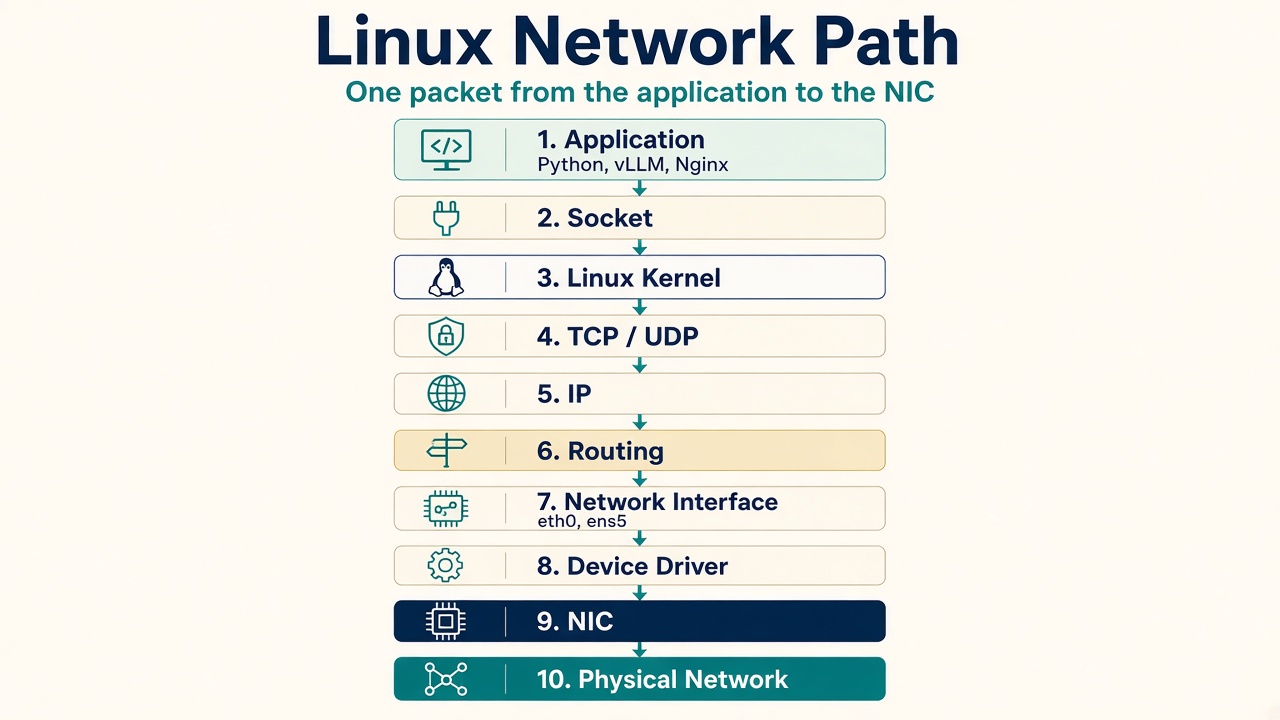
Sockets, TCP, IP, ports, routing, packets, interfaces, drivers, DNS, iptables, and NICs all at once. The easiest way through is to follow one packet from the application to the network.
Start with one HTTPS request ↓
An application does not control the network card
Just like CPU scheduling, memory, and storage, an application does not directly control the network card. The application asks the Linux kernel to send or receive data, and the kernel’s networking stack handles everything required to move that data between the application and the physical network.
Suppose we have a Python application that wants to connect to an API:
requests.get("https://example.com")At a very high level, the journey looks like this:
Everything starts with the application
Suppose we are running Nginx, Python, MySQL, Kubernetes, vLLM, or PyTorch. These applications live in User Space. They cannot simply tell the Ethernet card: “Send these bytes to another server.” Instead, they use the operating system’s networking interface. That interface starts with a socket.
A socket is the endpoint the application actually talks to
A socket is simply an endpoint through which an application communicates over the network.
For example, a web server might listen on 10.0.0.10:443. The IP identifies the machine or interface. The port helps identify the application or service.
| Port | Service |
|---|---|
| 22 | SSH |
| 80 | HTTP |
| 443 | HTTPS |
When Nginx listens on port 443, Linux knows that incoming connections for that socket should be delivered to Nginx.
The application asks the kernel
The application interacts with networking through system calls such as socket(), bind(), listen(), accept(), connect(), send(), and recv().
TCP and UDP
Once the request enters the kernel, Linux needs to know how the application wants to communicate. Two of the most important transport protocols are TCP and UDP.
TCP
Connection-oriented. Before sending application data, TCP normally establishes a connection. It provides reliable delivery, ordering, retransmission, flow control, and congestion control. HTTP/HTTPS commonly runs over TCP, though HTTP/3 uses QUIC over UDP.
UDP
Simpler. There is no TCP-style connection setup. UDP does not provide TCP’s built-in guarantees for delivery or ordering. Applications can build additional reliability on top when needed.
Before the data, TCP sets up a connection
| Client | Server | |
|---|---|---|
| SYN | → | |
| ← | SYN-ACK | |
| ACK | → |
After this, the connection is established. UDP skips that setup:
IP answers “where does this packet need to go?”
TCP or UDP has prepared the transport information. The next layer is IP — Internet Protocol. IP is responsible for addressing and moving packets between networks. For example, source 10.0.0.10 and destination 10.0.1.20.
Linux checks the routing table before the packet leaves
Suppose the destination is 10.0.1.20. Linux checks its routing table. You can see it with:
ip routeFor example:
default via 10.0.0.1 dev eth0
10.0.0.0/24 dev eth0
Linux uses this information to decide which interface, which gateway, and which route. If the destination is outside the local network, Linux may send the packet to a gateway.
Netfilter, nftables, and iptables can still drop a healthy service
Before a packet leaves or after one arrives, Linux may apply firewall or packet-processing rules. This is handled through the kernel’s Netfilter framework. Tools such as iptables and nftables configure rules that Netfilter applies.
Allowed
Denied
This is why a service may be running perfectly but still be unreachable. Nginx can be running, port 443 can be listening, the route can be working — and the firewall still drops port 443. The application itself may have nothing wrong with it.
After routing, Linux sends the packet toward an interface
Check interfaces with:
ip addror:
ip linkYou might see eth0, ens5, or enp0s3. In cloud systems, names such as ens5 are common. The interface represents the network device from Linux’s perspective.
The kernel cannot speak every NIC the same way
It uses a device driver. The driver understands the specific hardware — an Intel NIC, a Mellanox / NVIDIA NIC, a virtio network device, or ENA on AWS.
Finally, the NIC sends the packet
When a packet comes back, the path is roughly reversed
The kernel figures out which connection, which port, which socket, and which process — then delivers the data to the correct application.
Nginx listening on 10.0.0.10:443
A request arrives:
How do we check which ports are listening?
One of the most important commands is:
ss -lntpFor example:
LISTEN 0 511 0.0.0.0:443 0.0.0.0:* users:(("nginx",pid=1234))This is one of the first commands I would run when someone says: “My application is running, but I cannot connect to it.”
TCP states tell you more than “it is down”
ss -tanYou may see TCP states such as LISTEN, ESTABLISHED, SYN-SENT, SYN-RECV, TIME-WAIT, and CLOSE-WAIT.
| What you see | What it may mean |
|---|---|
| Many SYN-SENT | The application is trying to connect but not receiving a response. |
| Many CLOSE-WAIT | The remote side closed connections, but the local application has not properly closed its socket. |
That CLOSE-WAIT pattern becomes a very useful application troubleshooting clue.
The simplest network test is only one small test
ping 10.0.0.20This helps determine whether basic IP connectivity exists. There is an important point: a successful ping does not mean the application is working. You could have ping working, but port 443 blocked, or Nginx not listening. So ping is only one small test.
traceroute shows where packets go between networks
traceroute example.comor on some systems:
tracepath example.comThis becomes useful when connectivity fails somewhere between networks.
ip -s link shows errors and drops
ip -s linkLook for RX packets, TX packets, errors, and dropped. RX errors increasing may indicate a driver problem, a NIC problem, a network configuration problem, or a physical/network issue.
RX errors
Packets arrived at the NIC but were corrupted or invalid. Common causes: bad cable, CRC/frame errors, duplex/link problems, or NIC/driver issues.
RX dropped
Packets arrived, but the system could not process them fast enough. Common causes: overloaded CPU, receive queues filling up, driver/NAPI backlog, or insufficient NIC ring buffers.
TX errors
The system tried to transmit but the NIC/driver encountered a problem. Common causes: NIC/driver problems, link issues, or hardware errors.
TX dropped
Packets were discarded before transmission, often because the transmit queue or qdisc became full during heavy traffic.
Deeper NIC information lives here
ethtool eth0This can show speed, duplex, and whether a link is detected.
For driver information:
ethtool -i eth0You may see driver, version, and firmware-version.
For NIC statistics:
ethtool -S eth0This can become extremely useful when debugging packet drops or hardware/driver issues.
tcpdump is one of the most important network tools
Suppose an application says “I sent the request.” Instead of guessing, we can actually watch the packets.
tcpdump -i eth0For port 443:
tcpdump -i eth0 port 443Now you can answer: did the packet leave? Did the response come back? Did we see SYN? Did we see SYN-ACK?
This is why tcpdump is one of the most valuable Linux networking tools.
No ACK, wait, then send it again
Suppose TCP sends a packet but does not receive confirmation. It may retransmit it.
A high number of retransmissions can indicate packet loss, network congestion, a bad connection, an overloaded receiver, or a network path problem. You can inspect TCP statistics with:
nstatand:
ss -sNetworking also depends heavily on memory
Linux maintains buffers for incoming and outgoing network data.
Receive
Send
If the application cannot consume data quickly enough:
So networking is closely connected to the memory management topic we just covered.
Packets need CPU time too
The CPU has to process interrupts, driver work, TCP, IP, firewall rules, and socket processing. So networking also connects to the Process Scheduler and CPU management.
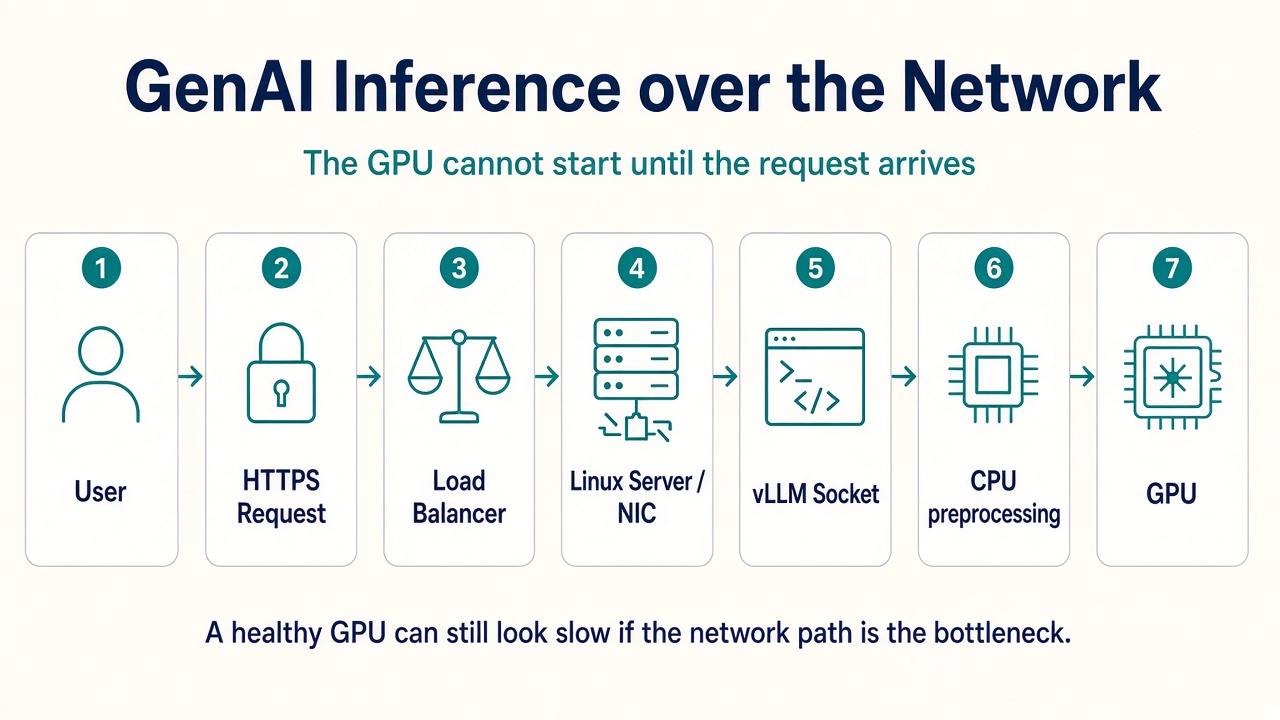
The GPU cannot start until the request arrives
Imagine we are running a GenAI inference service. The GPU might generate the tokens, but before the GPU does anything, the request must arrive over the network.
And after the GPU generates output:
So an inference system can have a perfectly healthy GPU and still have terrible performance because of network latency, packet loss, TCP retransmissions, connection limits, firewall problems, socket backlog, or NIC saturation.
Networking becomes even more important across GPU servers
Imagine training a large model on four GPU servers. The GPUs need to exchange enormous amounts of data.
Now networking can become one of the biggest bottlenecks. This is where technologies such as NCCL, InfiniBand, RDMA, RoCE, and GPUDirect RDMA become important. The goal is to move data between GPUs and machines as efficiently as possible.
Traditional copies vs GPUDirect RDMA
A simplified traditional path might look like GPU → CPU memory → kernel → NIC → network. For very high-performance AI systems, technologies such as GPUDirect RDMA can reduce unnecessary CPU involvement and memory copies in supported setups.
Traditional
GPUDirect RDMA
That is one reason networking knowledge has become even more important in modern AI infrastructure.
The troubleshooting journey I would teach
| Question | Where to look |
|---|---|
| What interfaces do I have? | ip addr |
| What is my route? | ip route |
| Is my application listening? | ss -lntp |
| Can I reach the destination? | ping |
| What path is being used? | traceroute / tracepath |
| Are packets actually moving? | tcpdump |
| Are there interface errors? | ip -s link |
| What is happening at the NIC? | ethtool |
| Need TCP statistics? | ss -s / nstat |
For deeper production troubleshooting, you can later introduce tc, conntrack, nft, bpftrace, eBPF networking tools, and perf.
1. Apps talk to sockets, not NICs. send() and recv() become system calls.
2. IP and routing pick the path. TCP or UDP wraps the data. The routing table picks the interface.
3. A listening process can still be unreachable. Netfilter can drop the packet after Nginx is healthy.
4. ping is not the application. Use ss, then tcpdump, when “it cannot connect.”
5. A healthy GPU can still look slow. Inference and distributed training both depend on the Linux network path.