System Design from Scratch: Scaling from 100 to 100,000 Users
System Design is easiest to understand when we stop thinking of it as a collection of technologies and start thinking of it as a sequence of problems, decisions, and trade-offs. We will begin with the simplest possible architecture: 10–100 users, one application, and one database. As the application grows, we will ask a simple question at every stage: What breaks next? When a bottleneck appears, we will understand why it is happening and introduce only the component needed to solve that problem.
As the system evolves, this will naturally lead us from vertical and horizontal scaling to load balancing, DNS, databases, caching, APIs, asynchronous processing, and eventually GenAI infrastructure. The goal is not to memorize architecture diagrams or technology names, but to understand why each component exists, what problem it solves, and what new trade-offs it introduces. This follows the core principle that requirements and reasoning should drive architecture, not the other way around.
Starting Point: A Simple Application
Imagine we have just launched an application.
We only have:
10–100 users
The architecture can be extremely simple:
The application handles things such as:
At this scale, this architecture may work perfectly well.
We don't need:
- 20 application servers
- Kubernetes
- multiple databases
- queues
- caching
- sharding
- complicated distributed systems
This is an important System Design lesson:
Do not add complexity before you have a problem that requires it.
Our system is simple, inexpensive, and easy to operate.
Then the Application Becomes Popular
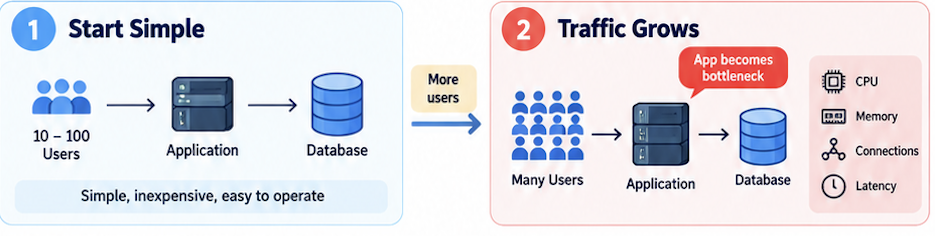
Now imagine our application grows from:
100 users
to:
100,000 users
Our architecture is still:
Now we start asking:
What could become a bottleneck?
Let's assume the application server becomes the first bottleneck.
For every incoming request, the application consumes resources such as:
- CPU
- Memory
- Network
- Threads / Processes
- File descriptors
- Database connections
With 100 users, perhaps CPU utilization was:
10–20%
But with increasing traffic:
1,000 users
      ↓
CPU 40%
10,000 users
      ↓
CPU 75%
100,000 users
      ↓
CPU 95–100%
Now requests start waiting.
Latency increases.
Eventually:
So we have identified our first problem:
One application server cannot handle all the incoming traffic.
Step 1: Scale the Application
There are two obvious possibilities.
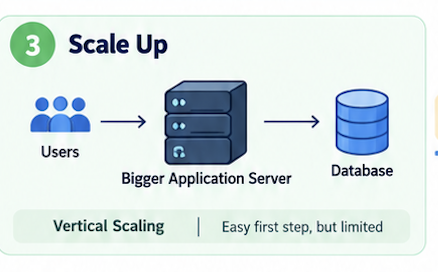
Option 1 — Vertical Scaling
We could make the existing application server larger.
For example:
4 CPU
16 GB RAM
becomes:
16 CPU
64 GB RAM
So:
This is called:
Vertical Scaling / Scale Up
It is often the easiest thing to do first.
But eventually there is a limit.
We cannot keep saying:
More CPU
More RAM
More CPU
More RAM
More CPU
More RAM
forever.
And there is another problem.
We still have:
             ONE
        Application Server
If that machine fails:
So instead of making one machine endlessly bigger, we can add more application servers.
Horizontal Scaling
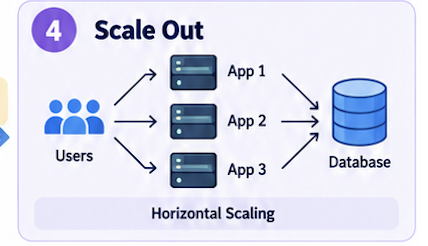
Instead of:
we want:
            App 1
           ↗
Users →    App 2
           ↘
             App 3
               ↓
            Database
Now we can distribute the work.
Instead of one application server handling:
10,000 requests/sec
perhaps we have:
App 1 → 2,500 requests/sec
App 2 → 2,500 requests/sec
App 3 → 2,500 requests/sec
App 4 → 2,500 requests/sec
This is:
Horizontal Scaling / Scale Out
But now we have created a new problem.
New Problem: Which Application Server Should Receive the Request?
Suppose a user sends a request:
We have:
App 1
App 2
App 3
App 4
Who decides where the request goes?
The user should not have to know:
Send request 1 → App 1
Send request 2 → App 3
Send request 3 → App 2
We need something in front of the application servers.
That gives us our first new component:
Load Balancer
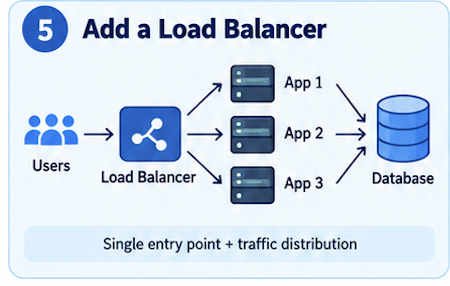
Our architecture becomes:
         100,000 Users
                ↓
          Load Balancer
        ↙       ↓       ↘
     App 1    App 2    App 3
        \       |       /
             Database
Now the Load Balancer can distribute incoming traffic across multiple application instances.
For example:
Request 1 → App 1
Request 2 → App 2
Request 3 → App 3
Request 4 → App 1
We have solved our first scaling problem:
The application layer can now scale horizontally.
If traffic grows:
We don't necessarily have to redesign the entire application.
But Our Solution Created New Problems
We started with:
As traffic increased, one application server could no longer handle all the requests.
So we scaled horizontally:
               App 1
              ↗
Users        → App 2
              ↘
                App 3
But that created a new problem:
Which application server should receive each request?
So we introduced a:
Load Balancer
Our architecture became:
           100,000 Users
                  ↓
            Load Balancer
          ↙       ↓       ↘
       App 1    App 2    App 3
          \       |       /
               Database
The Load Balancer gives users a single entry point and distributes incoming traffic across multiple application servers.
We have solved one problem:
The application layer can now scale horizontally.
But introducing the Load Balancer creates a new set of questions.
And this is where our next System Design discussion begins.
Problem 2: How Should the Load Balancer Distribute Traffic?
Suppose all three application servers are healthy:
App 1 → Healthy
App 2 → Healthy
App 3 → Healthy
A new request arrives:
Which application server should receive it?
Should we simply send requests one after another?
Request 1 → App 1
Request 2 → App 2
Request 3 → App 3
Request 4 → App 1
This is Round Robin.
But what happens if:
App 1 → 100 active connections
App 2 → 20 active connections
App 3 → 70 active connections
Perhaps the next request should go to:
App 2
This introduces Least Connections.
And what if the servers have different capacities?
App 1 → 16 CPU
App 2 → 16 CPU
App 3 → 4 CPU
Sending exactly the same amount of traffic to every server may not make sense.
This introduces Weighted Load Balancing.
So our first Load Balancer question becomes:
What routing algorithm should we use?
Problem 3: What Happens When an Application Server Fails?
Suppose:
App 1 → Healthy
App 2 → Healthy
App 3 → Failed ❌
If the Load Balancer continues sending traffic to App 3:
then having multiple application servers doesn't help very much.
The Load Balancer needs to know:
- Which servers are healthy?
- Which servers are unhealthy?
This introduces:
Health Checks
The Load Balancer might periodically check:
App 1 → /health → 200 OK
App 2 → /health → 200 OK
App 3 → /health → Failure
Now:
             Load Balancer
               ↙       ↘
            App 1     App 2
            App 3 ❌
The Load Balancer temporarily removes App 3 from the backend pool.
When App 3 becomes healthy again:
App 3 → /health → 200 OKit can be added back.
Now new questions appear:
- How frequently should health checks run?
- How many failed checks before a server is considered unhealthy?
- What exactly should /health check?
- When should a recovered server start receiving traffic again?
Problem 4: What Happens to User Sessions?
Suppose:
Request 1 → App 1and App 1 stores the user's session locally.
Then:
Request 2 → App 2But App 2 doesn't know anything about the session stored on App 1.
Now we have another problem.
One possible solution is:
Sticky Sessions
User A → App 1
User A → App 1
User A → App 1
The Load Balancer keeps sending the same user to the same application server.
But what happens if:
App 1 fails?
Or App 1 gets much more traffic than the other servers?
A more scalable design is often:
Application Servers = Statelessand store shared state outside the individual application server.
Conceptually:
                App 1
               ↗
User → LB →    App 2
               ↘
                 App 3
                   ↓
              Shared State
Now any request can go to any application server.
This gives us an important System Design principle:
Stateless application servers are generally easier to scale horizontally.
Problem 5: Does the Load Balancer Need to Understand the Request?
Suppose we only need to distribute TCP connections.
The Load Balancer may only need information such as:
- IP Address
- Port
- TCP / UDP
This brings us to:
Layer 4 Load Balancing
Conceptually:
But what if we want to route based on the HTTP request?
For example:
/api/users  → User Service
/api/orders → Order Service
/api/chat   → AI Service
Now the Load Balancer needs to understand HTTP.
This brings us to:
Layer 7 Load Balancing
                   /users  → User Service
                  ↗
User → Layer 7 LB ─→ /orders → Order Service
                  ↘
                    /chat   → AI Service
So another design question becomes:
Do we need Layer 4 or Layer 7 load balancing?
Problem 6: What if the Load Balancer Itself Fails?
This is extremely important.
Initially we had:
The application server was a:
Single Point of Failure
So we added multiple application servers.
Now:
But if there is only:
ONE Load Balancer
then we may simply have moved the Single Point of Failure.
Before:
After:
So the Load Balancer layer itself must also have:
- Redundancy
- Failover
- High Availability
Conceptually:
              Users
                 ↓
        Load Balancer Layer
          ↙             ↘
        LB 1            LB 2
          \             /
           \           /
          App 1 App 2 App 3
This gives us another important principle:
Do not remove a Single Point of Failure by simply creating a new Single Point of Failure somewhere else.
Now Our Architecture Has Evolved
We started with:
Then traffic increased:
Then we went deeper:
So the progression so far is:
And only after this deep dive...
We return to our architecture:
Now we ask the next major architecture question:
Great — we have scaled the application layer. But every application server is still talking to the same database. What happens when the database becomes the bottleneck?
Problem → Solution → New Problem → Deep Dive → Evolve the Architecture
Yes. The third problem is now the database.
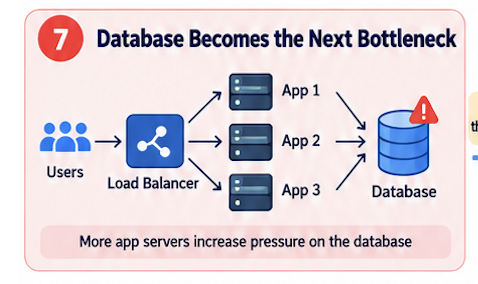
After Step 1, our architecture is:
100,000 Users
      ↓
Load Balancer
      ↓
┌────────┬────────┬────────┐
App 1    App 2    App 3    App 4
└────────┴────────┴────────┘
      ↓
   Database
We solved the application-server bottleneck by scaling the application horizontally.
But now all those application instances are sending traffic to one database.
So eventually:
App 1 ──┐
App 2 ──┤
App 3 ──┼──→ Database
App 4 ──┤       ↑
App 5 ──┘    Bottleneck
The database may start experiencing:
- High CPU
- High memory usage
- Too many connections
- Slow queries
- High disk I/O
- Lock contention
- Increasing query latency
So let's solve the database problem one step at a time.
Step 2A: Optimize the Existing Database
Before adding more database servers, ask:
Is the database actually too small, or are we using it inefficiently?
Suppose the application executes:
SELECT * FROM users WHERE email = 'user@example.com';and we have:
100 million users
If email is not indexed, the database may need to scan a huge amount of data.
Conceptually:
As traffic grows:
One inefficient query
        ×
Thousands of requests/sec
        =
Database overload
So one of the first things we should investigate is:
- Slow queries
- Query execution plans
- Missing indexes
- Unnecessary queries
- Too much data being returned
- Database connection usage
Then we add appropriate indexes.
For example:
CREATE INDEX idx_users_email
ON users(email);
Now conceptually:
Before
After
The architecture has not changed:
We simply made the database work more efficiently.
This is an important System Design lesson:
Before scaling infrastructure, make sure the current infrastructure is being used efficiently.
But Eventually Optimization Is Not Enough
Imagine we optimize:
Queries ✔
Indexes ✔
Connections ✔
Database schema ✔
But traffic continues growing.
Database CPU is still:
90–95%
Memory is under pressure.
Disk I/O is high.
Now we have a genuine capacity problem.
So the next simplest solution is:
Step 2B: Vertical Scaling the Database
Suppose the database currently runs on:
4 CPU
16 GB RAM
500 GB SSD
We can move it to:
16 CPU
64 GB RAM
Faster SSD/NVMe
Architecture:
100K Users
    ↓
Load Balancer
    ↓
App App App App
    ↓
 ┌─────────────┐
 │   Bigger    │
 │  Database   │
 │             │
 │ More CPU    │
 │ More RAM    │
 │ Faster Disk │
 └─────────────┘
This is:
Vertical Scaling / Scale Up
And this is often a perfectly reasonable next step.
But We Still Have Another Problem
Even after making the database bigger, look carefully at our architecture:
Users
  ↓
Load Balancer
  ↓
App 1  App 2  App 3  App 4
  ↓      ↓      ↓      ↓
       Database
There is still only:
ONE DATABASE
What happens if it crashes?
So we now have a:
Single Point of Failure
This leads naturally to our next step:
Step 2C: Database Replication
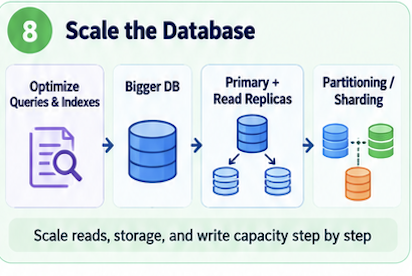
Instead of:
we keep copies:
            Primary Database
                    │
              Replication
             ↙      ↓      ↘
        Replica 1 Replica 2 Replica 3
Now:
Replication can help with:
Availability
Disaster recovery
and sometimes
Read scalability
But now something interesting happens.
Suppose our workload is:
90% Reads
10% Writes
All the reads are still hitting the primary.
Why?
We already have replicas.
Could we use them?
Yes.
And that creates the next step:
Writes → Primary Database
Reads → Replica 1
        Replica 2
        Replica 3
That's Read Replicas.
100K Users
    ↓
Load Balancer
    ↓
Multiple App Servers
    ↓
 ┌─────────────────────┐
 │    Database Layer   │
 ├─────────────────────┤
 │ Primary   ← Writes  │
 │ Replica 1 ← Reads   │
 │ Replica 2 ← Reads   │
 │ Replica 3 ← Reads   │
 └─────────────────────┘
This works very well when the system is read-heavy because the read traffic can be distributed across replicas. An important distinction here: replication is the mechanism for maintaining copies, while a read replica is specifically a replica used to serve read traffic.
So our evolution is:
PROBLEM 1
Application cannot handle traffic
        ↓
Scale Application
        ↓
Load Balancer + Multiple App Servers
PROBLEM 2
Database becomes bottleneck
        ↓
Optimize Queries + Indexes
        ↓
Still not enough
        ↓
Vertical Scale Database
        ↓
Still one database / SPOF
        ↓
Replication
        ↓
Read-heavy workload
        ↓
Read Replicas
But now our application keeps growing.
Step 2D: The Primary Database Becomes the Write Bottleneck
Suppose our traffic changes.
Initially:
90% Reads
10% Writes
Read replicas helped a lot.
But now our application grows to the point where we receive:
Thousands of writes/secFor example:
Create user
Send message
Update profile
Create order
Upload document metadata
Store conversation
Write transaction
The problem is:
Reads  → Replica 1
         Replica 2
         Replica 3

Writes → Primary
We can distribute reads.
But all writes are still going to:
ONE PRIMARY DATABASESo:
App 1 ─────┐
App 2 ─────┤
App 3 ─────┼────→ Primary DB
App 4 ─────┤          ↑
App 5 ─────┘      Bottleneck
Now the primary may experience:
High CPU
High disk I/O
Lock contention
High write latency
Too many concurrent transactions
Replication pressure
We have hit another scaling limit.
But There Is Another Problem Too: Data Size
Suppose we started with:
100,000 usersand each user had a small amount of data.
No problem.
But over time:
100K users
↓
1M users
↓
10M users
↓
100M users
Now imagine we have:
Users
Messages
Conversations
Orders
Documents
Events
and the database contains:
1 billion rowsEventually:
One database serverhas to handle:
All the data
+
All the writes
+
All the indexes
+
All the queries
Even a very large machine eventually reaches a limit.
So we have a new question:
How can we divide the data?
This leads us first to:
Step 2E: Partitioning
Partitioning means dividing a large dataset into smaller logical pieces.
Suppose we have:
1 Billion MessagesWe could divide them by time:
Messages

January   → Partition 1
February  → Partition 2
March     → Partition 3
April     → Partition 4
Or maybe by user ID:
Users 1–1M       → Partition 1
Users 1M–2M      → Partition 2
Users 2M–3M      → Partition 3
Conceptually:
             Database
                ↓
      ┌─────────┼─────────┐
      ↓         ↓         ↓
Partition 1 Partition 2 Partition 3
The important point is:
We are dividing the dataset into manageable pieces.
This can make large datasets easier to manage and, depending on access patterns, can improve query efficiency.
But notice something important.
Those partitions may still exist on:
ONE DATABASE SERVERConceptually:
        Database Server
        ┌───────────────┐
        │ Partition 1   │
        │ Partition 2   │
        │ Partition 3   │
        │ Partition 4   │
        └───────────────┘
We divided the data logically.
But that one machine may still have to handle all the traffic.
So eventually we ask:
Can we distribute those pieces across multiple database servers?
Now we reach:
Step 2F: Sharding
Sharding means distributing portions of the dataset across multiple database nodes.
A useful distinction:
Partitioning = divide the data
Sharding = distribute those partitions across machines
Instead of:
                  Database
                     ↓
                All User Data
we might have:
Application
     ↓
Shard Routing Logic
     ↓
┌────────────┬────────────┬────────────┐
│  Shard 1   │  Shard 2   │  Shard 3   │
│ Users      │ Users      │ Users      │
│ 1–1M       │ 1M–2M      │ 2M–3M      │
└────────────┴────────────┴────────────┘
Now:
User 100
   ↓
Shard 1

User 1,500,000
   ↓
Shard 2

User 2,500,000
   ↓
Shard 3
Instead of one database handling:
All users
All writes
All storage
we distribute them:
Shard 1 → some users + some traffic
Shard 2 → some users + some traffic
Shard 3 → some users + some traffic
Now we are scaling the database horizontally.
New Problem: Hot Shards
Now suppose we make a poor choice.
We shard by geography:
US     → Shard 1
Europe → Shard 2
Asia   → Shard 3
But our user distribution is:
US     → 80%
Europe → 10%
Asia   → 10%
Then:
Shard 1
████████████████████ 80%

Shard 2
██ 10%

Shard 3
██ 10%
We technically have three shards.
But Shard 1 is still overloaded.
This is called a:
Hot Shard
This example shows why shard-key selection matters.
So sharding solved:
One database handling everythingbut introduced:
Shard-key design
Hot shards
Routing complexity
And there is another problem.
New Problem: Queries Across Multiple Shards
Suppose you ask:
Show conversation history for user 123Easy.
We know:
user 123 → Shard 1So:
Query → Shard 1 → ResultBut what if we ask:
Find the 100 most active users in the entire systemNow data may exist across:
Shard 1
Shard 2
Shard 3
Shard 4
...
So we may have to do:
                Query
                  ↓
       ┌──────────┼──────────┐
       ↓          ↓          ↓
    Shard 1    Shard 2    Shard 3
       ↓          ↓          ↓
     Result     Result     Result
       └──────────┼──────────┘
                  ↓
            Merge Results
                  ↓
             Final Result
This is often called:
Scatter-Gather
and it can be much more expensive.
Again:
Scaling solves one problem and introduces another.
One More Problem: Rebalancing
Suppose we initially have:
4 shardsTraffic grows.
Now we need:
8 shardsWe cannot simply create four empty shards and be done.
Some existing data may need to move:
Shard 1 data → Shard 5
Shard 2 data → Shard 6
...
This is:
Rebalancing
Moving a large amount of data while keeping the application available can be difficult, which is one reason not to jump to sharding too early.
So Our Database Evolution Now Looks Like This
Stage 1
App
 ↓
Single Database
Traffic grows.
Stage 2
Optimize queries
Add indexes
Tune connections
Still growing.
Stage 3
Vertical Scale Database
More CPU
More RAM
Faster Storage
Need availability:
Stage 4
Primary
  ↓
Replicas
Read traffic increases:
Stage 5

Writes → Primary

Reads  → Replica 1
         Replica 2
         Replica 3
Dataset/write traffic becomes too large:
Stage 6
Partition the data
One node still cannot handle it:
Stage 7
Shard across multiple database servers
Now:
Users
  ↓
Load Balancer
  ↓
Multiple App Servers
  ↓
Database Routing
  ↓
┌────────┬────────┬────────┐
Shard 1  Shard 2  Shard 3
At this point we have scaled:
Application layer ✔
Database read layer ✔
Database storage layer ✔
Database write layer ✔
And now the next very natural problem appears:
Even with a scalable database, why should we repeatedly hit the database for the same frequently requested data?
Cache
The next most natural component to introduce is a Cache.
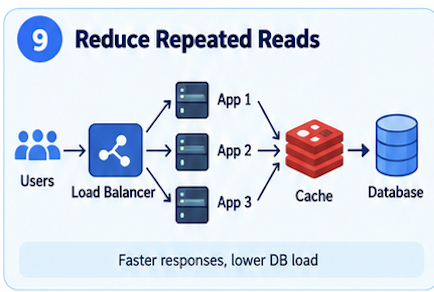
Why? Because even after scaling the database, we may still be doing the same expensive reads repeatedly.
For example, imagine thousands of users repeatedly request:
GET /products/123
GET /profile/456
GET /configuration
Without a cache:
Every request reaches the database.
Even if the database is scalable, that's unnecessary work.
So we introduce:
The flow becomes:
Request
  ↓
Check Cache
  ↓
Cache Hit?
 ┌───────┴────────┐
Yes               No
 ↓                 ↓
Return          Database
                   ↓
                Result
                   ↓
              Update Cache
                   ↓
                Return
Caching is introduced as a way to reduce repeated expensive reads, improve latency, reduce database pressure, and reduce expensive computation.
NOTE: In general, a cache read may take around 1 ms or less, while the same request from the database may take 10–20 ms or more depending on the system.
Then the cache itself becomes a scaling problem
Initially we might have:
But with 100K users, one cache server may become overloaded.
Now we can ask exactly the same System Design question:
What happens when the cache becomes the bottleneck?
Suppose one cache server has:
16 GB memory
but our working dataset becomes:
100 GB
or it receives:
200,000 requests/sec
One cache node may no longer be enough.
So we scale the cache horizontally:
                Cache 1
               ↗
Application → Cache 2
               ↘
                 Cache 3
Now we need a way to decide:
key A → Cache 1
key B → Cache 3
key C → Cache 2
This naturally introduces concepts such as:
- Cache partitioning
- Consistent hashing
- Cache replication
- Eviction
- TTL
- Cache invalidation
- Cache stampede
trade-off: caching gives us speed, but adds complexity around freshness and consistency.
So our system evolution becomes:
STEP 1
Application bottleneck
       ↓
Multiple App Servers
       ↓
Load Balancer
Cache Memory Is Limited
Even after distributing the cache, memory is still finite.
Suppose our cache can hold:
1 million entries
but the application eventually accesses:
10 million entries
We cannot keep everything.
Something has to leave.
That introduces:
Cache Eviction
Cache eviction answers:
When the cache is full, which item should we remove?
Three common strategies.
LRU — Least Recently Used
Remove data that hasn't been accessed recently.
Recently used → Keep
Not used recently → Remove
Why it is common:
- simple
- works well for many workloads
- keeps recently used items in memory
LFU — Least Frequently Used
Remove data that is accessed least often.
Popular → Keep
Rarely accessed → Remove
FIFO — First In, First Out
Remove older entries first.
There is no universally correct eviction policy.
It depends on the workload.
Problem 5: Cached Data Can Become Stale
Suppose the cache contains:
User name = AliceThe user changes their name:
Alice → AliciaThe database now contains:
Alicia
but the cache still contains:
Alice
Now:
Database → Alicia
Cache    → Alice
We have a:
Cache Invalidation Problem
We need to decide:
When should cached data be removed or updated?
One possible mechanism is:
TTL — Time To Live
We give the cache entry an expiration time.
For example:
user:101
TTL = 5 minutes
After five minutes:
But TTL creates another trade-off.
OR
Home feed → 30-second TTL
Profile card → a few minutes
Trending list → 60-second TTL
After the TTL expires, the next request misses the cache, fetches fresh data from the database, and updates the cache.
Good for:
- data that can tolerate being slightly stale
- simple cache management
- feeds, trending lists, recommendations
Trade-off:
- simple to implement
- but stale data may still be shown until TTL expires
versus:
There is no magic TTL.
It depends on:
- How frequently does the data change?
- How bad is stale data?
- How expensive is rebuilding it?
- How much backend traffic can we tolerate?
Problem 6: What Happens When a Popular Cache Entry Expires?
Now imagine we cache:
trending-productsand millions of users request it.
Everything is working:
Then at exactly 10:00 AM:
TTL expires
At the same time:
10,000 requests arrive
Every request asks:
So suddenly:
This is a:
Cache Stampede
also called a Thundering Herd.
Possible approaches include:
- Only one request refreshes the cache
- Serve slightly stale data while refreshing
- Add randomness/jitter to TTL values
- Refresh popular entries before they expire
For example:
Rather than:
STEP 2
Database bottleneck
       ↓
Indexes / Vertical Scaling
       ↓
Replication / Read Replicas
       ↓
Partitioning / Sharding
STEP 3
Repeated database work
↓
Introduce Cache
↓
Cache becomes bottleneck
↓
Distributed CacheActive / Explicit Cache Invalidation
When the underlying data changes, the application explicitly removes or updates the cache entry.
Example:
user changes profile photo → invalidate profile:user123
permission changes → invalidate related authorization cache immediately
Good for:
- data that must stay correct
- privacy, permissions, balances, critical user state
Trade-off:
- fresher data
- but more application complexity
TTL or Active Invalidation — Which One Should We Use?
The best answer is:
It depends on the type of data, and in many systems we use both.
A very simple rule:
Use TTL when:
- slightly stale data is acceptable
- the data changes frequently
- simplicity is important
- examples: home feed, trending list, recommendation list
Use Active Invalidation when:
- stale data is dangerous
- correctness matters more than simplicity
- examples: privacy settings, permissions, account state, subscription status
Common practical approach:
Use TTL for less critical data, and use active invalidation for correctness-sensitive data.
TTL is easier, but explicit invalidation is safer for critical data.
We started with the simplest possible architecture: a small number of users, one application server, and one database. As traffic grew, the application became the first bottleneck, so we explored vertical scaling and then horizontal scaling. Horizontal scaling introduced the need for a Load Balancer, which led to deeper design questions such as health checks, routing algorithms, session handling, Layer 4 vs. Layer 7 load balancing, and Load Balancer high availability.
As the system continued to grow, the database and repeated reads became new bottlenecks. We addressed these through database optimization, replication, read replicas, partitioning, and sharding, and then introduced caching to reduce latency and backend load. Scaling the cache introduced its own challenges, including cache partitioning, consistent hashing, replication, eviction, TTL, cache invalidation, cache stampede, and hot keys. The key lesson is that System Design evolves step by step: identify the bottleneck, introduce a solution, understand its trade-offs, and then solve the next problem.