Introduction to GPU
GPUs are everywhere in AI conversations today.
We’ll start with the basics, then look inside the GPU ↓
If you’ve spent time learning about ChatGPT, large language models, or AI training, you’ve probably heard the same advice: You need a GPU.
But why?
What exactly does a GPU do that a CPU cannot do as efficiently? And how did hardware originally designed to make video games look better become the foundation of modern AI?
In this lesson, we’ll break it down from the inside out, starting with the basics, then looking at the key parts of a GPU and how they work together when running an AI model.
GPUs were never built for AI
Today, it’s almost impossible to talk about AI without hearing the word GPU.
Whether you’re learning about ChatGPT, training a neural network, or experimenting with an open-source model, sooner or later someone will tell you:
You need a GPU.
But here’s the interesting part: GPUs were not originally created for AI.
GPU stands for Graphics Processing Unit, and its original job was much simpler: help computers draw graphics for video games.
Think back to the late 1990s and early 2000s. Games were becoming much more realistic. A computer had to calculate things like:
- lighting
- shadows
- reflections
- textures
- character movement
- millions of pixels on the screen
And it had to do all of that again and again, many times every second.
That created a very specific problem.
A CPU is excellent at handling many different kinds of tasks. It can run your operating system, open applications, process user input, and make complex decisions.
But graphics required something different.
Instead of doing a few complicated tasks, the computer needed to perform huge numbers of similar calculations at the same time.
That is exactly what GPUs were designed to do.
A simple way to think about it is:
CPU: a few very powerful workers handling different jobs.
GPU: thousands of smaller workers doing similar jobs in parallel.
For many years, GPUs mainly used that parallel processing power to draw games.
Later, researchers realized something very important: AI workloads needed the same kind of parallel computation.
That realization completely changed the GPU's role.
From video games to ChatGPT
GPUs did not suddenly become useful for AI. Their design evolved over many years, and each stage made the next one possible.
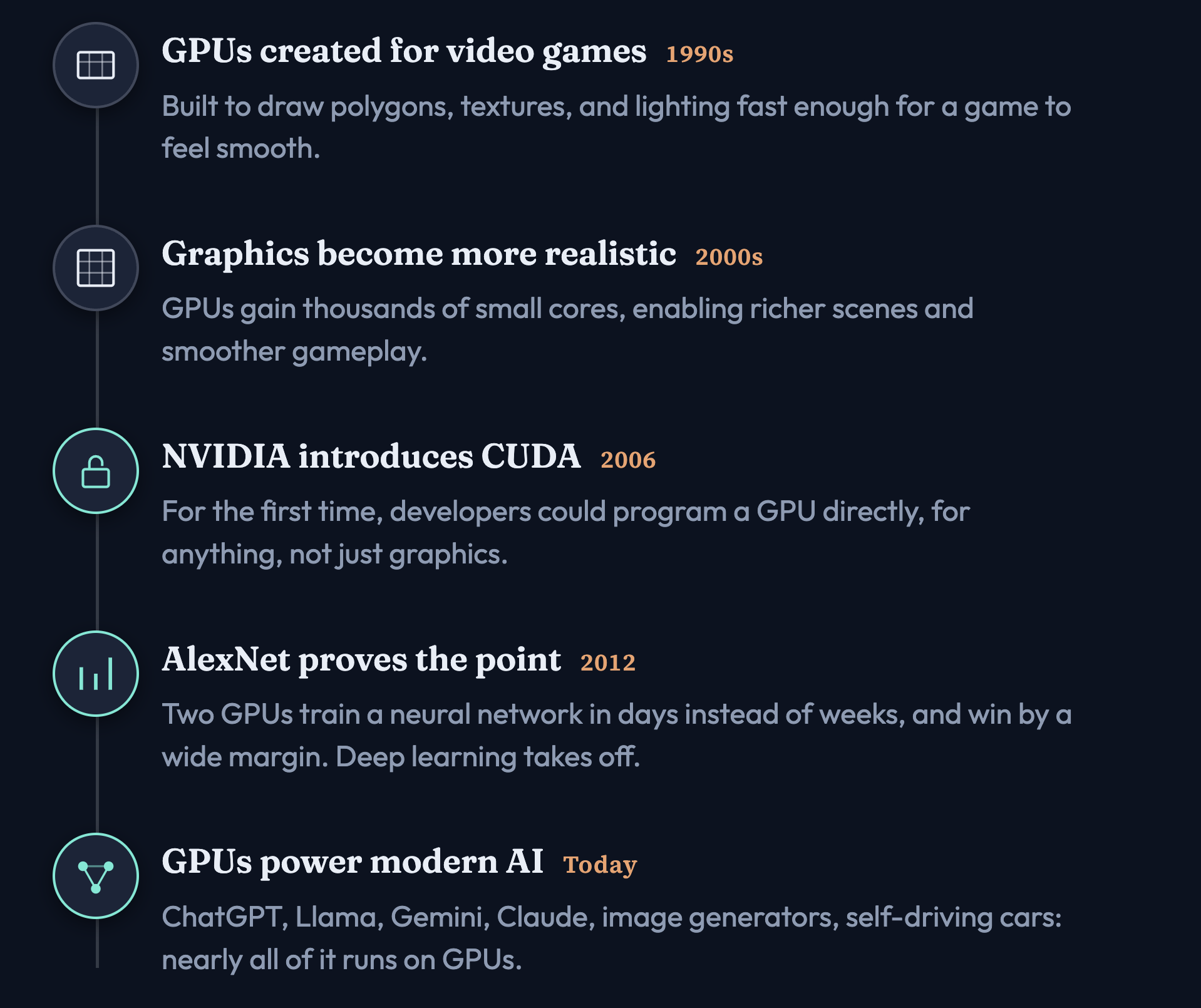
1. 1990s — GPUs were created for video games
Early GPUs were built to draw graphics quickly: polygons, textures, lighting, and pixels. Games needed the same type of calculation to be repeated many times, so GPUs were designed to do lots of similar work in parallel.
2. 2000s — Graphics became more realistic
Games became more demanding: better lighting, shadows, reflections, larger worlds, and higher frame rates. To keep up, GPUs gained more processing units and became much better at parallel computation.
3. 2006 — NVIDIA introduced CUDA
This was a major turning point. Before CUDA, GPUs were mainly treated as graphics processors. CUDA allowed developers to write programs that used the GPU for general-purpose computation, not just drawing graphics.
So now researchers could say: Instead of using the GPU to calculate pixels, can we use it to calculate scientific or mathematical problems?
The answer was yes.
4. 2012 — AlexNet demonstrated the value of GPUs for deep learning
AlexNet used GPUs to train a deep neural network for the ImageNet competition. The important lesson was not just the model itself. It showed the AI community that GPUs could dramatically speed up deep-learning training.
Neural networks perform a huge number of similar mathematical operations, especially matrix multiplications, and that is exactly the type of workload GPUs handle well.
5. Today — GPUs are a major part of modern AI infrastructure
Large AI systems now perform enormous amounts of parallel computation. GPUs are widely used for training and running models because they can process many operations simultaneously and move large amounts of data quickly.
So the entire journey can be remembered like this:
Gaming created the GPU → GPUs became massively parallel → CUDA made them programmable → deep learning proved their usefulness → modern AI scaled on top of them.
A few powerful workers, or thousands of parallel workers?
A simple way to understand the difference between a CPU and a GPU is to imagine two different kinds of teams.
A CPU has a relatively small number of powerful cores. Each core is designed to handle complex tasks very quickly.
That makes a CPU excellent for work where one step depends on the previous step, such as:
- running the operating system
- opening applications
- handling user input
- executing application logic
- making lots of different decisions
This is often described as being optimized for latency.
Latency means: how quickly can one task be completed?
A GPU is designed differently.
Instead of relying on a few very powerful cores, it uses a much larger number of simpler processing units that can work at the same time.
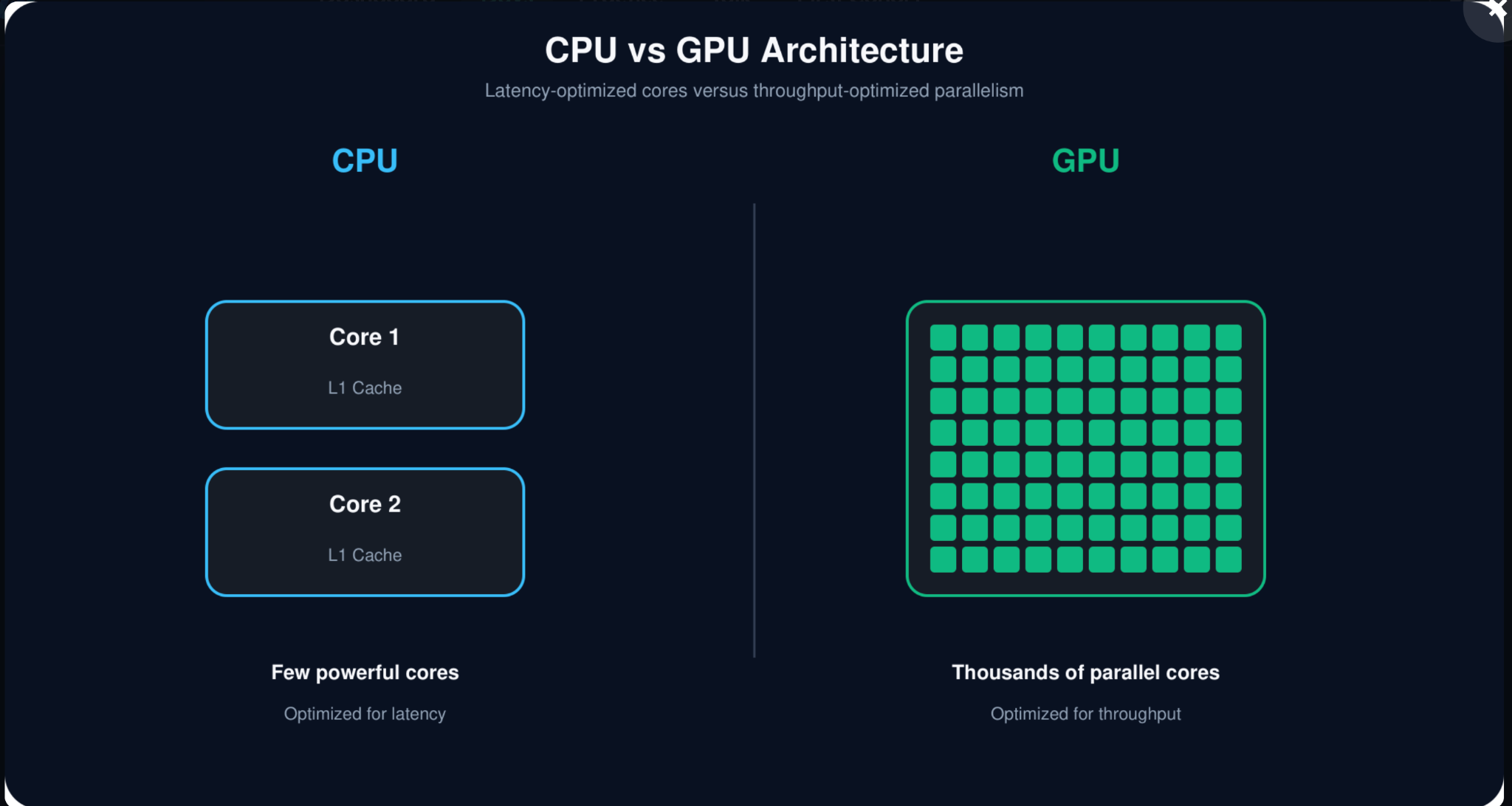
That makes a GPU excellent for workloads where the same type of calculation needs to be repeated across a large amount of data.
This is often described as being optimized for throughput.
Throughput means: how much work can be completed at the same time?
A useful analogy is:
CPU: a few highly skilled workers handling different and complicated jobs.
GPU: a very large team of workers doing similar jobs in parallel.
Neither one is better in every situation. They are designed for different kinds of work.
This is why GPUs became so important for AI. Neural networks perform huge numbers of similar mathematical operations, especially matrix calculations. Instead of doing those operations one after another, a GPU can process many of them in parallel.
That is the key idea:
CPU = optimize one task for speed
GPU = optimize many similar tasks for parallel execution
And AI happens to need a lot of that second kind of work.
What are all these parts actually doing?
So far, we’ve talked about why GPUs are good at parallel work. Now let’s look at what is physically inside a GPU card.
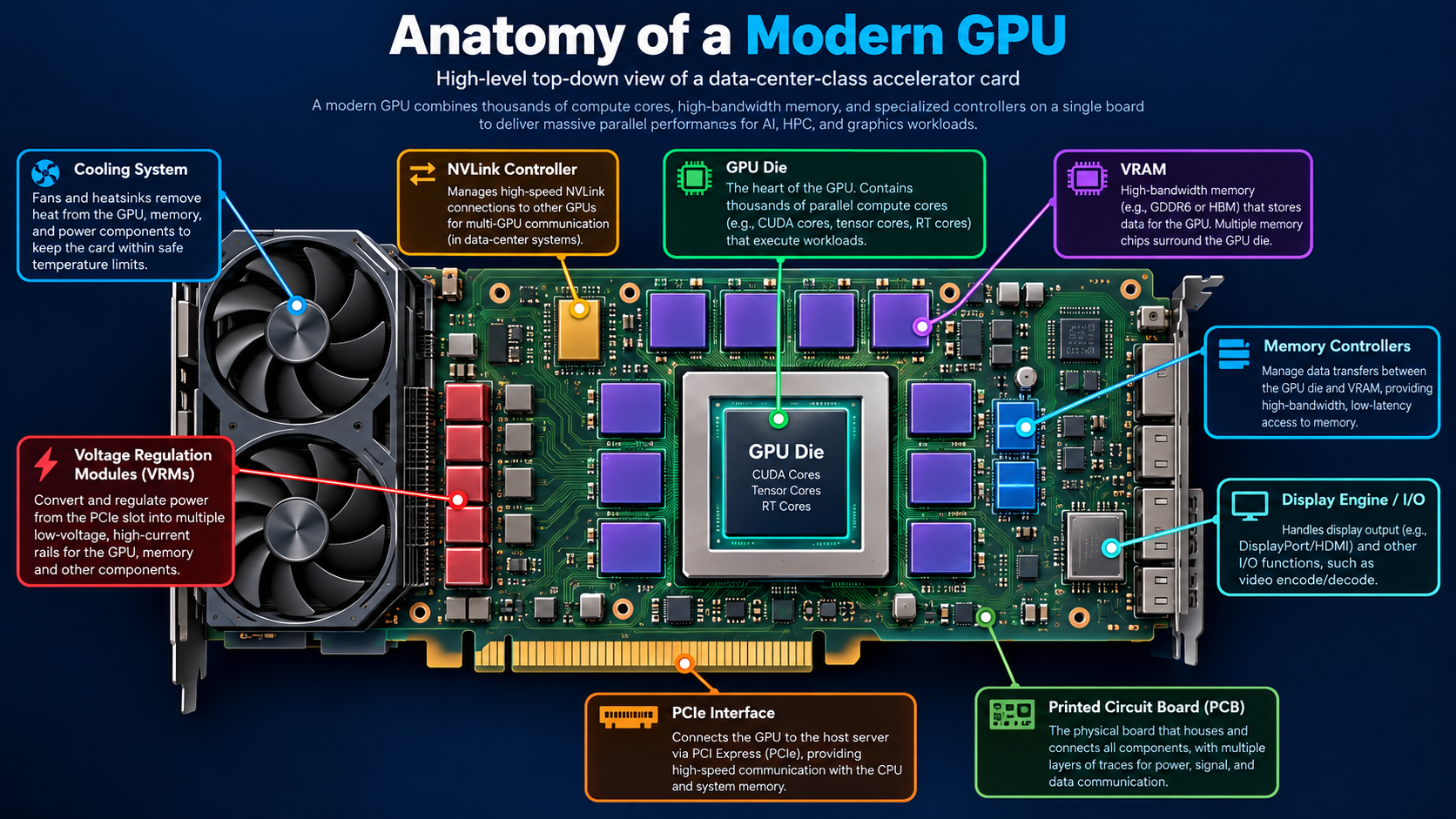
At first glance, the diagram above may look complicated. Don’t worry about memorizing every component yet. The goal is simply to understand the big picture.
At the center is the GPU die; this is where most of the actual computation happens. Inside that die are the processing units that perform the calculations used for graphics and AI.
But the GPU die cannot work alone. It needs several other components around it:
- VRAM stores the data the GPU is currently working with, including model parameters during AI workloads.
- Memory controllers move data between VRAM and the GPU.
- PCIe connects the GPU to the rest of the computer, especially the CPU.
- NVLink can provide a faster connection between GPUs in systems that use multiple GPUs.
- Voltage regulators provide the power the GPU needs.
- Cooling systems remove the large amount of heat generated while the GPU is working.
You can think of the entire GPU card as a small specialized computer.
The GPU die does the computation, but memory, power, cooling, and communication components all have to work together to keep it running efficiently.
Now that we understand the overall picture, we can zoom in step by step and look at the important components inside the GPU.
The tiny switches that make everything possible
Before we talk about CUDA cores, Tensor Cores, or GPU memory, we need to start with the smallest building block inside the chip: the transistor.
A transistor is a tiny electronic switch.
At the simplest level, it can be thought of as having two states:
ON or OFF
That may sound too simple to be useful, but when billions of these switches are connected together, they can represent data, perform calculations, and control how information moves through the chip.
Think of a single transistor like one LEGO brick. One brick by itself cannot build much. But billions of carefully arranged bricks can create an incredibly complex machine.
That is essentially what happens inside a GPU.
The GPU die contains billions of transistors organized into different structures. Together, those structures become things such as:
- CUDA cores
- Tensor Cores
- caches
- registers
- memory controllers
- scheduling logic
So when we say that a GPU has billions of transistors, those transistors are not billions of independent workers. They are the building blocks used to construct the hardware that actually performs the work.
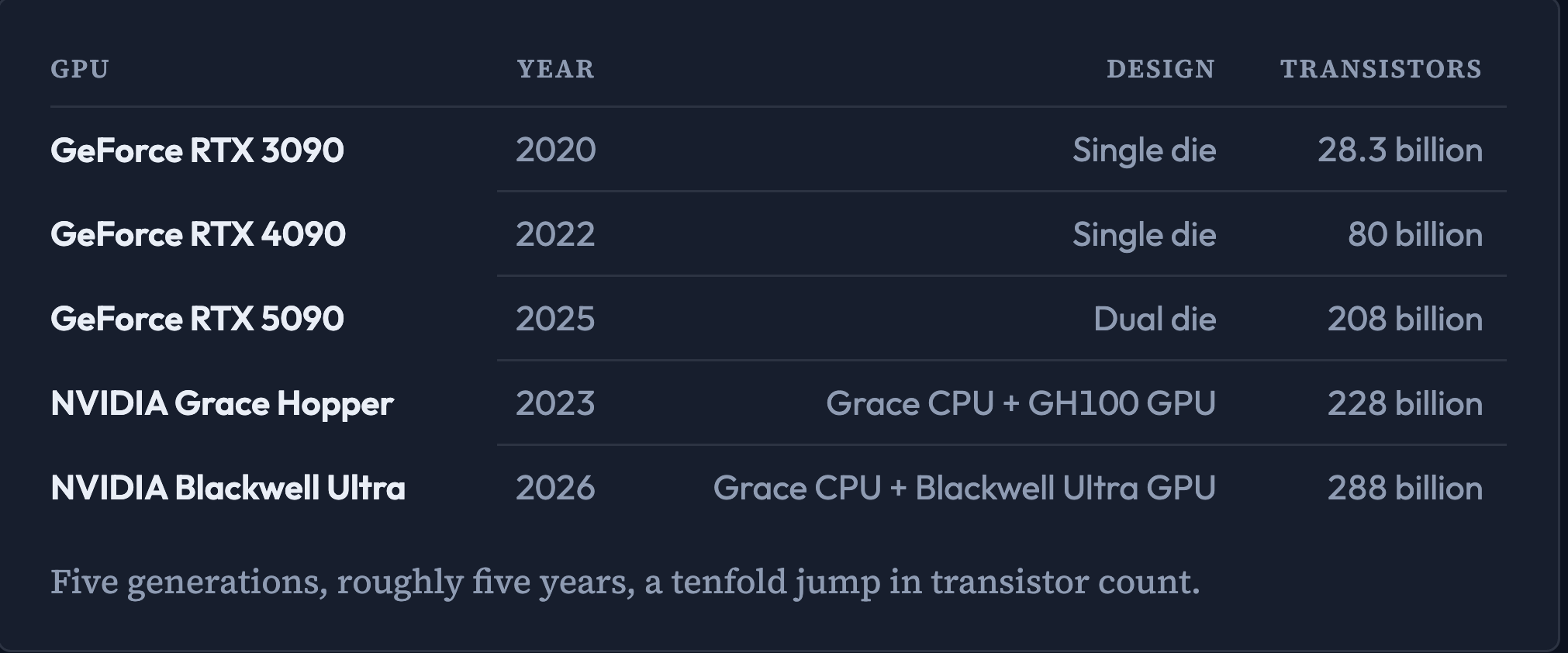
Modern GPUs contain an enormous number of them. As GPU architectures have evolved, manufacturers have been able to fit more transistors into increasingly sophisticated chip designs.
But there is an important point to remember:
More transistors does not automatically mean a proportionally faster GPU.
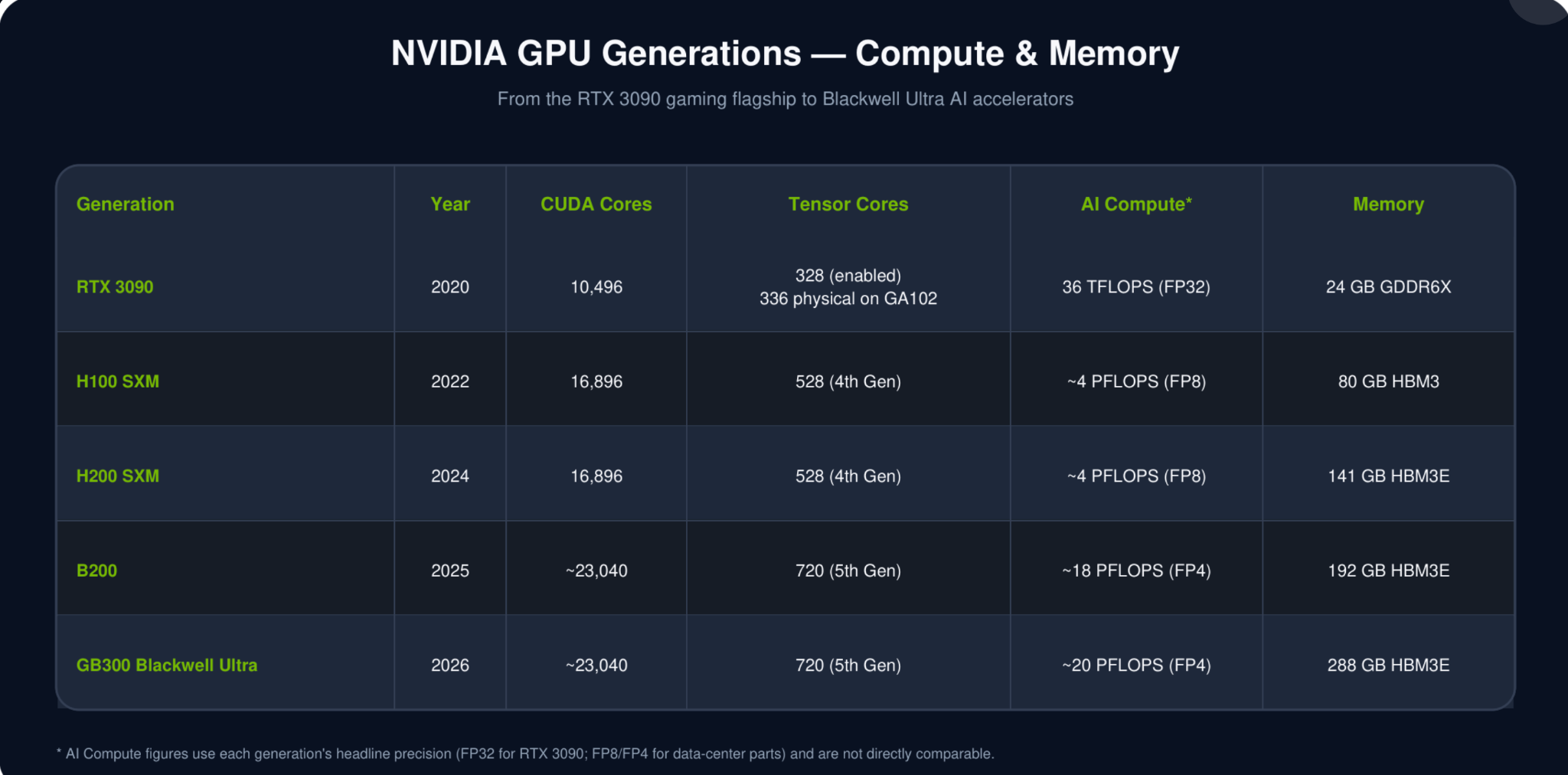
Performance also depends on how those transistors are organized, the type of compute units they create, memory bandwidth, cache design, clock speed, power limits, software, and many other factors.
For AI, what really matters is what those transistors allow the GPU to build: a huge amount of compute hardware that can operate in parallel.
Keep this picture in mind
Transistors → build circuits → circuits build GPU components → GPU components perform AI calculations
So transistors are where the story begins.
From here, we can start moving upward through the GPU architecture and see how billions of tiny switches eventually become thousands of parallel compute units.
Most of the actual computation happens inside the SMs
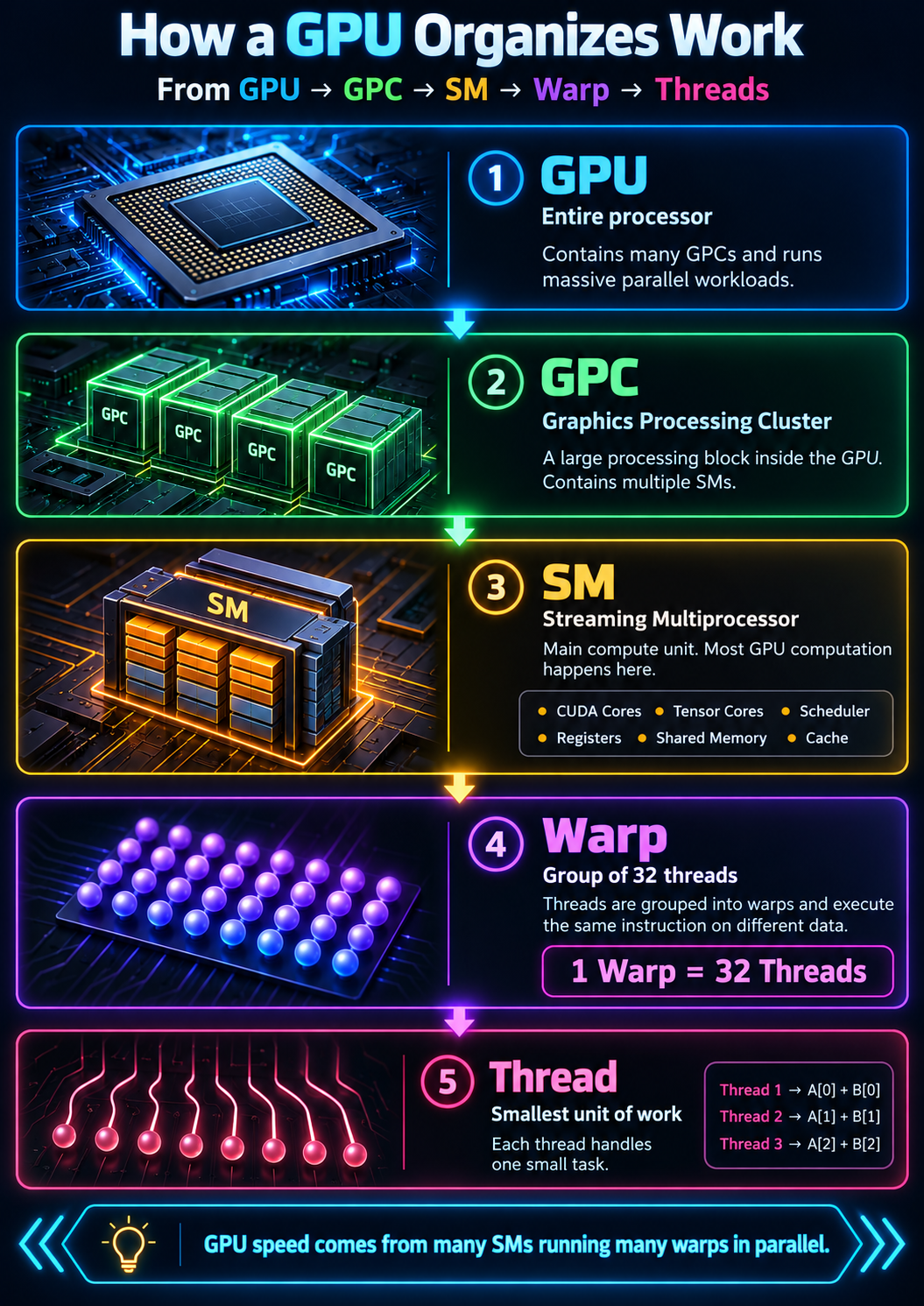
This is an important part of the GPU because most of the actual computation happens inside the SMs.
A modern GPU can contain many SMs, and they all work in parallel.
Think of a large warehouse.
Instead of giving every package to one worker, you divide the work across many teams. Each team handles a small portion of the total workload, while the other teams work on their own portions at the same time.
That is roughly what an SM does.
Each SM receives part of the GPU workload and processes it independently alongside the other SMs.
An SM is also more than just a collection of cores. It contains several important pieces of hardware, including:
- CUDA cores
- Tensor Cores
- schedulers
- registers
- shared memory
- cache
You can think of an SM as a small compute unit inside the larger GPU.
One layer deeper: threads and warps
The GPU does not simply send one task to one core.
Instead, work is divided into many threads.
A thread is one small unit of work.
On NVIDIA GPUs, threads are grouped into sets of 32, called a warp.
The SM schedules and executes these warps.
A simple example helps.
Imagine the GPU needs to add two lists containing thousands of numbers.
Instead of processing one pair of numbers at a time, the GPU creates many threads. Each thread handles a different pair of numbers.
Those threads are grouped into warps:
1 warp = 32 threads
The threads in a warp execute the same instruction on different pieces of data.
For example:
Thread 1: add A[0] + B[0]
Thread 2: add A[1] + B[1]
Thread 3: add A[2] + B[2]
...
Thread 32: add A[31] + B[31]
Then another warp handles the next group of numbers.
Many warps can be active across many SMs at the same time.
That is one of the main reasons GPUs are so fast at parallel workloads.
The hierarchy to remember
GPU → GPC → SM → Warp → Threads
And for NVIDIA GPUs:
1 warp = 32 threads
Inside each SM: three kinds of cores
When people talk about a GPU, they often mention the number of cores. But in a modern NVIDIA GPU, not all cores do the same kind of work.
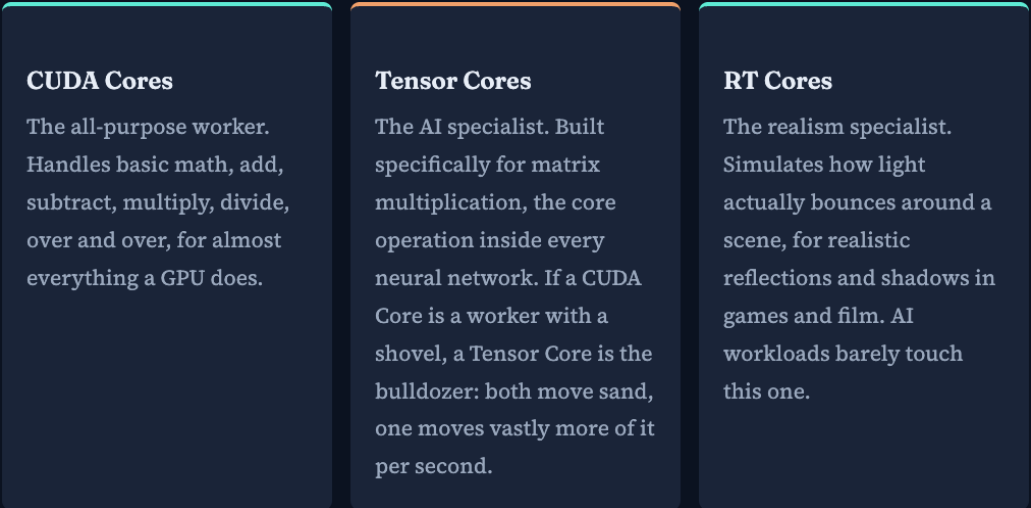
Inside each Streaming Multiprocessor (SM), there are three main types of cores, and each one has a different role.
1. CUDA Cores
These are the general-purpose workers of the GPU.
They handle the basic mathematical operations a GPU performs again and again, such as:
- addition
- subtraction
- multiplication
- division
You can think of CUDA Cores as the everyday workers that keep the GPU running.
They are used in many kinds of workloads, including graphics, scientific computing, and AI.
2. Tensor Cores
These are the AI specialists.
Tensor Cores are designed specifically for matrix operations, especially matrix multiplication, which is one of the most important calculations in neural networks.
This is why Tensor Cores matter so much for AI.
A useful way to think about it is:
- CUDA Core = a worker using hand tools
- Tensor Core = a machine built for one high-speed job
Both can do useful work, but Tensor Cores are much faster when the workload matches what they were designed for.
Tensor Cores are also optimized to work with lower-precision numbers such as FP16, BF16, or other reduced-precision formats.
That sounds like a limitation, but in AI it is often a big advantage:
- less data to move
- more calculations per second
- faster training and inference
- usually enough numerical accuracy for the model to work well
That trade-off, slightly lower precision for much higher speed, is one of the main reasons modern AI became practical at scale.
3. RT Cores
These are the graphics specialists.
RT stands for ray tracing.
RT Cores help simulate how light behaves in a 3D scene, which makes reflections, shadows, and lighting in games look more realistic.
They are very important for modern graphics, but they are not a major part of most AI workloads.
The key takeaway
A modern GPU includes different types of cores because different tasks need different kinds of hardware.
- CUDA Cores handle general computation
- Tensor Cores accelerate AI and matrix math
- RT Cores improve graphics realism
For AI, the most important ones are usually Tensor Cores, supported by CUDA Cores.
Why So Many Different Types?
At this point, you may be wondering:
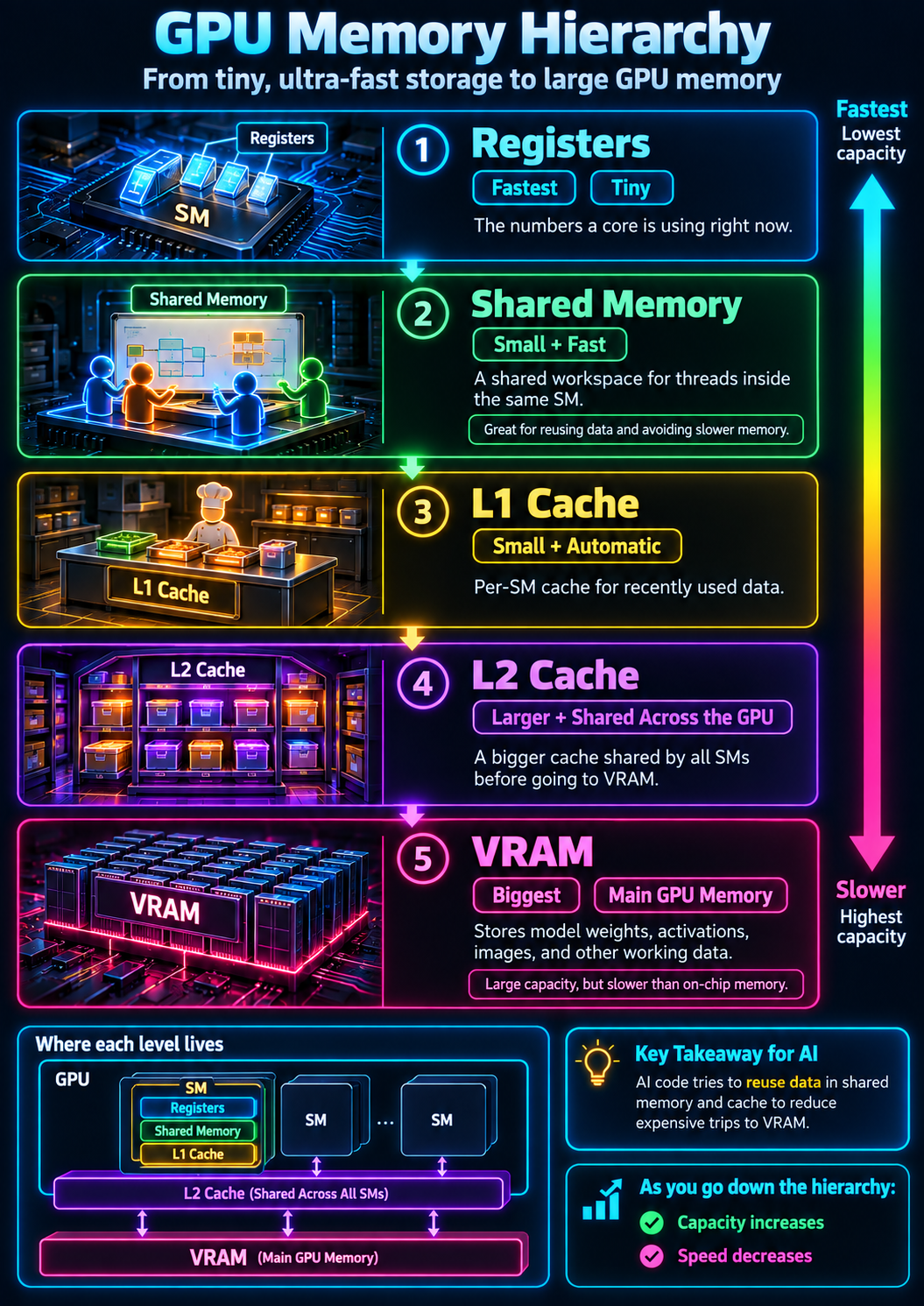
Why does a GPU need registers, shared memory, L1 cache, L2 cache, and VRAM?
Why not just use one big memory?
The answer is simple: speed and capacity are a trade-off.
The memory closest to the GPU cores is extremely fast, but there is very little of it. As we move farther away from the cores, memory becomes larger, but accessing it takes more time.
A simple way to remember the hierarchy is:
Registers → Shared Memory / L1 Cache → L2 Cache → VRAM
As we move down this hierarchy:
Capacity increases, but access becomes slower.
Shared Memory
The whiteboard used by the whole team
Imagine several threads inside the same SM are working on the same problem.
They may need to reuse the same piece of data again and again.
One option would be for every thread to keep going all the way to VRAM to fetch that data. But VRAM is relatively far away, so repeatedly doing that would waste time.
This is where shared memory helps.
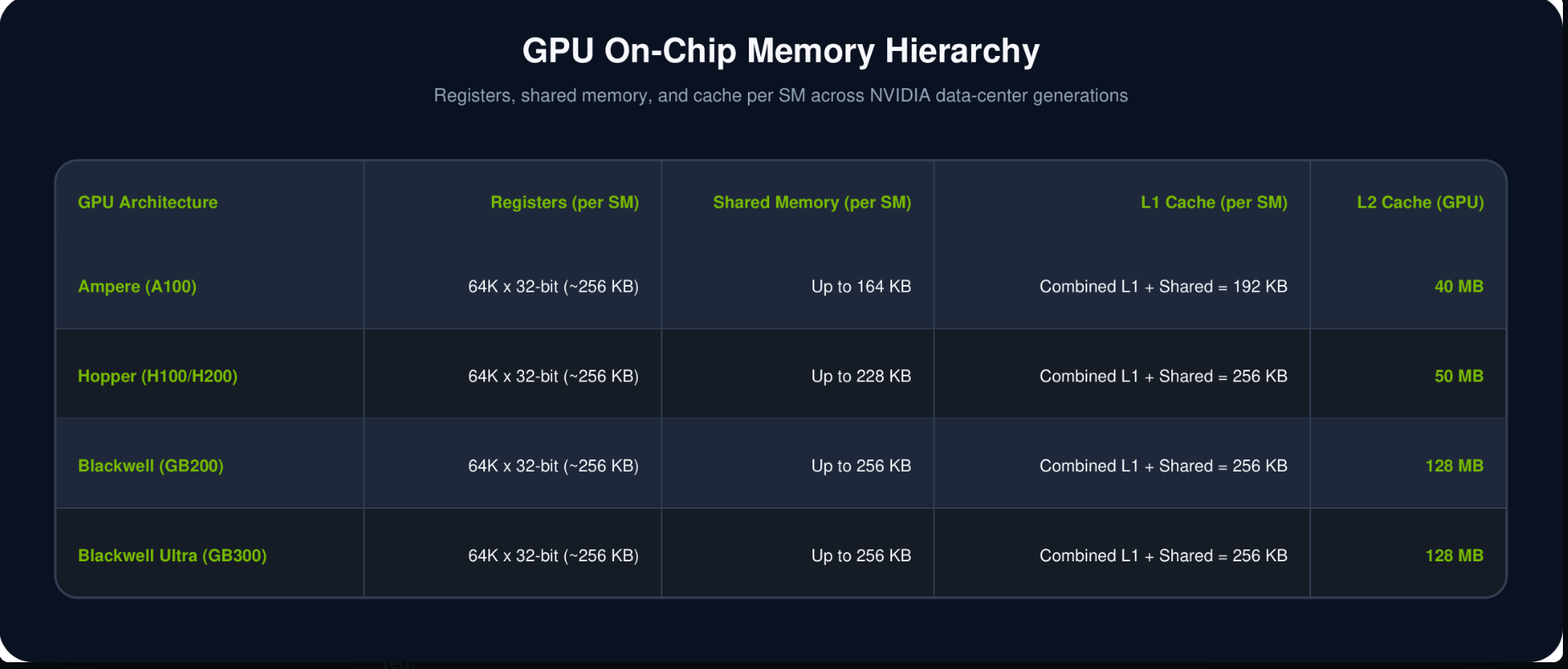
Shared memory is a small, fast memory space available to threads running inside the same SM.
A useful analogy is a team working around a whiteboard.
Instead of every team member walking to another room to look up the same information, someone writes it on the whiteboard. Now everyone on the team can access it quickly.
That is exactly the purpose of shared memory:
load useful data once, keep it close, and reuse it.
For high-performance GPU and AI code, this can make a significant difference because it reduces unnecessary trips to slower memory.
One important detail:
Shared memory is explicitly managed by the program.
The programmer or a framework such as CUDA, PyTorch, or a lower-level kernel library decides when data should be placed there.
L1 Cache
Frequently used data kept close to the SM
Shared memory is deliberately managed by software.
L1 cache works differently.
Each SM also has a small, very fast cache called L1. Its job is to automatically keep recently or frequently accessed data close to the compute units.
Think of a chef working in a kitchen.
The chef does not keep salt, oil, and spices in a storage room across the building. The things used constantly stay on the countertop.
L1 cache plays a similar role.
If the GPU needs some data and it is already available in L1, it can retrieve it quickly.
If the data is not there, the GPU has to look farther down the memory hierarchy.
The important difference is:
Shared Memory → software decides what goes there.
L1 Cache → hardware manages it automatically.
On modern NVIDIA GPUs, L1 cache and shared memory are closely related and can share on-chip memory resources within an SM.
For a beginner, the key point is simply:
both exist to keep frequently needed data close to the compute units.
L2 Cache
A larger shared cache for the entire GPU
The L1 cache belongs close to an individual SM.
But what happens if several SMs need the same data?
This is where L2 cache comes in.
L2 is larger than L1 and is shared across the GPU.
Continuing our kitchen analogy:
L1 is the chef's countertop.
L2 is the pantry shared by the entire kitchen.
If the required data is not available close to the SM, the GPU can check L2 before making the more expensive trip to VRAM.
That makes L2 especially useful because many SMs may reuse the same data.
So the rough path becomes:
SM → L1 → L2 → VRAM
The farther the GPU has to travel for data, the more expensive the access becomes.
This is one reason GPU designers keep increasing cache capacity: the goal is to keep the compute units working instead of waiting for data.
VRAM
The GPU's main memory
Eventually, we reach VRAM — Video Random Access Memory.
Despite the word Video in its name, VRAM is extremely important for AI.
VRAM is the large memory attached to the GPU where the GPU keeps the data required by the workload.
For an AI model, that can include:
- model weights
- input data
- activations
- KV cache during LLM inference
- intermediate calculation results
- temporary working buffers
For example, when you load a large language model onto a GPU, a large portion of the model's weights is placed in VRAM.
The GPU then repeatedly reads those weights while performing inference.
VRAM has much more capacity than registers or caches, but it is also farther away from the compute units.
That's why GPU performance is not only about having fast CUDA or Tensor Cores.
Those cores need to be continuously supplied with data.
If they spend too much time waiting for data to arrive from VRAM, the GPU cannot fully use all of its computational power.
Putting everything together
Think about the memory hierarchy like a workspace:
Registers
The data currently in your hands.
⬇️
Shared Memory / L1 Cache
Things sitting on your desk or whiteboard.
⬇️
L2 Cache
The shared cabinet in the room.
⬇️
VRAM
The large storage room nearby.
The closer the data is to the compute units, the faster it can be accessed.
But the closer memory is also much smaller.
So GPU programming is constantly trying to answer one question:
How can we keep the data the GPU needs as close to the compute units as possible?
That leads to one of the most important ideas in GPU performance: A fast GPU is not useful if its cores are constantly waiting for data.
For AI workloads, compute power and memory performance have to work together.
The highway between the GPU and memory
A GPU can have thousands of compute cores, but those cores are only useful if data reaches them fast enough.
Think of the connection between the GPU and its memory as a highway.
Two ideas matter here:
Memory bus width
This tells us how wide the highway is.
A wider bus means more bits of data can move between the GPU and its memory at the same time.
For example:
- a 64-bit bus is like a road with fewer lanes
- a 384-bit bus is like a much wider highway with many more lanes
The wider the road, the more data can travel side by side.
Memory bandwidth
This tells us how much data actually moves through that highway every second.
So if bus width is the number of lanes, bandwidth is the total amount of traffic that can pass through those lanes in one second.
Bandwidth is usually measured in:
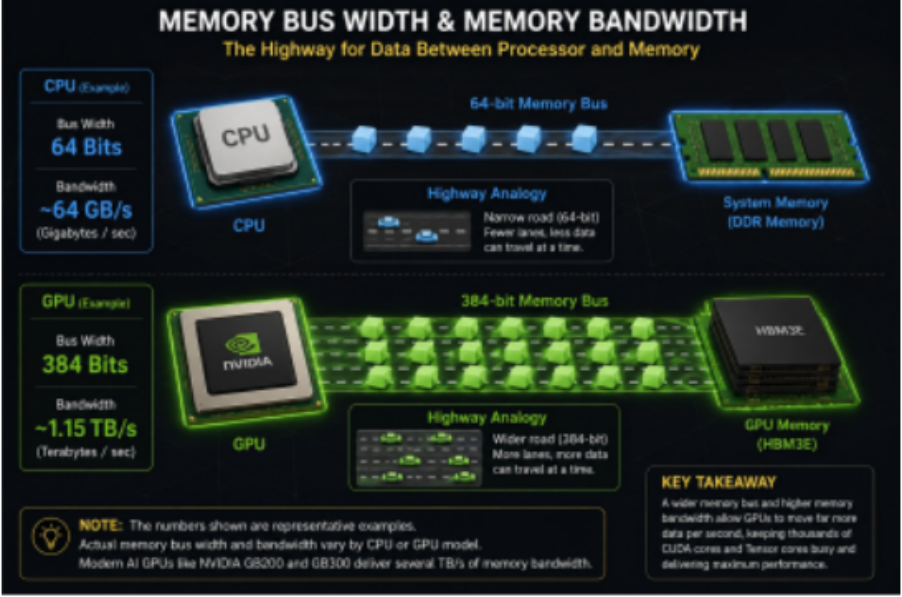
GB/s — gigabytes per second
or
TB/s — terabytes per second
Why does this matter for AI?
Large AI models constantly move huge amounts of data.
For example, during LLM inference, the GPU repeatedly reads model weights from memory so that CUDA and Tensor Cores can perform calculations.
If the cores are ready to work but the data is arriving too slowly, the cores have to wait.
That means the GPU can become memory-bandwidth limited.
In simple terms:
Fast cores + slow memory = cores waiting
Fast cores + high memory bandwidth = cores stay busy
That is why memory bandwidth is such an important specification for AI GPUs.
The easiest way to remember it
Bus width = how wide is the road?
Bandwidth = how much data can travel on that road every second?
And the key takeaway is:
A powerful GPU is not just about how many cores it has. It also needs enough memory bandwidth to keep those cores continuously supplied with data.
How do those GPUs exchange data quickly?
A single GPU can only hold so much data in its memory.
As AI models get larger, one GPU may no longer be enough to store the model or handle all the computation. In that case, we use multiple GPUs together.
But now we have a new problem:
How do those GPUs exchange data quickly?
That is where NVLink comes in.
NVLink is NVIDIA’s high-speed connection for GPU-to-GPU communication. It allows GPUs to exchange data much faster than if everything had to travel through the CPU first.
A simple way to picture it is this:
Imagine two office buildings.
Without NVLink, employees may have to leave one building, go through a central office, and then reach the other building.
With NVLink, the two buildings have a private bridge connecting them directly.
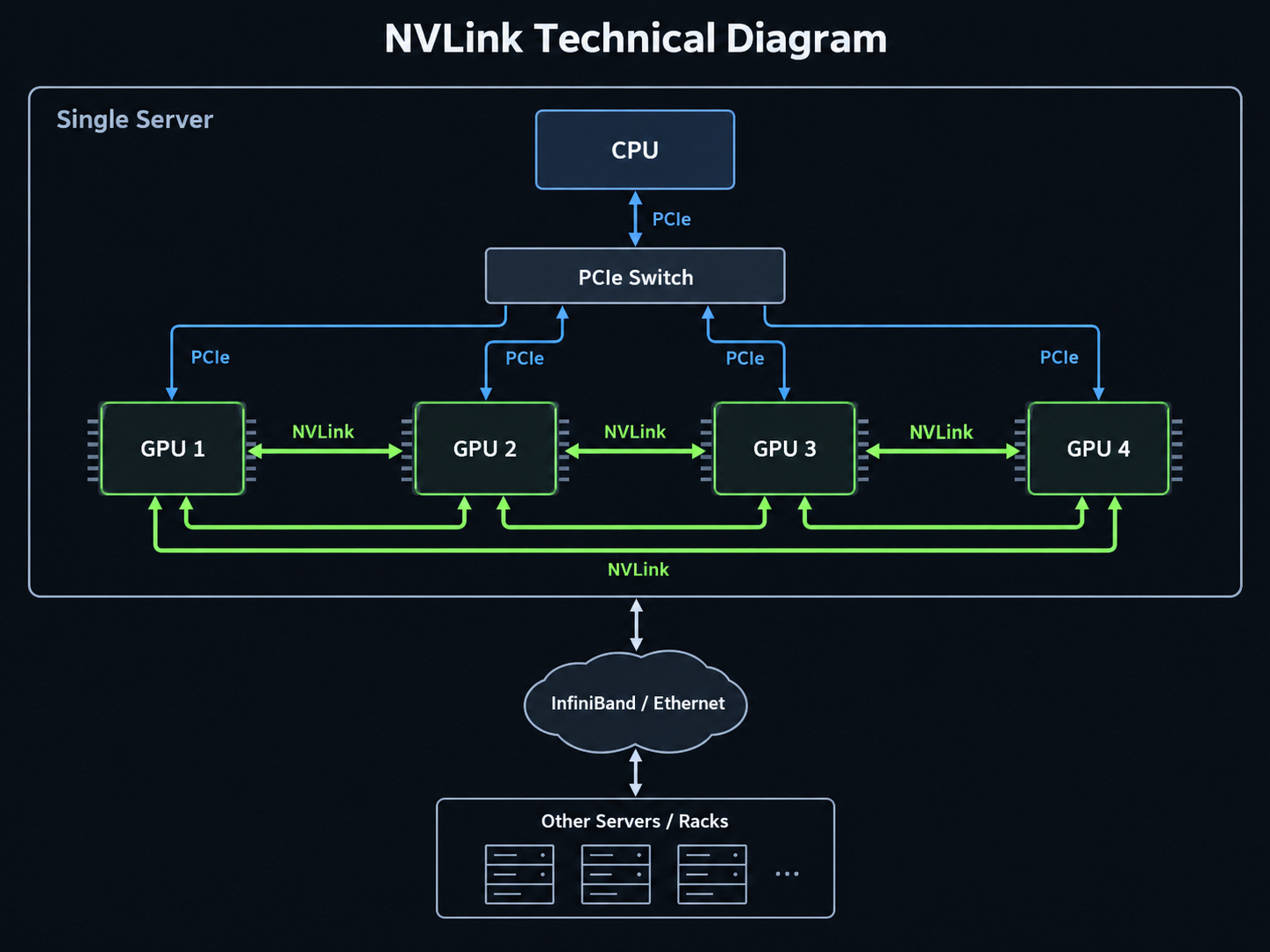
That is the idea behind NVLink.
The GPUs can share data with each other through a dedicated high-speed connection, which is especially useful when several GPUs are working together on the same AI workload.
Where does NVLink fit?
NVLink is mainly used for high-speed communication between GPUs that are physically close to each other, such as GPUs inside the same system or tightly connected GPU platform.
When AI workloads grow beyond that and need to communicate across multiple servers or racks, other networking technologies are used, such as:
- InfiniBand
- high-speed Ethernet
So the basic picture is:
Inside one multi-GPU system → NVLink
Between servers or racks → InfiniBand or Ethernet
Why this matters for AI
Large AI workloads often split work across multiple GPUs.
Those GPUs may need to exchange things such as:
- model data
- intermediate results
- gradients during training
- activations between parts of the model
If GPU-to-GPU communication is slow, the GPUs spend more time waiting and less time computing.
So NVLink helps multiple GPUs behave more like one tightly connected compute system.
The easiest way to remember it
PCIe connects the GPU to the host system.
NVLink connects GPUs to other GPUs at very high speed.
InfiniBand or Ethernet connects larger groups of systems across the network.
That distinction is the key takeaway for a beginner.
Keeping the GPU from overheating
A GPU can contain billions of transistors, and those transistors switch on and off extremely quickly while the GPU is working.
That activity produces a lot of heat.
If the heat is not removed properly, the GPU can become too hot. When that happens, it protects itself by reducing its speed. This is called thermal throttling.
In more extreme cases, the GPU may shut down to prevent damage.
That is why cooling is an important part of GPU design.
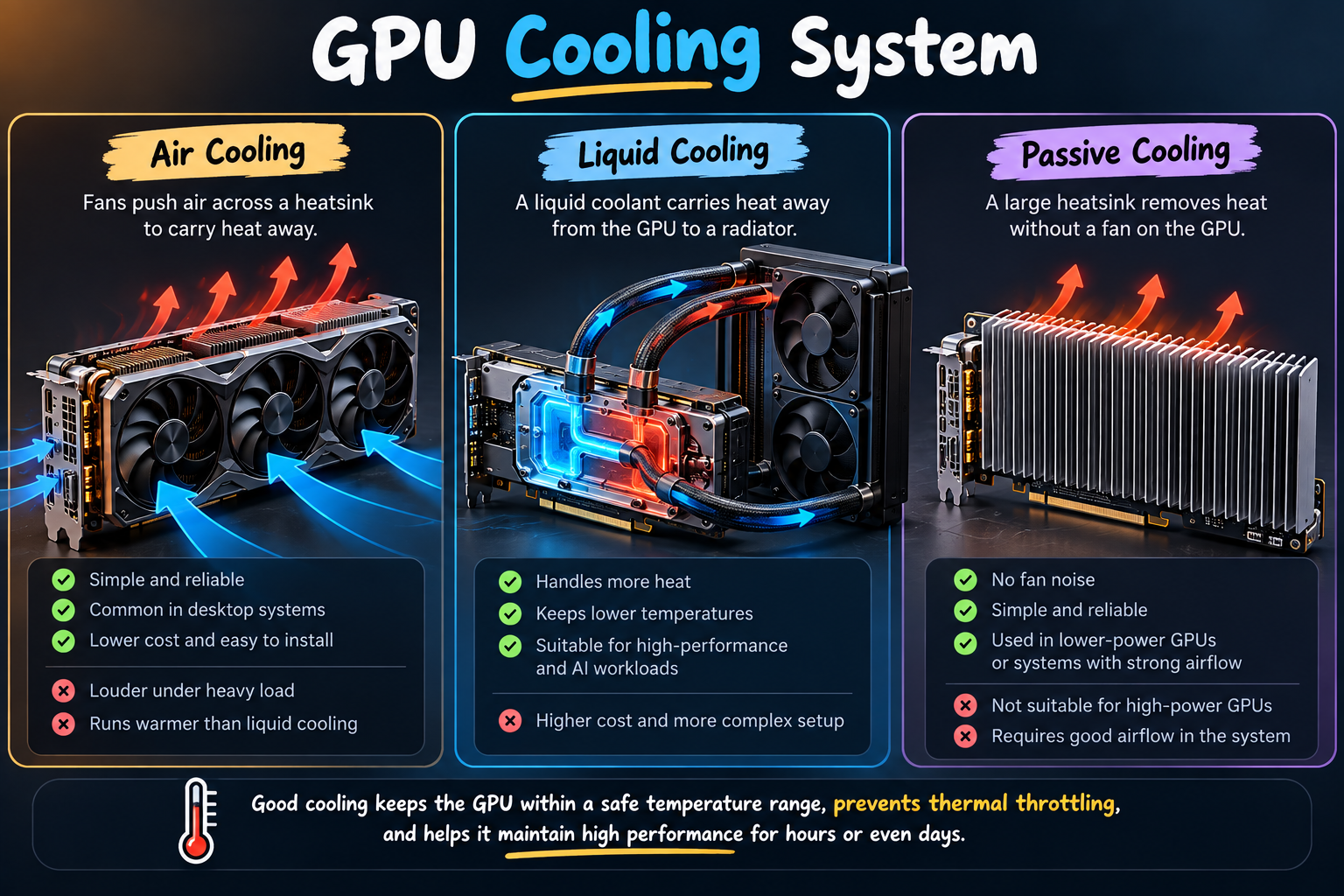
There are three common ways to cool a GPU:
- Air cooling
Fans push air across a heatsink attached to the GPU. It is simple, reliable, and commonly used in desktop systems. - Liquid cooling
A liquid coolant carries heat away from the GPU to a radiator. It can handle more heat and is often used in high-performance systems where air cooling is not enough. - Passive cooling
A large heatsink removes heat without using a fan directly on the GPU. This works only for lower-power hardware or systems that already have strong airflow around the card.
Why cooling matters for AI
AI workloads can keep a GPU busy for long periods of time.
Training a model may run for hours or even days, so the GPU needs to stay within a safe temperature range while maintaining high performance.
If the GPU gets too hot:
temperature rises → clock speed drops → performance decreases
So cooling is not only about protecting the hardware.
It also helps the GPU sustain its performance under heavy workloads.
Simple takeaway
More GPU activity → more heat
Better cooling → more stable performance
And if cooling is not sufficient:
GPU overheats → thermal throttling → slower performance
What happens when you ask an AI model a question?
Let’s connect everything we’ve learned.
Imagine you type:
“What is Artificial Intelligence?”
That simple question triggers a chain of work across the CPU, GPU, memory, and compute units.
The flow looks roughly like this:
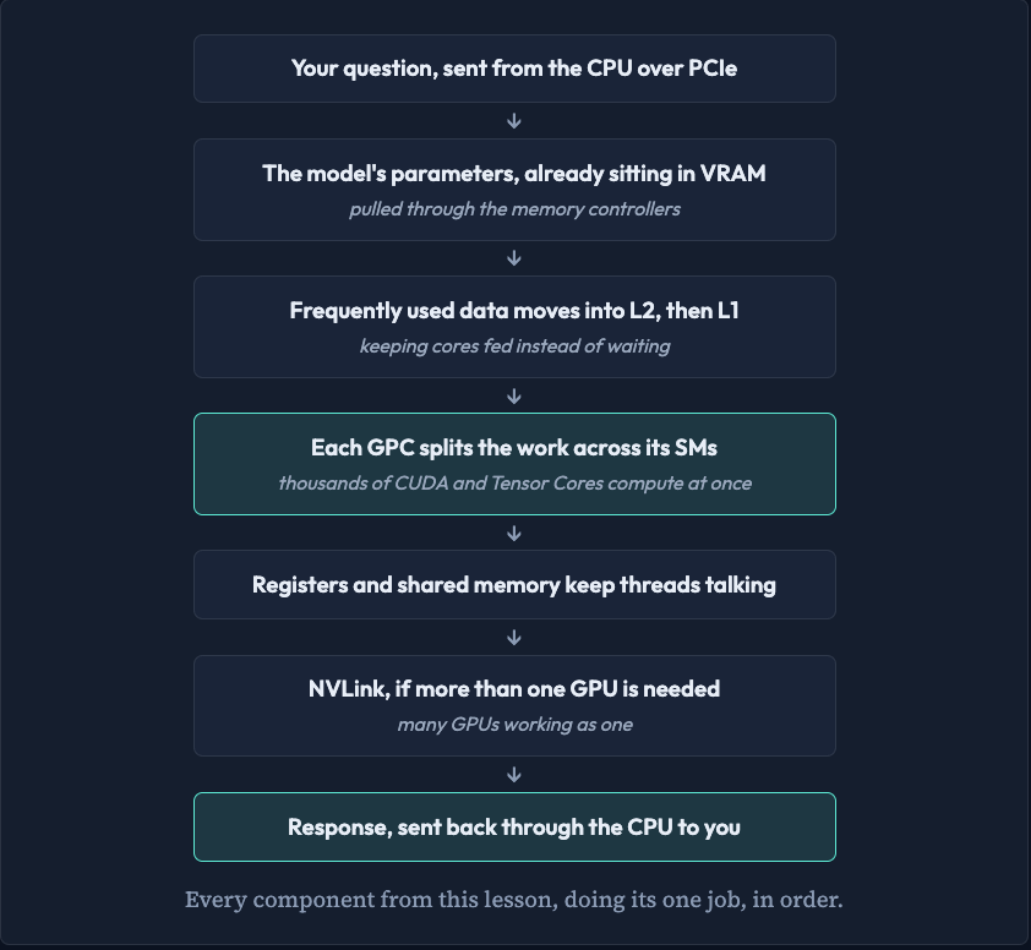
- Your question starts on the CPU
The CPU prepares the request and sends the required work to the GPU over PCIe. - The model is already loaded into VRAM
The model’s weights and other data are stored in the GPU’s main memory, ready to be used. - Data moves closer to the compute units
Frequently needed data is brought into L2 cache, then closer to the SMs through L1 cache and shared memory. - The GPU divides the work
The workload is distributed across GPCs and then across many Streaming Multiprocessors (SMs). - Thousands of cores start computing
Inside the SMs, CUDA Cores and Tensor Cores perform the mathematical operations required by the neural network. - Registers and shared memory keep data close
Threads use fast local memory so they can avoid repeatedly going back to slower VRAM. - Multiple GPUs can work together
If the model or workload is too large for one GPU, NVLink can help GPUs exchange data quickly. - The result comes back to you
Once the computation is complete, the result moves back through the system and is eventually returned as the response you see on screen.
The big picture
A GPU may look like just a large circuit board with fans attached to it, but internally it is a carefully organized computing system.
Different components have different jobs:
- VRAM stores the model and working data
- Caches and shared memory keep frequently used data close
- SMs organize the computation
- CUDA and Tensor Cores perform the math
- NVLink helps multiple GPUs communicate
- Cooling keeps everything running at full speed
And all of these parts work together for one goal:
keep thousands of compute units supplied with data so they can perform a huge amount of work in parallel.
That is the core idea behind a GPU and the reason it became such an important part of modern AI.