Build a GenAI Q&A API with Amazon Bedrock Mantle, AWS Lambda, and API Gateway
Beginner-friendly, hands-on AWS lab | Console-based deployment | Python 3.12
Companion code: cracking-the-genai-interview / bedrock-apig-lambda
In this project, we will build a small question-and-answer API. A user sends a question to a web endpoint, AWS Lambda forwards that question to a foundation model through Amazon Bedrock Mantle, and the API returns the model’s answer. We will explain each service before using it, so you can understand both the setup and the reason behind it.
This guide follows the architecture, code examples, and configuration in the original lab. Availability of specific models, IAM policies, and endpoints depends on your AWS account and region; check the AWS console if an option is different in your account.
What you will learn
- How an HTTP request moves through API Gateway, Lambda, and a foundation model.
- How a Lambda IAM role grants permission without keeping a permanent secret in code.
- Why third-party Python libraries must be packaged for the Lambda runtime.
- How to deploy, test, troubleshoot, and clean up a simple AI API.
Companion project: cracking-the-genai-interview / bedrock-apig-lambda (local workspace: bedrock-apig-lambda).
1. Understand what we are building
Imagine you want a simple way for a website, command-line script, or mobile app to ask an AI model a question. Instead of calling the model directly from the user’s device, we create one API endpoint on AWS. The endpoint receives a question and gives back an answer.
The three main AWS services
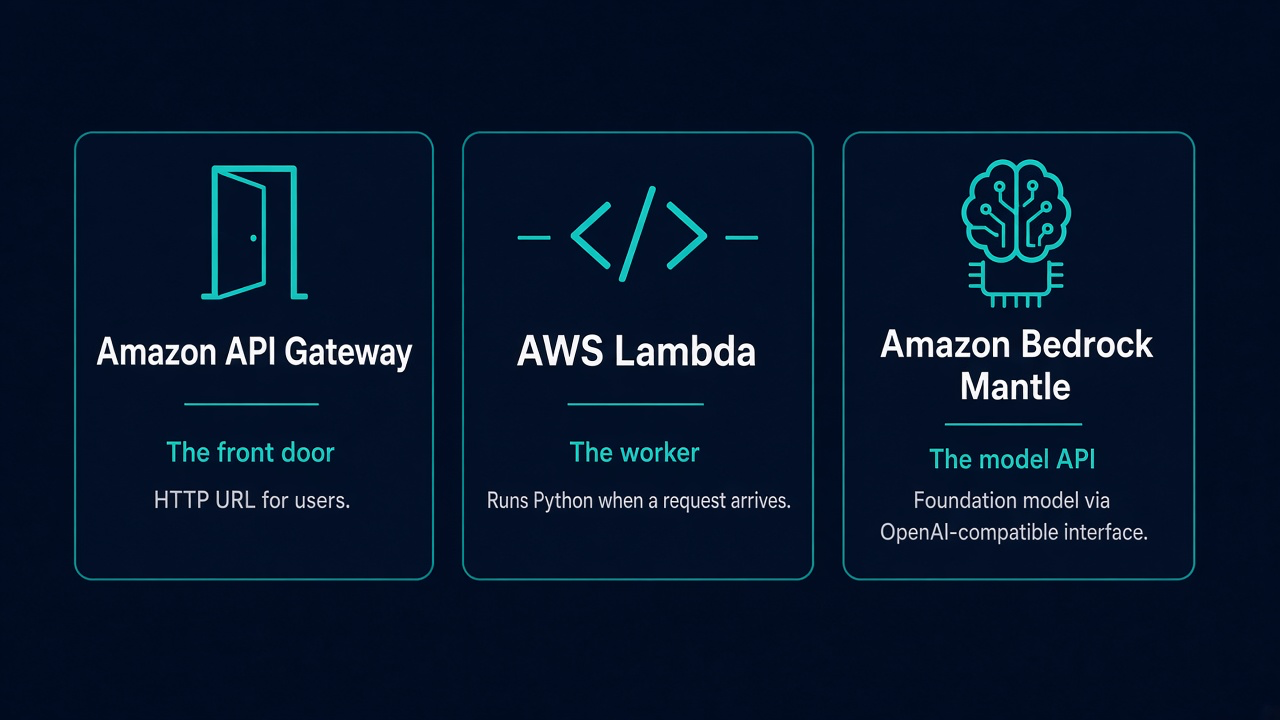
- Amazon API Gateway is the front door. It gives users an HTTP URL and passes requests to our backend.
- AWS Lambda runs our Python code when a request arrives. We do not manage a server for this example.
- Amazon Bedrock Mantle provides a model API. Our Lambda function calls it through an OpenAI-compatible interface.
Request flow
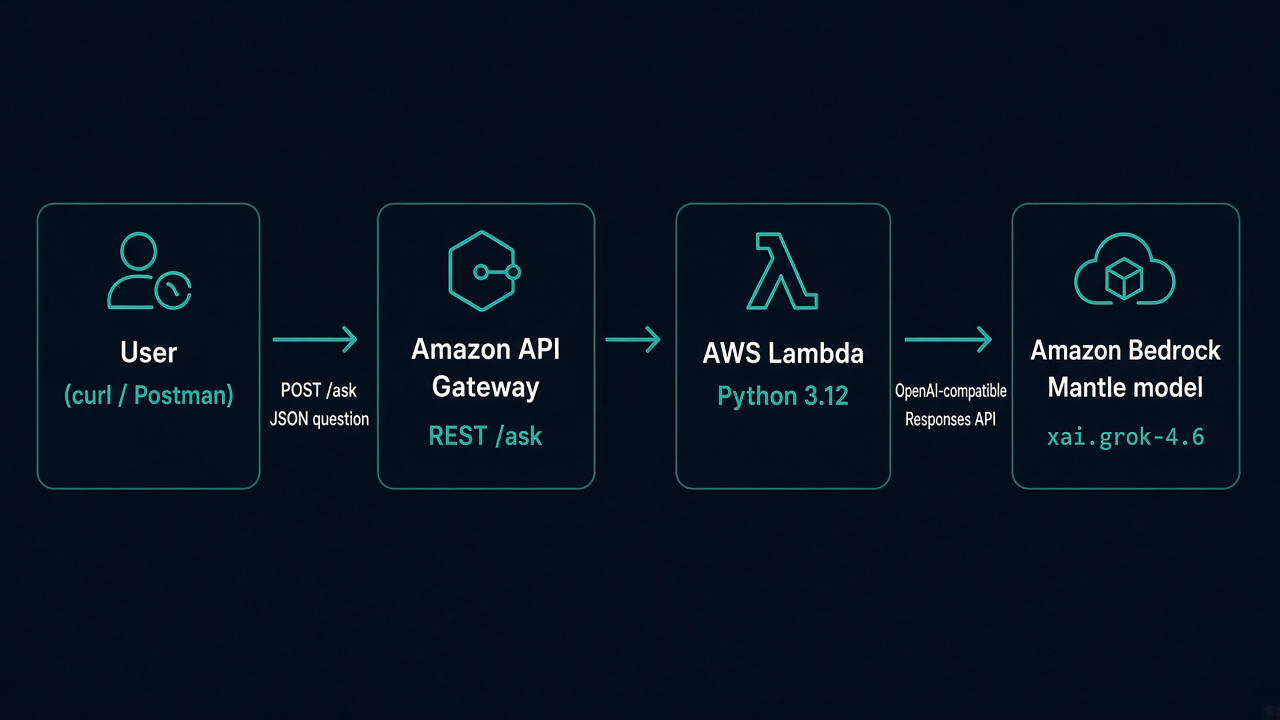
User (curl or Postman) | POST /ask {"question": "What is Amazon Bedrock?"} v Amazon API Gateway (REST API) | forwards the request v AWS Lambda (Python 3.12) | obtains a short-lived token using its IAM role | sends the question via the Responses API v Amazon Bedrock Mantle (model: xai.grok-4.6) | model generates an answer v Lambda -> API Gateway -> User
For this learning lab the API uses no caller authentication. Anyone who knows the URL may be able to invoke it, so do not treat this configuration as production-ready.
2. Why we chose this design
AWS can expose models using different interfaces. This specific lab uses Bedrock Mantle and the OpenAI-compatible Responses API, not the Bedrock Runtime Converse or InvokeModel APIs. The distinction matters because the endpoints, permissions, and SDK calls are different.
- Model: xai.grok-4.6, which was accessible to the original lab’s AWS account. Your account may have different access.
- Region: us-west-2 (Oregon). Keep the Lambda configuration, IAM resource, and model endpoint in the same intended region.
- Authentication: generate a short-term Bedrock token from the Lambda execution role; a static BEDROCK_API_KEY is only an optional alternative in the source lab.
- Deployment: use the AWS console and an uploaded ZIP file so the exercise focuses on AWS concepts instead of infrastructure-as-code tools.
Tip: “OpenAI-compatible” describes the API format and SDK support. Your request is still sent to the Bedrock Mantle endpoint configured in the code.
3. Before you start
Sign in to an AWS account where you can create and manage Lambda functions, IAM roles, API Gateway APIs, and Bedrock resources. Select US West (Oregon), shown as us-west-2 in AWS.
- AWS account access to Bedrock Mantle, Lambda, API Gateway, and IAM.
- If creating the package yourself: Python 3.12 or later, pip, and zip. For testing, curl is enough; jq is optional.
- Lambda settings for this lab: Python 3.12 and x86_64 architecture, matching the prepared deployment package.
Keep in mind that invoking foundation models and other AWS resources can incur charges. Delete the lab resources after practicing.
4. Get familiar with the project files
The project folder has the Python function, a list of required libraries, a ready-made deployment package, and helper scripts. Here is the original layout:
bedrock-apig-lambda/
├── README.md
├── lambda/
│   ├── handler.py / lambda_function.py
│   ├── requirements.txt  # openai, aws-bedrock-token-generator
│   └── function.zip      # prepared Lambda deployment package
└── scripts/
    ├── package-lambda.sh # rebuild a Linux-compatible ZIP
    └── test-ask.sh       # test the endpoint using curl
The important file for Lambda is function.zip. It must include the Python handler and the libraries that the handler imports.
5. Create an IAM role for Lambda
A Lambda execution role is an AWS identity assumed by your function. Instead of saving a permanent AWS access key inside Python, the function can receive temporary permissions from this role.
- Open IAM in the AWS console and create a role trusted by the Lambda service (lambda.amazonaws.com).
- Name it bedrock-ask-lambda-role.
- Attach AWSLambdaBasicExecutionRole so Lambda can write logs to CloudWatch.
- Grant the Mantle permissions needed by the original lab. If AmazonBedrockMantleInferenceAccess is available in your account, follow the project instructions; otherwise use an appropriate least-privilege IAM policy.
Actions listed in the source lab:
bedrock-mantle:CreateInference
bedrock-mantle:Get*
bedrock-mantle:List*
Resource: arn:aws:bedrock-mantle:us-west-2:ACCOUNT_ID:project/*

bedrock-mantle:CallWithBearerToken
Resource: *
Replace ACCOUNT_ID with your actual AWS account ID where applicable. Before saving a policy, verify the supported IAM action names and resource scope in your AWS account, because permissions can vary with the service and feature. The original lab warns that a long-term Bedrock API key belongs to the IAM user who created it, which can produce unexpected 401 errors when you expect the Lambda role to be used.
6. Prepare a Lambda deployment ZIP
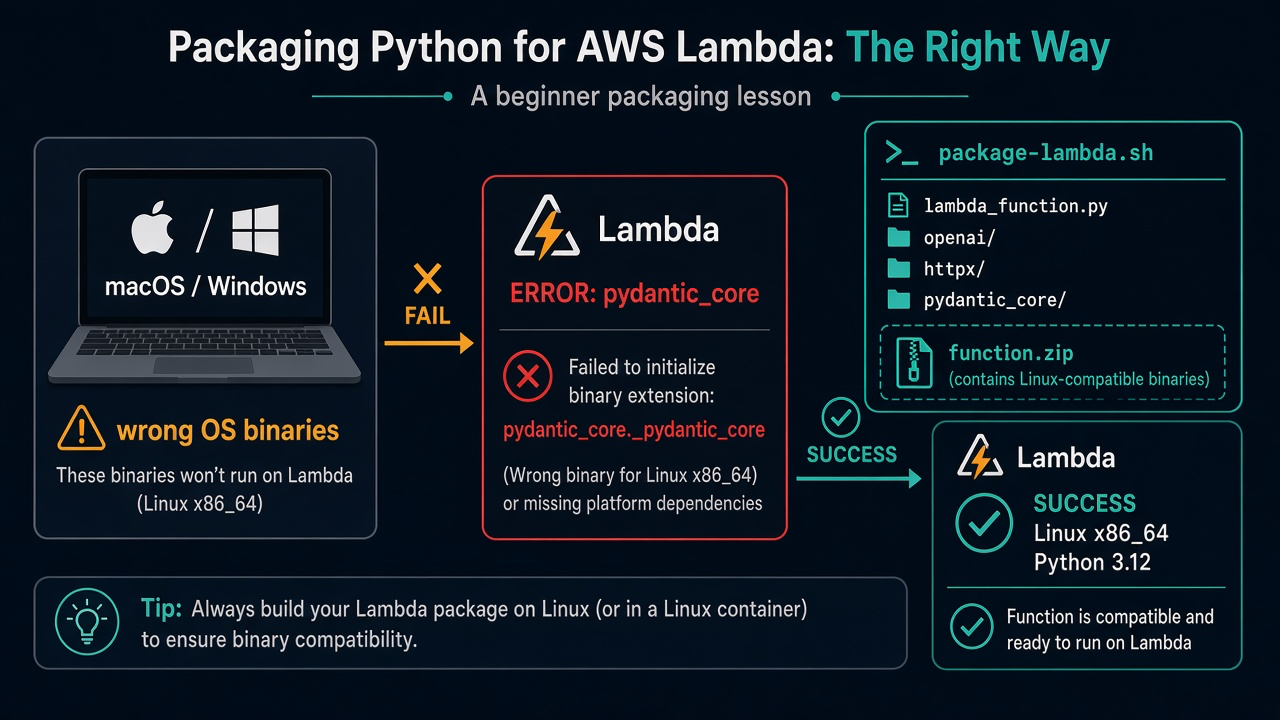
Unlike your laptop, Lambda does not automatically install packages just because requirements.txt is present. The deployment ZIP must already contain the Python dependencies alongside your code.
A second important detail is operating-system compatibility: if you package compiled Python dependencies on macOS or Windows, they may not run on Lambda’s Linux environment. The original project includes a script to build Linux-compatible dependencies.
./scripts/package-lambda.sh
# Expected output: lambda/function.zip (approximately 25 MB in the original lab)
Alternatively, use the prebuilt lambda/function.zip supplied with the project. Inside the ZIP, lambda_function.py and dependency folders such as openai/, httpx/, and pydantic_core/ should be at the ZIP root, rather than inside another package/ folder.
If you see an error mentioning pydantic_core._pydantic_core, check the ZIP platform and runtime version first.
7. Create and configure your Lambda function
Now we create the backend that will receive the question and call the model.
- Open AWS Lambda and select Create function. Use the name bedrock-ask.
- Choose Python 3.12 and architecture x86_64.
- Under execution permissions, select the existing IAM role bedrock-ask-lambda-role.
- Upload the function.zip package as the function code. Set the handler to lambda_function.lambda_handler.
- Set the timeout to 60 seconds and memory to at least 256 MB.
Environment variables
Environment variables are configuration settings available to the Lambda code. They make it possible to adjust the model and request behavior without editing the Python source each time.
MODEL_ID=xai.grok-4.6
MANTLE_API_PATH=/openai/v1
BEDROCK_REGION=us-west-2
MAX_TOKENS=4096
REASONING_EFFORT=low
MAX_TOKENS limits the model output budget, and REASONING_EFFORT asks the model to use less reasoning effort. The original lab found that a smaller token budget could return an incomplete response without visible answer text, so it uses 4096 and low for this particular model. Settings may need adjustment for another model.
8. Test Lambda before adding API Gateway
Testing Lambda on its own is helpful because it separates problems with the Python/model call from problems with the public API URL.
{
  "httpMethod": "POST",
  "body": "{\"question\": \"What is Amazon Bedrock?\"}"
}
Create a test event with the values above and invoke the Lambda function. In the original lab, a successful run returned HTTP status 200, an answer, model xai.grok-4.6, and endpoint bedrock-mantle. If it fails, review the error and check the CloudWatch logs before going further.
9. Create the API Gateway REST API
Our Lambda is working inside AWS, but users still need an HTTP address. API Gateway provides that address and forwards an HTTP POST request to Lambda.
- In API Gateway, create a REST API named bedrock-ask-api.
- Add a resource named /ask and a POST method.
- Select Lambda proxy integration and connect it to bedrock-ask. Proxy integration passes the request event to the handler.
- For this exercise only, choose Authorization NONE.
- Deploy the API to a stage named dev.
https://{api-id}.execute-api.us-west-2.amazonaws.com/dev/askThe stage name dev and the resource path /ask are both part of the endpoint. If either is missing, API Gateway can respond with “Missing Authentication Token,” even though this exercise does not use authentication. The source lab also includes an example account-specific URL; use the URL created by your own API instead.
10. Send a question with curl
curl is a command-line HTTP client. It lets us test the complete request path without creating a website. First, set API_URL to the endpoint from your API Gateway stage; then send a JSON body containing question.
export API_URL="https://YOUR_API_ID.execute-api.us-west-2.amazonaws.com/dev/ask"

curl -sS -X POST "$API_URL" \
  -H "Content-Type: application/json" \
  -d '{"question":"What is Amazon Bedrock?"}'
Read the result: the request enters API Gateway, triggers Lambda, calls Mantle, and returns an answer. If the call fails, use the troubleshooting section to identify which part of the path needs attention.
11. Understand the Python model call
The OpenAI Python SDK can send requests to a custom compatible base URL. Here we tell it to use the Bedrock Mantle URL and pass a token generated using the AWS role environment.
from openai import OpenAI
from aws_bedrock_token_generator import provide_token

client = OpenAI(
    api_key=provide_token(region="us-west-2"),
    base_url="https://bedrock-mantle.us-west-2.api.aws/openai/v1",
)

response = client.responses.create(
    model="xai.grok-4.6",
    input=[{"role": "user", "content": question}],
    max_output_tokens=4096,
    reasoning={"effort": "low"},
)
Reading the code from top to bottom: provide_token retrieves a short-lived credential; OpenAI creates the client configured for Mantle; responses.create sends the question, selects the model, and requests an output. The surrounding Lambda handler (in the companion project) takes care of reading the incoming API request and returning the result as an HTTP response.
12. What if your model is not available?
Model availability varies by account, region, and access agreements. The original lab used xai.grok-4.6 because the account used for testing could call it. Seeing a model listed as AVAILABLE does not always mean your account is authorized to invoke it.
The source also mentions openai.gpt-oss-20b as another possible model and notes a different Mantle path (/v1 instead of /openai/v1). If you change the model, check its exact model ID, API route, credentials, and account access instead of assuming every model uses the same setup.
13. Common errors and how to fix them
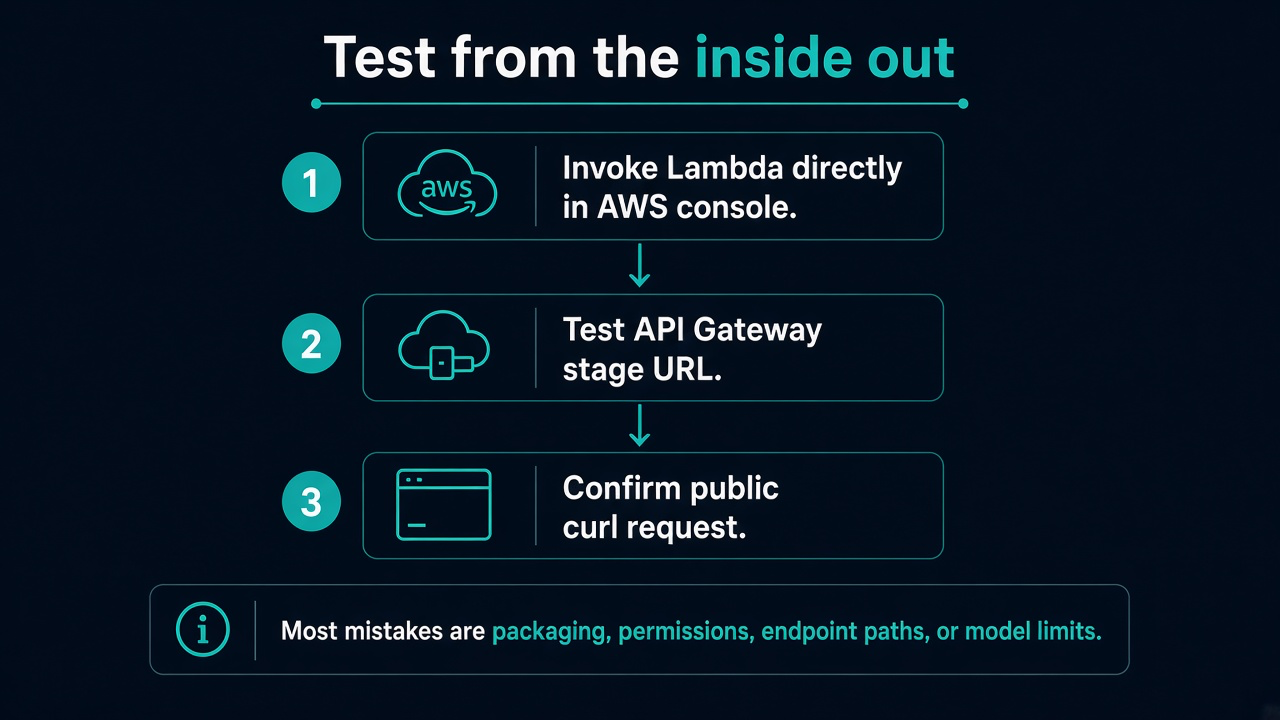
When something breaks, focus on the error message first. Most mistakes in this lab are related to packaging, permissions, endpoint paths, or model limits.
A useful troubleshooting habit is to test from the inside out: first invoke Lambda directly, then test API Gateway, then confirm the public curl request.
| Error | What to check |
|---|---|
| No module named openai | The dependency is missing from your ZIP. Rebuild or upload the packaged ZIP, not requirements.txt by itself. |
| pydantic_core._pydantic_core | The package was built for the wrong OS or Python version. Use a Linux-compatible build for Python 3.12. |
| AuthenticationError / HTTP 401 | Review token generation and Mantle IAM permissions. A static API key may belong to a different identity. |
| Empty answer / incomplete | The model may have exhausted its output budget. Review MAX_TOKENS and REASONING_EFFORT. |
| Missing Authentication Token | Check that the invoke URL includes both the deployment stage and /ask. |
| Model not supported on this route | Confirm MANTLE_API_PATH is right for your chosen model. |
| API Gateway 502 | Inspect Lambda and CloudWatch logs; check failures and timeout settings. |
14. Clean up your AWS resources
This lab creates a publicly callable API and may use billable AWS resources. When you finish, remove anything you no longer need.
- Delete the API Gateway API named bedrock-ask-api.
- Delete the Lambda function named bedrock-ask.
- Delete the IAM role named bedrock-ask-lambda-role if nothing else uses it.
- Remove any Bedrock API keys created specifically for this exercise.
15. What this lab does not cover
To make the first deployment easier to understand, we intentionally leave out several production features. They are important follow-up topics, not mistakes in this introductory lab.
- Bedrock Runtime APIs such as Converse and InvokeModel.
- API authentication, Cognito, API keys for clients, and AWS WAF.
- Streaming model responses.
- Infrastructure as code using SAM, CDK, or Terraform.
For a real deployment, protect the API with authentication and authorization, add request limits and monitoring, review costs, and follow least-privilege IAM practices.
16. Review: what you should remember
- API Gateway accepts an HTTP request; Lambda processes it; Bedrock Mantle calls the model.
- Bedrock has different model interfaces, so endpoint paths and IAM permissions must match the API you choose.
- The OpenAI-compatible SDK works with Mantle by specifying the compatible base URL, a valid Bedrock credential, and the model ID.
- Lambda libraries must be packaged for the target Linux environment.
- An API Gateway path error is not necessarily an authentication problem.
- Reasoning models may need a sufficient output-token budget to return a visible answer.
Try it yourself
As a short exercise, send three different questions using curl or Postman. Then explain in your own words which AWS service receives the request first, which service runs the Python code, and which service performs the model inference. Finally, intentionally remove /dev from your test URL, observe the error, and restore the correct path.