Designing an AI Inference System
A simplified AI inference platform capable of serving Large Language Models.
Start with how this differs from a normal API ↓
When we normally think about system design, we think about things like:
- API servers
- Load balancers
- Databases
- Caches
- Message queues
- Horizontal scaling
AI inference systems use many of the same building blocks.
But there is one major difference:
Instead of primarily using CPUs to process short-lived requests, an AI inference system may spend several seconds generating a response on expensive GPUs.
That changes how we think about scaling, load balancing, caching, scheduling, and even performance metrics.
In this guide, we will design a simplified AI inference platform capable of serving Large Language Models.
An API that streams a generated answer
Imagine that we want to provide an API like this:
POST /v1/chat/completionsThe client sends:
{
  "model": "my-large-model",
  "messages": [
    {
      "role": "user",
      "content": "Explain Kubernetes in simple terms."
    }
  ],
  "temperature": 0.7,
  "max_tokens": 500
}
Our system should generate the response and stream it back to the user.
From the outside, this looks like a normal API.
Internally, however, the request is very different from a traditional web request.
The computation does not disappear when the request ends
Consider a traditional application.
A request might look like:
The application receives the request, performs some computation or database operations, and sends the response.
Once the request finishes, most of the computation associated with it disappears.
LLM inference behaves differently.
The model does not retrieve a pre-existing answer.
It generates the answer one token at a time.
That single fact drives much of our architecture.
Four stages from prompt to streamed answer
Before designing the architecture, we need to understand what happens when someone sends a prompt.
There are four important stages.
3.1 Step 1 — Tokenization
Suppose the user writes:
What is Kubernetes?
The model does not directly understand words.
The text is first converted into numerical token IDs.
Conceptually:
The exact IDs depend on the tokenizer used by the model.
Tokenization normally happens on the CPU and is relatively inexpensive compared with running the model itself.
3.2 Step 2 — Prefill
Now the input tokens are sent to the model.
This stage is called prefill.
During prefill, the model processes the prompt and calculates the information it needs to start generating the response.
Prefill is generally compute intensive because GPUs perform large matrix multiplication operations across the input.
Another very important thing is created during this stage:
KV Cache
We will use this later.
3.3 Step 3 — Decode
After prefill, the system starts generating the response.
Suppose the model wants to generate:
Kubernetes is a container orchestration platform.
It cannot normally generate the entire sentence in one operation.
Instead:
Each new token depends on the tokens that came before it.
For example:
This is called autoregressive decoding.
This is one of the most important concepts to understand when designing an LLM inference system.
3.4 Step 4 — Stream the response
Imagine the complete response takes seven seconds to generate.
One option would be:
That creates a poor user experience.
Instead, AI applications normally stream tokens as soon as they become available.
The client sees the answer being generated.
This is why applications such as AI chat interfaces appear to "type" the answer.
Streaming dramatically improves perceived latency, even though the total generation time might remain the same.
What the service needs to do
Now that we understand inference, we can define what our service needs to do.
Our system should:
- Accept a prompt and generate text.
- Support an OpenAI-compatible chat-completion style API.
- Allow inference parameters such as: temperature, top_p, max_tokens, stop sequences.
- Support multiple models.
- Stream generated tokens to the client.
- Allow requests to be cancelled.
- Stop GPU computation when the client disconnects.
Cancellation is particularly important.
If a user closes the browser after receiving ten tokens, there is normally no reason to continue generating hundreds of additional tokens.
Continuing would waste GPU resources.
How well the system should work
Now we define how well the system should work.
For an inference service, I would pay attention to the following metrics.
Time to First Token — TTFT
This measures:
TTFT is extremely important.
A user may tolerate the response taking several seconds to finish if the first token appears quickly.
Inter-Token Latency
After the first token appears, we want subsequent tokens to arrive smoothly.
For example:
Large delays between tokens make the application feel slow.
GPU Utilization
GPUs are expensive.
If we have a fleet of GPUs sitting mostly idle, our inference service becomes unnecessarily expensive.
So we want the scheduler and batching engine to keep GPUs busy.
Availability
Our API should remain available even if:
- a router crashes
- an inference worker crashes
- a GPU fails
- a node is replaced
A possible target could be:
99.99% availability
depending on the business requirements.
Horizontal Scalability
If traffic increases:
we should be able to add more inference workers.
Memory capacity and memory bandwidth
Two things are particularly important when designing LLM inference.
GPU memory capacity. Can the model and its runtime state fit into GPU memory?
Memory bandwidth. How quickly can the GPU move the model data required for generating tokens?
These two constraints affect almost everything else in the architecture.
Weights are only one slice of the budget
A common beginner mistake is thinking:
GPU Memory Required = Model Weights
It is more like:
This becomes very important when many users send requests simultaneously.
The model's temporary working memory
During generation, the model repeatedly needs information from the tokens it has already processed.
Recalculating everything from scratch for every generated token would be extremely inefficient.
Instead, the system stores intermediate attention information in memory.
That storage is called the:
Key-Value Cache, or KV Cache.
Think of it as the model's temporary working memory for the current request.
Conceptually:
Every active request consumes some KV-cache memory.
So imagine:
As concurrency increases, KV-cache memory can become one of the most important capacity constraints in the system.
Gateway, router, workers, shared infrastructure
Now we can design the system.
Let's walk through each component.
Protect the expensive GPU infrastructure
The API Gateway is the entry point into our AI inference platform.
Its main goal is simple:
Protect the expensive GPU infrastructure before a request enters the inference system.
The API Gateway should mainly handle:
- Authentication
- Authorization
- Request validation
- Prompt/input-size limits
- Requests-per-minute limits
- Tokens-per-minute limits
- Identifying the customer tier
- Streaming connections
- Detecting client disconnects
For example, the gateway may attach information like:
customer_id = 1234
tier        = enterprise
model       = large-model
max_tokens  = 1000
The request is then forwarded to the inference router.
Why token-based rate limiting matters
For a traditional API, we might limit:
100 requests/minute
But this is not enough for an LLM API.
Consider:
Both are one HTTP request, but Request B consumes significantly more inference resources.
Therefore we may enforce both:
Token-aware rate limiting matters because token consumption better reflects AI inference workload than request count alone.
What happens if all GPUs are busy?
This is an important interview question.
Suppose our GPU cluster is almost full:
At this point, we should not treat every request equally.
For example, our policy could be:
- Priority 1 → Enterprise users
- Priority 2 → Paid users
- Priority 3 → Free users
If there is not enough capacity:
- Enterprise → Queue / Serve first
- Paid → Queue if capacity permits
- Free → Throttle or reject temporarily
A simplified flow looks like this:
Does this happen at the API Gateway?
Not primarily.
The API Gateway knows:
- Who is the customer?
- What tier are they on?
- Are they allowed to make this request?
But the Router/Scheduler knows:
- Which GPUs are busy?
- How much KV cache is available?
- How many requests are queued?
- Which workers have capacity?
- Which request should run next?
So the responsibility should be separated like this:
The API Gateway provides the priority information.
The Router/Scheduler makes the scheduling decision.
What happens to free users?
If the system is overloaded, the scheduler may decide not to admit free-tier traffic.
For example:
The rejection can then be returned through the API Gateway as something like:
HTTP 429 Too Many Requestsor:
HTTP 503 Service Unavailable
Retry-After: 5
depending on why the request was rejected.
The API Gateway identifies and authenticates the customer and attaches the service tier to the request. The inference Router/Scheduler owns GPU-aware admission control and prioritization. If GPUs are saturated, Enterprise traffic can be prioritized, paid traffic queued next, and free traffic throttled or rejected.
This keeps responsibilities clean:
Which inference worker should handle this request?
Once the API Gateway has authenticated and validated the request, the next question is:
Which inference worker should handle this request?
That is the job of the Request Router.
The router should generally be stateless.
That means it does not permanently store conversation history or inference state.
Because it is stateless, we can easily run multiple router replicas:
If one router fails, another can continue accepting new requests.
The router stays stateless so it can be horizontally replicated.
What does the router actually do?
The router mainly makes four decisions:
- Which model should serve the request?
- Which inference worker should receive it?
- Does the system currently have enough capacity?
- Should the request be accepted, queued, or rejected?
So the API Gateway asks:
"Is this request allowed?"
The Router asks:
"Where should this request run?"
11.1 Model selection
Suppose our platform supports multiple models:
- Small Model → 8B
- Medium Model → 30B
- Large Model → 70B
Not every request needs the largest model.
For example:
"What is Docker?"
while a more complex request might go to:
"Analyze this distributed-system failure and produce a detailed root-cause analysis."
So the router can perform:
This matters because larger models usually require more:
- GPU memory
- GPU compute
- Inference time
- Cost
Simpler requests can be routed to smaller models and more complex requests to larger ones.
11.2 Worker selection
Once the model has been selected, the router needs to decide:
Which worker running that model should receive the request?
Suppose we have:
- Worker 1 → GPU utilization high
- Worker 2 → KV cache 50%
- Worker 3 → KV cache 80%
- Worker 4 → unhealthy
The router should not randomly send traffic.
It needs to consider worker state.
Useful information could include:
- Worker health
- Available KV-cache capacity
- Current queue length
- Active requests
- Model loaded on worker
- Prefix-cache availability
11.3 Why not just use round robin?
For a traditional stateless web application, we might simply use:
Round Robin
For example:
- Request 1 → Server A
- Request 2 → Server B
- Request 3 → Server C
But AI inference workers are not equal at every moment.
Consider:
- Worker A — KV Cache = 20%
- Worker B — KV Cache = 85%
- Worker C — KV Cache = 45%
Sending the next request blindly to Worker B may make things worse.
So AI inference routing needs to be capacity aware.
11.4 Prefix-aware routing
This is an important AI-specific optimization.
Suppose thousands of requests use the same system prompt:
"You are an expert DevOps assistant..."
Without prefix-aware routing:
- Request 1 → Worker A
- Request 2 → Worker B
- Request 3 → Worker C
Each worker may process the same prefix independently.
Instead, if Worker A already has that prefix cached:
The router can try to send similar requests to that worker.
This can reduce repeated prefill work and improve efficiency.
Prefix-aware load balancing lets requests sharing the same system prompt reuse cached work on the same worker.
11.5 Health checks
The router should continuously know whether inference workers are healthy.
For example:
If Worker 3 repeatedly fails health checks:
New requests should no longer be sent there.
Health checks can remove workers after repeated failures.
The exact health-check frequency or failure threshold is an implementation choice.
11.6 What happens if GPUs are busy?
This is where the router becomes very important.
Suppose:
- Worker 1 → Full
- Worker 2 → Full
- Worker 3 → Almost Full
The router now has to perform:
Admission Control
If capacity is unavailable, the router may:
Queue the request
OR
Reject the request
This is also where the priority policy we discussed earlier fits.
So remember:
11.7 Why KV cache matters to the router
Suppose:
- Worker A — KV Cache = 40%
- Worker B — KV Cache = 82%
- Worker C — KV Cache = 95%
Sending another long-context request to Worker C might cause memory pressure.
So the router can use KV-cache utilization as one of its capacity signals.
When workers' KV caches become highly utilized, the router can queue new requests or return an error instead of allowing the system to degrade silently.
11.8 What happens if a router fails?
Because the router is stateless:
another router can continue handling new requests.
This is one reason we deliberately avoid storing important inference state inside the router.
11.9 Router vs inference worker
This separation is important in interviews.
| Request Router | Inference Worker |
|---|---|
| Which model? | Prefill |
| Which worker? | KV Cache |
| Is there capacity? | Continuous Batching |
| Should we queue? | Decode |
| What priority? | GPU Execution |
| Can we reuse a prefix? | Token Generation |
Think of it like this:
11.10 Complete router flow
A request reaches the router.
The Request Router is a stateless service that decides where an inference request should execute. It selects the model and worker based on worker health, available capacity, KV-cache utilization, and potentially prefix-cache locality. If the GPU cluster is saturated, the router performs admission control and applies traffic priority policies such as prioritizing Enterprise users over paid and free users.
The most important distinction is:
- API Gateway — Can this request enter the system?
- Request Router — Where should this request run?
- Inference Worker — Execute the model on the GPU
That is usually enough depth for an interview without turning the router discussion
This is where the model actually runs
Once the Request Router selects the best destination, the request is sent to an Inference Worker.
This is where the actual LLM execution happens.
The Router decides:
Where should the request run?
The Inference Worker does:
Actually run the model and generate the response.
Inference workers are stateful workers where the model lives, containing continuous batching, KV-cache management, and the GPU execution engine.
What lives inside an inference worker?
A simplified worker looks like this:
The important parts are:
- Model weights
- KV cache
- Continuous batching
- GPU execution
- Token streaming
12.1 Model weights
Before the worker can serve requests, the model needs to be loaded into GPU memory.
For example:
The model should not be downloaded from object storage for every request.
Instead, the worker loads the model during startup or deployment and keeps it available for inference.
Model weights live in object storage and are downloaded when the cluster or worker is initialized rather than per request.
12.2 Why multiple GPUs?
Large models may not fit on a single GPU.
Suppose:
Model requires 140 GB
but each GPU only has:
80 GB VRAM
We may need multiple GPUs.
One common technique is:
Tensor Parallelism
The model is divided across multiple GPUs, and those GPUs cooperate during each forward pass.
Conceptually:
Workers can use multiple H100 GPUs through tensor parallelism.
12.3 Prefill happens inside the worker
Remember the inference lifecycle:
During prefill, the model processes all input tokens.
For example:
Prefill is generally more compute-intensive because many input tokens can be processed in parallel.
Prefill processes the input tokens together and produces both the first generated token and the KV cache.
12.4 KV cache
The KV cache is one of the most important things maintained by the inference worker.
Suppose the model has already processed:
"Kubernetes is a container"
When generating the next token, we do not want to recompute everything from scratch.
Instead, intermediate attention information from previous tokens is stored in the:
KV Cache
Each active request has its own KV-cache state.
So with many concurrent users:
- User 1 → KV Cache
- User 2 → KV Cache
- User 3 → KV Cache
- User 4 → KV Cache
This is why the inference worker is considered stateful while requests are active.
KV cache can consume significant GPU memory during high-traffic workloads.
12.5 Why the worker is stateful
This is an important interview distinction.
The Router is stateless.
The Inference Worker is stateful.
Why?
Because while generation is happening, the worker holds:
- KV Cache
- Active sequences
- Batch state
- Model execution state
For example:
If the worker crashes, those active requests may fail because the temporary inference state disappears.
But persistent conversation history should still live in a database, not inside the worker.
Router failure does not lose persistent data, while worker failure can interrupt inflight requests; KV cache is temporary state.
12.6 Decode phase
After prefill, the worker enters the decode phase.
This is where output tokens are generated.
The important point is:
Output tokens are generated sequentially.
The model cannot normally generate token 10 before token 9 exists.
This is why decoding behaves very differently from the prefill phase.
12.7 Why decode can underutilize the GPU
Imagine only one user is generating tokens.
For every token, the GPU performs another model forward pass.
But a single request may not provide enough parallel work to fully utilize a large GPU.
Conceptually:
A lot of the GPU's compute capability may not be efficiently used.
That leads us to one of the most important techniques in inference serving:
Batching
12.8 Traditional batching
Suppose we receive:
Request A, Request B, Request C
We could group them together:
Processing requests together allows the GPU to perform more work in parallel.
That improves GPU utilization.
But traditional batching has a problem.
Suppose:
- Request A → 50 output tokens
- Request B → 500 output tokens
- Request C → 100 output tokens
Request A finishes quickly.
Request C finishes shortly afterward.
But Request B continues for much longer.
If the batch is fixed, we may waste capacity waiting for the longest request.
12.9 Continuous batching
Modern inference systems solve this using:
Continuous Batching
Instead of keeping the batch fixed, requests can dynamically enter and leave.
A finishes
D arrives
C finishes
E arrives
The worker continuously fills available batch slots.
This keeps the GPU much busier.
Continuous batching is a tight loop running during each decode step inside the inference worker.
12.10 Why continuous batching matters
Without continuous batching:
Part of the GPU may sit idle.
With continuous batching:
We try to keep the GPU doing useful work.
This directly impacts:
- GPU utilization
- Throughput
- Cost per token
- Number of users served
So if an interviewer asks:
How do you improve GPU utilization in an inference system?
One strong answer is:
Use continuous batching so that new requests can join the batch when other requests finish instead of waiting for the entire batch to complete.
12.11 Paged KV cache / paged attention
Another challenge is managing KV-cache memory efficiently.
Imagine GPU memory like this:
Requests have different sequence lengths, so their KV-cache requirements are different.
Memory can become fragmented.
The KV-cache pool can be managed using paged attention.
The beginner-friendly idea is:
Instead of requiring one large continuous memory block for every request, divide KV-cache memory into smaller pages or blocks.
Conceptually:
Each request can use the pages it needs.
This makes GPU memory usage more efficient.
12.12 Request cancellation
Suppose a user closes the browser while the model is still generating.
The worker should stop generating tokens.
Otherwise, the GPU might continue generating hundreds of tokens that nobody will consume.
Generation should stop when the client disconnects so GPU resources can be freed.
12.13 Streaming tokens back
The worker generates:
Token 1, Token 2, Token 3, Token 4
and streams them back through the system.
We do not want the worker to wait for the entire answer before returning anything.
Instead:
This is what produces the familiar typewriter-like response in AI chat applications.
12.14 What happens when the worker is full?
Suppose:
- Worker 1 KV Cache = 95%
- Worker 2 KV Cache = 92%
- Worker 3 KV Cache = 97%
The worker should not blindly accept more work.
Instead, it exposes its capacity information to the Router.
Then the Router can decide:
Send request, OR queue request, OR reject request.
This is why the responsibility is split:
- Inference Worker — Reports current capacity
- Router — Makes admission decision
12.15 What happens if an inference worker fails?
Suppose:
The Router stops sending new requests to that worker.
But requests already running on Worker 2 may fail.
Why?
Because their temporary state lived there:
- KV Cache
- Active sequence state
- Current generation state
The client may receive an error and potentially retry the request.
Persistent conversation history is still safe because it lives outside the worker.
12.16 Complete inference worker flow
Let's put everything together.
An inference worker is the stateful part of the serving system where the model is loaded and actual GPU execution happens. It manages model weights, active KV caches, continuous batching, prefill, decode, and token streaming. Multiple requests are continuously batched together to improve GPU utilization, while KV-cache memory is managed carefully because it becomes a major capacity constraint under high concurrency.
The clean separation is:
- API Gateway — Can this request enter?
- Request Router — Where should it execute?
- Inference Worker — Run the model
- GPU — Perform the computation
And inside the worker, remember this flow:
That is usually the right depth for explaining Inference Workers in a DevOps, SRE, Platform, or system-design interview.
HTTPS outside, gRPC inside
Externally, clients usually communicate with the platform using:
HTTPS + JSON
This is simple, widely supported, and easy for clients to consume.
Internally, however, the communication between the Request Router and Inference Workers should be more efficient.
A common choice is:
gRPC + Protocol Buffers
The communication flow looks like this:
Why use gRPC internally?
The Router and Inference Workers communicate frequently and may exchange information such as:
- Token IDs
- Request metadata
- Model information
- Generated tokens
- Cancellation messages
- Worker health and capacity
Using gRPC internally gives us a few advantages:
- Binary serialization is generally more compact than JSON.
- It reduces serialization/deserialization overhead.
- It supports strongly defined request and response formats.
- It supports streaming, which is useful because LLM responses are generated token by token.
- It works well for service-to-service communication inside the inference cluster.
gRPC is used between the Router and workers because Protocol Buffers are more efficient than JSON for exchanging token-related data.
Streaming tokens back
The worker does not wait until the complete response is generated.
As soon as a token is generated:
Then:
Token 2, Token 3, Token 4, … continue through the same path.
So the flow becomes:
Cancellation also travels through the same path
Suppose the user closes the browser while generation is still happening.
The cancellation should travel downstream:
This avoids wasting GPU resources on a response that nobody is waiting for.
Externally, I would expose HTTPS/JSON because it is easy for clients to use. Internally, between the Router and Inference Workers, I would prefer gRPC with Protocol Buffers because it is more efficient for high-frequency service-to-service communication and supports streaming naturally.
So the key distinction is:
Easy for clients
Efficient for inference traffic
This level is probably enough — it gives the interviewer the why, without going into HTTP/2 framing, protobuf encoding, or gRPC internals unless they specifically ask.
Object storage, then the GPU at startup
We should not permanently keep the master copy of every model only on individual GPU servers.
Instead:
Object storage might contain model files.
Workers download or prepare the models during deployment/startup rather than downloading them for every inference request.
A database, not the KV cache
Remember:
The KV cache is temporary.
It should not be our permanent conversation database.
Instead:
Exists primarily to make active inference efficient.
Meanwhile:
KV Cache exists primarily to make active inference efficient.
If an inference worker crashes, its KV cache can disappear.
The persistent conversation data should remain elsewhere.
A distinction worth remembering
This distinction is worth remembering for interviews.
| Router | Inference Worker | |
|---|---|---|
| State | Stateless | Stateful during inference |
| Why | Horizontal scaling and recovery are easier. | It holds model state, KV cache, active sequences, and batch information. |
| If it crashes | Another router can handle new requests. | Active generation on that worker may fail. |
But persistent conversation history should remain safe in the storage layer.
Requests per second is not enough
This is where AI infrastructure differs from many traditional services.
The obvious answer might be:
Scale based on requests per second.
But consider:
Both count as:
1 request
But they require very different resources.
So:
Requests Per Second alone is not enough.
KV cache utilization is the earlier signal
GPU utilization is useful for monitoring, but using it alone as the primary scaling signal is a poor choice because it can behave as a lagging indicator.
By the time GPU utilization tells us there is a problem, requests may already be waiting.
Instead, one useful signal for an inference platform is:
KV Cache Utilization
For example:
Healthy
Healthy
Watch
Scale out
Admission control
The exact thresholds should come from testing rather than being treated as universal numbers.
From the question to the streamed answer
Now let's put everything together.
A user asks:
"Explain Docker in simple terms."
The complete request flow becomes:
Meanwhile:
Infrastructure metrics, plus inference metrics
An AI inference system needs the normal infrastructure metrics:
- CPU
- Memory
- Network
- Disk
- GPU Utilization
- GPU Memory
But we also need inference-specific metrics.
Important ones include:
- Time to First Token
- Tokens per Second
- Inter-Token Latency
- Input Tokens
- Output Tokens
- Request Queue Length
- KV Cache Utilization
- Batch Size
- Request Cancellation Rate
- Model Loading Time
- GPU Memory Utilization
Among these, TTFT and KV Cache Utilization stand out as important inference-specific indicators.
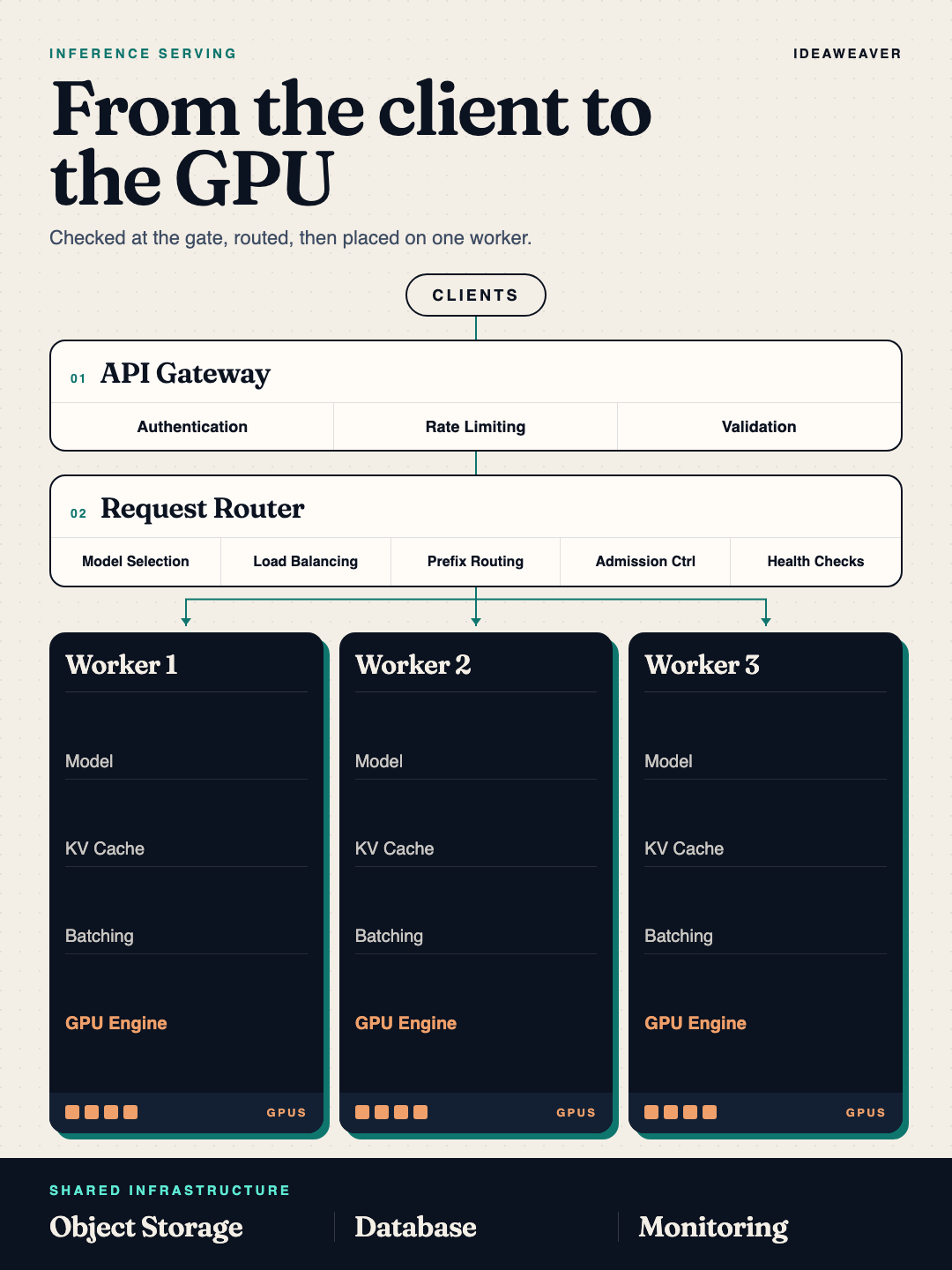
The simplified system
Our simplified architecture now looks like this:
This is not a traditional web application
The biggest mistake when designing an AI inference system is treating it exactly like a traditional web application.
A traditional web application might primarily worry about:
- Requests per second
- CPU utilization
- Database connections
- API latency
An AI inference system also needs to think about:
- GPU memory
- Model weights
- KV cache
- Memory bandwidth
- Prefill
- Decode
- Continuous batching
- TTFT
- Tokens per second
- Request cancellation
The important mental model is:
Once you understand this flow, the architecture starts making much more sense.
The API gateway protects the platform.
The router decides where requests should go.
The inference workers perform the actual model execution.
The KV cache keeps active inference efficient.
The batching engine helps us use GPUs efficiently.
The storage layer keeps persistent information separate from temporary inference state.
And the autoscaler adds GPU workers before the inference layer becomes overloaded.
That is the foundation of a modern AI inference system.