Week 3
Designing an AI Inference System
A simplified platform for serving large language models.
Click or press → to reveal each idea. Use the buttons on a slide to explore.
The difference
Same building blocks. A different clock.
That changes scaling, load balancing, caching, scheduling, and the metrics that matter.
The API
From the outside, it looks like a normal API
Internally, this is not a traditional web request.
Two kinds of request
A traditional API finishes. An LLM keeps generating.
It generates the answer one token at a time. That single fact drives the architecture.
The lifecycle
Four stages
What it must do
Functional requirements
If the user closes the browser after ten tokens, there is no reason to generate hundreds more.
How well
The metrics that matter
Users will wait for the rest if the first token is fast. Large gaps between tokens feel slow. Idle GPUs make the service expensive.
Two bottlenecks
Capacity and bandwidth
Can it fit?
How fast can the data move?
These two constraints affect almost everything else.
GPU memory
It is not just the weights
This matters as soon as many users send requests at once.
KV cache
The model’s temporary working memory
As concurrency grows, KV-cache memory becomes a capacity limit.
The shape
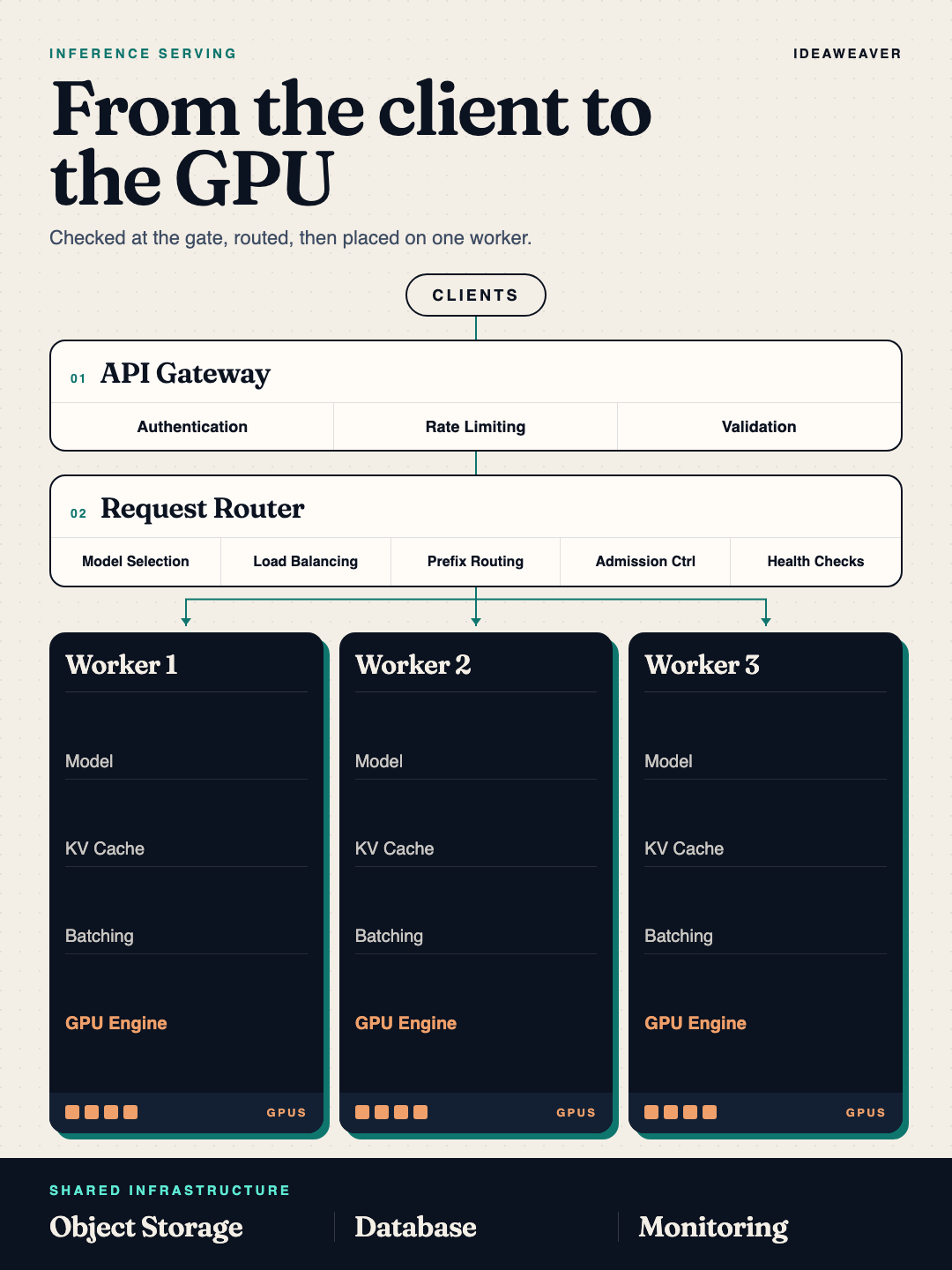
Gateway, router, workers
API Gateway
Protect the GPUs before a request enters
Rate limits
One request is not one request
Enforce requests per minute and tokens per minute. Token consumption reflects the workload better than request count alone.
When every GPU is busy
Do not treat every caller the same
A rejection can come back as HTTP 429, or HTTP 503 with Retry-After: 5, depending on why.
The gateway knows who you are. The router knows whether a GPU can take you.
Who owns what
Three questions, three components
Attaches priority. Does not pick the GPU.
Request Router
Stateless, so it can be copied
The gateway asks “is this allowed?” The router asks “where should this run?”
Model selection
Not every prompt needs the 70B
Larger models need more GPU memory, compute, time, and cost.
Simpler requests can go to smaller models. More complex requests go to larger ones.
Worker selection
Round robin is the wrong default
Sending the next long request to the fullest worker makes the problem worse.
Two optimizations
Reuse the prefix. Drop the sick worker.
Admission control
Full, full, and almost full
When caches are highly utilized, queue or return an error. Do not let the system degrade silently.
Inside the worker
This is the stateful part
A worker crash can interrupt in-flight generation. It does not erase conversation history, because that lives in the database. The KV cache is temporary.
More than one GPU
140 GB of model, 80 GB cards
Workers can use multiple H100 GPUs this way. Weights are downloaded when the worker starts, not on every request.
Prefill vs decode
Parallel prompt, then one token at a time
That idle time is why batching exists.
Continuous batching
The batch is not frozen
A finishes
D joins
E joins
That raises GPU utilization, throughput, and users served, and it lowers cost per token.
Paged attention
Don’t reserve one giant block per request
Each request takes the pages it needs. Memory use gets tighter.
Cancel and stream
Tokens go out as they are born
Otherwise the GPU keeps writing tokens nobody will read.
Two protocols
HTTPS outside. gRPC inside.
Protocol Buffers are more efficient than JSON for token IDs, health, capacity, and cancellation.
What is durable
Weights in object storage. History in a database.
KV cache stays temporary
Autoscaling
Requests per second hides the real load
Both count as one request
GPU % lagsHealthy
Watch
Scale out
Admission control
Scale on KV-cache utilization. 40–60% healthy, 75% watch, 80% scale out, 90% admission control. Test the thresholds. Don’t treat them as universal.
Watch these
Normal metrics, plus inference metrics
TTFT and KV-cache utilization are the two inference indicators to emphasize.
The system
Clients to GPUs
Remember
Don’t design it like a web app
The gateway protects the platform. The router places the request. The workers run the model.