Linux I/O management
Applications do not talk directly to the disk. They ask the kernel to read or write, and the kernel decides how that request travels to hardware.
Start with the path from Python to NVMe ↓
Linux I/O management is how data moves between applications and devices
Linux I/O management is responsible for moving data between applications and devices such as disks, SSDs, NVMe drives, network storage, and sometimes even GPUs. Applications normally do not talk directly to the storage device. They ask the kernel to read or write data, and the kernel decides how that request should travel through the filesystem, cache, block layer, device driver, and finally the hardware.
For GenAI, this matters a lot because loading a 20 GB, 70 GB, or 200 GB model is fundamentally an I/O problem before it becomes a GPU-compute problem.
Suppose a Python application wants to read a file:
data = open("model.bin", "rb").read()It looks simple from the application side. Underneath, Linux may perform something like this:
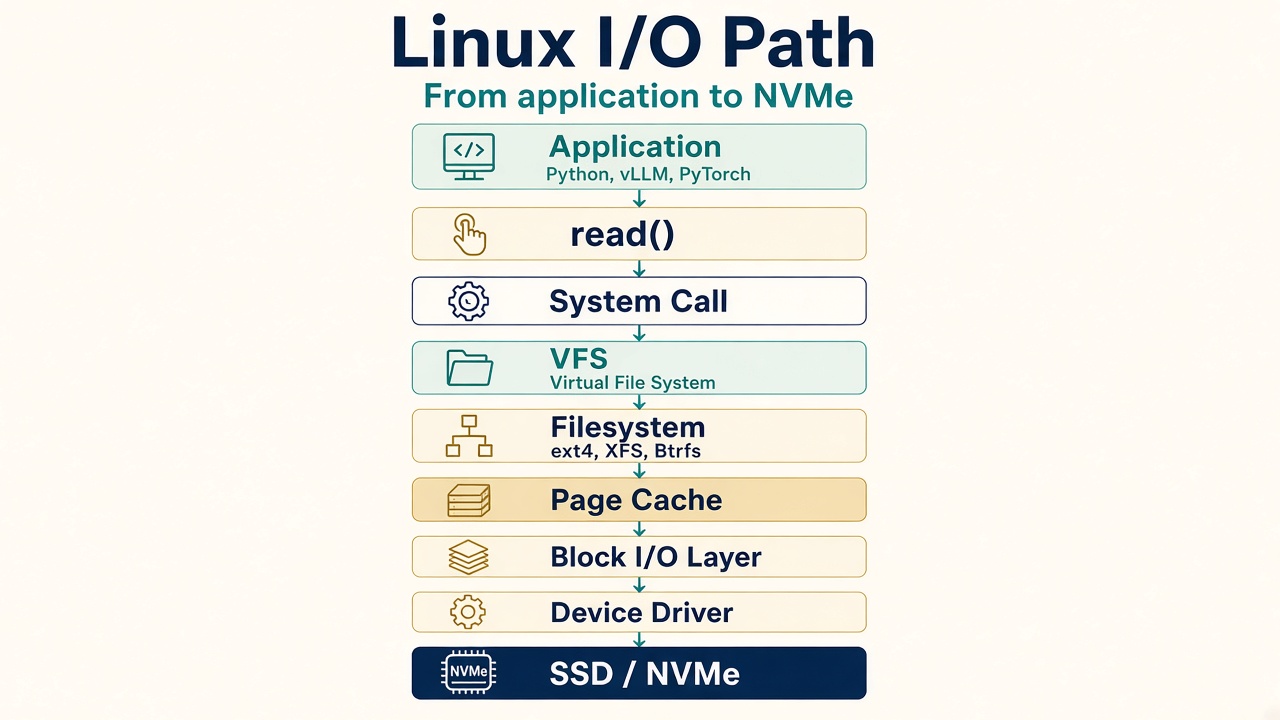
The application says “I need some data.”
That application might be Python, Nginx, a database, vLLM, or PyTorch. It does not know whether the file is stored on ext4, XFS, Btrfs, NVMe, SSD, EBS, or NFS. That complexity is hidden by the operating system. The application simply makes a request.
open(), read(), and write() cross into the kernel
The application may use something like read(), write(), or open(). Eventually these become system calls into the kernel.
VFS is the common interface over every filesystem
The kernel now has to answer: which filesystem is this file using? Linux supports many filesystems — ext4, XFS, Btrfs, NFS, tmpfs — and instead of every application needing to understand each one, Linux provides a common layer called the Virtual File System, or VFS.
Linux tries very hard not to go to disk every time
Disk is slow compared with RAM, so Linux keeps frequently accessed file data in memory. This is called the page cache.
Suppose the application reads model.bin.
First time
Second time
This is why Linux often uses a large amount of RAM for caching.
Model loading is an I/O problem before it is a GPU problem
Imagine loading a large Llama, Qwen, or Mistral model — 200 GB of model files.
The first time you load them, every byte has to come off storage. If the model data remains cached, later reads may be much faster.
Model loading performance is not only about GPU speed. Storage throughput and Linux page cache can strongly affect startup time.
If the data is not already in cache, Linux talks to the device in blocks
The request reaches the block I/O layer. Storage devices are generally accessed in blocks. The block layer handles requests such as “read this block” or “write this block.” It may also merge or reorder requests to improve performance.
Several requests may be waiting. Someone has to pick the next one.
An I/O scheduler decides the order in which storage read and write requests are sent from Linux to a block device. Its goal is to balance things like throughput, latency, fairness, and responsiveness depending on the workload and the type of storage.
Linux may have multiple I/O requests waiting — Request A, Request B, Request C, Request D. The kernel needs to decide which request should go to the device first.
With modern SSDs and NVMe devices, the need for heavy request reordering is lower than it was with spinning disks, so simpler schedulers such as none, mq‑deadline, or kyber are often used, while BFQ (Budget Fair Queueing) is useful when fair bandwidth sharing between processes is more important.
You can check the scheduler for a device with:
cat /sys/block/xvda/queue/schedulerYou may see:
none [mq-deadline] kyber bfqThe value in brackets means the currently active scheduler is mq‑deadline. The device name in the path changes with the disk: xvda on some virtual machines, nvme0n1 on NVMe, or sda on other drives.
none
No I/O scheduling; requests are passed directly to the block device. Best for very fast devices like NVMe where the device or controller already handles scheduling efficiently.
mq-deadline
Prioritizes requests based on deadlines to prevent starvation and keep latency predictable. A good general-purpose choice for servers and databases.
kyber
Designed for fast devices and tries to control read/write latency by limiting queued requests. Useful for SSD and NVMe workloads where low latency matters.
BFQ (Budget Fair Queueing)
Fairly distributes disk bandwidth between processes. Best for desktops, interactive workloads, or systems where responsiveness and fairness are important.
A simple summary is:
none
minimal scheduling
mq-deadline
predictable latency
kyber
low-latency fast storage
Eventually Linux has to speak the hardware’s language
That is done through the device driver. Examples include the NVMe driver, a SCSI driver, a virtio driver, or an EBS/NVMe interface. The driver understands how to communicate with that particular type of hardware.
Putting everything together
Request going down
Data coming back
That is the basic Linux read path.
write() does not always mean the disk has the data yet
Writing is slightly more interesting. Suppose the application executes write(). Linux may not immediately write that data to disk. It may first place it in memory.
A dirty page means the data has changed in RAM but has not yet been written to storage. Later Linux writes it to disk:
The application saying “write” does not always mean the physical disk write has completed immediately. That distinction is very important.
Sometimes the application must wait for persistent storage
A database transaction is the classic example. Then it may call fsync().
Databases care a lot about this because they cannot simply say “the transaction is committed” if the critical data exists only in volatile memory.
Buffered I/O vs Direct I/O
Normally Linux uses the page cache. That is called buffered I/O. Some applications, especially databases, may use direct I/O, which bypasses much of the normal page-cache path because they want to manage caching themselves.
Buffered I/O
Direct I/O
Sequential vs random I/O
This is another important performance concept. Sequential I/O is generally easier for storage systems to handle efficiently. Random I/O can be more expensive, especially on traditional HDDs. SSDs and NVMe handle random I/O much better than HDDs, but latency still matters.
Sequential
Random
Latency vs throughput
Throughput
How much data can I transfer? Example: 2 GB/sec.
Latency
How long does one request take? Example: 500 microseconds.
For GenAI model loading, throughput may be very important. For databases or latency-sensitive inference systems, individual I/O latency can also matter.
The first command I would teach is iostat
iostat -xz 1This is one of the best storage troubleshooting commands. Important fields include:
| Field | What it tells you |
|---|---|
r/s |
Read requests per second |
w/s |
Write requests per second |
rkB/s |
Kilobytes read per second |
wkB/s |
Kilobytes written per second |
await |
Roughly how long I/O requests are taking |
%util |
How busy the device looks |
await tells you roughly how long I/O requests are taking. If latency suddenly becomes very high — await = 2 ms versus await = 200 ms — something may be wrong with storage performance.
Which process is reading or writing?
pidstat -d 1You may see something like:
PID     kB_rd/s    kB_wr/s    Command
1200          0      50000    python
1500     120000          0    vllm
Now you know which process is generating I/O.
Think of it as top, but for disk I/O
iotopIt helps answer: which process is hammering my disk?
lsblk shows which device the filesystem actually lives on
lsblkFor example:
NAME        TYPE   SIZE
nvme0n1     disk   500G
├─nvme0n1p1 part   100G
└─nvme0n1p2 part 400GI/O matters more than people think
Imagine a large inference server. Model size = 100 GB. You start the application:
Suppose the NVMe can read 1 GB/sec. Loading 100 GB theoretically already takes around 100 seconds before considering other overhead. Now imagine faster storage at 5 GB/sec. The model loading stage can be dramatically faster.
This is why AI infrastructure performance is not just GPU performance. It is CPU + RAM + storage + network + GPU. All of them matter.
The simple picture to remember
For a beginner, keep this path in mind:
And for GenAI:
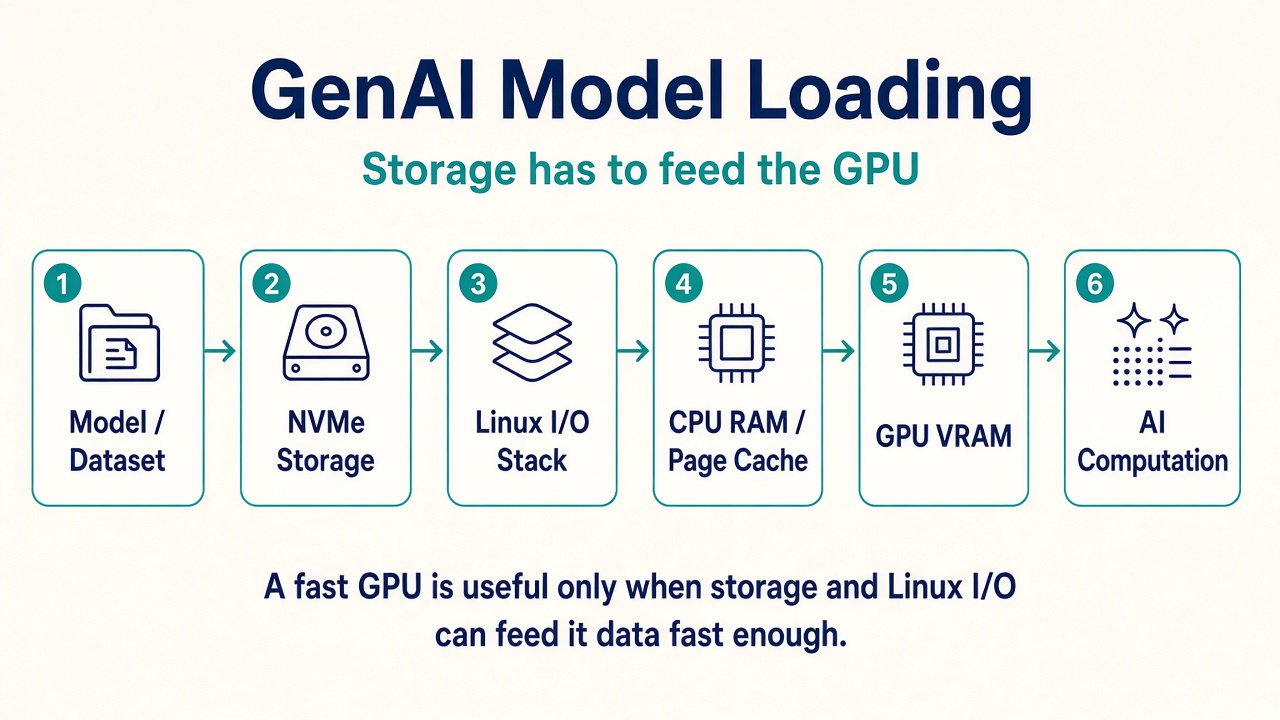
Linux I/O management is responsible for moving that data efficiently from storage toward the application and eventually to the GPU.
For troubleshooting, the progression I would teach is:
| Question | Where to look |
|---|---|
| Is storage slow? | iostat -xz 1 |
| Which process is causing I/O? | pidstat -d 1 / iotop |
| What storage device am I using? | lsblk |
| Is the application waiting on I/O? | ps / vmstat |
| Need deeper analysis? | blktrace / eBPF / perf |
1. Apps talk to the kernel, not the disk. read() and write() become system calls.
2. VFS hides the filesystem. The application does not need to know ext4 from XFS.
3. Page cache makes the second read cheap. Linux uses RAM so it does not have to go to disk every time.
4. write() is not always a disk write. Dirty pages sit in RAM until writeback or fsync().
5. A fast GPU still has to be fed. Model loading is storage + Linux I/O + RAM before it is VRAM compute.