Understanding GPU Memory Requirements for LLM Inference
A practical memory-sizing walkthrough using a 70B-parameter model
Start with what actually occupies GPU memory ↓
“We need to deploy the Llama 70B model. Can you figure out the GPU infrastructure we’ll need?”
As a DevOps, SRE, or Platform Engineer, this is exactly the kind of question you may be expected to answer.
But before asking how many GPUs are required, you first need to understand what actually occupies GPU memory during inference.
Model weights are only one part of the picture. The KV cache, runtime buffers, activations, framework overhead, and multi-GPU communication can all contribute to the final memory requirement.
What Does GPU Memory Store?
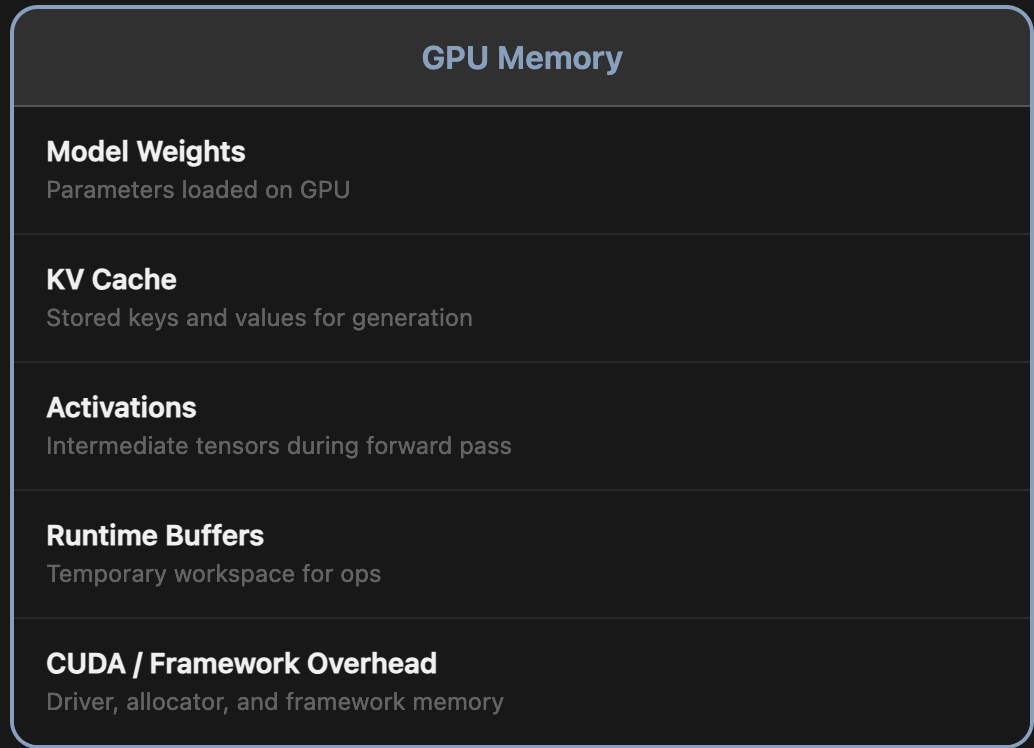
During inference, GPU memory is shared by several components:
- Model weights: the learned parameters loaded onto the GPU.
- KV cache: stored keys and values reused while generating tokens.
- Activations: intermediate tensors produced during the forward pass.
- Runtime buffers: temporary workspace used by operations.
- CUDA / framework overhead: memory used by the driver, allocator, and inference framework.
The Starting Point
Parameters are values the model learned during training. The amount of memory needed to store those parameters depends on the numerical precision used to represent each one.
For a 70-billion-parameter model:
- FP32: 70B × 4 bytes ≈ 280 GB
- FP16/BF16: 70B × 2 bytes ≈ 140 GB
- INT8: 70B × 1 byte ≈ 70 GB
- INT4: 70B × 0.5 byte ≈ 35 GB
Why these numbers? One byte contains 8 bits. So 32-bit precision uses 4 bytes per parameter, while 16-bit precision uses 2 bytes per parameter.
| Precision | Bits per Parameter | Bytes per Parameter | Approx. Size of 70B Model |
|---|---|---|---|
| FP32 | 32 | 4 | ~280 GB |
| FP16 / BF16 | 16 | 2 | ~140 GB |
| INT8 | 8 | 1 | ~70 GB |
| INT4 | 4 | 0.5 | ~35 GB |
Can We Reduce the Model Size?
Yes - through quantization.
Quantization stores model values at lower precision. A simple analogy is reducing a number such as 3.14159265 to 3.14: you use less precision to represent the value.
Common lower-precision formats and techniques referenced in this context include INT8, INT4, GPTQ, AWQ, GGUF, and FP8. Moving from FP16 to INT8 or INT4 can reduce the memory required for the model weights significantly.
Reducing model-weight precision can shrink the static memory footprint, but model weights are still only one part of total inference memory.
Memory That Grows During Generation
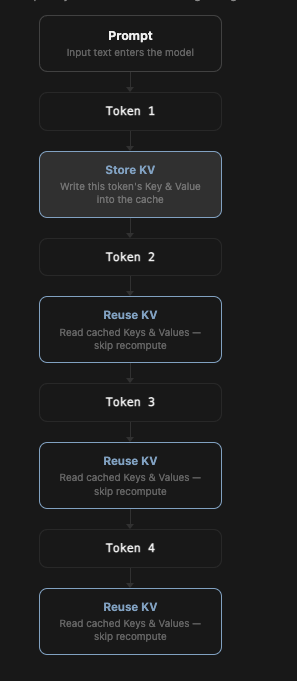
The KV cache - short for Key-Value cache - is different from model weights because it is dynamic. As the model processes more tokens, it stores additional key and value information so that earlier computation can be reused instead of recomputed from scratch for every new token.
Why Does the KV Cache Keep Growing?
Each additional token adds information to the cache. That means the KV cache grows with sequence length, and the total requirement grows again when multiple users are active at the same time.
How Much Memory Does One Token Need?
Using the simplified FP16 calculation from this example:
= 80 × 8192 × 2 × 2 ≈ 2.5 MB per token
For a 32,000-token context window:
2.5 MB × 32,000 ≈ 80 GB
And for 10 simultaneous users in this planning example:
80 GB × 10 ≈ 800 GB
In this example, the KV cache alone reaches about 800 GB for 10 active users at a 32K context.
This is why sizing only the model weights can dramatically underestimate the memory required for inference.
Runtime Memory and Framework Overhead
The inference runtime also needs working memory. The original calculation groups the following items into runtime overhead:
- Intermediate activations
- Temporary tensors
- CUDA runtime
- Framework buffers
- Allocator fragmentation
- Communication buffers in multi-GPU systems
For this example, runtime overhead is estimated at 10% of the combined model-weight and KV-cache memory:
10% of 940 GB = 94 GB
Putting It Together: Total GPU Memory Requirement
Now combine the three major pieces in the example:
| Component | Memory |
|---|---|
| Model weights | 140 GB |
| KV cache | 800 GB |
| Runtime overhead | 94 GB |
| Total | ≈ 1,034 GB |
Under the assumptions used in this walkthrough, the total comes to approximately 1,034 GB - just over 1 TB of GPU memory.
Does Every Deployment Really Need 1 TB?
No single number applies to every deployment. The 1 TB figure above is a planning example built from a specific set of assumptions:
- A 32K context window
- 10 users active simultaneously
- FP16 model weights
- A 10% allowance for runtime memory and overhead
Change those assumptions and the result changes as well. The important lesson is the sizing method: account for the static model weights, the dynamic KV cache, concurrency, and additional runtime memory instead of looking at model size alone.
What to remember
- Model weights are only the starting point.
- The KV cache grows with every token.
- Concurrent users multiply the KV-cache requirement.
- Always reserve additional memory for runtime and framework overhead.
When someone asks, “How many GPUs do we need for this LLM?”, do not begin with the GPU count. Begin with the memory budget. Once you understand what must live in GPU memory - and how that memory changes with context length and concurrency - the infrastructure discussion becomes much more grounded.