Understanding user space vs kernel space in the Age of GenAI
Before going deep into the Linux kernel, the first thing to understand is how a normal application actually interacts with the system.
Start from the application, then move down ↓
Applications do not control the machine directly
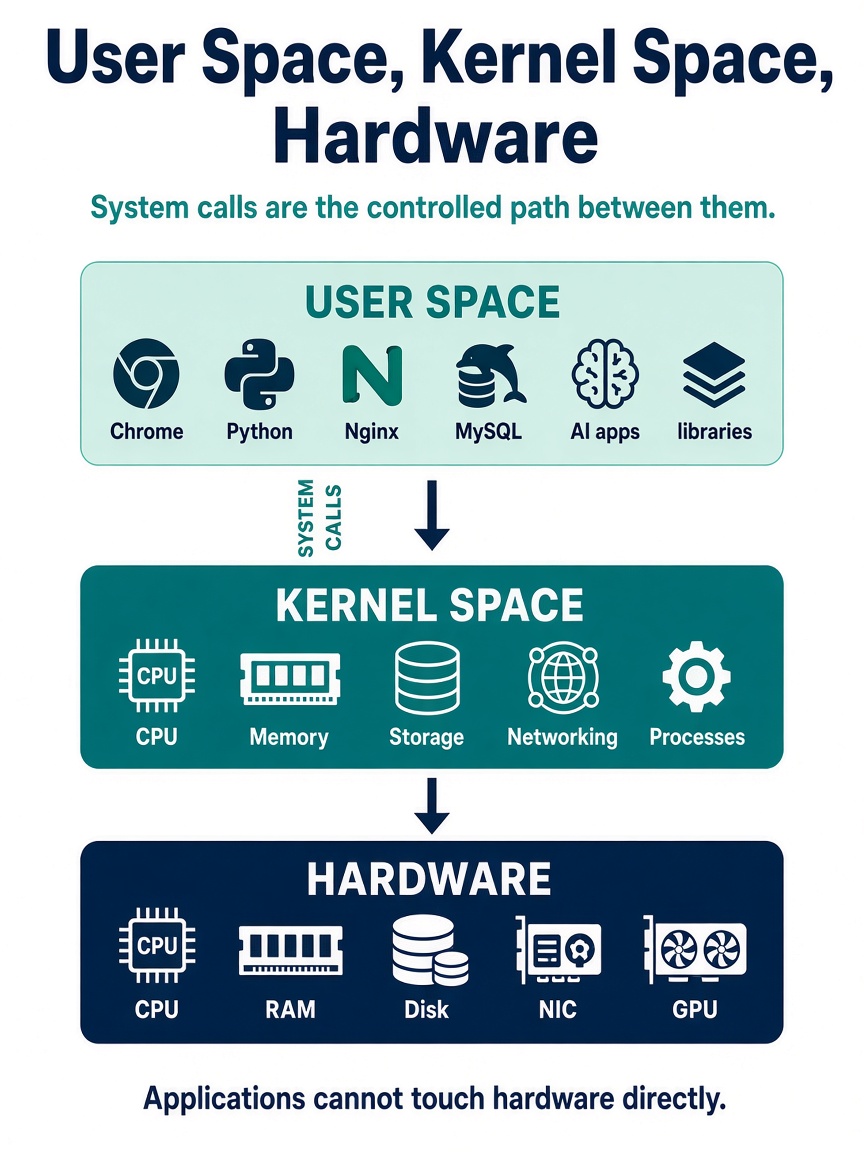
When we run Chrome, Python, Nginx, MySQL, a Kubernetes workload, or even an AI application, that application does not directly control the CPU, memory, disk, network card, or GPU.
Linux creates a separation between applications and the critical parts of the operating system. At a very high level, we can think of the system as User Space, Kernel Space, and Hardware, with system calls providing the controlled path between the application and the kernel.
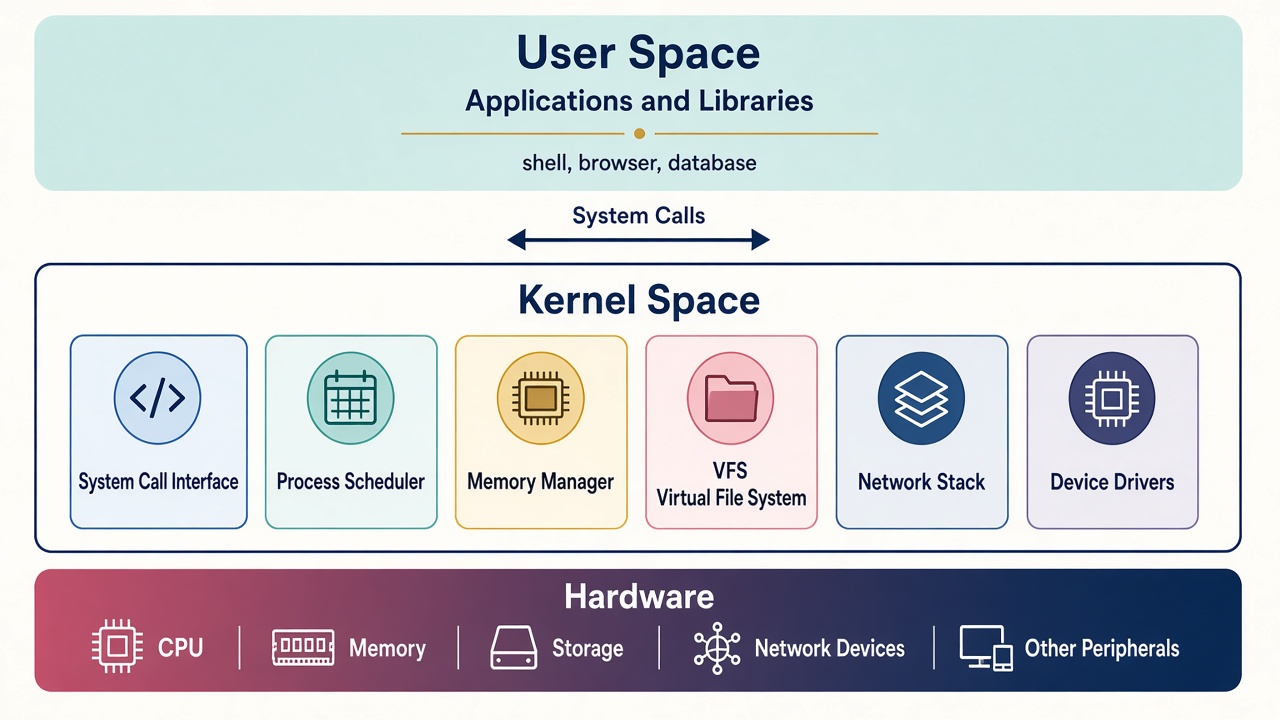
Inside kernel space, several major subsystems do the actual work: the system-call interface, the process scheduler, the memory manager, the virtual file system, the network stack, and device drivers.
Let’s start from the top
When we run an application on Linux, for example:
- Chrome
- Python
- Nginx
- MySQL
ls- an AI application
that application normally runs in User Space.
User Space is the area where normal applications and most libraries run.
Libraries can include things such as:
- glibc
- OpenSSL
- Python libraries
- CUDA libraries
The application uses these libraries to perform different tasks.
The important point here is that an application running in User Space does not have unrestricted access to the entire machine.
NOTE: glibc, short for GNU C Library, is one of the most important libraries in Linux user space. Many applications do not make system calls directly; instead, they call functions provided by glibc, and glibc handles the interaction with the kernel when needed. For example, when a C program calls functions such as open(), read(), write(), malloc(), or printf(), glibc provides the user-space implementation or wrapper around those operations. Some functions eventually trigger Linux system calls, while others may perform work entirely in user space. So, a simple way to think about it is: glibc sits between many applications and the Linux kernel, providing standard APIs that make it easier for programs to use operating-system services.
System call vs library call
A library call is a function call made by an application to a user-space library such as glibc. Functions like printf(), malloc(), fopen(), and strlen() are examples of library calls. These functions make programming easier because the application does not need to interact with the Linux kernel directly. Some library calls perform all their work in user space, while others eventually make a system call when they need help from the kernel.
To observe these two layers, we can use different tools. ltrace is used to trace calls to dynamically linked libraries, while strace is used to trace system calls made to the Linux kernel. For example, a program may call printf() through glibc, and glibc may eventually use the write() system call to send the output to the terminal.
A simple way to remember it:ltraceshows library-level activity in user space, whilestraceshows requests going into the kernel.
NOTE: Not every library call results in a system call.
strace — into the kernel
# strace -fc ls
% time     seconds  usecs/call     calls    errors syscall
------ ----------- ----------- --------- --------- ----------------
  0.00    0.000000           0         6           read
  0.00    0.000000           0        24           close
  0.00    0.000000           0        22           fstat
  0.00    0.000000           0        35           mmap
  0.00    0.000000           0         6           mprotect
  0.00    0.000000           0         1           munmap
  0.00    0.000000           0         3           brk
  0.00    0.000000           0         2           ioctl
  0.00    0.000000           0         8           pread64
  0.00    0.000000           0         2         1 access
  0.00    0.000000           0         1           execve
  0.00    0.000000           0         2           statfs
  0.00    0.000000           0         6         4 prctl
  0.00    0.000000           0         2         1 arch_prctl
  0.00    0.000000           0         1           futex
  0.00    0.000000           0         2           getdents64
  0.00    0.000000           0         1           set_tid_address
  0.00    0.000000           0        34        12 openat
  0.00    0.000000           0         1           set_robust_list
  0.00    0.000000           0         1           prlimit64
  0.00    0.000000           0         1           getrandom
  0.00    0.000000           0         1           rseq
------ ----------- ----------- --------- --------- ----------------
100.00    0.000000           0       162        18 total
ltrace — in user space
ltrace -fc ls
% time     seconds  usecs/call     calls      function
------ ----------- ----------- --------- --------------------
 47.21    0.003490        3490         1 setlocale
 16.87    0.001247         103        12 readdir
  7.24    0.000535          59         9 getenv
  4.88    0.000361          60         6 malloc
  3.69    0.000273          91         3 __errno_location
  3.07    0.000227          75         3 free
  2.81    0.000208         208         1 strlen
  1.89    0.000140         140         1 getopt_long
  1.46    0.000108         108         1 ioctl
  1.45    0.000107          53         2 fclose
  1.18    0.000087          43         2 __fpending
  1.04    0.000077          77         1 opendir
  1.04    0.000077          77         1 exit_group
  0.88    0.000065          65         1 strrchr
  0.83    0.000061          61         1 isatty
  0.81    0.000060          60         1 bindtextdomain
  0.72    0.000053          53         1 closedir
  0.66    0.000049          49         1 __cxa_finalize
  0.58    0.000043          43         1 textdomain
  0.57    0.000042          42         1 __cxa_atexit
  0.55    0.000041          41         1 _setjmp
  0.55    0.000041          41         1 memcpy
------ ----------- ----------- --------- --------------------
100.00    0.007392                    52 total
NOTE: The exact strace and ltrace output can vary depending on the Linux distribution, library versions, and how the application was compiled. Focus on understanding the type of calls rather than expecting identical output on every machine.
Why do we need User Space?
Imagine if every application could directly control:
- CPU
- Memory
- Disk
- Network Card
- GPU
That would be extremely risky.
A buggy application could overwrite another application's memory. One process could interfere with another process. An application could directly manipulate hardware and potentially crash the entire system.
Linux therefore creates a separation.
User Space provides isolation. Applications can run and do useful work, but they do not directly control critical system resources.
This separation is one of the fundamental ideas behind modern operating systems.
Now we move one layer down
The Linux kernel is the core part of the operating system.
Unlike normal applications, the kernel has privileged access to system resources and hardware.
Conceptually:
The kernel is responsible for managing things such as:
- CPU
- Memory
- Storage
- Networking
- Devices
- Processes
So when an application needs to perform an operation that requires privileged access, it asks the kernel to perform that operation on its behalf.
System Calls: the bridge between the two
Now the obvious question is:
If applications cannot directly access the hardware, how do they ask the kernel to do something?
That is where system calls come in.
A system call is the controlled interface through which a program running in User Space requests a service from the kernel.
For example, imagine a Python application opening a file:
f = open("data.txt")From the programmer's perspective, this looks very simple.
But underneath, the request eventually reaches the operating system:
So we can define a system call very simply:
A system call is a request from a User Space application to the kernel to perform a privileged operation on its behalf.
The kernel still needs a specialist for each device
The Linux kernel usually does not communicate with every hardware device directly through generic kernel code. It uses device drivers that understand how to communicate with particular hardware.
For example:
A file read
A network request
The same subsystems, in the Linux tree
The Linux kernel source code is available at github.com/torvalds/linux.
The major subsystems we discussed map roughly to:
Linux Kernel Source
│
├── CPU / Process Scheduling → kernel/sched/
├── Memory Management        → mm/
├── Networking               → net/
│   └── Network Drivers      → drivers/net/
└── I/O / Storage
    ├── VFS & Filesystems    → fs/
    ├── Page Cache           → mm/
    ├── Block I/O Layer      → block/
└── Storage Drivers → drivers/nvme/, drivers/scsi/GPUs and LLMs did not erase this architecture
This architecture is not something that disappeared because we started using GPUs and LLMs.
Suppose our application contains:
model.generate(...)At the application level, it may look as if Python or PyTorch is directly working with the GPU.
But there are multiple layers underneath:
For GenAI workloads, these same kernel components still matter:
That is why understanding Linux internals remains relevant even in the age of GenAI.
Whether we are running:
- Nginx
- Kubernetes
- PostgreSQL
- PyTorch
- vLLM
- or an LLM across multiple GPUs
the workload still depends on the operating system underneath.
If you remember only three things
To sum up, User Space is where applications run, Kernel Space is where the operating system manages the machine, and system calls provide the controlled bridge between the two.
A buggy Python script, a busy Nginx worker, and a multi-GPU vLLM server all still live in user space — and all still have to ask the kernel for privileged work.