Linux memory management
When a process asks for memory, where does that memory actually come from, and how does Linux manage it safely?
Start between the application and the RAM chips ↓
Applications do not manage physical RAM themselves
When we start an application such as Python, Nginx, MySQL, or an AI workload, that application needs memory for its code, variables, heap, stack, libraries, buffers, and other data. The application does not directly manage physical RAM. Instead, the Linux kernel memory manager sits between applications and physical memory and decides how memory should be allocated, mapped, protected, shared, reclaimed, or moved to swap.
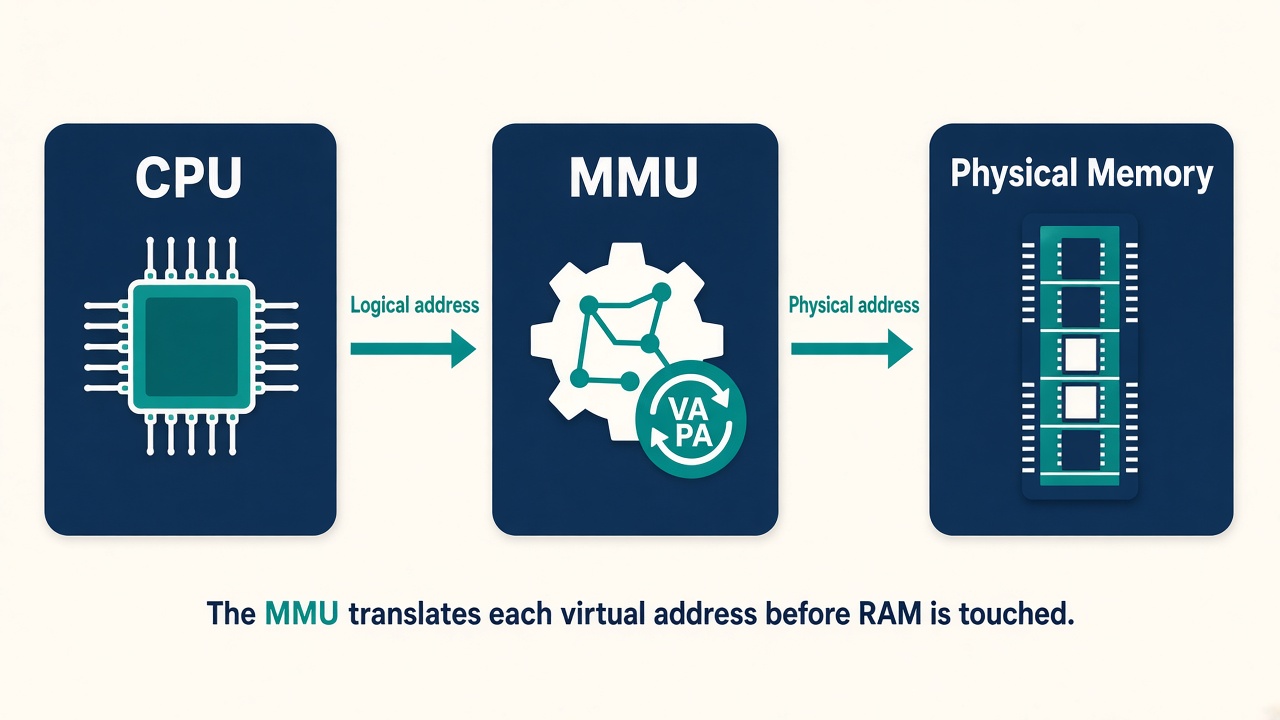
The CPU never walks RAM with a virtual address
When a process uses a memory address, that address is a logical (virtual) address. A piece of hardware called the MMU — Memory Management Unit — translates it into a physical address before RAM is touched.
16 GB of RAM is not what the process thinks it has
Suppose your machine has 16 GB RAM. That is the actual physical memory installed in the system.
But applications do not normally work directly with those physical addresses. Each process gets its own virtual address space.
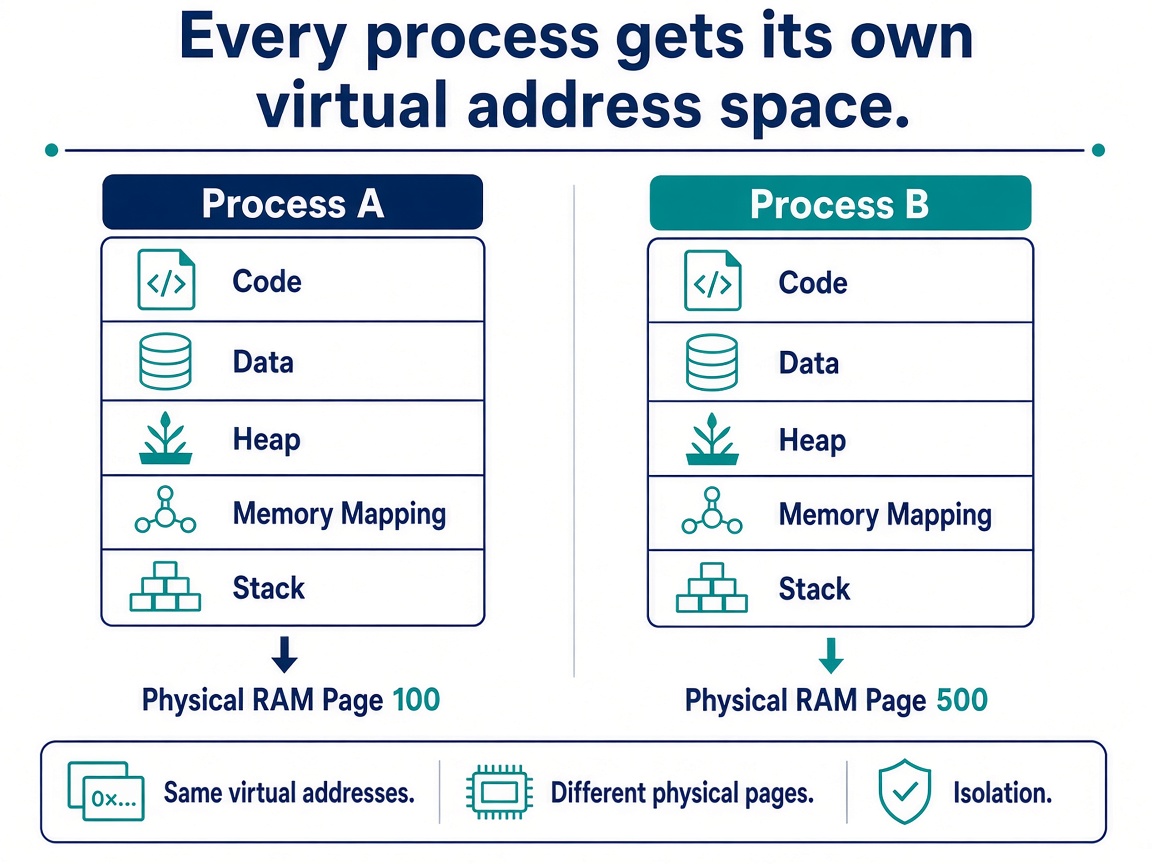
Process A
Process B
Conceptually:
This provides isolation. Process A normally cannot simply access Process B's memory.
Virtual Memory in Linux
When an application runs on Linux, it normally does not access physical RAM directly. Instead, every process gets its own virtual address space, and the Linux kernel maps virtual addresses to physical memory as needed. This provides isolation between processes and lets Linux manage memory efficiently.
A simplified view is:
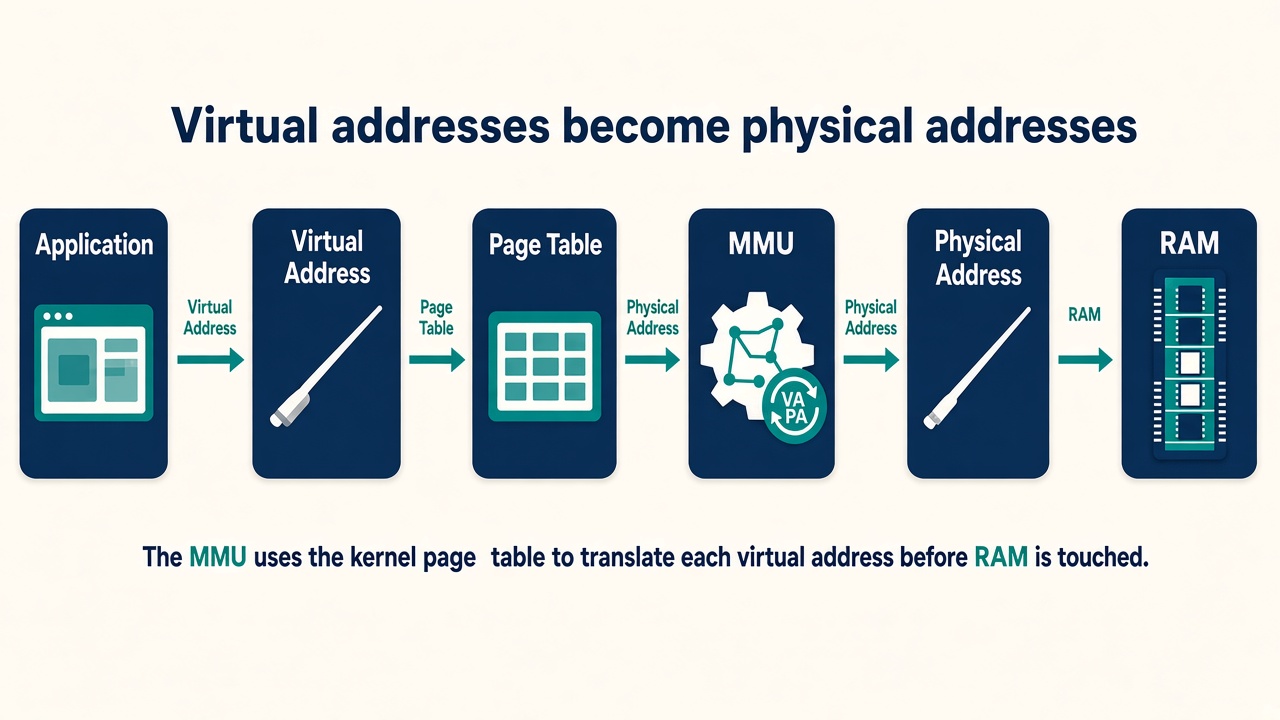
The CPU's MMU (Memory Management Unit) translates virtual addresses into physical addresses using page tables maintained by the kernel. Linux manages memory in fixed-size blocks called pages, commonly 4 KB on x86 systems.
Virtual address space is not RAM
Suppose your machine has:
Physical RAM = 32 GBA process may still have a potential virtual address space of many terabytes.
For example:
$ lscpu | grep "Address sizes"

Address sizes: 46 bits physical, 48 bits virtual
This tells us two different things:
46-bit physical addressing
48-bit virtual addressing
For virtual addresses:
2^48 bytes
= 281,474,976,710,656 bytes
= 256 TiB
Because:
2^40 bytes = 1 TiB

2^48
= 2^8 × 2^40
= 256 TiB
So a CPU supporting 48-bit virtual addresses has a theoretical virtual-address range of 256 TiB.
Why do we often say 128 TiB User Space + 128 TiB Kernel Space?
On x86-64 with 48-bit virtual addressing, addresses are divided into two canonical ranges.
Conceptually:
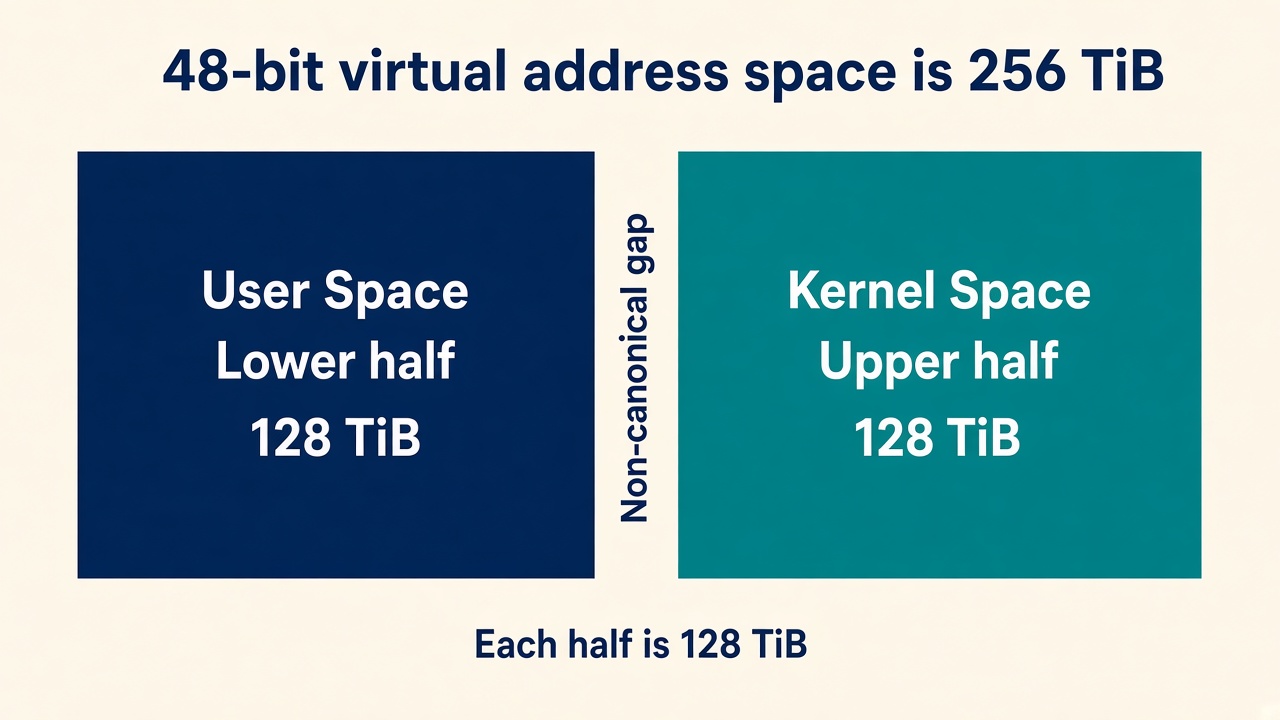
Each half is:
2^47 bytes = 128 TiBThe lower canonical range is approximately:
0x0000000000000000
        ↓
0x00007fffffffffff
and is normally used for user-space addresses.
The upper canonical range is approximately:
0xffff800000000000
        ↓
0xffffffffffffffff
and Linux uses the upper region for kernel-space mappings.
There is a large non-canonical gap between them.
Why doesn't a 64-bit CPU use all 64 bits for addresses?
A 64-bit CPU does not mean 64 address bits must be implemented.
Using all 64 address bits would provide:
2^64 bytes = 16 EiBwhich is far beyond what today's systems normally need.
Supporting that entire range would also increase hardware complexity in areas such as:
- MMU
- Page tables
- TLBs
- Address translation
- Cache structures
So x86-64 was designed to initially implement fewer address bits while leaving room for expansion.
For example:
Common systems
48-bit virtual
→ 256 TiB

Newer 5-level paging systems
57-bit virtual
→ 128 PiB
This is why bits above the implemented virtual-address width must follow the architecture's canonical-address rules.
What does 46-bit physical mean?
From:
46 bits physicalwe get:
2^46 bytes
= 64 TiB
So the CPU can theoretically address up to 64 TiB of physical address space.
It does not mean your machine actually contains 64 TiB of RAM.
For example:
CPU physical addressing capability → 64 TiB

Actual installed RAM → 64 GB
Those are completely different things.
Useful Linux commands
To check the CPU's supported address sizes:
lscpu | grep "Address sizes"To see how much virtual memory a process currently has mapped:
grep VmSize /proc/<PID>/statusFor your current shell:
grep VmSize /proc/$$/statusTo inspect the actual virtual-address mappings:
cat /proc/<PID>/mapsor:
pmap <PID>The most important idea
Do not confuse these three things:
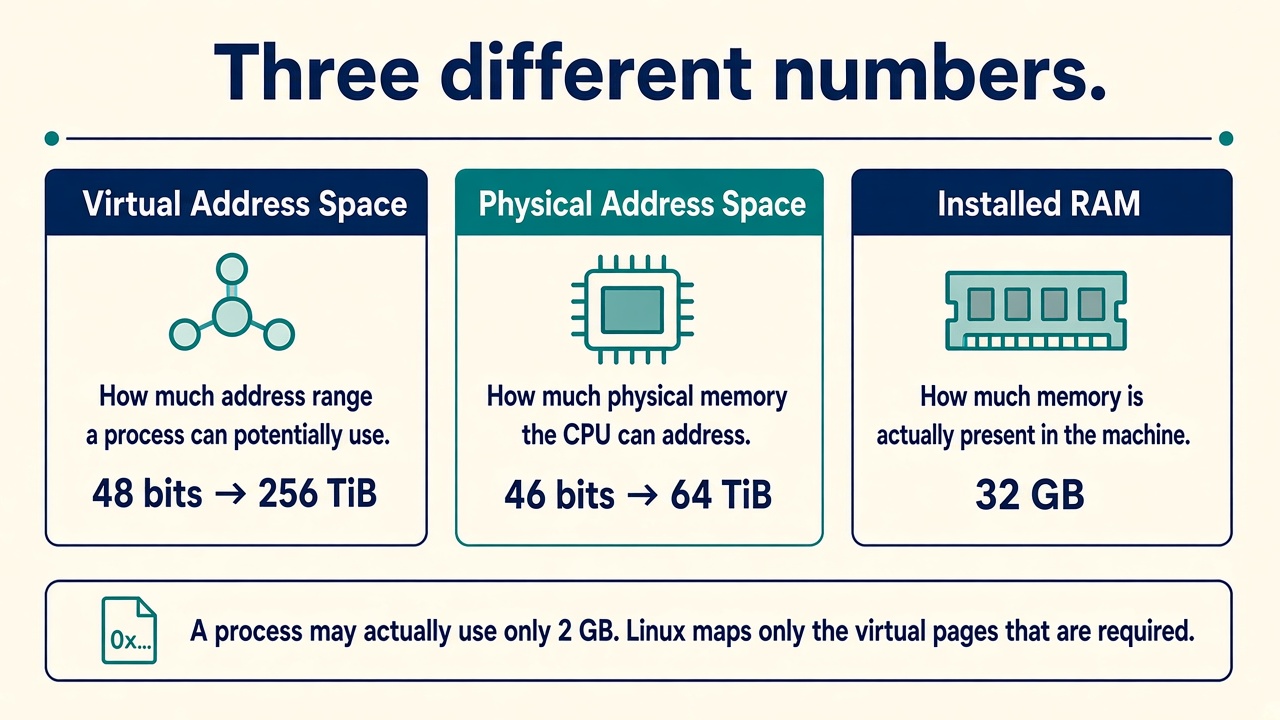
How much address range a process can potentially use
Physical Address SpaceHow much physical memory the CPU can address
Installed RAMHow much memory is actually present in the machine
For example:
64-bit CPU

Virtual address size:
48 bits
→ 256 TiB total canonical virtual range

Physical address size:
46 bits
→ up to 64 TiB addressable

Installed RAM:
32 GB
And a process may actually use only:
2 GBLinux maps only the virtual pages that are required to physical memory, often allocating physical pages on demand when they are first accessed.
Simple takeaway: Virtual memory gives every process the illusion of having its own large, private memory space, while Linux and the MMU handle the mapping to the much smaller amount of real physical RAM underneath.
The biggest win is process isolation
Virtual memory gives Linux several important benefits. The biggest one is process isolation.
Imagine if every process directly accessed physical RAM:
Instead Linux gives every process its own virtual view:
The kernel controls how those virtual addresses map to actual physical memory.
Memory is managed in pages, not one byte at a time
Linux does not normally manage memory one byte at a time. Memory is divided into blocks called pages.
On many Linux systems the normal page size is 4 KB. You can check it with:
getconf PAGE_SIZEYou may see:
4096which means 4096 bytes = 4 KB.
So conceptually physical RAM looks like:
Virtual memory is also divided into pages.
Linux has to remember which virtual page is which physical page
That information is stored in page tables.
For example:
The CPU's MMU uses these page tables when translating virtual addresses into physical addresses.
So the simplified flow is:
The Linux kernel is responsible for creating and maintaining these mappings.
Does Linux allocate RAM immediately?
This is where memory management becomes interesting.
Suppose a program asks for 1 GB of memory. That does not necessarily mean Linux immediately reserves and physically fills 1 GB of RAM.
Linux often uses demand paging. Memory may only be physically allocated when the process actually starts using it.
This helps Linux use memory efficiently.
A page fault is not automatically a problem
Suppose a process accesses a virtual memory address. The CPU checks the page table. If the required page is not currently mapped as needed, the CPU triggers a page fault.
This sounds like an error, but a page fault can be completely normal.
There are two terms worth knowing.
Minor page fault
The required data is already available in memory, but the process's page table needs to be updated. This is relatively cheap.
Major page fault
Linux must retrieve the required data from storage. This is much slower.
For example, a major page fault looks like:
This distinction becomes very important during performance troubleshooting.
Two important areas inside the virtual address space
The stack is commonly used for things such as function calls and local variables.
For example:
void test() {
    int x = 10;
}
x may live on the stack.
The heap is commonly used for dynamically allocated memory.
For example:
malloc(1024);Conceptually:
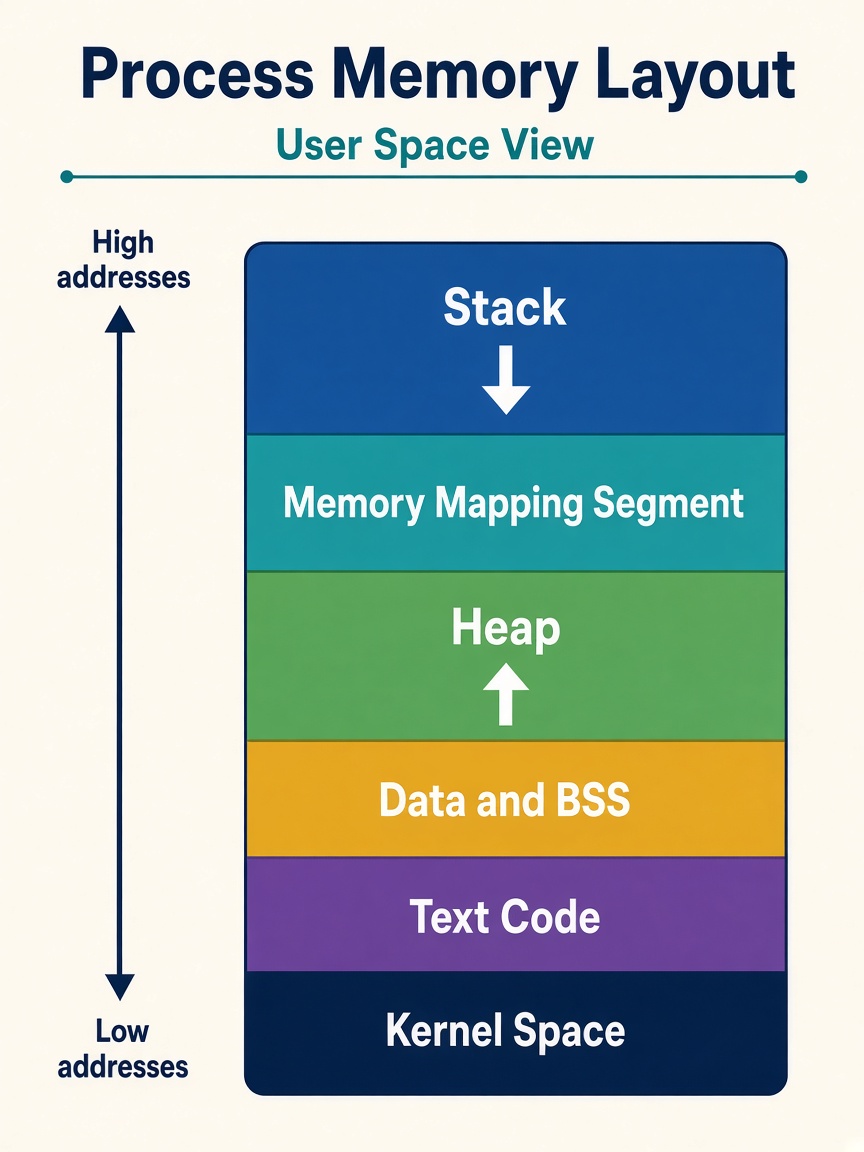
High address
Stack Memory Mapping Heap Data / BSS CodeLow address
What happens when RAM becomes full?
Suppose the machine has 8 GB RAM and applications keep requesting memory. Linux does not immediately crash. The kernel first tries to reclaim memory that is no longer urgently needed.
One important source is the page cache. Linux uses unused RAM to cache filesystem data.
So instead of leaving RAM empty, Linux may use unused RAM as page cache. This makes disk access much faster. If applications need the memory later, Linux can reclaim some of that cache.
Low “free” memory does not automatically mean a Linux server has a memory problem.
That is a very important Linux concept.
Linux deliberately uses available RAM for caching
Suppose an application reads /data/file.txt.
The first time:
The next time the same data is needed:
So when you run:
free -hyou should not look only at free. The more useful number is usually available, because some cached memory can be reclaimed when applications need it.
If Linux is under memory pressure, it may move pages to disk
This area is called swap.
Later, if the application needs those pages:
But disk is much slower than RAM. So heavy swapping can cause serious performance problems.
You may see this situation:
Out Of Memory Killer
Eventually Linux may reach a point where it cannot reclaim enough memory.
For example: RAM full, plus swap full or unavailable, plus memory requests that continue. Now the kernel faces a serious problem.
Linux may invoke the OOM Killer — Out Of Memory Killer. The kernel selects one or more processes to terminate in order to free memory.
You may find messages like this in dmesg or journalctl -k. For example:
Out of memory
Killed process 1234 (python)
This is another very common Linux interview and troubleshooting topic.
Not all RAM belongs to applications
The Linux kernel itself needs memory. For example: kernel objects, filesystem metadata, network structures, process structures, and device structures.
This is where concepts such as the slab allocator come in. And this connects directly with the command slabtop.
So you can think of memory broadly as:
Keep this memory-management path in mind
Linux gives every process its own virtual address space and maps that virtual memory to physical RAM using pages and page tables, while the kernel continuously manages allocation, caching, reclaim, swap, and memory protection.
The natural next step is to go into free, vmstat, /proc/meminfo, RSS vs VSZ, page cache, swap, major/minor page faults, OOM Killer, and slabtop from a troubleshooting perspective.
Memory is one of the biggest bottlenecks in AI systems
Linux memory management becomes much more interesting when we connect it to GenAI, because memory is one of the biggest bottlenecks in AI systems.
For GenAI, we are usually dealing with two different memory worlds: CPU memory (RAM) and GPU memory (VRAM). The Linux memory manager primarily manages the CPU-side virtual memory and physical RAM, while GPU memory is managed through the GPU driver and frameworks such as CUDA. But the two are tightly connected because model weights, input data, tokenization, networking buffers, pinned memory, and GPU transfers all start or interact with the CPU side.
For example, when you load a model with PyTorch:
model = AutoModelForCausalLM.from_pretrained(...)the model may initially be read from storage into RAM. Linux uses the page cache while reading those model files. Then, when you move the model to the GPU:
model.to("cuda")the data must travel from CPU memory to GPU memory.
This is why an AI server may need a large amount of system RAM even when most of the actual inference happens on GPUs.
Some RAM is locked in place for faster GPU transfers
Normally, application memory can be moved or reclaimed by the operating system. But GPU frameworks sometimes use page-locked or pinned host memory so that transfers between CPU RAM and GPU VRAM can happen efficiently.
Normal RAM
Pinned Memory
In PyTorch, you may encounter pin_memory=True when using a DataLoader. This matters because excessive pinned memory can also put pressure on system RAM.
Each process sees its own address space
Suppose you are running multiple inference workers: vLLM Worker 1, vLLM Worker 2, Tokenizer, API Server, Monitoring Agent. Each process sees its own virtual address space, even though all of them ultimately share the same physical RAM.
A few faults are normal. A storm of major faults is not.
Imagine an inference process accesses part of a memory-mapped model file that has not yet been loaded into RAM.
A few page faults are normal. But a large number of major page faults can hurt latency because Linux has to retrieve data from storage.
For an inference system, that could result in:
This is especially interesting when discussing cold starts for large models.
The second load can be much faster
Suppose a 20 GB model is stored on NVMe. The first time you load it:
That may take time. If the model is loaded again and those pages are still cached:
The second load can therefore be significantly faster. This is one reason why Linux showing very little free memory on an AI server does not automatically mean there is a problem. Linux may be using memory productively as cache.
free -hYou might see:
              total   used   free   buff/cache   available
Mem:            128G    60G     5G       63G          65G
Someone new to Linux might say: “Only 5 GB is free! We are running out of memory.” But Linux may be able to reclaim a large portion of the cache. That is why available is usually much more useful than simply looking at free.
Swap is particularly dangerous for AI workloads
Imagine an inference process needs 40 GB RAM but the system is under heavy memory pressure. Linux may start moving inactive pages to swap. Later, the process needs those pages again. This can be painfully slow compared with RAM.
For a latency-sensitive inference service:
So when debugging a slow GenAI server, checking memory and swap activity is important:
free -h
vmstat 1
Pay particular attention to:
- si = swap in
- so = swap out
If these continuously increase, the system is actively swapping.
The process disappeared. Did it crash, or was it killed?
GenAI applications can consume enormous amounts of memory. Imagine:
| Consumer | Memory |
|---|---|
| System RAM | 64 GB |
| vLLM | 30 GB |
| Model loading | 20 GB |
| Tokenizer | 4 GB |
| Page Cache | 15 GB |
| Other processes | 8 GB |
Eventually the system may come under severe memory pressure. If Linux cannot reclaim enough memory, the OOM Killer may terminate a process.
You might suddenly find that the vLLM process disappeared, and initially assume the application crashed. But checking dmesg or journalctl -k might reveal:
Out of memory: Killed process 12345 (python)This is a very realistic production troubleshooting scenario.
System RAM and GPU VRAM are different resources
System RAM
free -h
GPU VRAM
nvidia-smi
Why free does not show GPU memory
The free command shows system RAM, not GPU VRAM.
It gets its information from:
/proc/meminfoSo conceptually:
free
/proc/meminfo
Linux Memory Manager
System RAM
A discrete NVIDIA GPU has its own separate memory:
CPU
GPU
GPU VRAM is managed through the GPU driver/runtime, not as normal Linux system memory.
So:
free
→ System RAM

nvidia-smi
→ NVIDIA GPU VRAM
For example:
nvidia-smior:
nvidia-smi --query-gpu=memory.total,memory.used,memory.free --format=csvA useful GenAI point is:
System RAM available
        ≠
GPU VRAM available
You can have plenty of free system RAM and still get a CUDA out-of-memory error if GPU VRAM is full. You could have 50 GB of CPU RAM available and 79 GB / 80 GB of GPU VRAM used, and your application may still fail with:
CUDA out of memorybecause system RAM and GPU VRAM are different resources. That distinction is extremely important in GenAI troubleshooting.
Simple takeaway:freereports Linux system memory, whilenvidia-smireports NVIDIA GPU memory.
Even GPU work starts in Linux memory
Even when the actual AI computation happens on the GPU, Linux memory management still plays a critical role in loading models, managing application memory, caching model files, handling CPU-to-GPU transfers, dealing with page faults, swap, and protecting the system from out-of-memory situations.
How a GenAI workload actually moves
When you start an AI application, the operating system and Python program are running on the CPU side first. The model file is usually stored on SSD/NVMe, so it must first be read into system memory, or at least made available through the operating system’s memory and I/O path.
A simple flow is:
Why does this happen? Because the GPU normally does not independently open your model file, start Python, manage the filesystem, and decide what to execute. The CPU runs the application, prepares the data, tells the GPU what work needs to be done, and transfers the required model weights and tensors into GPU memory.
For example:
model = load_model("model.bin")At this point, the CPU-side application reads the model. Then:
model.to("cuda")conceptually means: take this model from CPU-accessible memory and copy it into GPU memory. Once the model is in GPU VRAM, the GPU can perform the expensive operations such as matrix multiplication much faster.
So for GenAI inference:
This is also why we need to monitor both:
free -hfor CPU/system RAM, and:
nvidia-smifor GPU VRAM.
If you remember only five things
1. Processes see virtual memory. The MMU and page tables map that onto physical RAM.
2. Pages, not bytes. Linux allocates, faults, caches, and swaps in page-sized chunks.
3. Available beats free. Page cache is often useful memory, not wasted memory.
4. Swap and OOM are last resorts. Heavy swap hurts latency. The OOM Killer is how Linux survives when reclaim fails.
5. RAM and VRAM are different. free -h and nvidia-smi answer different questions, and a GenAI failure can come from either side.