Understanding the ‘Chat’ in ChatGPT
You have probably used ChatGPT many times. But have you ever stopped at the name itself? It looks technical. It gets much easier once we split it in two: Chat + GPT.
Let’s start with the word most people skip ↓
If you prefer watching instead of reading, this lesson also exists as a short video. It covers the same ground: why ChatGPT first looked like a simple chatbot, and what each part of the name actually means.
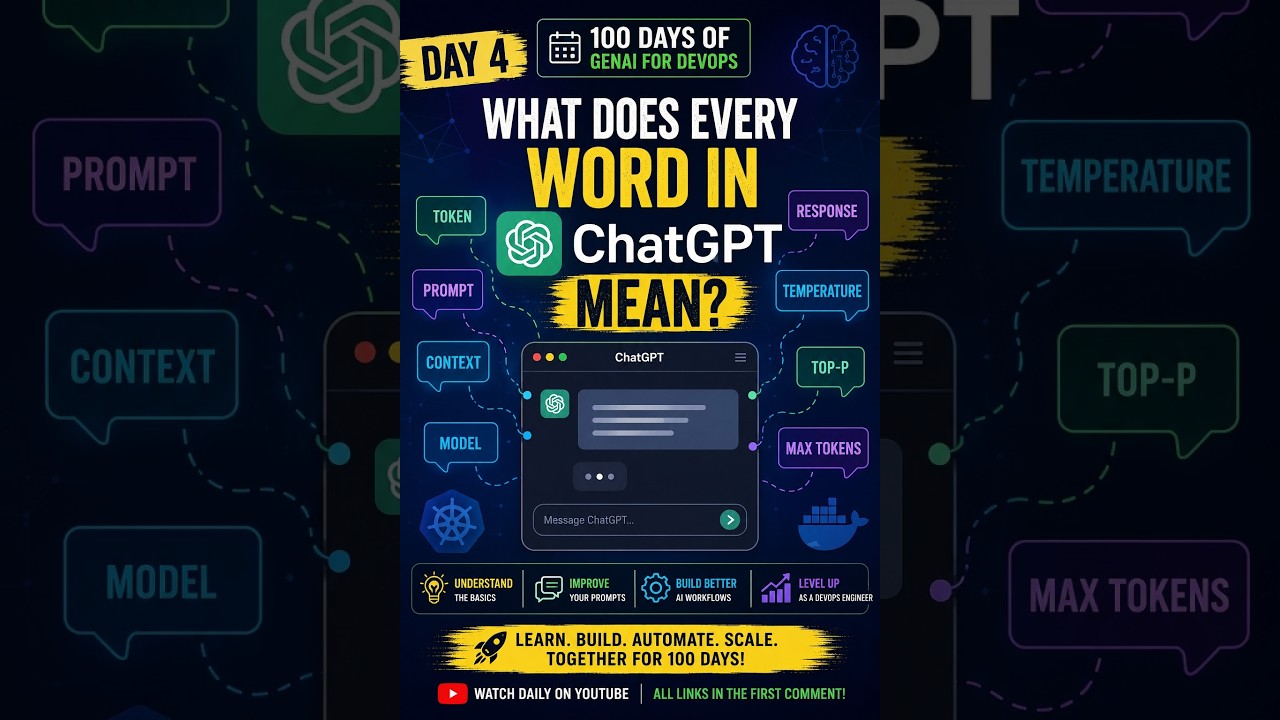
Chat tells us how we talk to it. GPT tells us what is underneath.
The word Chat is the interface: a conversation.
The term GPT is the technology. And each letter has its own job:
G — Generative
P — Pre-trained
T — Transformer
This page stays with Chat. The next page in Week 1 picks up the G.
The night a chatbot became a household name
On November 30, 2022, OpenAI released a new tool called ChatGPT.
At first, it looked like just another chatbot. We already had Siri, Alexa, and Google Assistant, so talking to a computer was not a new idea.
But ChatGPT was different.
It became one of the fastest-growing technology products people had ever seen. So the real question is: what made this chatbot so different from the ones we already had?
To answer that, we have to understand what each word in the name means. We start with the simplest one: Chat.
It feels like it remembers you. Does it?
When we use ChatGPT, the conversation feels completely natural.
Imagine I start with:
My name is Prashant.
A few messages later, I ask:
What is my name?
ChatGPT may respond:
Your name is Prashant.
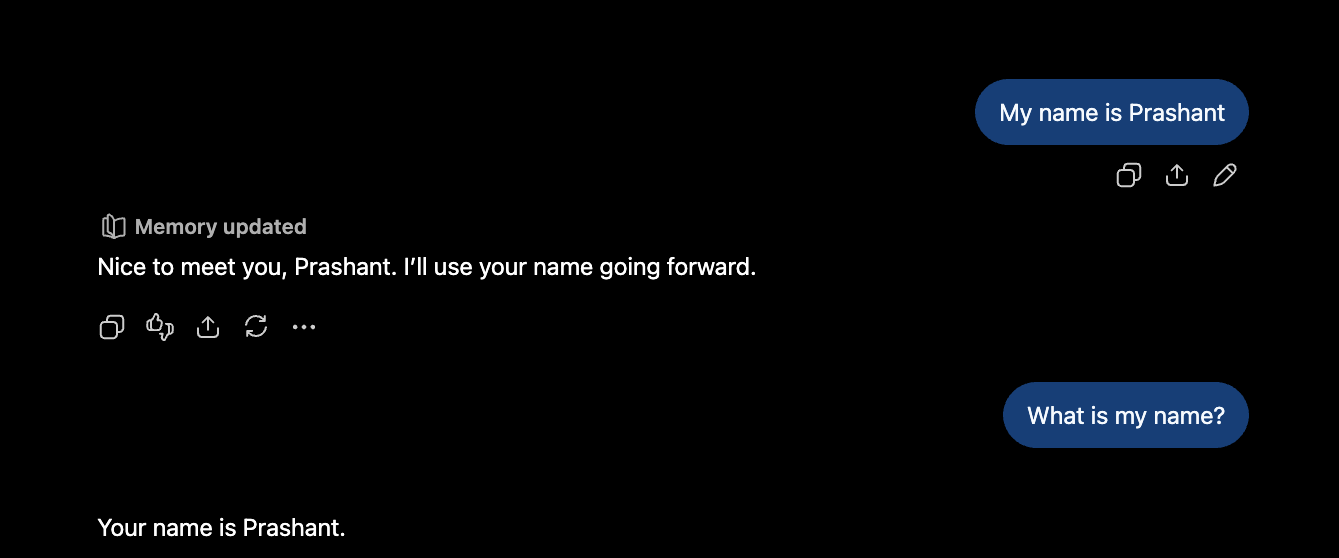
At first, nothing seems unusual. I told it my name earlier, so of course it remembered.
That simple interaction hides the technical question this whole week is built on:
Does an LLM actually remember what we said earlier?
The answer is more interesting than it looks.
LLMs are naturally stateless
At a very simplified level, an interaction with an LLM looks like this:
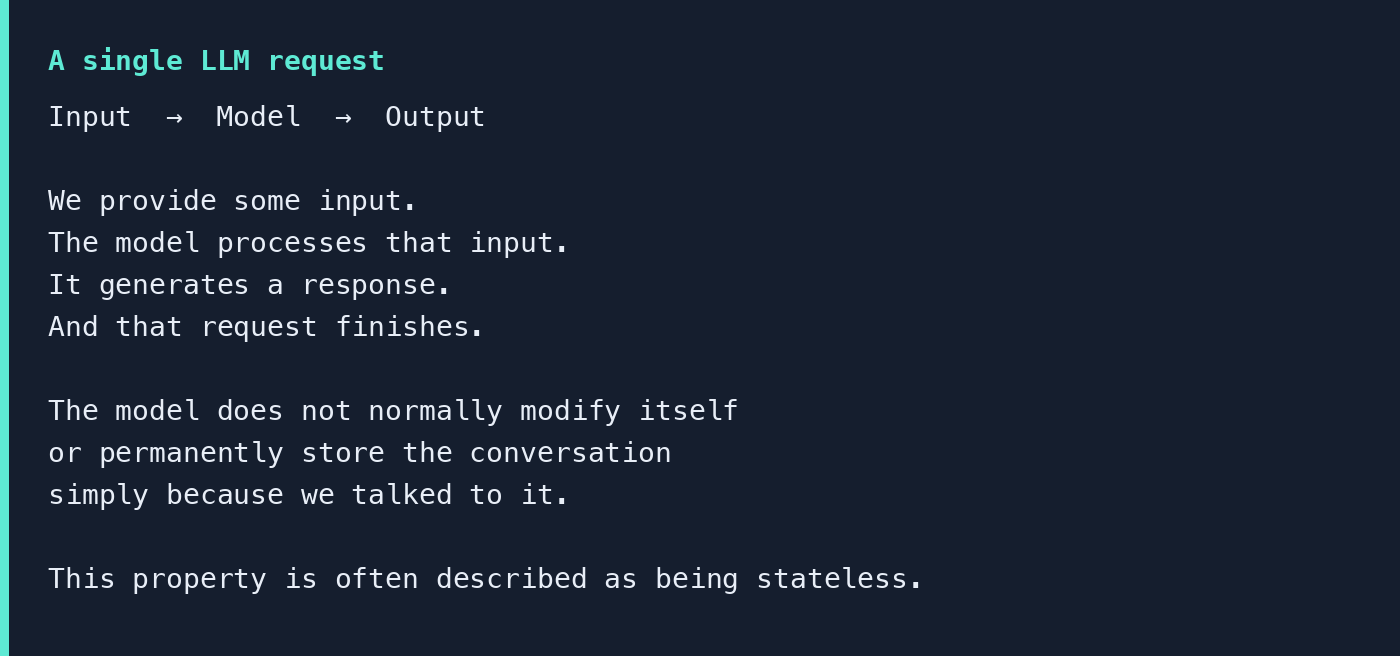
The model does not normally modify itself or permanently store the conversation simply because we talked to it. That property is often described as being stateless.
So suppose we make two completely independent requests:
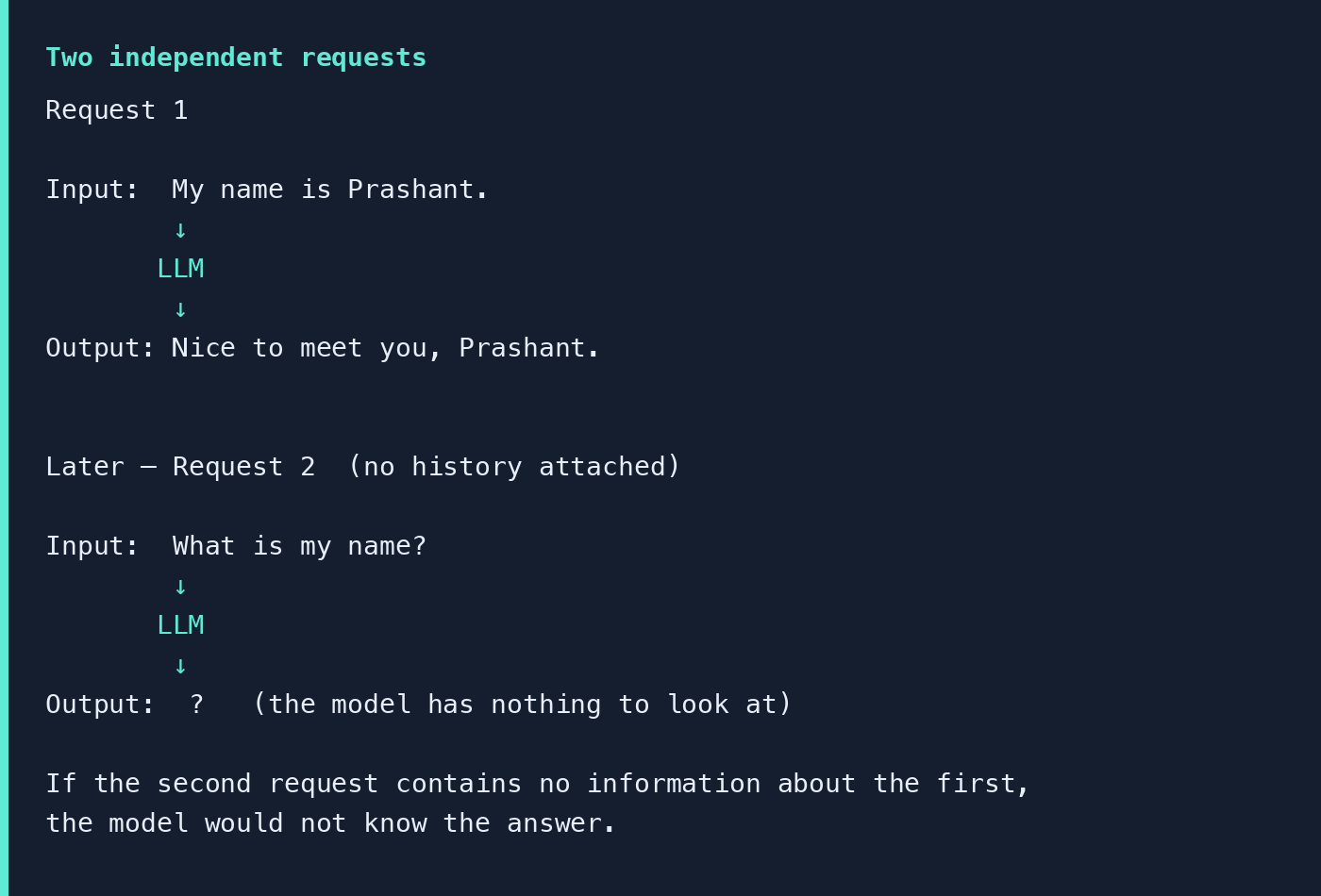
So how does a chat app make the model appear to remember?
To understand that, we need one of the most important concepts in an LLM application: the context window.
Imagine the LLM is standing in front of a whiteboard. Before we ask a question, we write some information on the board:
Name: Prashant
Learning about: Large Language Models
Preference: Explain things in simple English
Question: What is an LLM context window?
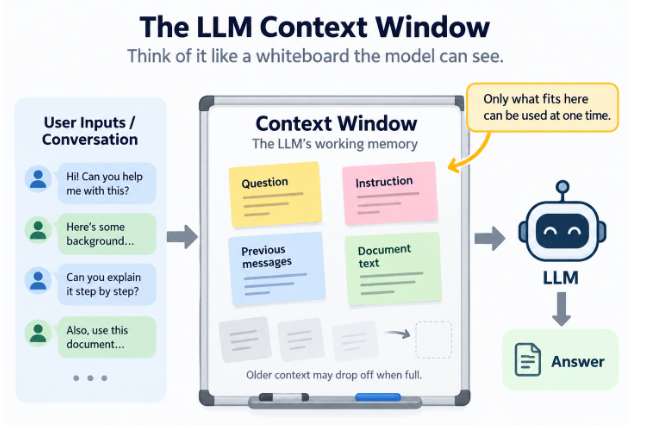
A whiteboard has a limited amount of space. You cannot keep writing forever. The same basic idea applies to an LLM.
There is a limit to how much information the model can consider at one time. That limit is called the context window.
Context window is the amount of information an LLM can work with at one time while generating a response.
That information may include your current question, earlier conversation, instructions given to the model, retrieved documents, code, and other relevant details.
You can think of it as:
Context window = size of the LLM’s working whiteboard.
What are tokens?
Context windows are normally measured in tokens, not pages or words.
A token is a small unit of text that the model processes. It might be an entire word, part of a word, punctuation, or some other piece of text.
When someone says a model supports a certain number of tokens, they are describing roughly how much text can fit inside the model’s working context. The exact number of pages that represents varies, because different documents contain different amounts and kinds of text.
The important thing for a beginner is simply this:
More tokens means the model can potentially work with more information at the same time.
But a very large context window does not automatically mean that filling the entire context is a good idea.
As context becomes longer, a model may overlook important details, become distracted by irrelevant information, or have trouble separating similar facts.
So context management is not “give the model as much as possible.” It is “give it the right information.”
Many frontier models now sit around a million tokens
That means they can potentially look at a very large conversation, codebase, book, or collection of documents in a single request.
| Model | Context window |
|---|---|
| OpenAI GPT-5.6 Sol | 1.05 million tokens (OpenAI Developers) |
| OpenAI GPT-6 Astra | 1.05 million tokens (OpenAI Developers) |
| Claude Opus 5 | 1 million tokens (Claude Platform Docs) |
| Claude Sonnet 5 | 1 million tokens (Claude Platform Docs) |
| Google Gemini 3.1 Pro | 1 million input tokens (Google DeepMind) |
| Google Gemini 3.8 Flash | 1 million input tokens (Google DeepMind) |
A rough conversion helps the numbers land:
1 token ≈ ¾ of an English word
1 normal text page ≈ 400–500 words
A 1-million-token context window is roughly enough space for around 750,000 English words, or approximately 1,500–2,000 pages of normal text.
This tells us how much information can fit. It does not tell us how well the LLM will understand or remember every piece of that information.
| Context window | Approx. English words | Rough pages |
|---|---|---|
| 32K tokens | ~24,000 words | ~50–60 pages |
| 128K tokens | ~96,000 words | ~190–240 pages |
| 200K tokens | ~150,000 words | ~300–375 pages |
| 1M tokens | ~750,000 words | ~1,500–1,900 pages |
| 1.05M tokens | ~787,000 words | ~1,575–1,970 pages |
As the context gets longer, models can become less reliable. They may overlook important details, get distracted, confuse similar facts, or reason more weakly — even when the input is still well below the advertised limit. Recent studies continue to observe this behavior.
How does ChatGPT remember earlier messages?
Earlier I said:
My name is Prashant.
Later I ask:
What is my name?
A chat application can send relevant conversation history together with the new question:
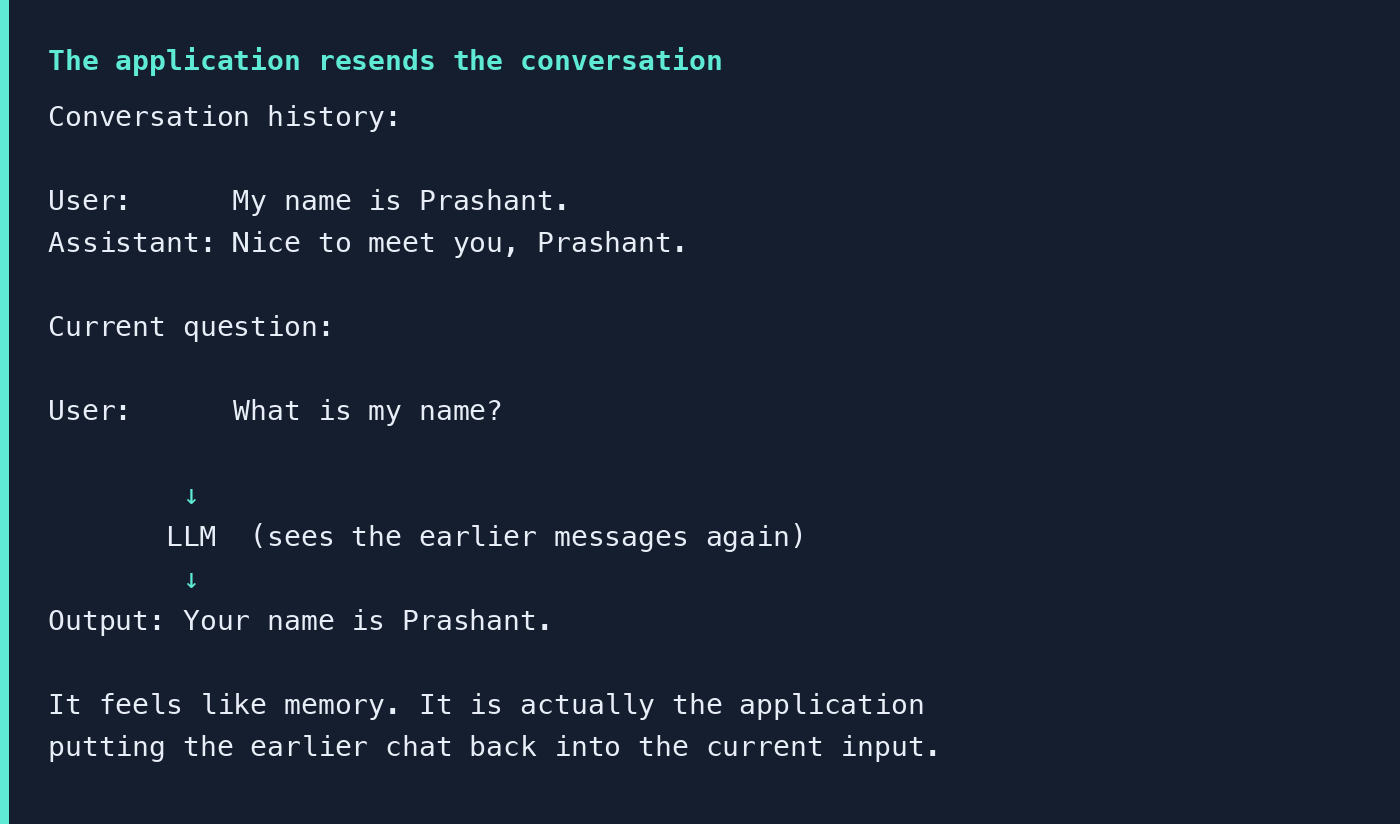
This is an important distinction. The model does not necessarily have to internally remember the previous message. The application can provide that information again.
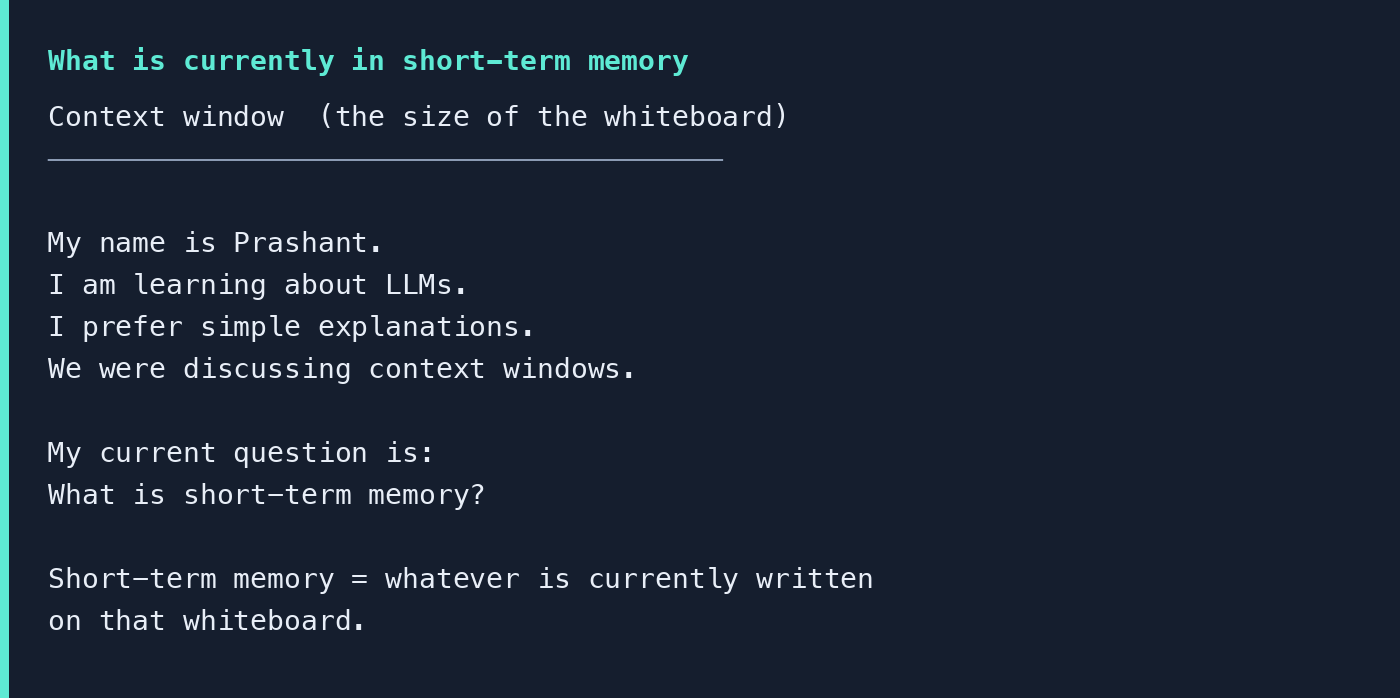
The whiteboard has a size. Short-term memory is what is written on it.
Short-term memory is information that remains available during the current interaction.
We can extend the whiteboard analogy. The context window is the size of the whiteboard. Short-term memory is whatever is currently written there.
What happens when the conversation becomes very long?
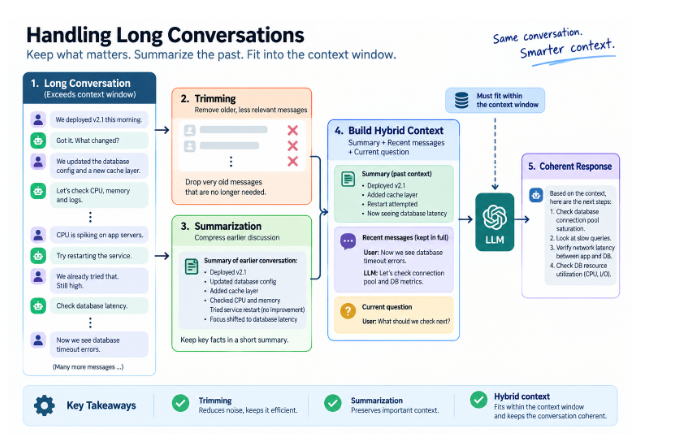
Imagine we keep chatting for several hours. We discuss an application deployment. Then Kubernetes. Then AWS. Then a database problem. Then high CPU. Then logs. Then Python. Then last week’s incident. Then hundreds of other messages.
The conversation keeps growing. Should the application send every message we have ever exchanged, every time we ask another question?
Eventually that becomes inefficient. There are two major problems.
First, the conversation may exceed the available context window.
Second, even if everything technically fits, too much irrelevant information can make it harder for the model to focus on what actually matters.
This is why LLM applications need context management.
Trimming old conversations
The simplest strategy is called trimming.
Suppose our debugging conversation contains:
We deployed version 2.1 this morning.
We changed the database configuration.
CPU utilization became high.
We restarted the application.
Database timeout errors started appearing.
What time did we deploy?
We discussed who attended the meeting.
Someone asked about tomorrow’s schedule.
If the current question is:
Why are database requests timing out?
Some of the older conversation is no longer useful. The application can remove the less relevant messages. That is trimming.
Trimming means removing information that is no longer useful for the current conversation.
The goal is not to preserve every sentence. The goal is to preserve what still matters.
Summarizing older conversations
Sometimes old information is important, but keeping every message would consume too much context. Instead of deleting it completely, we can summarize it.
Suppose the conversation originally contains:
We deployed v2.1.
We changed the database configuration.
We introduced a cache layer.
CPU utilization was checked.
The application was restarted.
The problem still exists.
Instead of sending all those messages, the application could create a compact summary:
v2.1 was deployed with database and cache changes. CPU was investigated and the service was restarted, but the problem still exists.
The important information survives, but fewer tokens are required.
Summarization means preserving the important meaning of older conversations while using fewer tokens.
Building a better context
A useful LLM application does not have to choose between sending everything and sending nothing. It can combine different kinds of information.
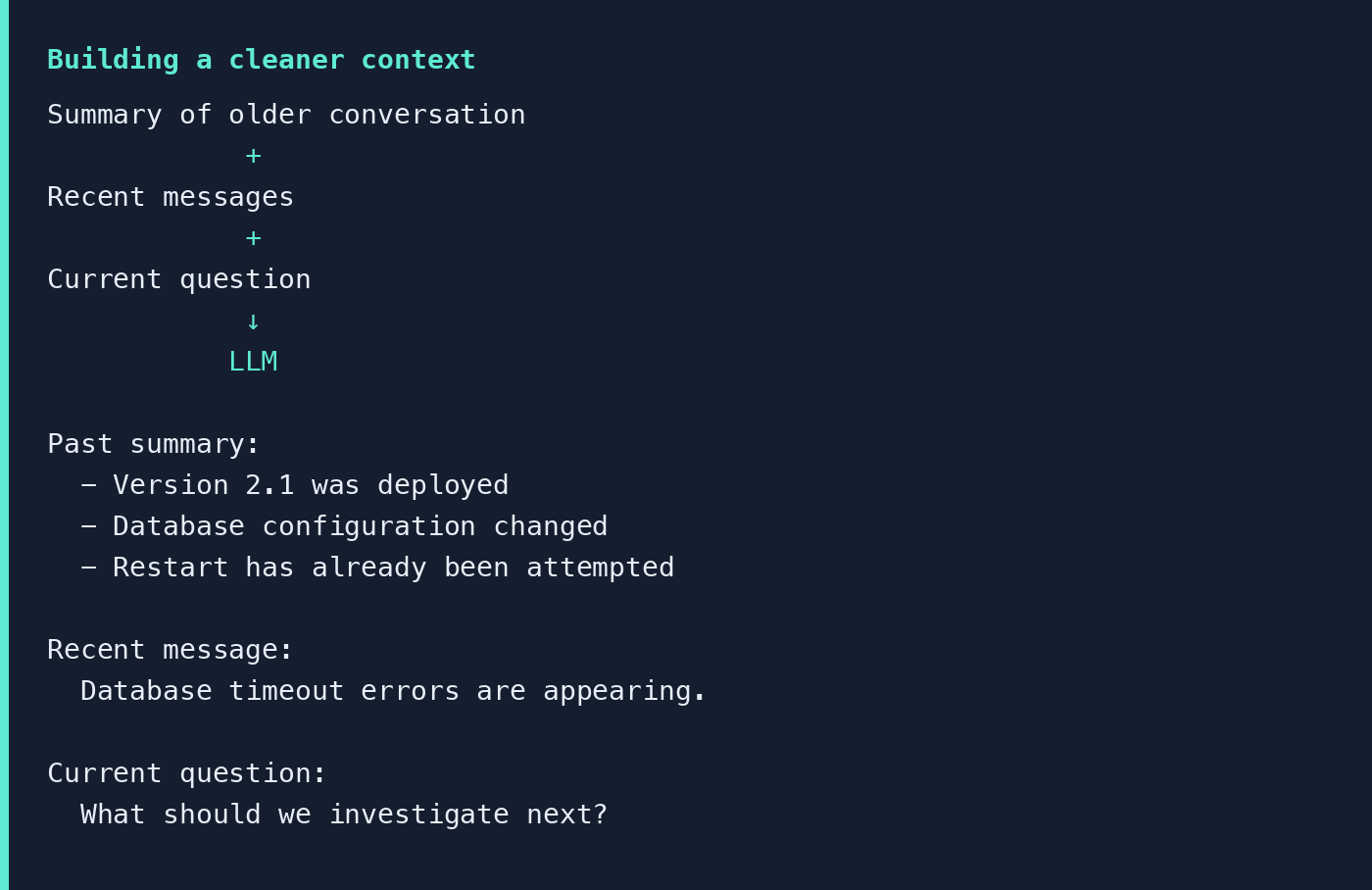
This leads to one of the most important ideas in context engineering:
The goal is not to fill the context window with everything. The goal is to give the LLM the most relevant information it needs to answer well.
But what happens when the conversation ends?
So far, everything we have discussed can work within the current interaction.
Now imagine I close the conversation. A week later I start a completely new one.
Earlier I had told the system:
Whenever you give me programming examples, I prefer Python.
Now, in a completely new conversation, I ask:
Show me an example of calling a REST API.
It would be useful if the application remembered that preference and automatically gave me a Python example. But that preference may no longer exist in the current context.
This is where we move from short-term memory to long-term memory.
The notepad vs the filing cabinet
Imagine you are working at a desk. You have a small notepad beside you. The notepad contains information useful for what you are doing right now. That is like short-term memory.
Behind you is a filing cabinet containing important information collected over weeks, months, or even years. When you need something, you retrieve the appropriate file. That is similar to long-term memory.
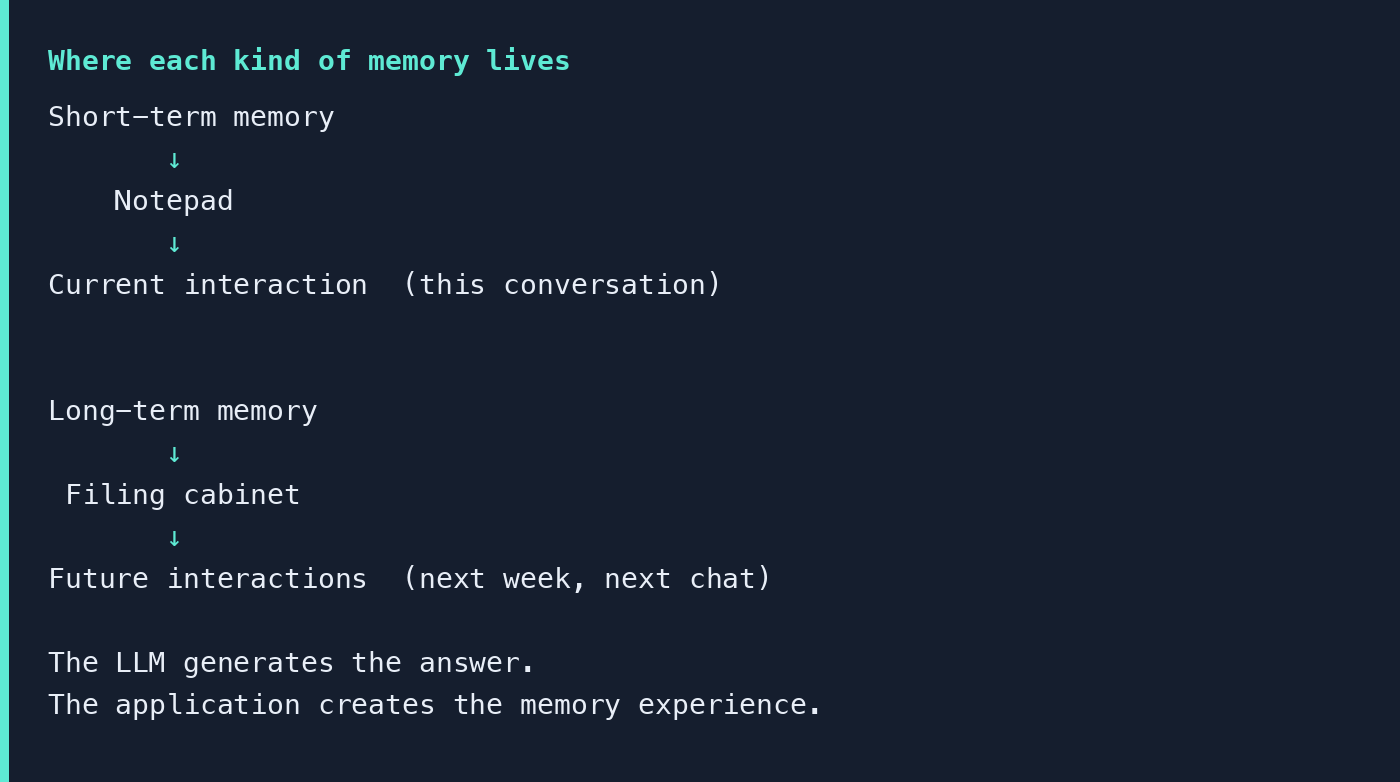
There is another important detail: long-term memory normally lives outside the LLM.
Suppose the application remembers: “Prashant prefers Python examples.” That does not necessarily mean the model’s internal parameters were modified to store that fact.
Instead, an application can store the information somewhere else — a database, a key-value store, a memory service, a vector database.
When a new conversation begins, the application can retrieve relevant memories and provide them to the model:
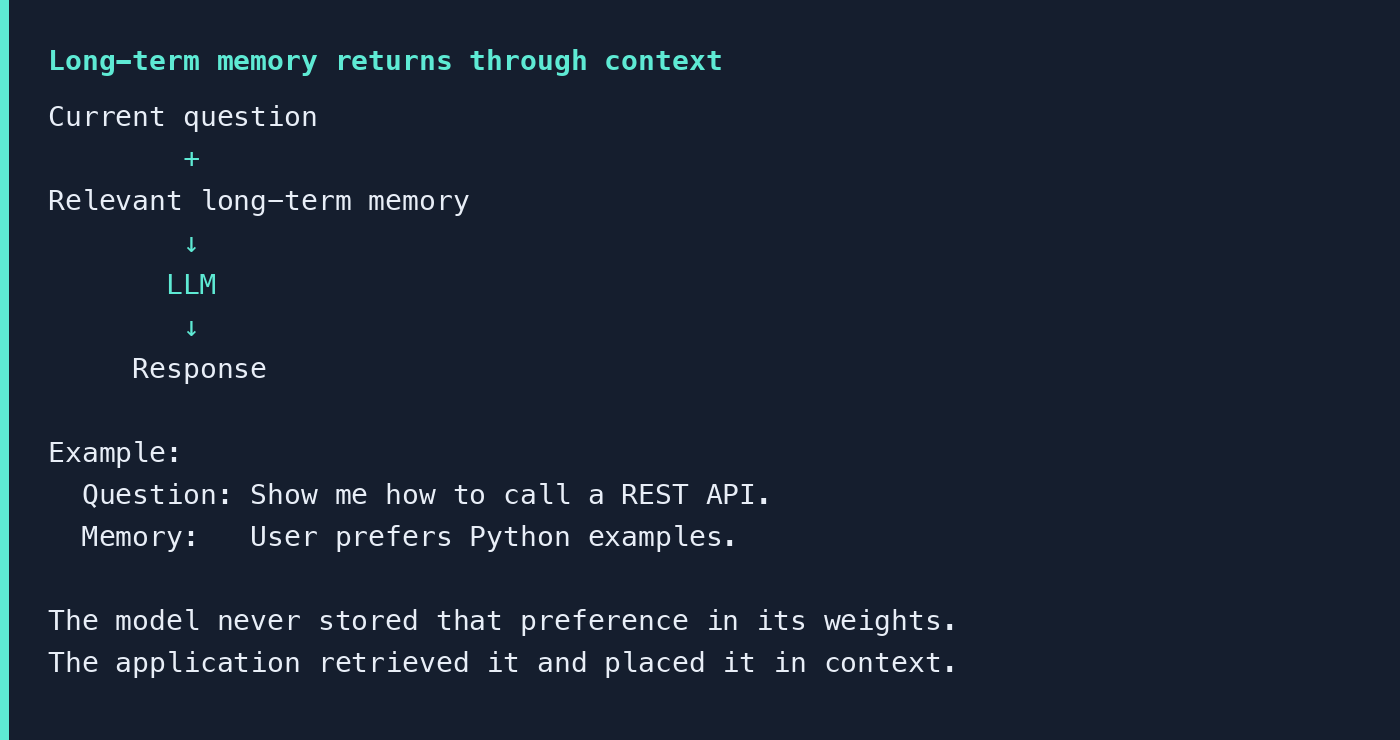
The LLM generates the answer. The application creates the memory experience.
Episodic, semantic, and procedural
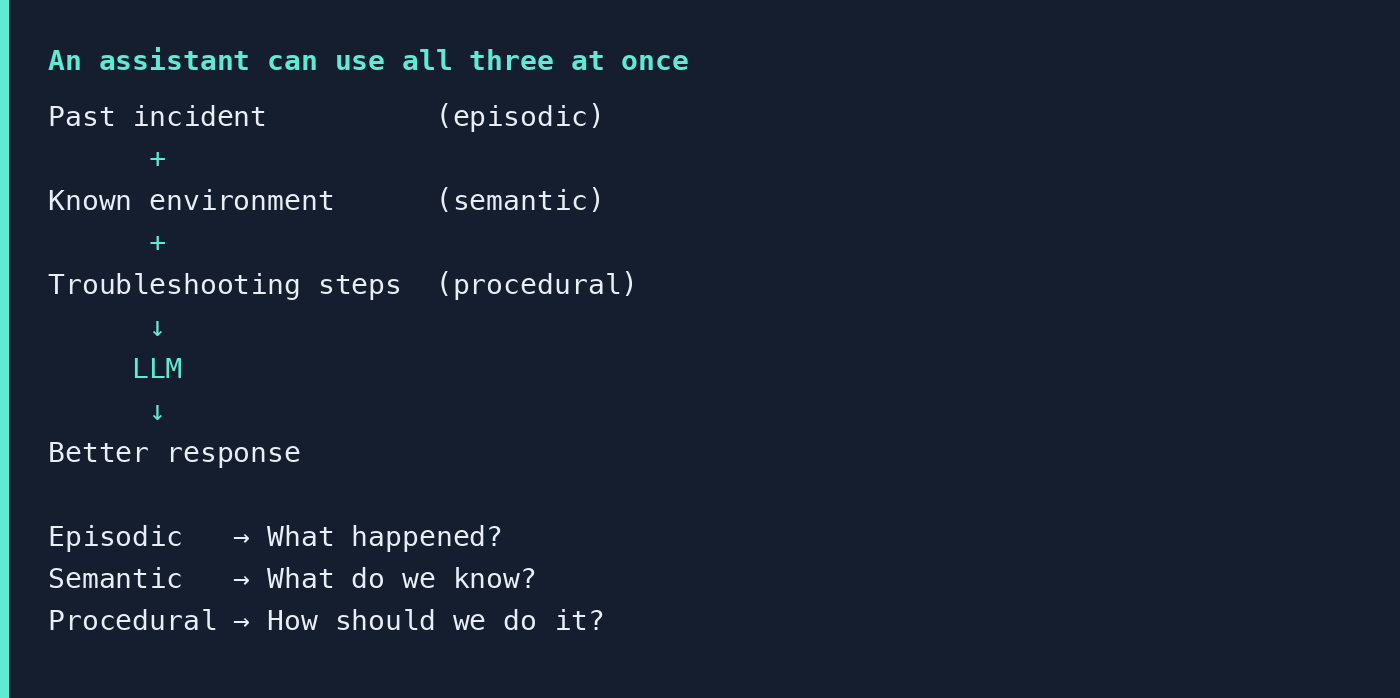
A useful way to understand long-term memory is through three categories.
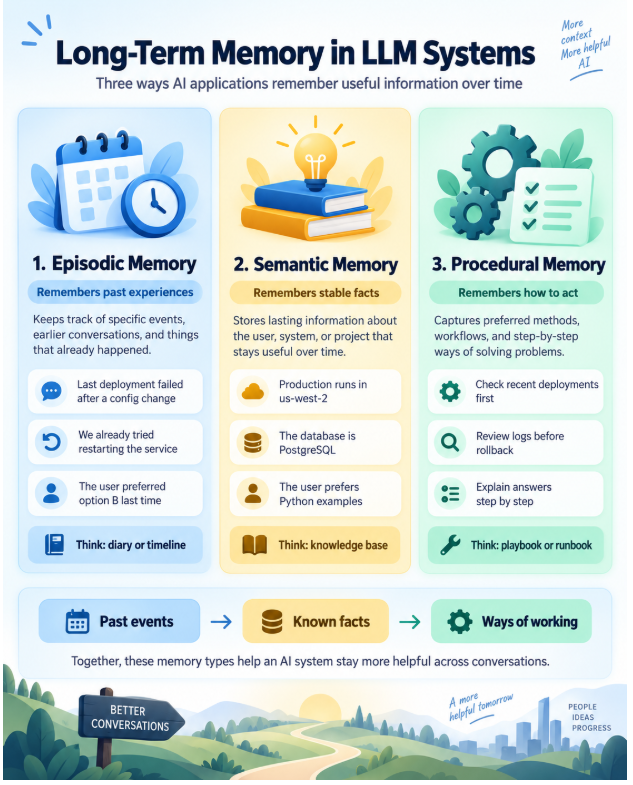
Episodic memory: What happened?
Episodic memory represents previous experiences or events.
Imagine an AI assistant used by a DevOps team. Last week there was an incident: the API started failing after a configuration change, the team rolled it back, and the API recovered. A future incident may look similar. Remembering what happened previously could help the assistant give a better response.
Episodic memory answers questions such as: What happened before? What did we try last time? What happened during the previous incident?
Think of it like a diary or incident history.
Semantic memory: What do we know?
Semantic memory contains facts that remain useful over time. For example: production runs on Kubernetes, the production region is us-west-2, the database is PostgreSQL, the user prefers Python examples.
These are not individual incidents. They are facts about the user, system, environment, or project.
Think of it like a knowledge base.
Procedural memory: How should we do it?
Procedural memory is about methods, workflows, or preferred ways of doing something.
Suppose our DevOps assistant knows that whenever CPU utilization becomes high, the team usually follows this troubleshooting process: check load average, identify CPU-intensive processes, check CPU utilization, look for I/O wait, review recent deployments and configuration changes.
That information describes how something should be done. Think of it like a runbook or playbook.
Creation, storage, retrieval, injection
Understanding the types of memory is useful. There is still an important question: how does information become a memory and later return to the LLM?
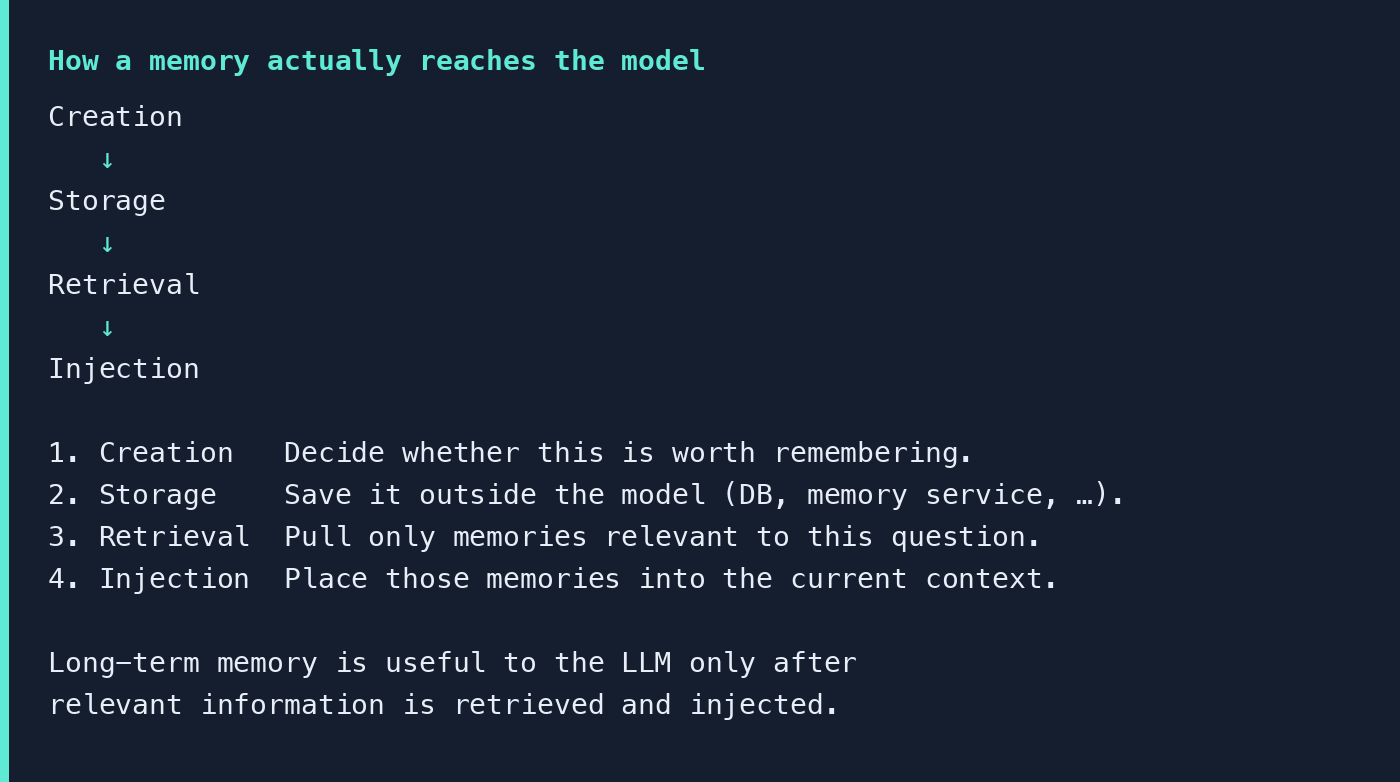
Step 1: Creation
Imagine the user says:
I prefer Python whenever you show me programming examples.
The system first has to decide: is this worth remembering beyond this conversation?
Not every message should become long-term memory. “I am sitting in a coffee shop right now” may be irrelevant within an hour. “I prefer Python examples when learning programming” may remain useful for months.
A good memory system therefore needs to be selective. It may examine the user’s messages, model responses, and tool results, and decide whether information should be ignored, stored as a new memory, or used to update an existing one.
This is one of the hardest parts of building useful long-term memory.
Good memory is not about remembering everything. It is about remembering what will continue to matter.
Step 2: Storage
Once the system decides something is worth remembering, it needs to store it somewhere. For example: “User preference: prefers Python examples.”
Depending on the application, memory might live in a relational database, a key-value store, a log, a specialized memory system, or a vector database. It might also include metadata: who does this belong to, when was it created, when was it updated, what type is it, how important is it?
The important idea is simple: the memory needs to survive after the current LLM request is finished.
Step 3: Retrieval
Suppose the user returns several weeks later and asks:
Can you show me how to call an API?
The application may contain hundreds or thousands of memories. It should not send all of them to the LLM. It needs to retrieve only memories relevant to the current situation.
A memory such as “User visited New York two months ago” probably has nothing to do with calling an API. A memory such as “User prefers Python examples” does.
Retrieve the right memory at the right time.
Step 4: Injection
The memory system retrieved: the user prefers Python examples. How does that actually influence the LLM?
The application places the retrieved memory into the context that will be sent to the model. The LLM receives both pieces of information and may respond with a Python example.
From the model’s perspective, the memory has become part of its current input. The model sees it as additional context.
Long-term memory becomes useful to the LLM only after relevant information is retrieved and brought back into the model’s current context.
This is the key idea behind the Chat experience
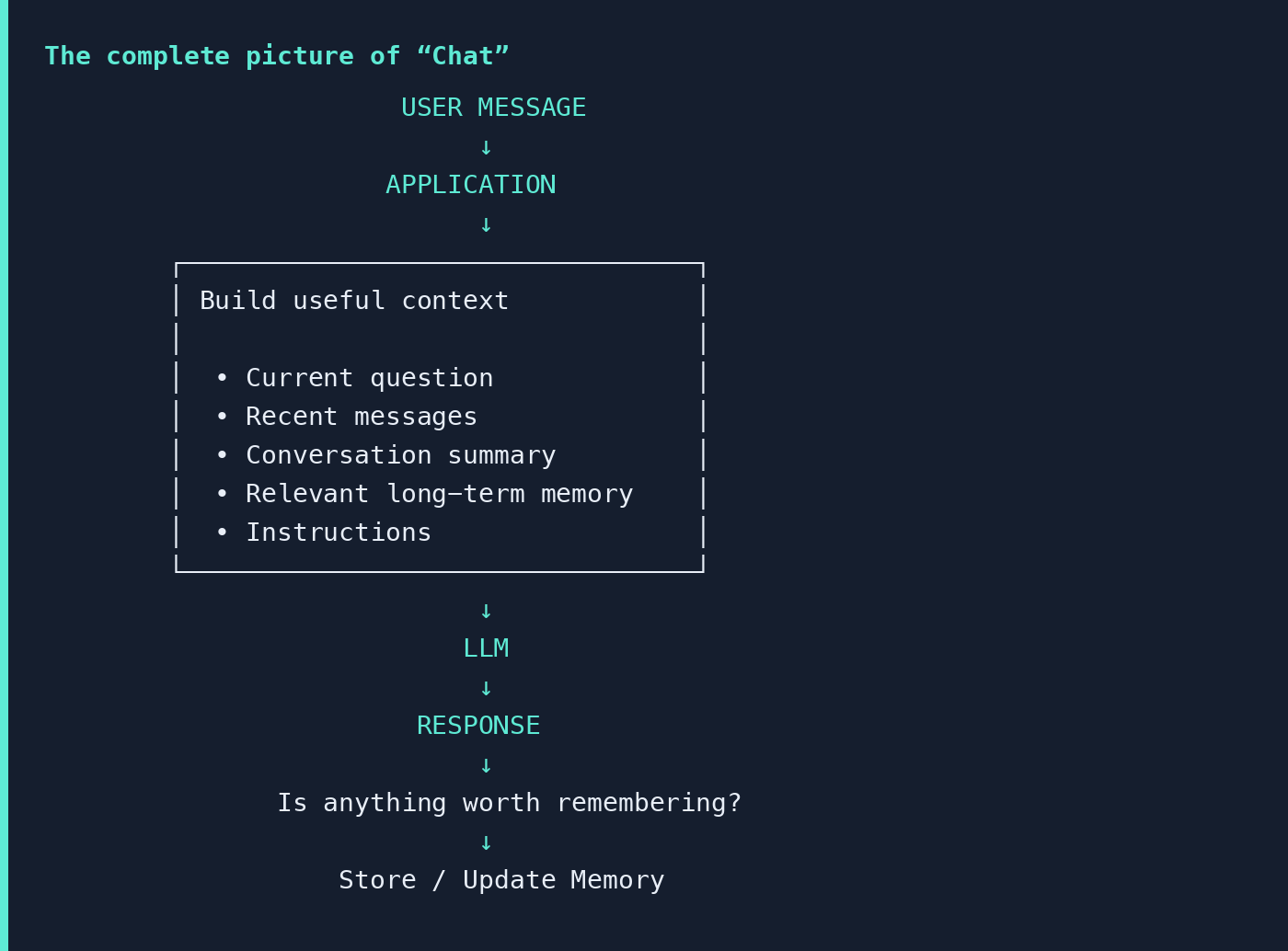
The application can preserve recent conversation, summarize older information, retrieve relevant long-term memories, and place useful information back into the model’s context.
That is how a system can appear to remember even when the underlying model is not permanently storing every conversation.
But now another question appears. We understand how the model gets enough context to participate in a conversation. Where does the answer itself come from?
That brings us to the next word in ChatGPT: G — Generative.
Tools and research for LLM memory
If you want to explore how long-term memory can be implemented in real AI applications, here are a few useful projects and research efforts:
If you remember only five things
1. “Chat” is more than exchanging messages. The model is generally stateless. The application around it manages context, history, summarization, and long-term memory.
2. The context window is the model’s working whiteboard. It is measured in tokens, and filling it with everything is not the same as filling it with the right information.
3. Short-term memory is whatever is currently on that whiteboard. Trimming and summarization exist because conversations grow faster than the window.
4. Long-term memory usually lives outside the model — in a database, a memory service, a vector store — and only helps after it is retrieved and injected back into context.
5. The LLM generates the answer. The application creates the memory experience.
The key idea is simple:
The LLM does not need to remember everything — it needs to receive the right information at the right time.
Now that we understand the “Chat” part of ChatGPT, continue to Week 1 · Generative — what the G actually means, and how an LLM generates an answer one token at a time.