Amazon Bedrock for Beginners: One AWS Service, Many AI Models
Imagine that you want to use several AI models in one application, such as Claude, Llama, Amazon Nova, Mistral, and Cohere. Normally, you might need a separate account, API key, SDK, and billing setup for each provider. Amazon Bedrock makes this much simpler. You use your AWS account and IAM permissions, choose a model, send your request, and Bedrock handles much of the connection work for you.
Without Bedrock, each AI provider can become a separate setup
Suppose your application needs AI models from Anthropic, Meta, Amazon, Mistral, or Cohere. If you connect to every provider directly, you may need to do the following for each one:
- Create a separate provider account.
- Create and manage a separate API key.
- Learn a different authentication method.
- Manage a separate billing account.
- Learn a different SDK or API endpoint.
- Handle different security and networking requirements.
Amazon Bedrock reduces this work. Bedrock is a managed AWS service that gives you access to foundation models from different providers through your AWS account. Your application authenticates with AWS IAM, chooses a model, and sends the request to Bedrock. Bedrock then sends the request to the selected model and returns the answer.
One important point: Bedrock gives you a common AWS way to handle access, security, billing, monitoring, and infrastructure, but the models are still different from one another. Some models support different parameters or special features. AWS provides the Converse API to make common chat requests look more consistent across many models.
AWS manages the infrastructure; you focus on using the service
When Bedrock is described as a fully managed or serverless service, it means you do not have to create or manage the servers and GPU infrastructure that run the models. AWS operates and maintains that infrastructure. You still pay based on the Bedrock pricing option you use, just as different AWS services have different billing models.
| AWS service | Simple billing idea |
|---|---|
| AWS Lambda | Pay for requests and execution time |
| AWS Fargate | Pay for CPU and memory while the task runs |
| Amazon S3 | Pay for storage and requests |
| DynamoDB On-Demand | Pay for read and write requests |
| Bedrock On-Demand | Pay mainly for input and output tokens |
| Bedrock Provisioned Throughput | Pay for reserved model capacity over time |
With On-Demand, you normally pay for the tokens you use
For common On-Demand model calls, you are usually charged based on tokens rather than how many seconds your request takes. There are two main types of tokens:
- Input tokens — the text or prompt you send to the model.
- Output tokens — the text the model generates for you.
Your prompt uses 15 input tokens. The model response uses 180 output tokens.
The cost is calculated using the price of the input tokens plus the price of the output tokens. Each model has its own pricing, so Claude, Nova, Llama, and Mistral may cost different amounts.
15 input tokens Model Model response
180 output tokens
Cost = price of the input tokens + price of the output tokens
Bedrock also offers Provisioned Throughput. Think of this as reserving model capacity for your workload. It can be useful when you need more predictable performance or dedicated capacity. Because the capacity is reserved for you, you pay for that reserved capacity even when traffic is low.
| Inference mode | How you pay |
|---|---|
| On-Demand | Based on input and output token usage |
| Provisioned Throughput | Reserved capacity, typically billed over time |
Bedrock gives you one AWS entry point, but every model is not identical
A common misunderstanding is that Bedrock gives exactly the same API request for every model. That is not always true.
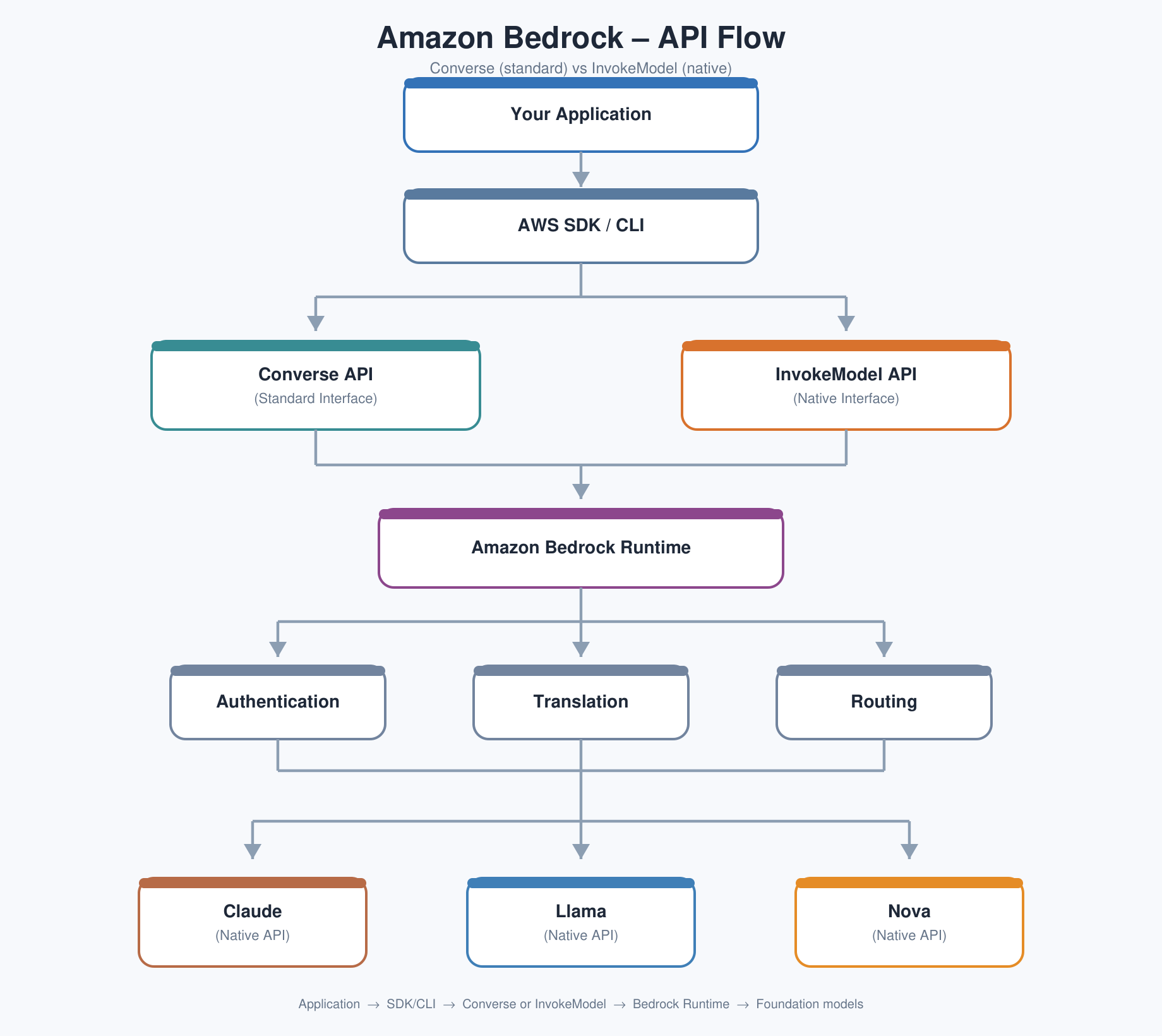
Bedrock gives you common AWS authentication and a common service endpoint, but the request format depends on which Bedrock API you use:
- InvokeModel — you send the request in the format expected by that specific model. Claude, Llama, Nova, and Mistral may use different JSON fields.
- Converse — AWS gives you a more common chat-style request format. This is easier when your application may switch between supported models.
A simple analogy is a shopping mall. Bedrock is the main entrance to the mall. You enter once, but the individual stores inside are still different. In the same way, Bedrock gives you one AWS entry point, while each AI model can still have its own capabilities and special options.
The same question can require different JSON for different models
Imagine your application supports Claude Sonnet and Llama 3.3 70B. You want to ask both models the same question: “Explain Kubernetes.” With InvokeModel, the request body can look different for each model:
# Claude-style body
{
  "anthropic_version": "bedrock-2023-05-31",
  "messages": [{"role": "user", "content": "Explain Kubernetes."}],
  "max_tokens": 500,
  "temperature": 0.7
}

# Llama-style body
{
  "prompt": "Explain Kubernetes.",
  "max_gen_len": 500,
  "temperature": 0.7
}
The goal is the same, but the JSON fields are different. For example:
| Claude | Llama |
|---|---|
| messages | prompt |
| max_tokens | max_gen_len |
| anthropic_version | not required |
InvokeModel uses a common endpoint pattern such as POST /model/{modelId}/invoke, but the JSON body can change depending on the model. In other words, Bedrock standardizes the AWS access and endpoint, but you may still need to understand each model’s native request format.
Converse API: a simpler chat interface
Most chat applications want to do the same basic thing: send a list of conversation messages to a model. AWS introduced the Converse API so that many supported models can use a common message structure, like this:
{
  "messages": [
    {
      "role": "user",
      "content": [{ "text": "Explain Kubernetes." }]
    }
  ]
}
With Converse, the basic request structure can stay the same even when you change the modelId from a Claude model to a Llama model. Bedrock handles the translation to the model’s native format behind the scenes. This makes your application code easier to maintain.
Converse standardizes common chat features, but some model-specific features can still be different. For example, a model may have its own reasoning options, tool settings, safety controls, image or PDF support, or token limits. If your application depends on one of these special features, check that the new model supports it before switching model IDs.
Follow the Bedrock request one step at a time
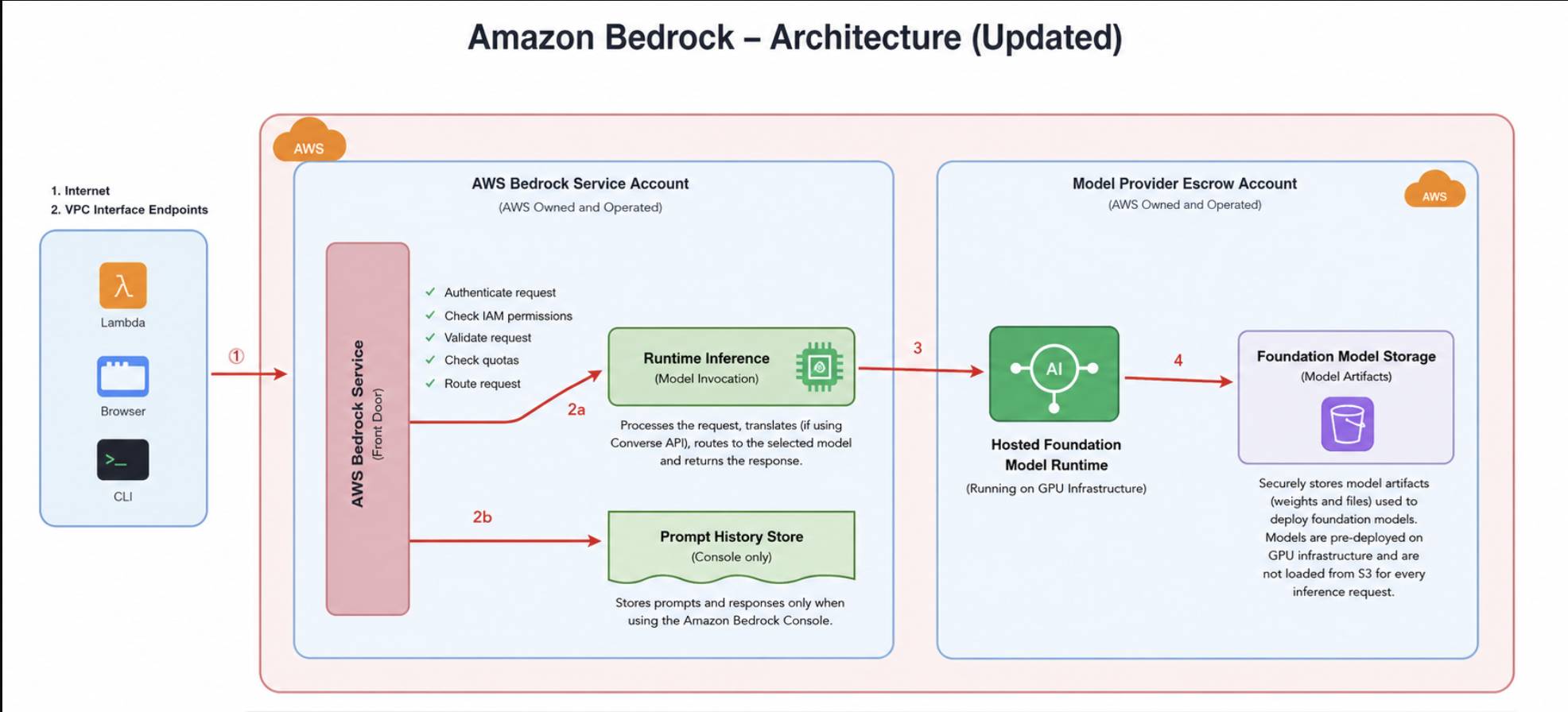
If you already understand a basic AWS request flow such as client → load balancer → backend, Bedrock follows a similar idea: your application sends a request, AWS checks it and routes it, and the selected model does the AI work.
1. Your application sends the request
The request can come from a web application, AWS Lambda, the AWS CLI, or a program using an AWS SDK such as boto3. It is sent to the Bedrock Runtime endpoint. If your environment requires private networking, you can also use a VPC interface endpoint.
2. Amazon Bedrock checks the request
Think of Bedrock as the front desk. It first checks who you are using IAM, whether you are allowed to use the requested model, whether the request is valid, and whether you are within service limits. If something is wrong, the request can fail before it ever reaches the model.
3. Bedrock Runtime routes the request to the model
After the request passes the checks, Bedrock Runtime acts like a traffic controller. It sends the request to the correct model backend. If you used Converse, Bedrock may translate the common Converse format into the format expected by that model. It then waits for the model response and sends the result back to your application.
4. Prompt history in the AWS console
The Bedrock playground in the AWS console can keep a history of prompts you enter there. This does not mean that every request from your Python code, Java application, CLI, or REST API automatically appears in that console history.
5. The model runs inside AWS-managed infrastructure
Your application is not simply sending the prompt to a provider’s public website over the internet. The model is made available through AWS-managed Bedrock infrastructure. This is why AWS controls such as IAM, CloudTrail, and PrivateLink can be used around Bedrock access. The underlying model infrastructure may serve multiple customers, while customer requests remain isolated.
6. The model files are already deployed and ready
The model files are stored securely, but Bedrock does not download a huge model file from storage every time you ask a question. The model is already deployed on inference infrastructure, including GPUs, and is ready to process requests.
Most of the waiting time is usually the model generating the answer
A Bedrock request does pass through several AWS-managed steps, but those checks and routing steps are usually much faster than generating the AI response itself. The table below shows the general idea using typical example ranges:
| Operation | Example time |
|---|---|
| Network to Bedrock | 5–20 ms |
| IAM authentication | < 5 ms |
| Authorization and validation | < 5 ms |
| Routing | < 5 ms |
| Model begins inference | 50–200 ms |
| Model generates about 500 tokens | 1–5 seconds |
The key idea is simple: authentication and routing usually take milliseconds, while generating hundreds of tokens can take seconds. In most cases, the model generation time is the larger part of the total response time.
Bedrock provides more than just access to an LLM
Amazon Bedrock is a platform for building and operating generative AI applications. You may use only one feature at first and add more features as your application grows.
Foundation models
Use models such as Claude, Llama, Nova, Mistral, Cohere, and others through your AWS account.
Guardrails
Add rules to help control harmful content, prompt injection, sensitive information, and restricted topics.
Knowledge Bases
Build managed RAG applications. Bedrock can retrieve useful information from your documents and give that context to the model so the answer is grounded in your data.
Flows
Connect prompts, models, knowledge bases, agents, and conditions into a visual workflow.
Imported or custom models
Run supported model architectures using Bedrock-managed inference. Not every model checkpoint can be imported.
Agents
Allow a model to use tools such as AWS Lambda functions, APIs, databases, and knowledge bases to complete tasks.
For imported models, Bedrock must support the model architecture. You cannot assume that every model from Hugging Face can be imported. Pricing can also be different: native foundation models are commonly priced by token usage, while imported models may require dedicated inference infrastructure.
Use boto3 to talk to Bedrock Runtime
The goal is simple: your Python program sends a prompt and receives an AI response. Your code talks to Amazon Bedrock Runtime. Bedrock then sends the request to the foundation model you selected.
You will often see two Bedrock-related boto3 clients. They have different jobs:
| boto3 client | What it is used for |
|---|---|
| bedrock | Management tasks, such as listing models and working with guardrails |
| bedrock-runtime | Inference tasks: send prompts and receive model responses |
Here is a small Converse example:
import boto3

client = boto3.client("bedrock-runtime", region_name="us-east-1")

response = client.converse(
    modelId="amazon.nova-lite-v1:0",
    messages=[{
        "role": "user",
        "content": [{"text": "Explain Amazon Bedrock in simple language."}]
    }]
)

print(response["output"]["message"]["content"][0]["text"])
What happens behind the scenes? boto3 creates an HTTPS request and signs it using AWS Signature Version 4. Bedrock Runtime checks your IAM permissions and service limits, sends the request to the selected model, and returns the generated text. If your AWS account has access to another supported model, you can change the modelId.
For a larger example, see the IdeaWeaver repository: bedrock_converse.py.
Monitor Bedrock like any other production service
In production, it is not enough to ask only, “Is Bedrock up?” You also want to understand traffic, response time, errors, limits, and cost. These are useful starting points:
1. Invocation count
How many model requests are being made? If the count suddenly drops to zero, first check your application and upstream traffic.
2. Invocation latency
How long do requests take? Look at averages, but also P95 and P99 so that slow requests are not hidden by a good average.
3. Errors
Watch for 4xx and 5xx errors such as AccessDenied, ValidationException, ResourceNotFound, ModelTimeout, or InternalServerException.
4. Time to first token (TTFT)
For streaming responses, users notice how quickly the first word appears. A good TTFT can make an application feel much faster.
5. Token usage and cost
Input and output tokens affect model cost. Track usage and compare it with AWS Cost Explorer so you can understand where your Bedrock spend is coming from.
An inference profile is a routing option, not a different AI model
For example, anthropic.claude-sonnet-4-6 and us.anthropic.claude-sonnet-4-6 do not represent two different Claude models. One identifies the base model, while the other is a US inference profile that can route requests across supported US deployments.
| ID | Meaning | When you might use it |
|---|---|---|
| anthropic.claude-sonnet-4-6 | Base model ID | Identify the foundation model itself |
| us.anthropic.claude-sonnet-4-6 | US inference profile | Let AWS route to an available supported US deployment |
Think of an inference profile as a smart routing layer. When you use a US inference profile, Bedrock can choose an available supported US Region for the request instead of forcing your application to hard-code one deployment location. Similar routing profiles can exist for other geographies or global routing.
Five beginner-friendly takeaways
- Amazon Bedrock gives you one AWS service for accessing many foundation models.
- With On-Demand inference, cost is mainly based on input and output tokens. Provisioned Throughput reserves capacity.
- InvokeModel can use model-specific request bodies, while Converse gives you a more common chat format.
- Your application sends requests through AWS-managed Bedrock infrastructure, and model generation usually takes much longer than authentication and routing.
- In production, monitor request count, latency, errors, time to first token, limits, and token cost.
Quick review
Try to explain each term in your own words before reading the answer:
The simplest way to remember Bedrock: one AWS entry point, many AI models. Use Converse for a common chat experience, understand token-based cost, and monitor it like any other production service.