Regular Expressions for Python & DevOps
A beginner-friendly guide to regular expressions for Python and DevOps
1. What is a Regular Expression?
A regular expression (regex) is a pattern used to search, match, validate, or extract text. Instead of searching for one exact word, you describe the shape of the text you are looking for.
In DevOps, regex is useful when working with log files, IP addresses, URLs, email addresses, configuration files, command output, and monitoring data.
r'^[a-zA-Z0-9_-]+\.(jpg|png|gif)$'The pattern above is an example of a regex that can match simple image file names ending in .jpg, .png, or .gif. You do not need to understand every symbol yet—we will build up the pieces gradually.
Beginner tip: Regex is easier to learn when you start with real text, build a small pattern, test it, and add one rule at a time. A site such as regexr.com can be useful for experimenting visually.
2. A Few Regex Building Blocks
| Regex piece | Meaning | Example |
|---|---|---|
\d |
one digit from 0 to 9 | 5 |
. |
any single character except a newline | a, 7, -, . |
[abc] |
one character from the set | a or b or c |
[^abc] |
one character NOT in the set | anything except a, b, c |
{3} |
exactly 3 occurrences | \d{3} |
{1,3} |
between 1 and 3 occurrences | \d{1,3} |
+ |
one or more occurrences | [a-z]+ |
? |
zero or one occurrence | https? |
\w |
word character: letters, digits, underscore | A, z, 8, _ |
\s |
whitespace such as space or tab | |
^ |
start of the string (outside []) | ^ERROR |
$ |
end of the string | \.log$ |
\. |
a literal dot | gmail\.com |
Beginner tip: A dot by itself (.) is a wildcard. If you really want a dot, such as the dot in an IP address or domain name, write \. instead.
3. Example 1: Matching Phone Numbers
Suppose we have these values:
510-123-4567
510.123.9764
510*345*4647
800-123-4567
900-123-4567
A first attempt might use a dot between groups. Because . means “any character,” it also matches the * character. That makes the pattern too broad.
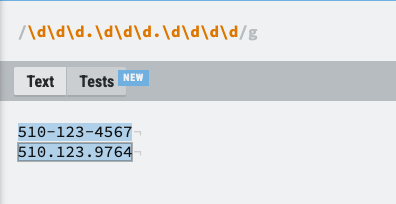
Use a Character Class for the Separator
If the separator should be only a dot or a hyphen, use a character class:
[.-]Inside the square brackets, this means: match exactly one character, either . or - .
![Regex tester. The pattern uses [.-] as the separator. 510-123-4567 and 510.123.9764 are highlighted. 510*345*4647 is not.](../images/week3/regex-phone-class.png)
[.-] limits the separator to a dot or a hyphen.Use Curly Braces for Repetition
Curly braces control how many times the previous token can appear. For example, \d{1,3} means “match between one and three digits.”
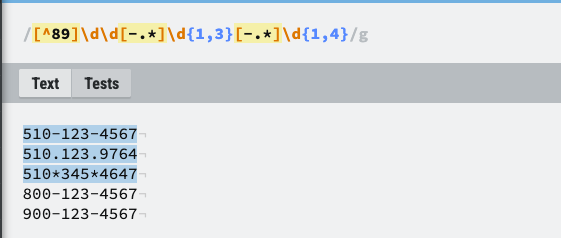
\d{1,3}[.-]\d{1,3}[.-]\d{1,4}![Regex tester showing \d{1,3}[.-]\d{1,3}[.-]\d{1,4} with the curly-brace counts highlighted.](../images/week3/regex-phone-braces.png)
{1,3} and {1,4} to control the number of digits.Beginner tip: This pattern demonstrates regex syntax, but it is intentionally loose. For a normal U.S.-style 3-3-4 number, a clearer pattern would be \d{3}[.-]\d{3}[.-]\d{4}.
Matching Numbers That Start With 800 or 900
If the first three digits must be either 800 or 900, we can be more specific. One simple form is:
[89]00[.-]\d{3}[.-]\d{4}Here, [89] means the first digit can be 8 or 9, followed by two literal zeroes.
![Regex tester showing [89]00[.-]\d{1,3}[.-]\d{1,4}. Only 800-123-4567 and 900-123-4567 are highlighted.](../images/week3/regex-phone-800.png)
Anchors: ^ and $
The ^ and $ symbols are called anchors. They help us match the whole value instead of finding the pattern somewhere in the middle of a longer string.
^[89]00[.-]\d{3}[.-]\d{4}$^means the match must start at the beginning of the string.$means the match must finish at the end of the string.- Important:
^means “not” only when it appears immediately after[inside a character class, such as[^0-9].
4. Example 2: Matching Email Addresses
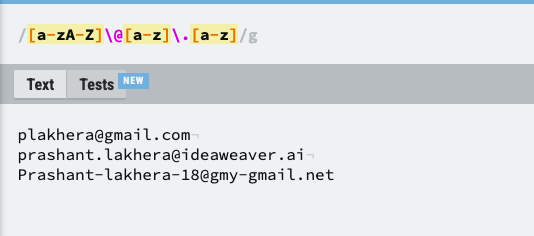
Here are some example email addresses:
plakhera@gmail.com
prashant.lakhera@ideaweaver.ai
prashant-lakhera-18@gmy-gmail.net
A simple beginner pattern is:
[a-zA-Z0-9.-]+@[a-z-]+\.[a-z]+This pattern is useful for learning the pieces of regex:
[a-zA-Z0-9.-]+matches one or more letters, digits, dots, or hyphens before @.@matches the @ character.[a-z-]+matches one or more lowercase letters or hyphens in the domain.\.matches a literal dot.[a-z]+matches one or more lowercase letters after the dot.
The + Quantifier
The + symbol means “one or more of the previous token.” For example, [a-z]+ means one or more lowercase letters. Without +, the character class would match only one character.
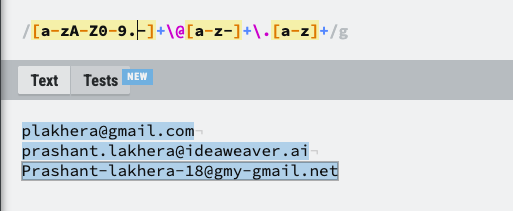
Beginner tip: This is a teaching regex, not a complete RFC-grade email validator. Real email syntax has many edge cases. For DevOps scripts, use regex when you need practical extraction or basic validation, not when you need to implement the complete email standard yourself.
Useful Shortcuts: \w and \s
\wmatches a word character: letters, digits, and underscore.\smatches whitespace, such as a space or tab.\Wand\Sare the opposite forms: non-word and non-whitespace.
5. Example 3: Matching a URL
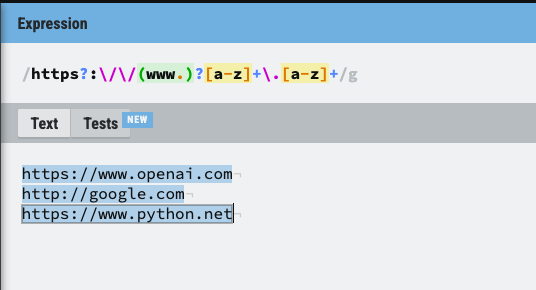
Here is one pattern for a URL:
https?:\/\/(www.)?[a-z]+\.\w+Written in Python, you normally do not need to escape the forward slashes, so the same idea is easier to read as:
https?://(www\.)?[a-z]+\.\w+Piece by piece:
| Regex piece | Meaning | Example |
|---|---|---|
http |
matches the letters http | http |
s? |
s is optional, so http and https are both accepted | http / https |
:// |
matches the literal characters :// | :// |
(www\.)? |
the www. part is optional | www. or nothing |
[a-z]+ |
one or more lowercase letters | openai |
\. |
literal dot | . |
\w+ |
one or more word characters | com |
Beginner tip: The ? quantifier means zero or one occurrence—not zero or more. Zero or more is written with * .
6. DevOps Example: Parsing an Apache Access Log
Regex becomes much more useful in DevOps when we apply it to real logs. Here are some Apache-style access-log entries:
194.5.53.89 www.ideaweaver.ai - [02/Oct/2026:21:51:29 +0000] "POST /xmlrpc.php HTTP/1.1" 200 88 "-" "Mozilla/5.0 (Windows NT 10.0; Win64; x64) AppleWebKit/537.36 (KHTML, like Gecko) Chrome/63.0.3239.132 Safari/537.36" | - | - - 0.001 - 0 NC:050000 UP:-20.191.45.212 www.ideaweaver.ai - [02/Oct/2026:21:42:34 +0000] "GET /wp-includes/images/w-logo-blue-white-bg.png HTTP/1.1" 200 4119 "https://www.ideaweaver.ai/wp-includes/images/w-logo-blue-white-bg.png" "Mozilla/5.0 (compatible; DuckDuckGo-Favicons-Bot/1.0; +http://duckduckgo.com)" | TLSv1.3 | - - 0.000 - 0 NC:000000 UP:-20.191.45.212 www.ideaweaver.ai - [02/Oct/2026:21:42:34 +0000] "GET /favicon.ico HTTP/1.1" 302 5 "https://www.ideaweaver.ai/favicon.ico" "Mozilla/5.0 (compatible; DuckDuckGo-Favicons-Bot/1.0; +http://duckduckgo.com)" | TLSv1.3 | 0.885 0.908 0.908 MISS 0 NC:000000 UP:-Extract the IP Address
Python’s re module provides regular-expression support. The script below reads the log file one line at a time, searches for an IPv4-looking value, and prints the first match from each line.
import re

with open('access.log', 'r') as file:
    for line in file:
        ip_address = re.search(r'\d{1,3}\.\d{1,3}\.\d{1,3}\.\d{1,3}', line)

        if ip_address:
            print(ip_address.group())
The pattern works like this: four groups of 1 to 3 digits, separated by literal dots. The backslash before each dot is important because an unescaped dot would match any character.
Beginner tip: This pattern finds the shape of an IPv4 address, but it does not check whether every number is between 0 and 255. That is often acceptable for quick log extraction; stricter validation needs additional logic.
Extract the URL / Host from the Log
import re

with open('access.log', 'r') as file:
    for line in file:
        url = re.search(r'https?://[^/"\s]+/', line)

        if url:
            print(url.group())
Why the r Prefix Is Used
In Python, r before a quoted string creates a raw string. Raw strings make regex patterns easier to read because backslashes such as \s and \d can be written directly without adding another layer of escaping for Python.
r'https?://[^/\"\s]+/'What re.search() Does
re.search() scans the input string and returns the first part that matches the pattern. If a match is found, it returns a match object. Calling .group() returns the exact text that matched. If nothing matches, re.search() returns None, so the if url: check safely skips that line.
URL Pattern, Piece by Piece
| Regex piece | Meaning | Example |
|---|---|---|
http |
the letters http | http |
s? |
optional s | http or https |
:// |
literal :// | :// |
[^/"\s]+ |
one or more characters that are not /, " or whitespace | www.ideaweaver.ai |
/ |
the slash immediately after the hostname | / |
For the sample referer below:
"https://www.ideaweaver.ai/favicon.ico"the pattern matches https://www.ideaweaver.ai/ and stops immediately after the first slash following the hostname. The rest of the path, favicon.ico, is not included.
7. Quick Recap
The easiest way to learn regex is to connect each symbol to a small practical task:
- Use
\dfor digits and\sfor whitespace. - Use
[]when you want one character from a controlled set. - Use
{}to say exactly or approximately how many times something should repeat. - Use
+for one or more,?for zero or one, and*for zero or more. - Escape special characters when you want them literally—for example, use
\.for a dot. - Use
^and$when the whole string must follow the pattern. - In Python, use the
remodule and raw strings such asr"\d+"for readable regex patterns.
For DevOps work, focus first on extracting useful information from logs and command output. Once that feels comfortable, move on to stricter validation and more advanced grouping.
References