Week 2 · System Design
System Design from Scratch: Scaling from 100 to 100,000 Users
A sequence of problems, decisions, and trade-offs.
The method
What breaks next?
Begin with the simplest possible architecture. When a bottleneck appears, understand why it is happening and introduce only the component needed to solve that problem.
Requirements and reasoning should drive architecture, not the other way around.
Starting point
A simple application
We only have 10–100 users.
10–100 Users
      ↓
 Application
      ↓
   Database
We don't need Kubernetes, multiple databases, queues, caching, or sharding.
Do not add complexity before you have a problem that requires it.
Traffic grows
Then the application becomes popular
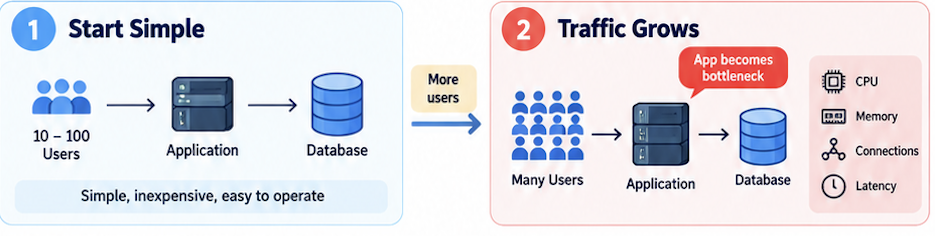
100 users → 100,000 users. The architecture is still one application and one database.
First bottleneck
One application server cannot handle all the incoming traffic
1,000 users  → CPU 40%
10,000 users → CPU 75%
100,000 users → CPU 95–100%
Requests start waiting. Latency increases. Timeouts. Poor user experience.
Step 1
Vertical Scaling / Scale Up
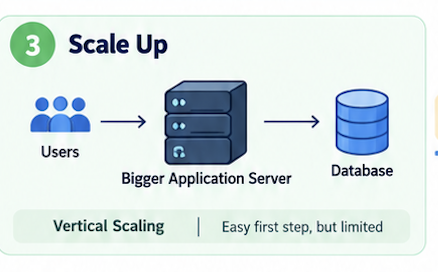
4 CPU / 16 GB RAM becomes 16 CPU / 64 GB RAM. Often the easiest first step. There is a limit.
The catch
We still have ONE application server
Application Server
        ❌
        ↓
Entire application unavailable
So instead of making one machine endlessly bigger, we add more application servers.
Step 1 continued
Horizontal Scaling / Scale Out
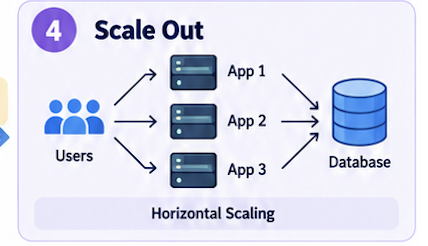
App 1 → 2,500 requests/sec
App 2 → 2,500 requests/sec
App 3 → 2,500 requests/sec
App 4 → 2,500 requests/sec
New problem
Which application server should receive the request?
The user should not have to know:
Send request 1 → App 1
Send request 2 → App 3
Send request 3 → App 2
We need something in front of the application servers.
First new component
Load Balancer
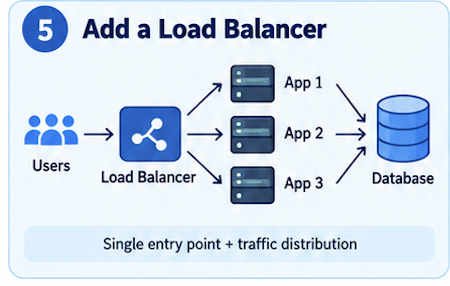
The application layer can now scale horizontally.
Problem 2
How should the Load Balancer distribute traffic?
- Round Robin — one after another
- Least Connections — send to the least busy server
- Weighted Load Balancing — servers have different capacities
What routing algorithm should we use?
Problem 3
What happens when an application server fails?
App 1 → /health → 200 OK
App 2 → /health → 200 OK
App 3 → /health → Failure
The Load Balancer temporarily removes App 3 from the backend pool. This introduces Health Checks.
Problem 4
What happens to user sessions?
Sticky Sessions
User A → App 1
User A → App 1
User A → App 1
A more scalable design is often:
Application Servers = Stateless
Stateless application servers are generally easier to scale horizontally.
Problem 5
Layer 4 vs Layer 7
Layer 4 needs IP, Port, TCP / UDP.
Client
  ↓
TCP Connection
  ↓
Layer 4 Load Balancer
  ↓
Backend Server
Layer 7 understands HTTP.
/api/users  → User Service
/api/orders → Order Service
/api/chat   → AI Service
Problem 6
What if the Load Balancer itself fails?
Before: One Application Server → SPOF
After:  One Load Balancer     → SPOF
The Load Balancer layer itself must also have redundancy, failover, and high availability.
Do not remove a Single Point of Failure by simply creating a new Single Point of Failure somewhere else.
Next bottleneck
Every application server is still talking to the same database
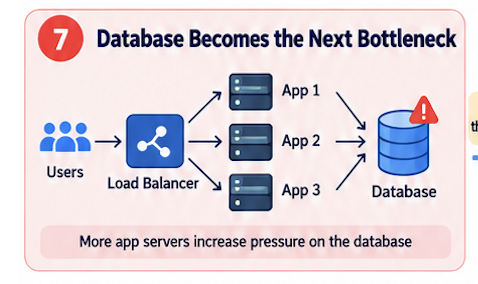
Problem → Solution → New Problem → Deep Dive → Evolve the Architecture
Step 2A
Optimize the existing database
SELECT * FROM users WHERE email = 'user@example.com';
If email is not indexed, the database may need to scan a huge amount of data.
Before scaling infrastructure, make sure the current infrastructure is being used efficiently.
Step 2B
Vertical Scaling the Database
4 CPU / 16 GB RAM / 500 GB SSD
        ↓
16 CPU / 64 GB RAM / Faster SSD/NVMe
Often a perfectly reasonable next step. There is still ONE DATABASE.
Step 2C
Database Replication
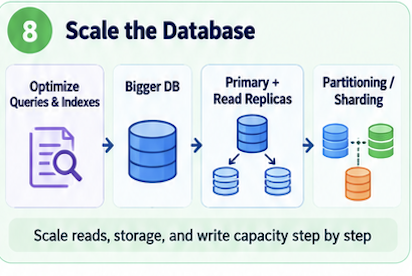
Replication can help with availability, disaster recovery, and sometimes read scalability.
Read replicas
Distribute the reads
100K Users
    ↓
Load Balancer
    ↓
Multiple App Servers
    ↓
 ┌─────────────────────┐
 │    Database Layer   │
 ├─────────────────────┤
 │ Primary   ← Writes  │
 │ Replica 1 ← Reads   │
 │ Replica 2 ← Reads   │
 │ Replica 3 ← Reads   │
 └─────────────────────┘
Replication maintains copies. A read replica is specifically a replica used to serve read traffic.
Step 2D
The primary becomes the write bottleneck
Reads  → Replica 1 / Replica 2 / Replica 3
Writes → Primary
We can distribute reads. All writes are still going to ONE PRIMARY DATABASE.
Another problem
Data size
100K users → 1M → 10M → 100M users
1 billion rows
One database server has to handle all the data, all the writes, all the indexes, and all the queries.
How can we divide the data?
Step 2E
Partitioning
Partitioning means dividing a large dataset into smaller logical pieces.
             Database
                ↓
      ┌─────────┼─────────┐
      ↓         ↓         ↓
Partition 1 Partition 2 Partition 3
Those partitions may still exist on ONE DATABASE SERVER.
Step 2F
Sharding
Partitioning = divide the data
Sharding = distribute those partitions across machines
Shard 1 → Users 1–1M
Shard 2 → Users 1M–2M
Shard 3 → Users 2M–3M
Now we are scaling the database horizontally.
Shard key
How do we decide which shard gets the data?
hash(user_id) → shard

User A → Shard 1
User B → Shard 3
User C → Shard 2
A good shard key should distribute data and traffic relatively evenly.
New problem
Hot Shards
US     → Shard 1 → 80%
Europe → Shard 2 → 10%
Asia   → Shard 3 → 10%
We technically have three shards. But Shard 1 is still overloaded.
New problem
Scatter-Gather
“Find the 100 most active users in the entire system” may need every shard.
Query → Shard 1 / Shard 2 / Shard 3 → Merge Results
Scaling solves one problem and introduces another.
One more problem
Rebalancing
4 shards become 8 shards. Some existing data may need to move.
Moving a large amount of data while keeping the application available can be difficult, which is one reason not to jump to sharding too early.
Database evolution
Seven stages
1 Single Database
2 Optimize queries / indexes
3 Vertical Scale Database
4 Primary + Replicas
5 Writes → Primary, Reads → Replicas
6 Partition the data
7 Shard across multiple database servers
Even with a scalable database, why should we repeatedly hit the database for the same frequently requested data?
Cache
Reduce repeated expensive reads
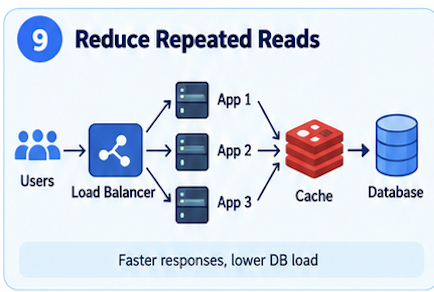
In general, a cache read may take around 1 ms or less, while the same request from the database may take 10–20 ms or more.
Cache path
Check the cache first
Request → Check Cache → Cache Hit?
Yes → Return
No  → Database → Update Cache → Return
Cache scales too
What happens when the cache becomes the bottleneck?
                Cache 1
               ↗
Application → Cache 2
               ↘
                 Cache 3
This introduces partitioning, consistent hashing, replication, eviction, TTL, invalidation, and cache stampede.
Cache memory is limited
Cache Eviction
When the cache is full, which item should we remove?
- LRU — Least Recently Used. Common because it is simple and keeps recently used items.
- LFU — Least Frequently Used
- FIFO — First In, First Out
Problem 5
Cached data can become stale
Database → Alicia
Cache    → Alice
TTL — Time To Live gives the cache entry an expiration time.
Home feed → 30-second TTL
Profile card → a few minutes
Trending list → 60-second TTL
TTL trade-off
Short TTL vs Long TTL
Short TTL
   ↓
Fresher data
   ↓
More cache misses
   ↓
More database traffic
Long TTL
   ↓
More cache hits
   ↓
Less database traffic
   ↓
Greater chance of stale data
There is no magic TTL.
Problem 6
Cache Stampede / Thundering Herd
A popular entry expires. 10,000 requests miss at once.
Only one request refreshes the cache
9,999 requests wait / use a slightly stale value
Rather than 10,000 database queries.
Another mechanism
Active / Explicit Cache Invalidation
user changes profile photo → invalidate profile:user123
permission changes → invalidate related authorization cache immediately
Good for data that must stay correct. Trade-off: fresher data, but more application complexity.
The rule
TTL or Active Invalidation?
It depends on the type of data, and in many systems we use both.
- TTL when slightly stale data is acceptable: home feed, trending list, recommendations
- Active Invalidation when stale data is dangerous: privacy, permissions, account state
TTL is easier, but explicit invalidation is safer for critical data.
The lesson
Identify the bottleneck. Introduce a solution. Understand the trade-offs. Solve the next problem.
We started with one application and one database. We scaled the application, then the database, then introduced a cache. Each fix created the next question.