Debugging Linux Performance Issues Using CrewAI
In the previous lessons, we learned that Large Language Models can do much more than simply answer questions. If we connect an LLM with the right tools, it can collect information from real systems, analyze that information, and help us troubleshoot problems.
Start with a very common DevOps problem ↓
Prefer watching the complete implementation?
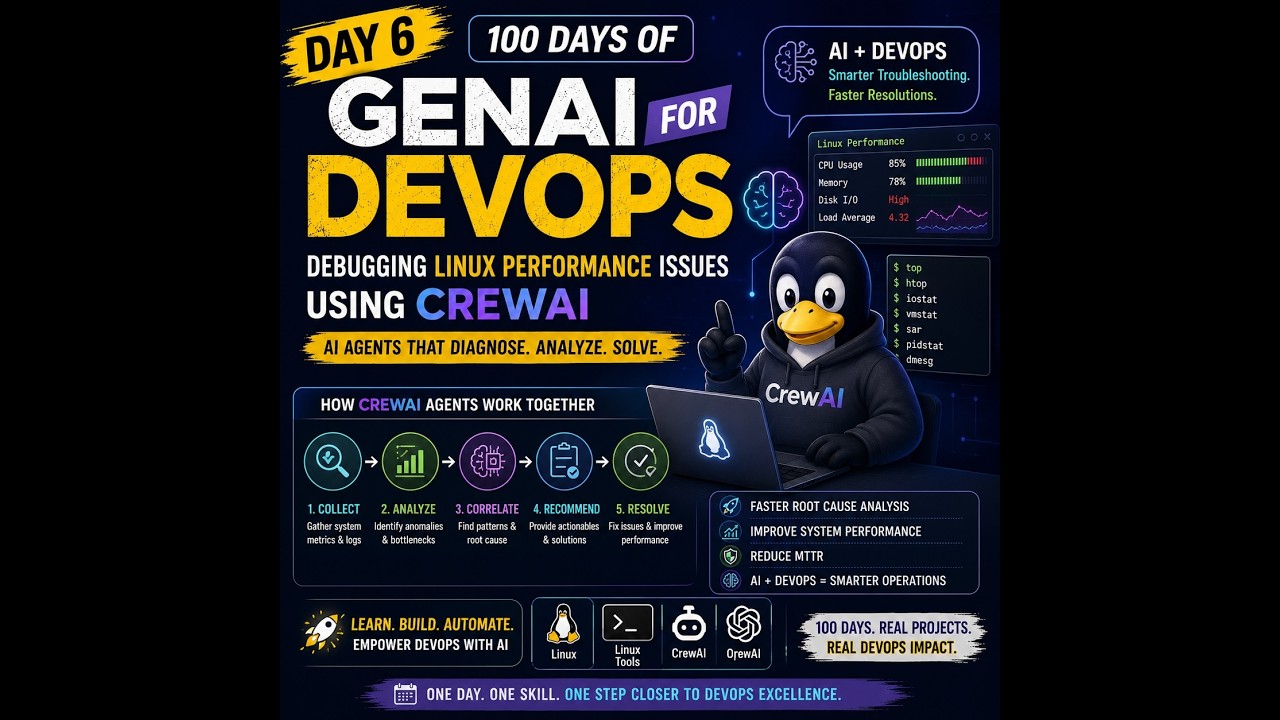
Today, we are going to apply that idea to a very common DevOps problem:
A Linux server is slow. How do we figure out what is wrong?
Instead of manually running many Linux commands and analyzing their output one by one, we are going to build an AI-powered Linux Performance Debugging Agent using CrewAI.
The basic idea is:
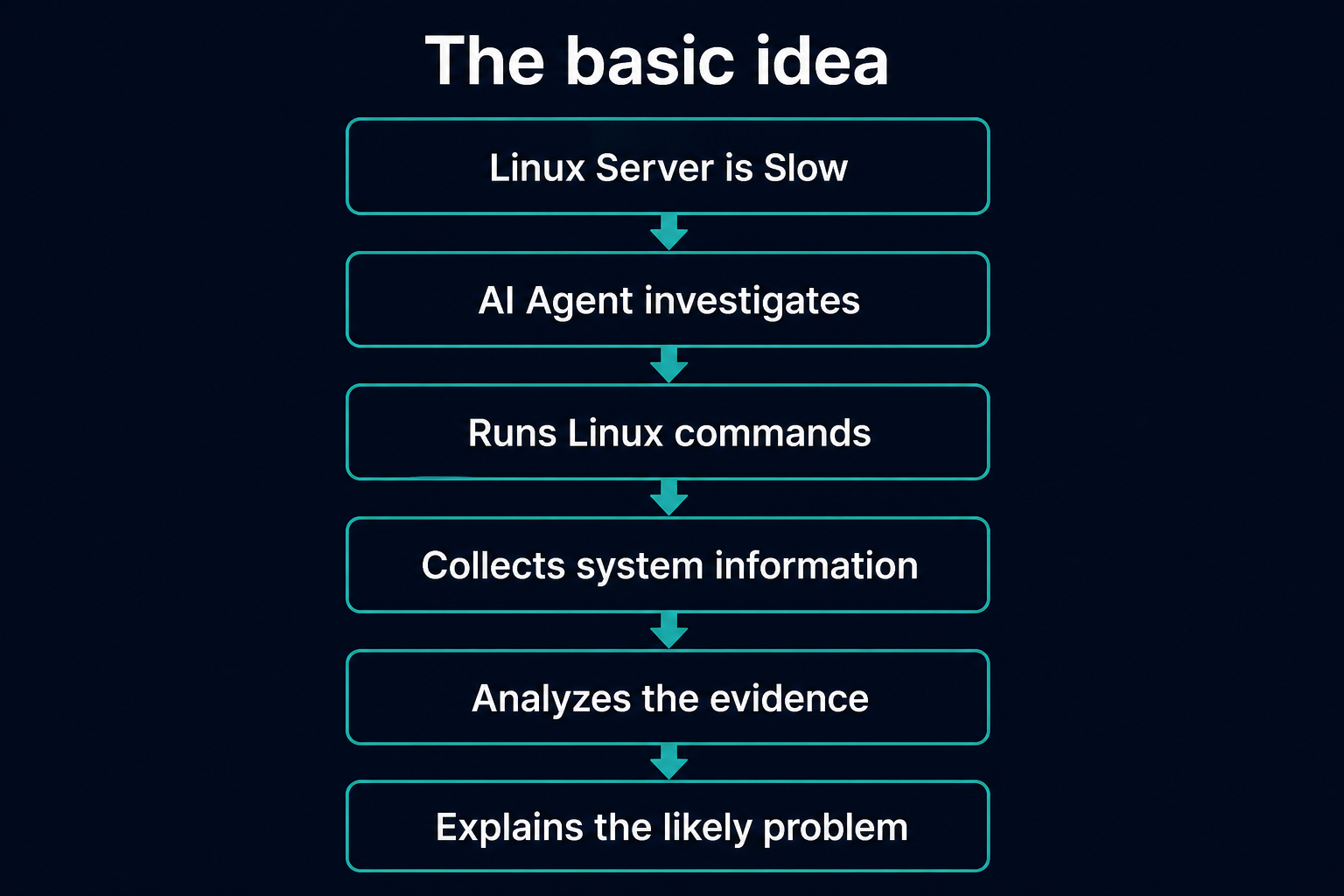
By the end of this lesson, you should understand not only how to build the agent, but also why AI agents are useful for DevOps troubleshooting.
Install what you need before you build
First, install CrewAI and its tools package:
pip install crewai crewai-tools
Next, install the Linux packages used by our investigation tools.
pidstat comes from sysstat. ss comes from iproute2.
apt install sysstat iproute2
Later in the lesson, we will intentionally create CPU load so the agent has something real to investigate. Install that helper now too:
apt install stress-ng
Let's start with the problem
Imagine someone sends you this message:
The production Linux server is very slow. Can you check what's wrong?
If you are a DevOps or SRE engineer, you probably don't immediately restart the server.
First, you investigate.
You may ask:
Is the CPU overloaded?

Is the server running out of memory?

Is the disk full?

Is disk I/O slow?

Which process is consuming resources?

Is the system swapping?

Is there unusual load?
Then you start running Linux commands.
For example:
uptime
to check system load.
Then:
free -m
to check memory.
Then:
df -h
to check disk usage.
Then you might inspect busy processes with commands such as:
ps aux --sort=-%cpu
ps aux --sort=-%mem
For I/O and network evidence, you might also run:
pidstat -d 1 2
ss -tunap
The important point is that troubleshooting is usually not one command.
It is a process.
How does a human troubleshoot?
An experienced engineer usually follows something like this:
Problem reported
      ↓
Check system
      ↓
Collect information
      ↓
Analyze results
      ↓
Run another command
      ↓
Collect more information
      ↓
Form a hypothesis
      ↓
Find root cause
For example, suppose:
uptime
shows extremely high load.
That creates another question:
Why is the load high?
So you check CPU usage.
Perhaps CPU usage looks normal.
Now you might think:
Maybe processes are waiting for disk I/O.
So you run another command.
This is what makes troubleshooting interesting.
The next step depends on what you discovered in the previous step.
Where can AI help?
Imagine giving an AI system this task:
Investigate why this Linux server is slow.
But instead of only allowing the AI to give generic advice, we give it access to Linux troubleshooting tools.
Now the AI could potentially do something like:
AI:
I should check the system load.

        ↓

Run:
uptime

        ↓

Result:
load average: 12.4, 11.8, 10.9

        ↓

AI:
Load is high. Let me check CPU and memory.

        ↓

Run:
ps aux --sort=-%cpu
ps aux --sort=-%mem

        ↓

Analyze results

        ↓

AI:
CPU looks normal, but I/O wait is high.
Let me investigate disk activity.

        ↓

Run:
pidstat -d 1 2

        ↓

Generate diagnosis
Now the LLM is doing more than answering a question.
It is participating in the investigation process.
That is where the idea of an AI agent becomes useful.
What is an AI Agent?
For beginners, think of an AI agent as:
An LLM that can reason about a task and use tools to help complete that task.
A normal chatbot might work like this:
Question
   ↓
LLM
   ↓
Answer
For example:
User:
"My Linux server is slow."

        ↓

LLM:
"Check CPU, memory and disk."
That's useful, but the model hasn't actually checked anything.
An agent can work differently:
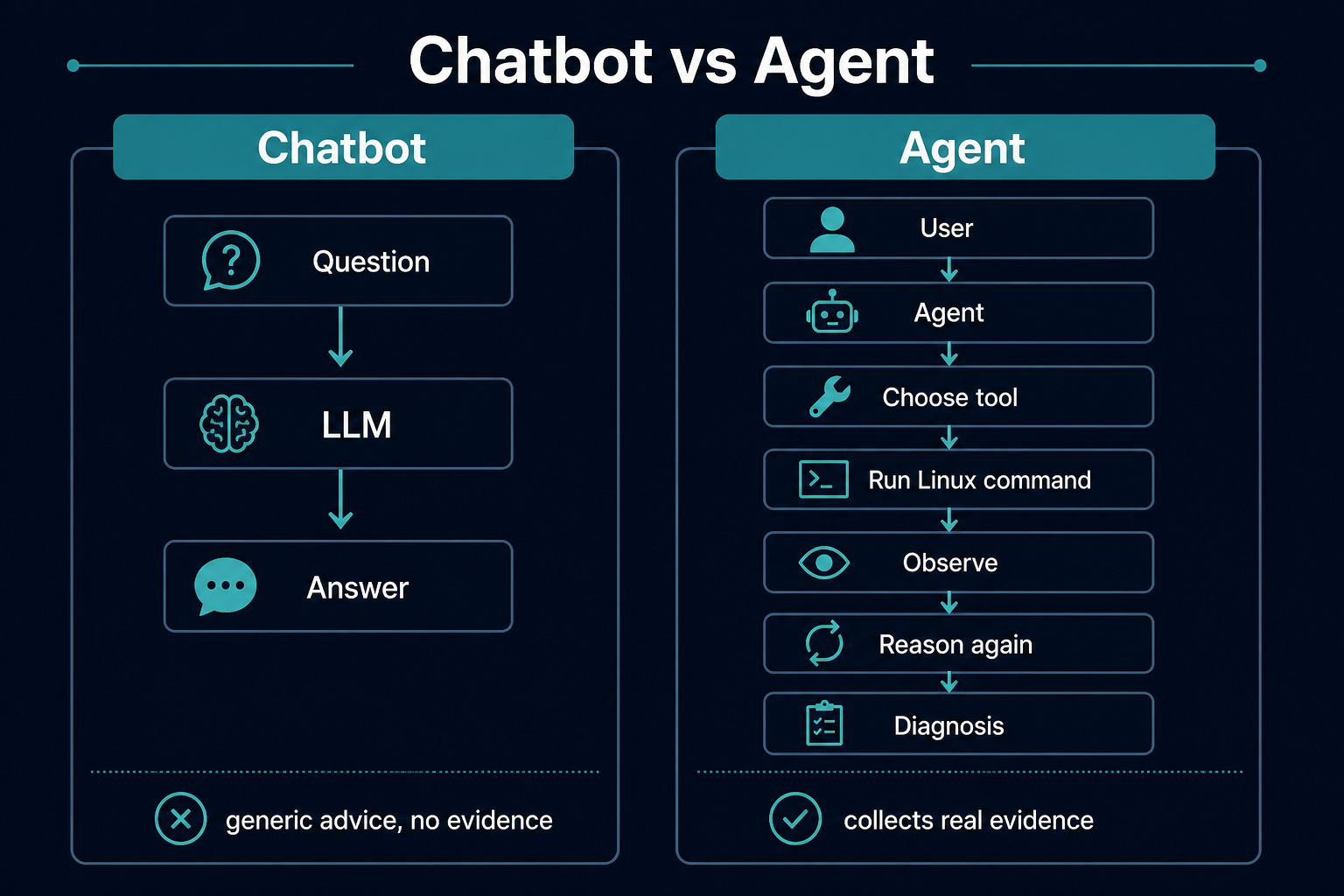
That difference is very important.
The agent doesn't just tell us:
Run free -m.
It can be designed to run the tool and inspect the result.
What is CrewAI?
For this project, we use CrewAI.
CrewAI is a framework for building AI agents.
The basic idea behind CrewAI is surprisingly simple.
Think about a real engineering team.
You might have:
Linux Engineer
Security Engineer
Network Engineer
DevOps Engineer
SRE
Each person has a different responsibility.
CrewAI allows us to create AI agents with similar specialized roles.
For example:
Linux Performance Engineer
        ↓
Responsible for investigating
Linux performance problems
We can give this agent:
- A role
- A goal
- Instructions
- An LLM
- Tools
Then we give it a task to complete.
The main building blocks
For our project, there are a few concepts we need to understand.

An Agent is our AI worker
In CrewAI, an agent is usually defined with three things:
role
goal
backstory
For example, we might create an agent whose role is:
Senior Linux Performance Engineer
Its goal might be:
Diagnose Linux performance problems using system evidence.
We can also give it a backstory such as:
You are an experienced Linux engineer who specializes in CPU, memory, disk, process, and system performance troubleshooting.
This helps the LLM understand how it should approach the problem.
Think of it as assigning someone a job.
Employee

Name:
Linux Performance Agent

Role:
Senior Linux Engineer

Goal:
Find the cause of Linux performance problems
An agent needs something to do
That is the Task.
A task usually has:
description
expected outcome
For example, the description might be:
Investigate the Linux server and determine why the system is running slowly.
The task might ask the agent to investigate:
CPU
Memory
Disk
Load
Processes
I/O
Swap
and the expected outcome might be a clear root cause report.
So:
Agent = Who performs the work

Task = What work needs to be done
This is one of the most important parts
The LLM itself cannot magically see our Linux server.
We need to give it tools.
For example:
CPU Tool
Memory Tool
Disk Tool
Process Tool
System Load Tool
Behind those tools, we can execute Linux commands.
For example:
CPU
ps aux --sort=-%cpu
Memory
ps aux --sort=-%mem
IO
pidstat -d 1 2
Network
ss -tunap
The tool acts as a bridge between the AI and the operating system.
Why does the AI need tools?
Suppose we ask ChatGPT:
What is the CPU utilization of my Linux server?
Without access to your server, the model cannot know.
It might tell you:
Run top.
But if we give an agent a CPU inspection tool, the workflow becomes:
Agent
   ↓
Calls CPU Tool
   ↓
Linux command executes
   ↓
Real CPU information returned
   ↓
Agent analyzes it
Now the answer is based on real evidence from the server.
This is a major concept in AI-powered DevOps.
The LLM is the reasoning engine behind our agent
It receives information such as:
System load
CPU usage
Memory usage
Disk usage
Running processes
and tries to understand what those numbers mean.
For example:
CPU usage: 98%
Process: python
Memory usage: normal
Disk usage: normal
The LLM might conclude:
The server slowdown appears to be CPU-related. A Python process is consuming most of the available CPU.
But if the evidence looks like:
CPU usage: 20%
I/O wait: 60%
Disk latency: high
the conclusion might instead be:
The bottleneck appears to be disk I/O rather than CPU.
This is why collecting evidence is important.
A Crew is the group responsible for completing the work
Finally, CrewAI gives us a Crew.
A crew usually brings together:
tasks
agents
workflow
The workflow can be sequential (one step after another) or hierarchical (a manager style agent coordinates the others).
For a simple project, we might only have one agent:
Crew
 |
 └── Linux Performance Agent
For a more advanced project, we could eventually have:
Linux Troubleshooting Crew
        |
        ├── CPU Agent
        ├── Memory Agent
        ├── Disk Agent
        └── Network Agent
Each agent could investigate a different part of the system.
But for learning, starting simple is much better.
Our architecture
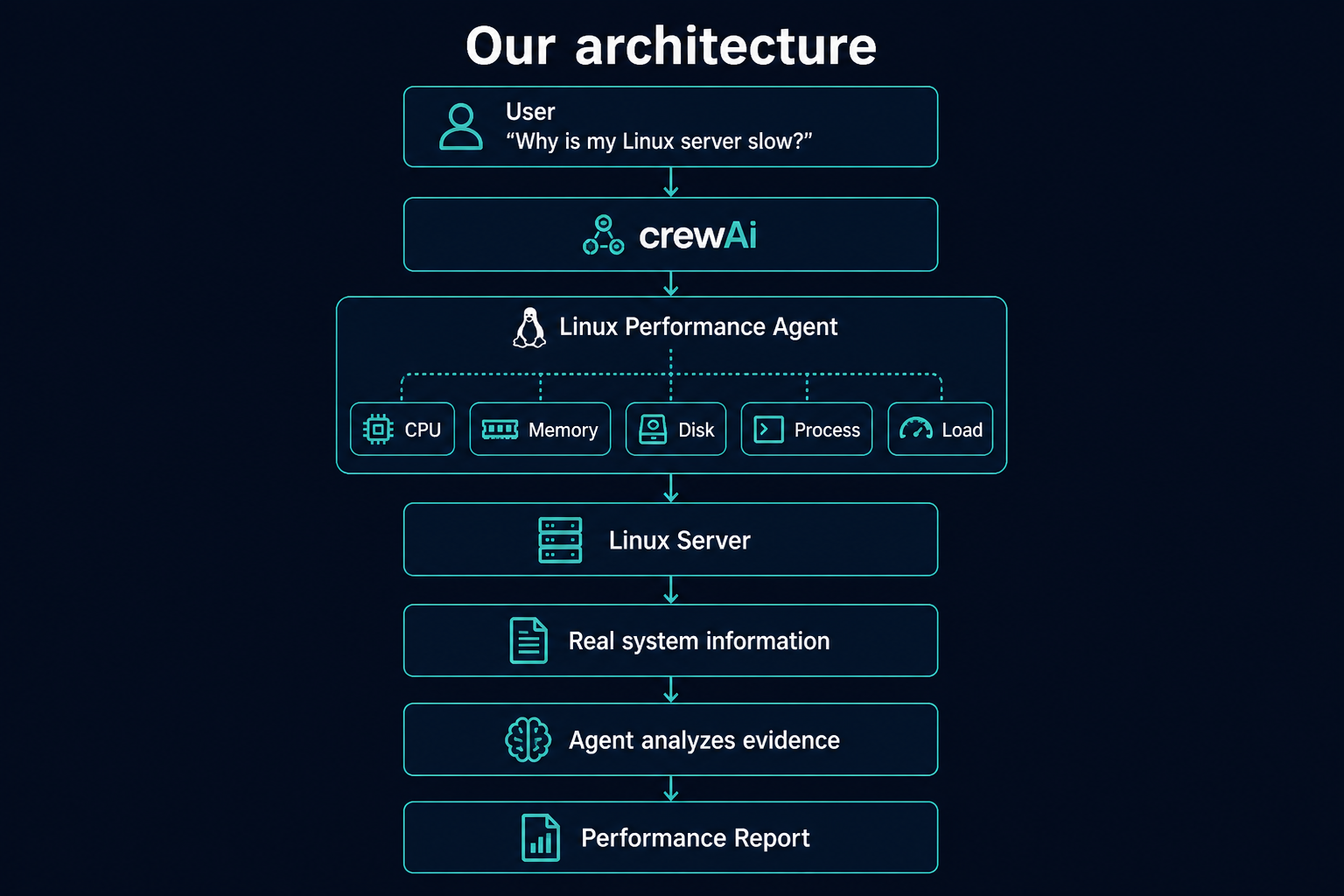
Now we can put everything together.
Our system looks something like this:
Create a slow server so the agent has something to find
Before you run the agent, it helps to create a real performance problem on a test machine.
If you have not installed it yet:
apt install stress-ng
Then generate CPU load for about 10 minutes:
stress-ng --cpu 0 --timeout 600s --metrics-brief &
Now the machine should feel busy. When the agent checks CPU with ps aux --sort=-%cpu, it should see the stress process near the top.
Use this only on a test server or local lab machine, not on production.
Let's understand this with an example
Suppose our server is slow.
The investigation might begin with:
uptime
and return:
load average: 8.5, 7.9, 6.8
The agent sees that the system load is high.
It might then inspect CPU usage.
Suppose it discovers:
CPU Usage: 95%
Now it needs to know which process is responsible.
It checks processes and finds:
PID    COMMAND    CPU
1234   python     92%
Now the agent has evidence.
It can produce something like:
Root Cause:

The Linux server is experiencing high CPU utilization.

A Python process with PID 1234 is consuming approximately
92% CPU.

Recommended next steps:

1. Identify the application associated with PID 1234.
2. Check its logs.
3. Determine whether the CPU usage is expected.
4. Check whether the process entered a loop.
5. Restart the application only if appropriate.
Notice how different this is from:
Try checking CPU.
The agent actually gathered evidence before reaching its conclusion.
The troubleshooting loop
This brings us to an important AI-agent concept.
A useful troubleshooting agent follows a loop:
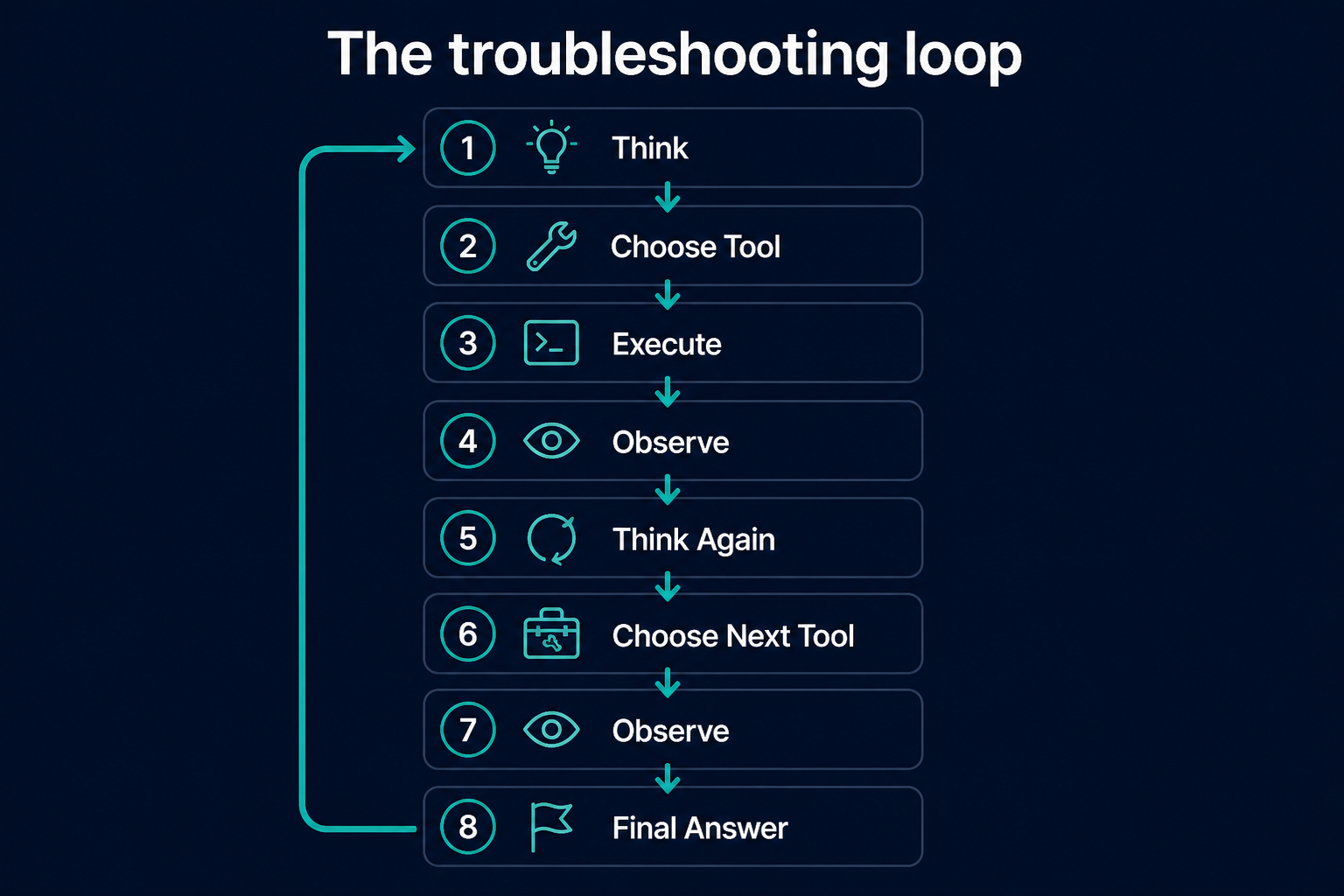
For Linux troubleshooting:
Server is slow
      ↓
Check load
      ↓
Load is high
      ↓
Check CPU
      ↓
CPU looks normal
      ↓
Check I/O
      ↓
I/O wait is high
      ↓
Check disk
      ↓
Disk latency is high
      ↓
Generate diagnosis
Why not send every command at once?
You might wonder:
Why not simply run 50 Linux commands and send everything to the LLM?
Technically, you could.
But that's usually not the best design.
You may collect huge amounts of unnecessary information.
For example, if the problem is clearly CPU-related, collecting thousands of lines of unrelated network information may not help.
A better approach is:
Start broad
    ↓
Identify suspicious area
    ↓
Collect deeper evidence
    ↓
Narrow down the problem
This is also how humans typically troubleshoot.
Memory problem
Suppose the agent checks memory and finds:
Total Memory: 16 GB
Used Memory: 15.5 GB
Available Memory: 300 MB
Swap Usage: High
Now the agent should investigate which process is consuming memory.
It might discover:
java → 10 GB
The final report could say:
Likely Issue:

The server is under memory pressure.

The Java process is consuming approximately 10 GB of RAM,
and the system has started using swap.

This can significantly reduce system performance.

Recommended investigation:

- Check JVM heap configuration.
- Check whether memory usage is continuously increasing.
- Investigate possible memory leaks.
- Review application logs.
Again, the important word is evidence.
Disk problem
Imagine:
CPU: Normal
Memory: Normal
Disk: 99% full
Now the likely problem is different.
The agent might recommend checking:
du
to find large directories.
Perhaps it discovers:
/var/log/application.log
has grown to hundreds of gigabytes.
Now we have a much more useful diagnosis:
The root filesystem is almost full.

Most of the disk usage appears to come from application logs.

Investigate log rotation and application logging configuration.
AI should not blindly fix the server
This is extremely important.
Our first version should focus on:
Observe
Analyze
Recommend
rather than:
Observe
Delete
Kill
Restart
Modify
Why?
Imagine the model decides:
This process is using too much CPU. I'll kill it.
What if that process is your production database?
Or it sees:
/var/log
using lots of disk space and decides to delete it.
That could create a much bigger incident.
A safer architecture is:
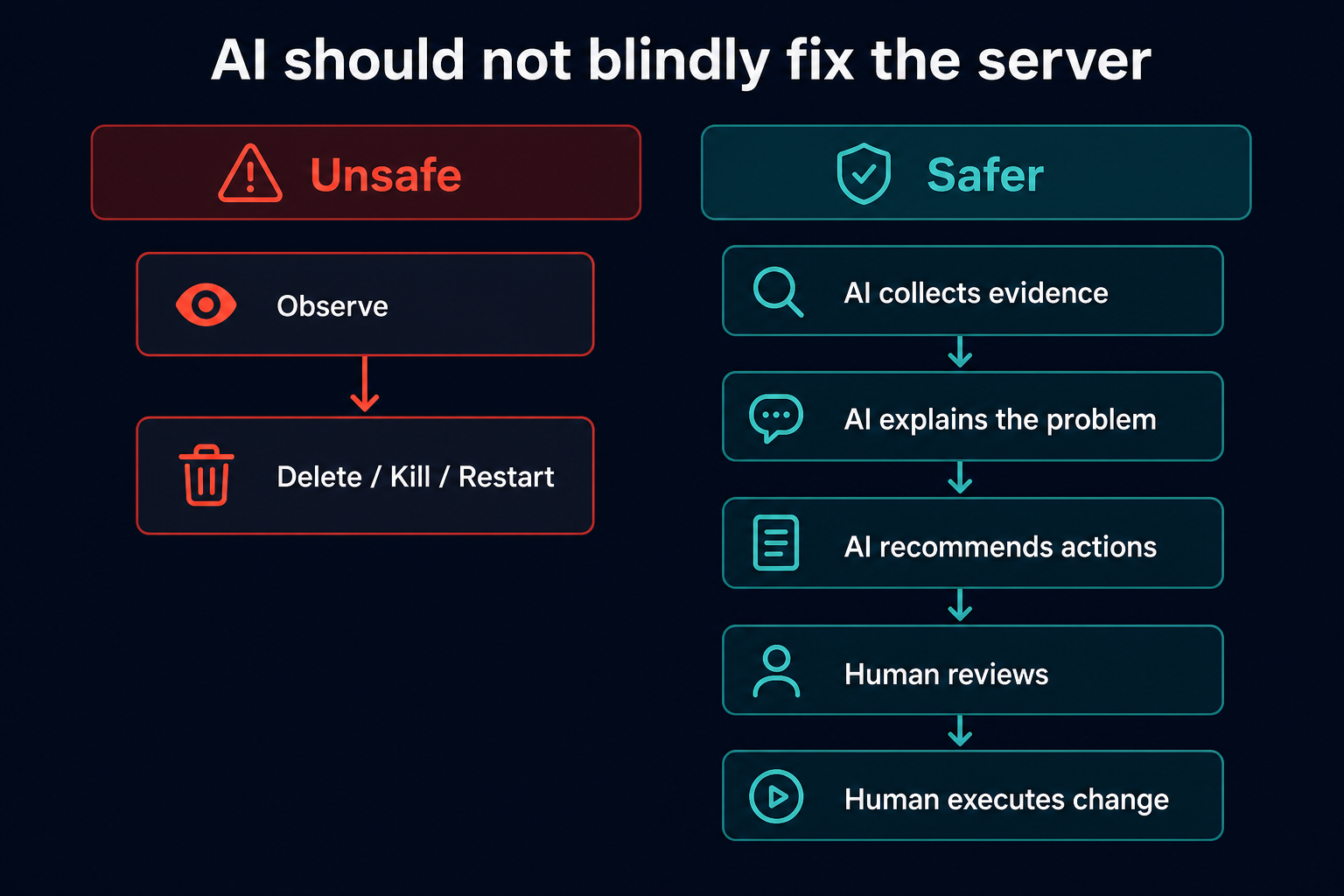
Read-only tools are a good starting point
When learning or building the first version, prefer commands that inspect the system.
For example:
ps aux --sort=-%cpu
ps aux --sort=-%mem
pidstat -d 1 2
ss -tunap
These commands mainly collect information.
Be much more careful with commands such as:
rm
kill
systemctl restart
shutdown
reboot
These modify the system.
Giving an autonomous AI unrestricted access to such commands can be dangerous.
What are we really building?
It might look like we're simply connecting CrewAI to some Linux commands.
But there is a bigger architecture here.
We are building:
Kubernetes example
Instead of Linux commands, imagine Kubernetes tools:
Application is failing
       ↓
Agent
       ↓
kubectl get pods
       ↓
Find failing pod
       ↓
kubectl describe pod
       ↓
Inspect events
       ↓
kubectl logs
       ↓
Analyze evidence
       ↓
Generate RCA
AWS example
The same idea works with AWS:
EC2 instance is slow
       ↓
Agent
       ↓
Check CloudWatch
       ↓
Check CPU
       ↓
Check memory
       ↓
Check disk
       ↓
Check logs
       ↓
Generate diagnosis
CI/CD example
Or perhaps a deployment failed:
Pipeline failed
      ↓
Agent
      ↓
Read pipeline logs
      ↓
Identify failed stage
      ↓
Inspect error
      ↓
Check configuration
      ↓
Suggest fix
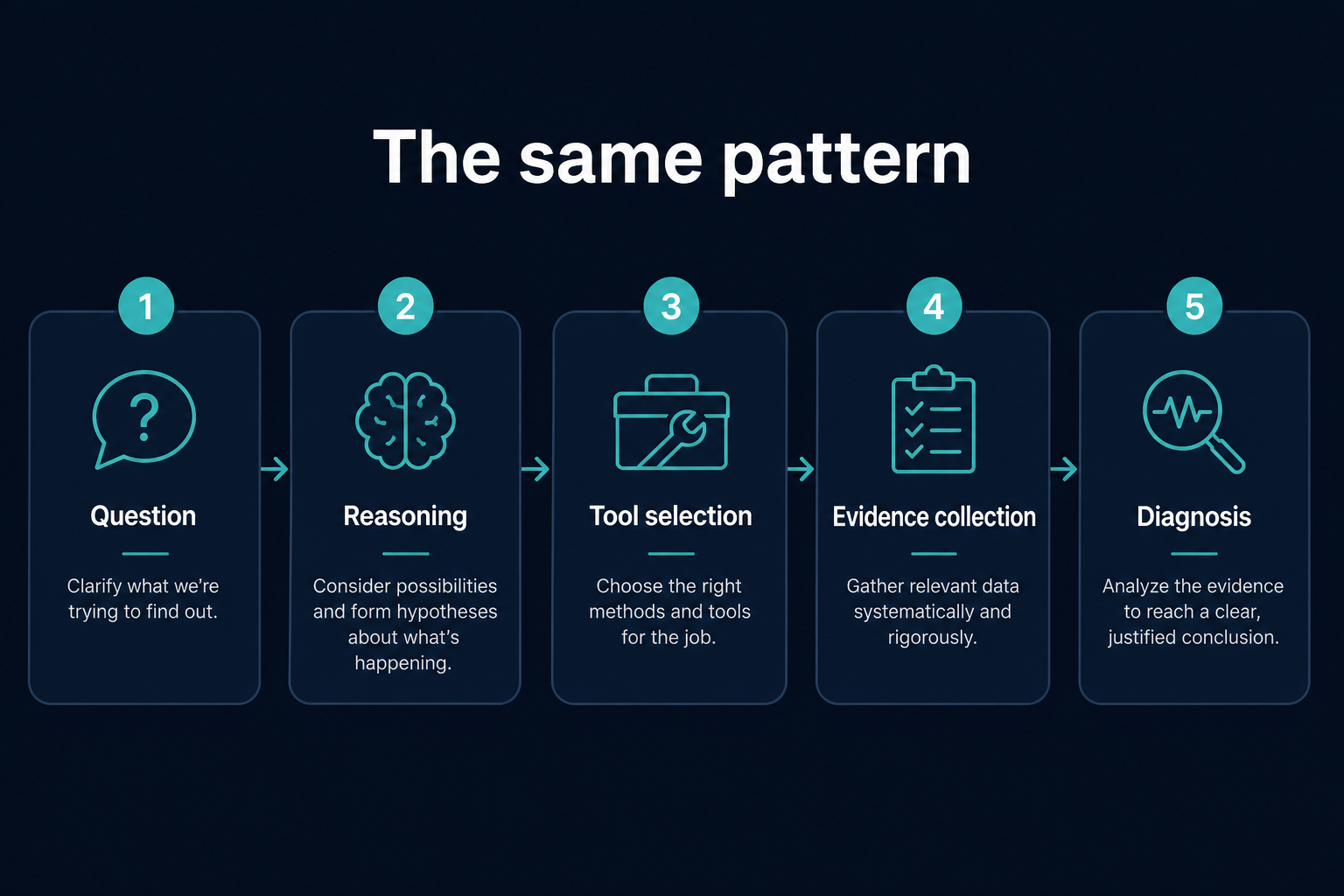
The technology changes.
The basic pattern remains the same.
What should you remember?
There are five important ideas from this project.
1. Linux troubleshooting is an investigation process.
You usually don't know the root cause before collecting evidence.
2. An LLM alone cannot see your Linux server.
It needs tools that can collect real system information.
3. CrewAI helps us build agents with roles, goals, tasks, and tools.
Our agent behaves like a Linux performance engineer.
4. Tools collect evidence; the LLM interprets the evidence.
This distinction is extremely important.
Tool → "CPU is 95%"

LLM → "High CPU may be causing the slowdown."
5. Start with read-only investigation.
Let the AI inspect and recommend.
Keep potentially destructive actions under human control.
If you remember only one thing from this lesson, remember this
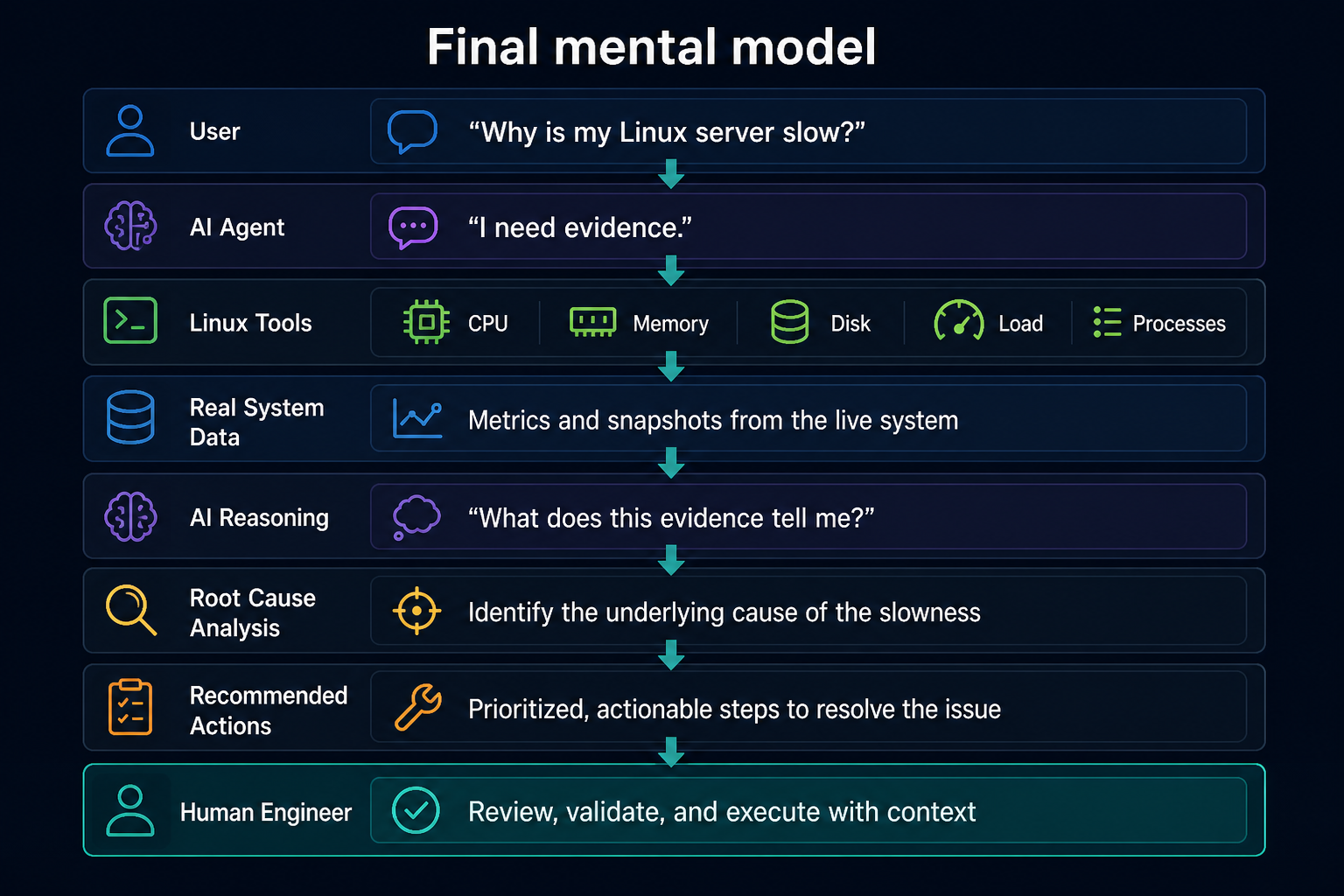
The most important idea is:
The LLM provides reasoning. Tools provide real-world evidence. CrewAI connects the two together.
And that combination is what turns a normal chatbot into something much more useful for DevOps troubleshooting.
GitHub repo: ideaweaver-ai/.../crewai