Model Context Protocol (MCP) — A Beginner-Friendly Deep Dive
If you are learning about AI agents, sooner or later you will hear the term MCP — Model Context Protocol.
At first, MCP can sound complicated. You may hear Host, Client, Server, Tools, Resources, JSON-RPC, stdio, and Streamable HTTP — and wonder why we need all of that just to let an AI model call a tool.
That is exactly the question we are going to answer ↓
Prefer watching the video version?
Instead of starting directly with MCP architecture, we need to understand the problem MCP is trying to solve.
1. Let's go back to the early days of ChatGPT
When ChatGPT was first released, it was extremely good at generating and understanding text.
You could ask:
Explain Kubernetes.
And it could explain Kubernetes.
You could ask:
Write a Python script to analyze Apache logs.
And it could generate the code.
But suppose you asked:
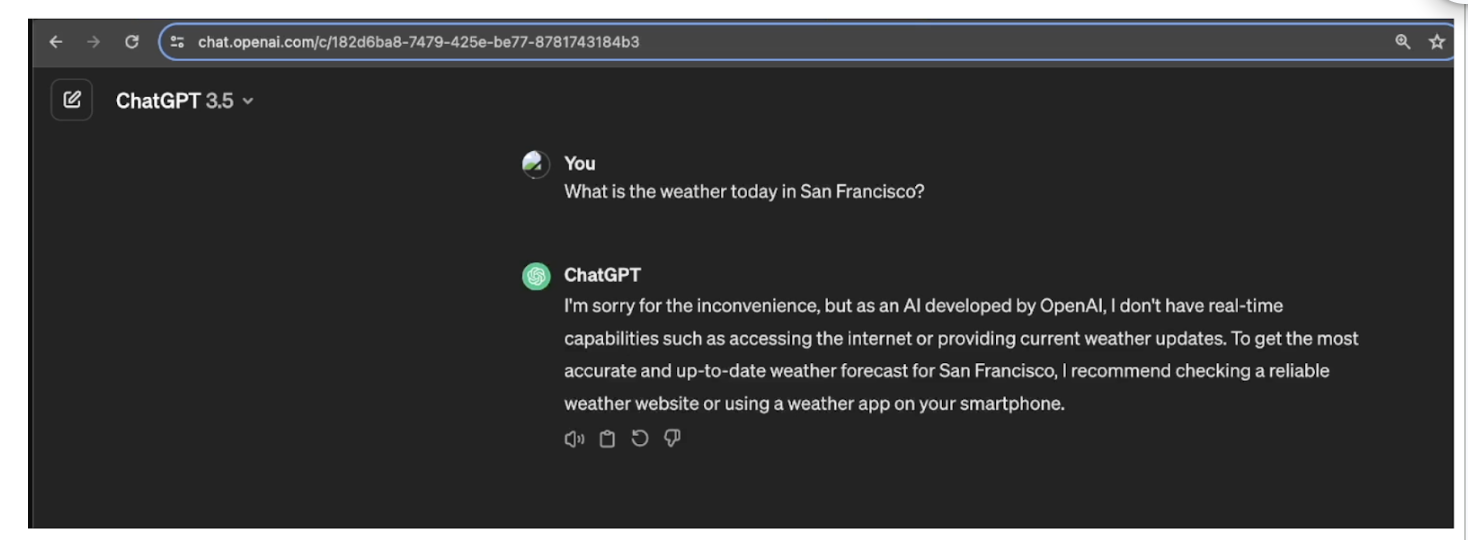
What is the weather in San Francisco right now?
There was a problem.
The model itself did not automatically have access to live weather information.
The same problem appears in DevOps.
Imagine asking an AI model:
Why is my Kubernetes Pod crashing?
To properly investigate this, we may need information such as:
kubectl get pods
kubectl describe pod payment-api
kubectl logs payment-api
But an LLM by itself cannot magically run these commands against your Kubernetes cluster.
This is an extremely important idea:
An LLM can reason about information, but something has to give it access to the outside world.
2. Function calling changed this
One solution was function calling.
Imagine our application has a function:
def get_weather(city):
    ...
The AI model receives the description of this function.
Now the user asks:
What is the weather in San Francisco?
The model can decide:
I need get_weather()
city = San Francisco
But here is the part beginners often misunderstand:
The language model does not actually execute the Python function.
It tells the application:
Please call get_weather with city="San Francisco".
The application executes the function.
The result might be:
18°C, partly cloudy
That result is returned to the model.
The model can finally answer:
It is currently 18°C and partly cloudy in San Francisco.
So conceptually:
User
  ↓
LLM
  ↓
"I need get_weather(city='San Francisco')"
  ↓
Application
  ↓
Weather API
  ↓
Application
  ↓
LLM
  ↓
Final Answer
The model decides.
The application executes.
Keep this distinction in mind because the same basic idea appears again when we learn MCP.
3. From function calling to tool calling
Function calling solved an important problem, but AI applications quickly became more powerful.
They needed access to much more than simple functions.
For example, an AI agent might need to interact with:
Web Search
GitHub
Database
Python
Filesystem
Kubernetes
AWS
Slack
Monitoring systems
This leads us to the broader idea of tools.
A function can be a tool.
But a tool does not necessarily have to be just a Python function.
Think about it like this:
                    Tool
                     │
        ┌────────────┼─────────────┐
        │            │             │
     Function    Web Search     Database
        │
        ├── Kubernetes
        ├── GitHub
        ├── Python
        └── MCP Server
Therefore:
Function calling is one way of doing tool calling.
Tool calling is the broader concept.
4. Now we have another problem
Suppose we are building an AI DevOps assistant.
We want it to interact with GitHub.
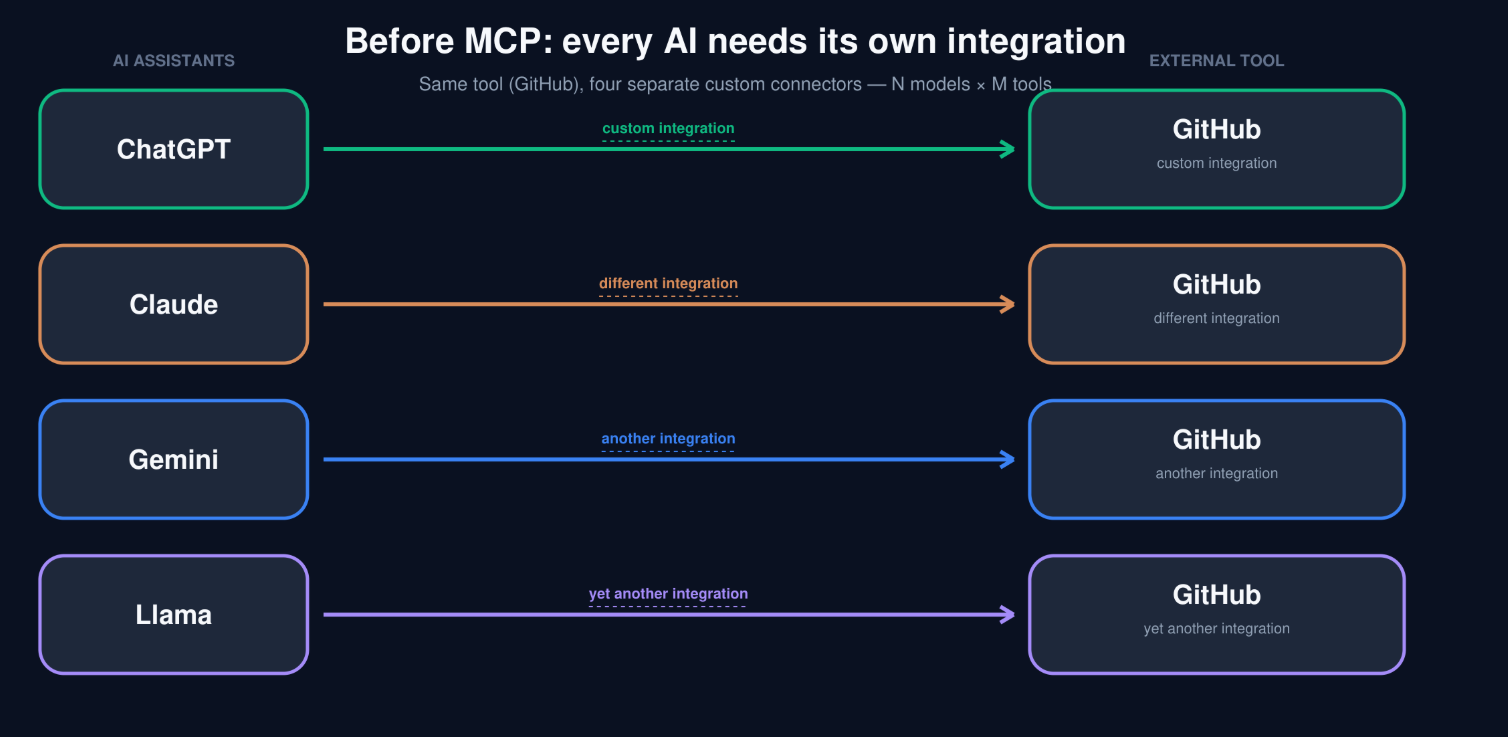
We could write custom integration code.
ChatGPT
   │
   └──────── Custom GitHub Integration ──────── GitHub
Great.
Now suppose we also want Claude to use GitHub.
We may need another integration.
Claude
   │
   └──────── Different Integration ──────────── GitHub
Then Gemini:
Gemini
   │
   └──────── Another Integration ────────────── GitHub
And another AI application.
And another tool.
Very quickly, we get something like:
AI Applications                External Systems

ChatGPT  ─────────────────────→ GitHub
ChatGPT  ─────────────────────→ Kubernetes
ChatGPT  ─────────────────────→ Database

Claude   ─────────────────────→ GitHub
Claude   ─────────────────────→ Kubernetes
Claude   ─────────────────────→ Database

Gemini   ─────────────────────→ GitHub
Gemini   ─────────────────────→ Kubernetes
Gemini   ─────────────────────→ Database
Every combination may require custom integration work.
That does not scale nicely.
5. This is the problem MCP tries to solve
What if we had a standard way for AI applications to communicate with external tools and data sources?
Instead of every AI application inventing its own integration, both sides could agree on a common protocol.
That is the basic idea behind Model Context Protocol, or MCP.
A useful analogy is the web.
Chrome does not need a completely different communication standard for every website.
Safari does not require websites to invent a Safari-specific protocol.
Web browsers and web servers agree on standard protocols.
Conceptually:
Browser
   │
   │ HTTP
   ▼
Web Server
MCP brings a similar standardization idea to AI applications and external capabilities.
AI Application
      │
      │ MCP
      ▼
MCP Server
      │
      ▼
External System
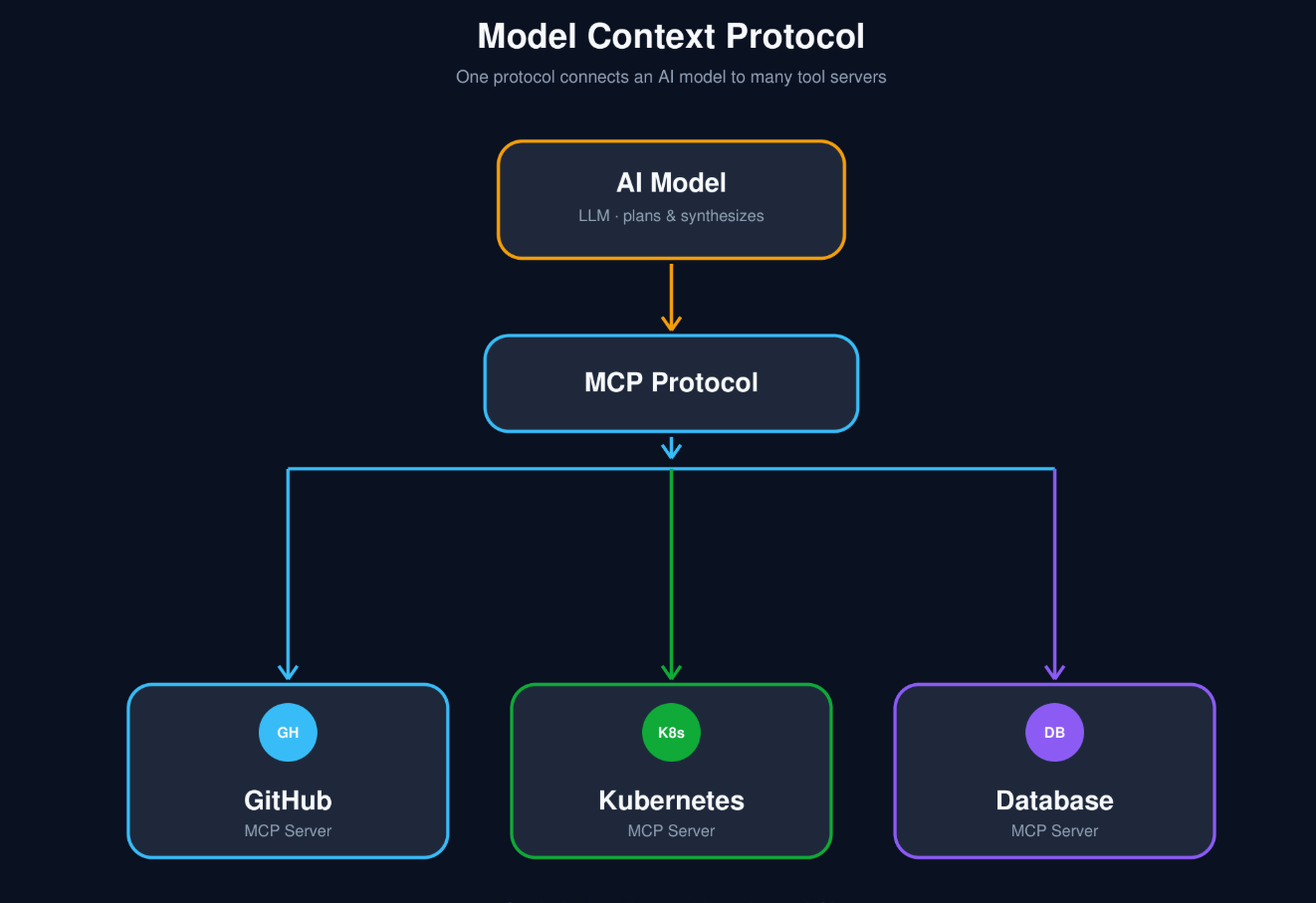
The external system could eventually be:
GitHub
Kubernetes
Database
Filesystem
Slack
AWS
Internal APIs
The important idea is:
MCP standardizes how the AI application's MCP client communicates with an MCP server.
6. What does MCP mean?
MCP stands for Model Context Protocol.
Let's understand those three words individually.
Model
The Model is the AI model that reasons about the user's request.
For example:
GPT
Claude
Gemini
or another LLM
Suppose you ask:
Why is my payment-api Pod failing?
The model can understand what you are asking.
It may also know that useful troubleshooting information includes:
kubectl get pods
kubectl describe pod
kubectl logs
But knowing what should be checked is different from actually checking your cluster.
That brings us to context.
7. What is context?
Many beginners hear "context" and immediately think:
Chat history.
Chat history is context.
But context can include much more.
Think of context as:
The working information available to the model when it is trying to produce an answer.
For our Kubernetes troubleshooting example, context might include:
User question

Conversation history

System instructions

Available tool descriptions

Pod status

Pod logs

Kubernetes events

Deployment configuration
Suppose a tool returns:
payment-api
Status: CrashLoopBackOff
Then another tool returns:
Connection refused while connecting to PostgreSQL
That information becomes useful context for the model.
Now the model has something concrete to reason about.
8. What is a protocol?
A protocol is simply an agreed set of rules for communication.
You already use protocols every day.
For example:
HTTP
DNS
SSH
SMTP
TCP
SSH defines a standard way for systems to communicate for remote access.
HTTP defines a standard way for web clients and servers to exchange messages.
Similarly, MCP defines a standard way for MCP clients and MCP servers to communicate.
So one beginner-friendly way to think about MCP is:
MCP provides a standard communication layer between AI applications and external capabilities.
9. A DevOps example
Suppose you ask:
Show me the logs for the payment-api Pod.
Without access to your Kubernetes environment, the model cannot retrieve those logs.
With an MCP-based integration, the flow could conceptually look like:
You
 │
 │ "Show me logs for payment-api"
 ▼
AI Application
 │
 ▼
LLM
 │
 │ decides a Kubernetes tool is needed
 ▼
MCP Client
 │
 │ MCP request
 ▼
Kubernetes MCP Server
 │
 │ Kubernetes API
 ▼
Kubernetes Cluster
The result then travels back:
Kubernetes Cluster
        │
        ▼
Kubernetes MCP Server
        │
        ▼
MCP Client
        │
        ▼
AI Application
        │
        ▼
LLM
        │
        ▼
You
The model can now explain the logs in natural language.
10. MCP architecture: Host, Client, and Server
Now we are ready for the three terms that confuse almost every MCP beginner:
Host
Client
Server
Let's understand them slowly.
11. MCP Host
The Host is the AI application in which the MCP functionality is being used.
Conceptually, this could be an:
IDE
Chat application
AI coding assistant
Agent runtime
Custom AI application
The host coordinates the overall interaction.
Think of the host as the orchestrator.
It connects the different pieces together:
User
 │
 ▼
┌─────────────────────────┐
│          HOST           │
│                         │
│   AI Model              │
│   MCP Client            │
│   Application Logic     │
│                         │
└─────────────────────────┘
12. MCP Client
Inside the host is an MCP client.
Its job is to communicate with an MCP server using MCP.
A simple mental model is:
Host
 │
 └── MCP Client
          │
          │ MCP
          ▼
      MCP Server
The client handles communication such as:
What tools do you provide?

Call this tool.

Here are the arguments.

Give me the result.
The AI model does not need to manually implement this communication.
The host and MCP client take care of it.
13. MCP Server
The MCP server exposes capabilities to the client.
For example, imagine a Kubernetes MCP server.
It might expose tools such as:
list_pods
get_pod
get_pod_logs
describe_deployment
list_events
A GitHub MCP server might expose:
list_repositories
get_issue
create_issue
list_pull_requests
get_pull_request
The server defines what capabilities are available and how those capabilities connect to the real underlying system.
So:
MCP Client
    │
    │ tools/call
    ▼
MCP Server
    │
    │ Kubernetes API
    ▼
Kubernetes
The MCP server performs the actual program logic required to interact with the external system.
14. The complete picture
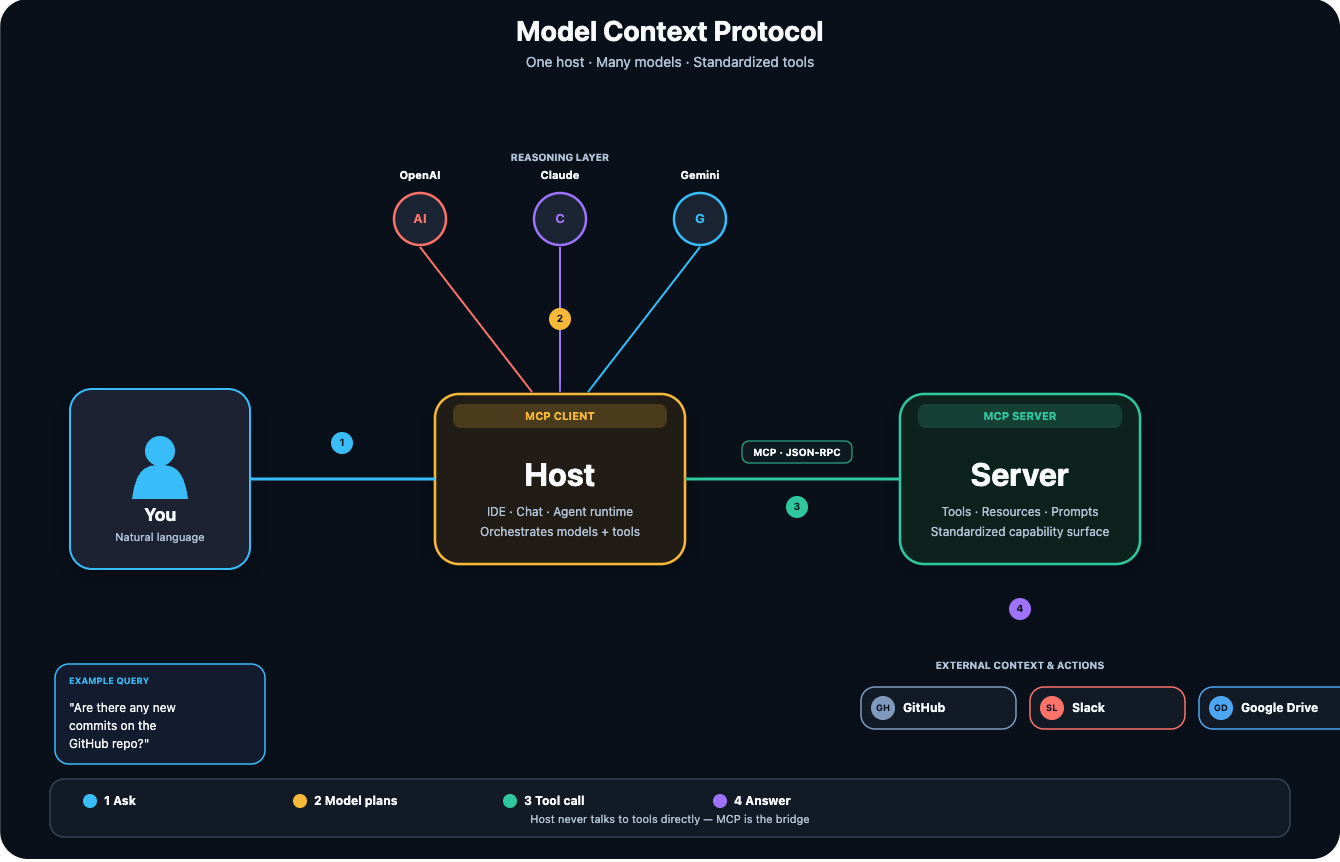
Now put everything together:
                    AI Model
                       │
                       ▼
User ───────────────→ Host
                       │
                       │
                  MCP Client
                       │
                       │ MCP
                       ▼
                  MCP Server
                       │
                       ▼
                External System
For DevOps:
User
 │
 ▼
DevOps AI Agent
 │
 ├── AI Model
 │
 └── MCP Client
       │
       ▼
 Kubernetes MCP Server
       │
       ▼
 Kubernetes Cluster
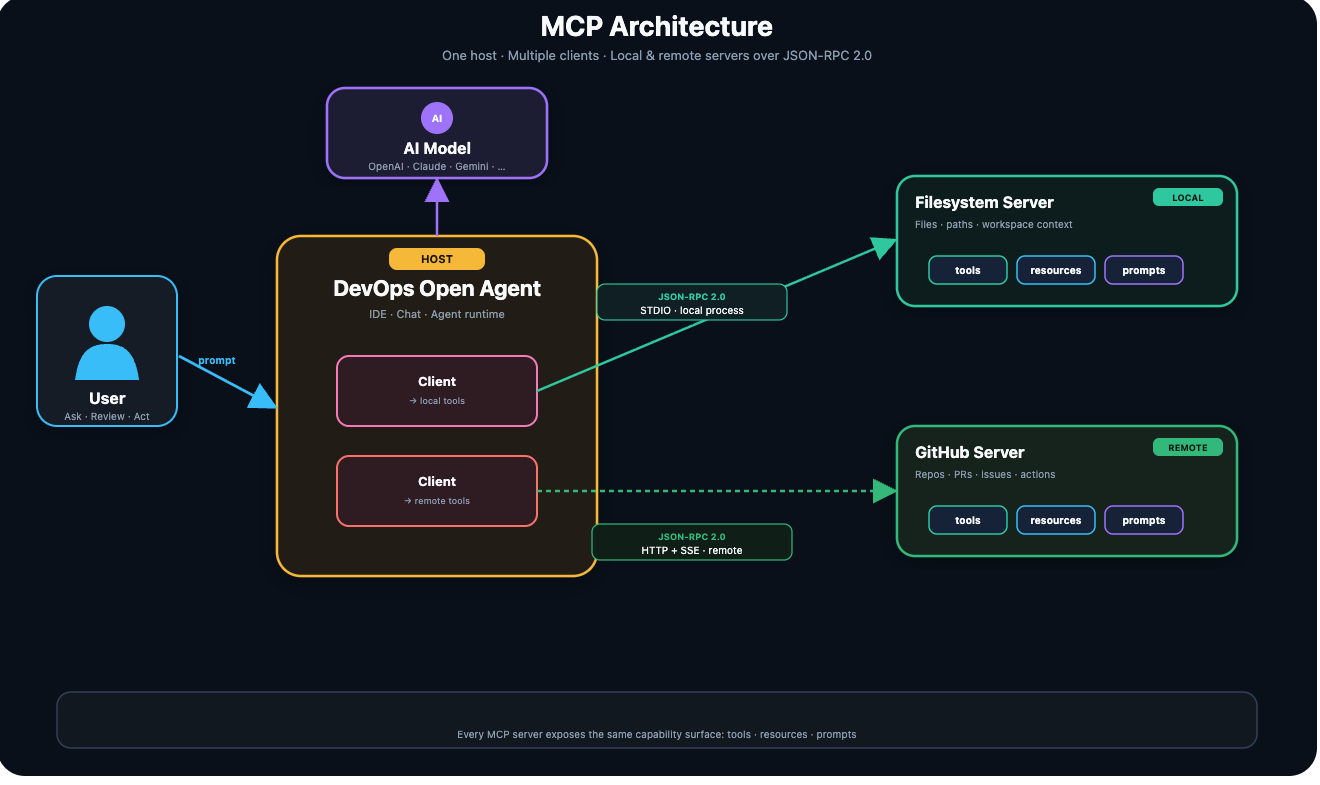
This distinction is important:
The model reasons.
The host orchestrates.
The MCP client communicates.
The MCP server exposes and executes capabilities.
The external system contains the real-world data or actions.
15. What actually happens when everything starts?
This is where MCP becomes much easier to understand.
Imagine our host is configured to use a Kubernetes MCP server.
The first thing that needs to happen is a connection.
Step 1 — Host connects to the MCP server
The host's MCP client establishes communication with the MCP server.
Conceptually:
Host
 │
 └── MCP Client
        │
        │ connect
        ▼
     MCP Server
During initialization, the client and server can establish what they support.
Think of it like two systems introducing themselves before beginning work.
16. Step 2 — The client discovers available tools
How does the AI application know that the Kubernetes MCP server supports something called:
get_pod_logs
It should not have to guess.
The client can ask the server for its available tools.
Conceptually:
MCP Client

"What tools do you have?"

        │
        ▼

MCP Server
The server might return:
list_pods
get_pod_logs
get_events
describe_pod
But the name alone is not enough.
The server can provide information describing the tool, including its expected input.
For example:
Tool:
get_pod_logs

Description:
Retrieve logs for a Kubernetes Pod.

Input:
pod_name
namespace
This information is extremely important because the model needs to understand:
What does this tool do?
and:
What information must I provide to call it?
17. Step 3 — The host tells the model about the tools
The MCP client now knows what the server provides.
But the LLM also needs to know.
The host therefore makes those tool definitions available to the model in the format required by the model API.
Conceptually:
MCP Server
    │
    │ Tool definitions
    ▼
MCP Client
    │
    ▼
Host
    │
    │ Model-specific tool format
    ▼
LLM
Now the model may know:
Available tool:

get_pod_logs(
    pod_name,
    namespace
)
This does not mean the model has executed anything.
It only knows that this capability exists.
18. Step 4 — The user asks a question
Now you ask:
Why is the payment-api Pod crashing?
The model looks at several pieces of information:
User's question
Conversation history
System instructions
Available tool names
Tool descriptions
Input schemas
The model may reason that it needs the Pod logs.
So it effectively tells the host:
Use:

get_pod_logs

Arguments:

pod_name = payment-api
namespace = default
This distinction is worth repeating:
The model requested a tool call. It did not execute the tool itself.
19. Step 5 — MCP Client calls the MCP Server
The host receives the model's requested tool call.
It passes that request to the MCP client.
The MCP client then sends a standardized request to the MCP server.
Conceptually:
LLM
 │
 │ "Call get_pod_logs"
 ▼
Host
 │
 ▼
MCP Client
 │
 │ MCP request
 ▼
MCP Server
20. Step 6 — The MCP Server performs the real operation
This is where something real finally happens.
The Kubernetes MCP server might internally use:
Kubernetes Python client
or another Kubernetes library/API.
It may perform an operation equivalent to retrieving:
kubectl logs payment-api
The result could be:
Connection refused while connecting to PostgreSQL
The server returns this information through MCP.
21. Step 7 — The result goes back to the model
The result travels back:
Kubernetes
    │
    ▼
MCP Server
    │
    ▼
MCP Client
    │
    ▼
Host
    │
    ▼
LLM
Now the model has new context:
Connection refused while connecting to PostgreSQL
The model can reason about that information and answer:
The application appears to be starting, but it cannot establish a connection to PostgreSQL. I would next verify the database Service, endpoint, port, credentials, and network connectivity.
That is where the power comes from.
The model provides the reasoning.
The external tool provides real information.
MCP provides standardized communication between the client and server.
22. MCP does not define your Kubernetes logic
This is another important concept.
MCP does not decide how your Kubernetes tool should work internally.
The MCP server developer decides things such as:
Which Kubernetes library should be used?

Which commands or API calls are allowed?

Which credentials should be used?

Which namespaces can be accessed?

How should arguments be validated?

How should results be formatted?

Which security restrictions should apply?
MCP mainly standardizes communication between:
MCP Client ↔ MCP Server
This means MCP is not:
a Kubernetes API

a GitHub API

a database

an LLM

an agent
It is the protocol used to expose and communicate with capabilities in a standard way.
23. What protocol does MCP actually use?
Now we need to separate two ideas:
Message format
and
Transport
They are not the same thing.
Imagine sending a package.
The message format describes what the package looks like and how the information inside is organized.
The transport describes how the package travels from one place to another.
For MCP, these concepts are separate too.
24. MCP messages — JSON-RPC 2.0
MCP uses JSON-RPC 2.0 for its messages.
Let's break that name down.
JSON
The data is represented using JSON.
For example:
{
  "pod_name": "payment-api"
}
RPC
RPC means Remote Procedure Call.
In simple terms:
One program asks another program to perform an operation.
So a request might conceptually look like:
{
  "jsonrpc": "2.0",
  "id": 7,
  "method": "tools/call",
  "params": {
    "name": "get_pod_logs",
    "arguments": {
      "pod_name": "payment-api"
    }
  }
}
Don't get scared by the JSON.
Read it like English:
Use JSON-RPC version 2.0.

This request has ID 7.

I want to call a tool.

The tool is get_pod_logs.

The pod is payment-api.
That is essentially what the message is saying.
25. The MCP Server responds
The server performs the operation.
Then it can return a result.
For example:
{
  "jsonrpc": "2.0",
  "id": 7,
  "result": {
    "content": [
      {
        "type": "text",
        "text": "Connection refused while connecting to PostgreSQL"
      }
    ]
  }
}
Again, read it in plain English:
This response belongs to request 7.

Here is the result.

The result contains text.

The text says:

Connection refused while connecting to PostgreSQL.
Much easier.
26. But how does that JSON-RPC message travel?
JSON-RPC tells us what the message looks like.
We still need a way to move that message between the client and server.
That is the job of a transport.
MCP discusses two standard transports:
stdio

Streamable HTTP
Let's understand both.
27. stdio
stdio stands for:
standard input
standard output
This is commonly useful when the MCP server runs locally.
The host can start the MCP server as a child process.
Conceptually:
┌──────────────────────┐
│        Host          │
│                      │
│     MCP Client       │
└──────────┬───────────┘
           │
           │ stdin/stdout
           ▼
┌──────────────────────┐
│      MCP Server      │
│    Local Process     │
└──────────────────────┘
The client sends messages to the server's standard input.
The server sends responses through standard output.
A simple mental model is:
Host launches MCP server locally.

Host → stdin → MCP Server

Host ← stdout ← MCP Server
28. Streamable HTTP
What if the MCP server is running somewhere else?
For example:
Your laptop
     │
     │ network
     ▼
Remote MCP Server
In that case, HTTP can be used.
Conceptually:
MCP Client
    │
    │ HTTP
    ▼
Remote MCP Server
Client messages can be sent using HTTP requests to the MCP endpoint, while the server returns the corresponding response through the supported HTTP mechanism.
This makes remote MCP server architectures possible.
29. JSON-RPC vs transport
This distinction is extremely useful for interviews.
Remember:
JSON-RPC 2.0
      =
How the MCP message is structured
while:
stdio / Streamable HTTP
      =
How the MCP message travels
A simple analogy:
JSON-RPC = language of the letter

Transport = delivery method
You could write the same kind of letter and deliver it differently.
Similarly, MCP messages can retain their standardized structure while the transport mechanism differs.
30. Putting everything together
Let's follow one complete example from beginning to end.
You ask:
Why is payment-api crashing?
1. User sends the question
User
 │
 ▼
Host
2. Model analyzes the question
The model decides it needs Kubernetes information.
Host
 │
 ▼
LLM
3. Model requests a tool
get_pod_logs(
    pod_name="payment-api"
)
4. Host passes the request to its MCP client
LLM
 │
 ▼
Host
 │
 ▼
MCP Client
5. Client creates an MCP request
Conceptually:
tools/call
get_pod_logs
payment-api
6. Message reaches the MCP server
MCP Client
      │
      │ JSON-RPC over transport
      ▼
MCP Server
7. Server performs the actual Kubernetes operation
MCP Server
     │
     ▼
Kubernetes API
8. Kubernetes returns logs
Connection refused while connecting to PostgreSQL
9. MCP server returns the result
Kubernetes
     │
     ▼
MCP Server
     │
     ▼
MCP Client
10. Host gives the result back to the model
MCP Client
     │
     ▼
Host
     │
     ▼
LLM
11. Model reasons over the new context
It now understands:
Pod = payment-api

Problem = application cannot connect to PostgreSQL
12. User receives a useful answer
LLM
 │
 ▼
User
That is the complete journey.
31. The entire MCP flow in one diagram
                         ┌─────────────┐
                         │     LLM     │
                         │   Reasons   │
                         └──────┬──────┘
                                │
                                │ tool request
                                ▼
┌────────┐              ┌───────────────┐
│  User  │─────────────→│     HOST      │
└────────┘              │               │
                        │  MCP Client   │
                        └───────┬───────┘
                                │
                                │ MCP
                                │ JSON-RPC
                                │
                                │ stdio / HTTP
                                ▼
                        ┌───────────────┐
                        │  MCP SERVER   │
                        └───────┬───────┘
                                │
                                │ real API / SDK
                                ▼
                  ┌─────────────────────────┐
                  │    External System      │
                  │                         │
                  │ Kubernetes / GitHub /   │
                  │ DB / Files / etc.       │
                  └─────────────────────────┘
32. MCP Inspector
When learning or developing MCP servers, it is useful to see what the server actually exposes.
That is where MCP Inspector helps.
Think of MCP Inspector as a debugging and exploration tool for an MCP server.
You can use it to inspect things such as:
Can I connect to the MCP server?

What tools does it expose?

What arguments does a tool expect?

Does calling the tool work?

What result does the server return?
This is particularly helpful while developing your own MCP server because you can test the MCP layer before integrating it into a larger AI application.
Official project: modelcontextprotocol/inspector.
33. The most important MCP mental model
If all the terminology becomes confusing, come back to this:
                 THINKING
                    │
                    ▼
                  MODEL
                    │
                    ▼
              HOST / CLIENT
                    │
              standardized
              communication
                    │
                    ▼
               MCP SERVER
                    │
                    ▼
              REAL SYSTEM
Or even shorter:
Model decides what it needs.

Host coordinates the process.

MCP client sends the request.

MCP server performs the operation.

External system provides real information.

Result comes back.

Model explains it.
34. MCP is not the AI agent
One final misconception is worth clearing up.
MCP itself is not an AI agent.
An agent may use MCP to access tools.
Think of it like:
AI Agent
   │
   ├── Reasoning
   ├── Planning
   ├── Memory
   │
   └── Tools
          │
          └── MCP
MCP solves an important part of the agent problem:
How can an AI application communicate with external capabilities through a standardized interface?
It does not replace reasoning, planning, the LLM, or the underlying APIs.
35. If you remember only seven things
If MCP still feels like a lot, remember these seven points:
1. An LLM cannot magically access your Kubernetes cluster, GitHub repository, database, or filesystem.
2. Tool calling allows a model to request the use of external capabilities.
3. The model usually decides which tool should be called; the surrounding application performs the actual execution flow.
4. Before MCP, integrations between AI applications and tools could require custom integration work.
5. MCP standardizes communication between MCP clients and MCP servers.
6. MCP messages use JSON-RPC 2.0, while transports such as stdio or Streamable HTTP determine how those messages travel.
7. The easiest mental model is:
User
  ↓
Model
  ↓
Host
  ↓
MCP Client
  ↓
MCP Server
  ↓
Real System
  ↓
Result
  ↓
Model
  ↓
Answer
Once this flow makes sense, MCP stops looking like a collection of confusing terms.
It becomes a fairly simple idea:
Give AI applications a standard way to connect to the tools and context they need.