Amazon Bedrock: one AWS door to many AI models
Suppose you want Claude, Llama, Nova, Mistral, and Cohere in the same application. Without Bedrock, that means five accounts, five API keys, five SDKs, and five billing stories. Bedrock is AWS’s answer: authenticate once with IAM, pick a model, and let AWS handle the plumbing.
Let’s start with the pain it removes ↓
Prefer to watch this one instead of reading it? This lesson also exists as a short video, covering the same ground: what Amazon Bedrock is, Converse vs InvokeModel, and how a request actually flows.
Without Bedrock, every provider is its own mini-project
If your app needs models from Anthropic, Meta, Amazon, Mistral, or Cohere, and you integrate each one yourself, you end up doing all of this:
- Create an account with each provider.
- Generate separate API keys.
- Authenticate with different services.
- Manage different billing accounts.
- Learn each provider’s SDK and endpoints.
- Handle different security and networking setups.
Amazon Bedrock simplifies most of that. It is a managed AWS service that gives you access to foundation models from multiple providers through your AWS account. You authenticate once with IAM. Bedrock routes the request to the model you chose and returns the response.
Here is the important nuance, though. Bedrock standardizes access, security, billing, monitoring, and infrastructure. It does not magically make every model identical. Each model can still have its own request shape, inference parameters, and special features. That is why AWS also built the Converse API — a more consistent chat interface for many models, while still leaving room for provider-specific extras.
AWS runs the infrastructure. You pay for usage.
When people say Bedrock is a fully managed, serverless service, they mean AWS deploys, operates, maintains, and updates the underlying infrastructure. How you get charged still depends on the mode you use — just like other AWS services:
| AWS service | Billing model |
|---|---|
| AWS Lambda | Per request + duration |
| AWS Fargate | Per vCPU-second and GB-second |
| Amazon S3 | Per GB stored + requests |
| DynamoDB On-Demand | Per read/write request |
| Bedrock On-Demand | Per input and output token |
| Bedrock Provisioned Throughput | Reserved hourly capacity |
For on-demand inference, you pay for tokens — not clock time
In the common on-demand mode, you are not billed per second or per minute. You pay for:
- Input tokens — the prompt you send
- Output tokens — the text the model generates
Prompt → 15 input tokens · Response → 180 output tokens
Total cost = (input tokens × input price) + (output tokens × output price). Claude, Nova, Llama, and Mistral each have their own rates.
There is also Provisioned Throughput. That is for workloads that need predictable performance and dedicated capacity. AWS reserves inference capacity for you, and you pay for that reserved capacity over time — typically hourly — even if traffic is quiet.
| Inference mode | How you’re charged |
|---|---|
| On-Demand | Per input token + output token |
| Provisioned Throughput | Reserved capacity (hourly) |
Bedrock is one door — not one identical request body
People often think Bedrock means “one API for every model.” That is only half true.
Bedrock gives you a common AWS endpoint and a common authentication story (IAM / SigV4). The request schema still depends on which API you call:
- InvokeModel — model-specific request body. Claude, Llama, Nova, and Mistral can all expect different JSON.
- Converse — AWS’s more standardized chat interface. Much nicer for apps that switch models, but not every advanced feature looks identical across providers.
A useful analogy: imagine wanting Netflix, Disney+, Prime Video, and Apple TV+. Without a common platform, you subscribe and learn each app separately. Bedrock is closer to one AWS front door where you still choose which provider’s model to watch — but you log in once with AWS credentials.
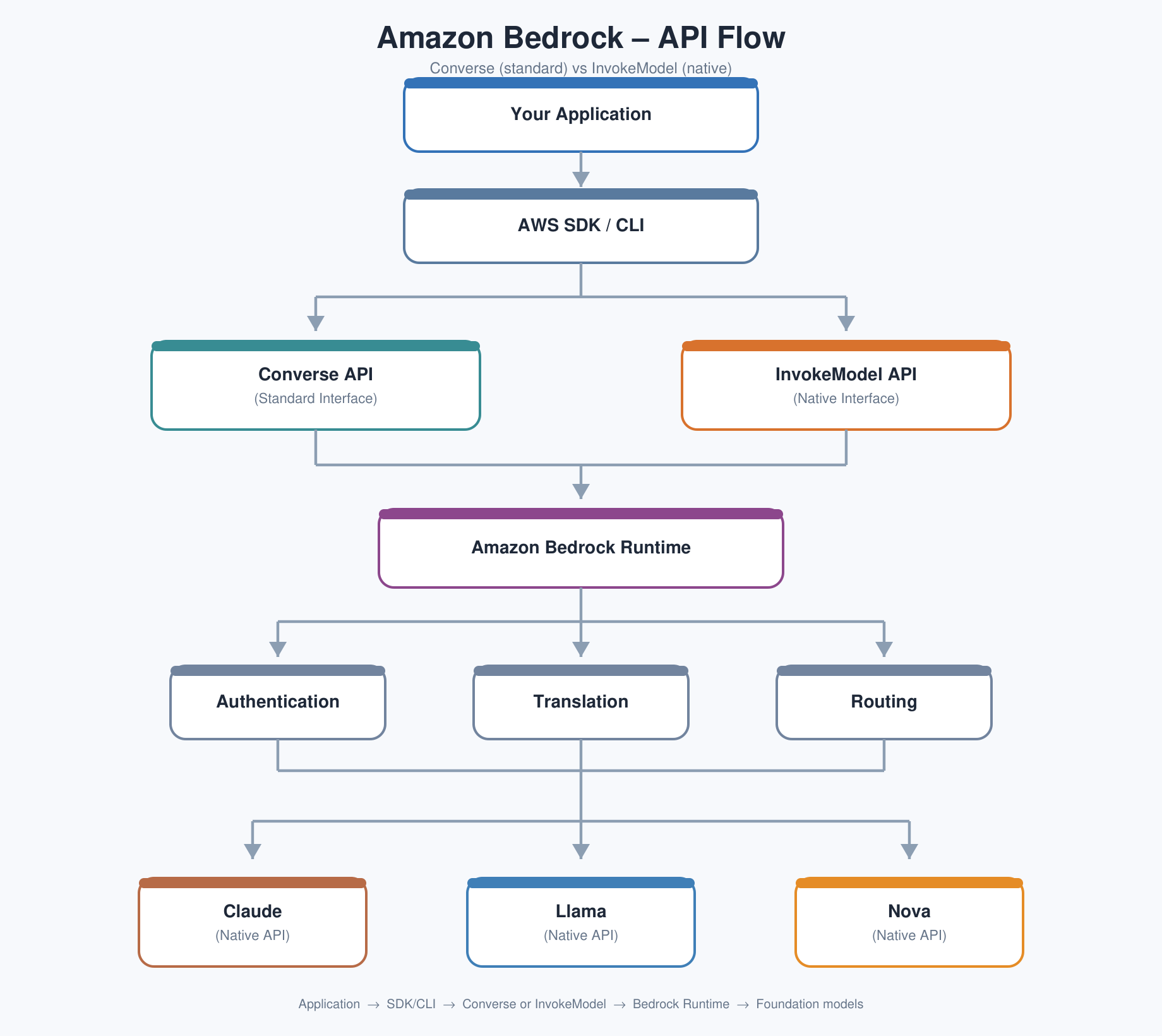
Same question, completely different JSON
Suppose your app supports Claude Sonnet and Llama 3.3 70B. With InvokeModel, asking “Explain Kubernetes” might look like this:
Same intent. Different fields. Even the parameter names disagree:
| Claude | Llama |
|---|---|
| messages | prompt |
| max_tokens | max_gen_len |
| anthropic_version | not required |
InvokeModel still uses one endpoint shape — POST /model/{modelId}/invoke — but the body changes with the model. Bedrock standardized authentication, IAM, and the endpoint. It did not standardize every native payload.
Enter the Converse API
Almost every chatbot really wants to send the same idea: “here are the messages in the conversation.” So AWS introduced Converse. Now your app can always send something like:
Whether the modelId is Claude or Llama, that request shape stays the same. Bedrock translates it into the model’s native format behind the scenes. Your application stops caring which provider invented which JSON field names.
Converse standardizes the common chat features. Provider-only extras — thinking mode, unique tool options, special safety settings, image or PDF support, different token limits — may still need additionalModelRequestFields, or may simply be unavailable on another model. Switch model IDs carefully when you rely on those extras.
Walk the Bedrock architecture once, slowly
If you are used to EC2 and ALB troubleshooting, this diagram will feel familiar: client → front door → routing → the thing that actually does the work.
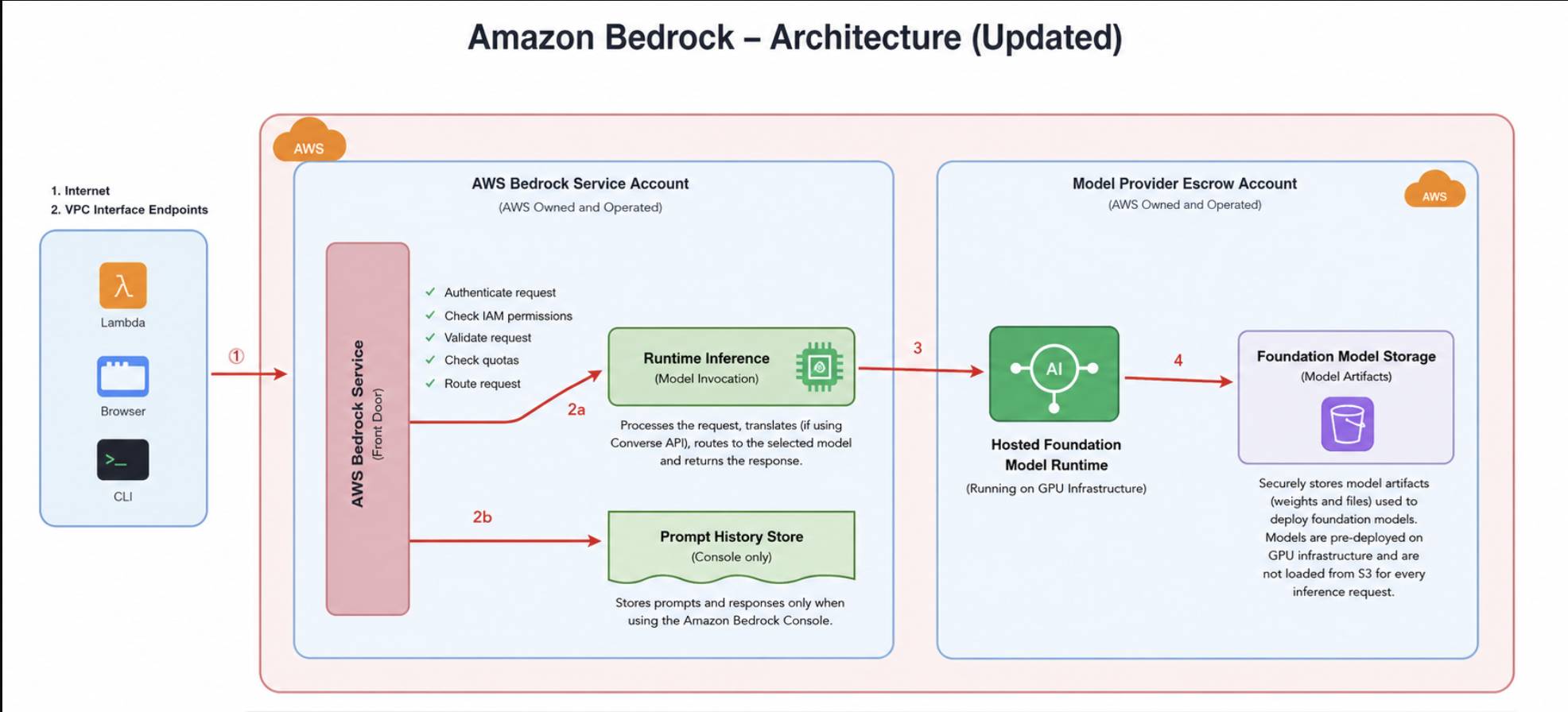
1. Your application
A web app, a Lambda, the AWS CLI, or any SDK client. The request goes to a Bedrock Runtime endpoint such as bedrock-runtime.us-east-1.amazonaws.com, or through a VPC interface endpoint if you need private networking.
2. AWS Bedrock Service — the front door
Think of this as the receptionist. It does not answer the AI question. It authenticates you (IAM), checks whether you may use that model, validates the request, applies quotas, and routes you onward. Bad requests fail fast with things like ValidationException. Hitting limits returns ThrottlingException.
3. Runtime Inference
This is the traffic controller. It receives the validated request, picks the right model backend, optionally translates a Converse request into the native format, waits for the model, and returns the response.
4. Prompt History Store (console only)
This one surprises people. The playground in the Bedrock console can remember prompts. Your Python, Java, CLI, or REST calls do not automatically land here. Application traffic is not silently saved into that console history.
5. Model Provider Escrow Account
AWS does not simply forward your prompt to Anthropic over the public internet. The provider’s model runs inside AWS-managed infrastructure. That is why IAM still applies, CloudTrail can log requests, PrivateLink can work, and latency stays inside the AWS network. The model fleet may be shared across customers, but prompts and responses are isolated. By default, they are not used to train the foundation models.
6. Foundation model storage
The diagram’s “S3 bucket” idea is really about securely stored model artifacts. The runtime is not reloading a giant file from S3 on every prompt. Models are already deployed on GPU infrastructure and ready to serve.
There is overhead — and it is almost never the story
Yes, the request crosses AWS-managed boundaries. No, that is usually not why an LLM feels slow. Typical orders of magnitude look like this:
| Operation | Typical time |
|---|---|
| Network to Bedrock | 5–20 ms |
| IAM authentication | < 5 ms |
| Authorization & validation | < 5 ms |
| Routing | < 5 ms |
| Model starts inference | 50–200 ms |
| Model generates ~500 tokens | 1–5 seconds |
The first four steps are tens of milliseconds. Token generation is hundreds or thousands. It is the flight, not the passport check.
More than “call an LLM”
Bedrock is a platform for building, securing, and operating GenAI applications. Depending on the job, you may only need one feature — or several chained together.
Foundation models
Claude, Llama, Nova, Mistral, Cohere, and more — plus Marketplace models — through your AWS account.
Guardrails
Policies for harmful content, prompt injection, toxicity, profanity, PII masking, and topic restrictions.
Knowledge Bases
Managed RAG: load docs, embed them, retrieve context, ground answers without retraining the model.
Flows
Visual orchestration across prompts, models, knowledge bases, agents, and conditional steps.
Imported / custom models
Bring compatible Llama, Mistral, Mixtral, Flan, Qwen, and related architectures onto Bedrock-managed inference.
Agents
Let the model call tools: databases, Lambda, APIs, knowledge bases, and business workflows.
Imported models are not “any Hugging Face checkpoint.” The architecture has to be one Bedrock understands. And billing differs: native models are usually token-priced; imported models often mean paying for the dedicated inference infrastructure that keeps your model available.
Talk to Bedrock Runtime with boto3
The goal is simple: send a prompt, get a response. Your Python app never talks to Claude or Llama directly. It talks to Amazon Bedrock Runtime.
Two clients show up in the docs. Do not mix them up:
| Service client | Purpose |
|---|---|
| bedrock | Management: list models, guardrails, admin tasks |
| bedrock-runtime | Inference: send prompts, get generations |
A minimal Converse call looks like this:
Behind the scenes: boto3 builds an HTTPS request, SigV4 signs it, Bedrock Runtime checks IAM and quotas, routes to the model, and returns the text. Swap the modelId for Claude or Llama once your account has access.
Want a fuller sample? There is a walkthrough in the IdeaWeaver repo: bedrock_converse.py.
Treat Bedrock like any other production dependency
Your job is not only “is the service up?” You want latency, throttles, spend, model health, and quota headroom. These CloudWatch angles are a strong starting set:
1. Invocation count
Traffic by model and by app. A sudden drop to zero is often your app or upstream traffic, not “AI is broken.”
2. Invocation latency
Watch average, P95, and P99. Averages hide the ten requests that took ten seconds.
3. Errors
4xx and 5xx: AccessDenied, ValidationException, ResourceNotFound, ModelTimeout, InternalServerException.
4. Time to first token
For streaming, users feel the first word. TTFT often matters more than total completion time.
5. Token usage / cost
Even when CloudWatch is not your bill, input and output tokens drive spend. Correlate with Cost Explorer.
Same Claude. Different routing stickers.
anthropic.claude-sonnet-4-6 and us.anthropic.claude-sonnet-4-6 are not two different models. They are two ways to invoke the same Claude Sonnet 4.6:
| ID | What it is | When to use it |
|---|---|---|
| anthropic.claude-sonnet-4-6 | Base model ID | Identify the foundation model itself |
| us.anthropic.claude-sonnet-4-6 | US geo inference profile | Let AWS route to the best available US deployment |
An inference profile is a routing layer. When you call the US profile, Bedrock may place the request in us-east-1, us-east-2, or us-west-2 based on capacity. Your app does not have to hard-code which region currently has room. Similar profiles exist for other geographies and for global routing.
Five things worth carrying forward
- Bedrock is one AWS door to many foundation models — IAM once, many providers.
- On-demand billing is mostly tokens in + tokens out; provisioned throughput is reserved capacity.
- InvokeModel keeps native payloads; Converse standardizes the common chat shape.
- Your request stays in AWS-managed infrastructure; model generation dominates latency.
- Operate it like production: invocations, latency percentiles, errors, TTFT, and token cost.
Say it back to me
Tap each card. Can you remember what it means, before you flip it?
One AWS door. Many models. Converse for common chat. Tokens for the bill. Operate the percentiles.