GenAI on Kubernetes: teaching the cluster about GPUs
Kubernetes is great at scheduling containers across machines — but it was built around CPUs and memory first. GPU support came later, through extensions. If you want Ollama, vLLM, PyTorch, or TensorFlow pods on GPUs, you need that bridge installed on purpose.
Start with why GPUs are invisible by default ↓
Prefer to watch this one instead of reading it? This lesson also exists as a short video, covering the same ground: why Kubernetes needs the GPU Operator, Device Plugin, and how to run your first GPU pod.
Why Kubernetes cannot use GPUs out of the box
A fresh Kubernetes install already understands everyday resources:
- CPU
- Memory
- Storage
- Network interfaces
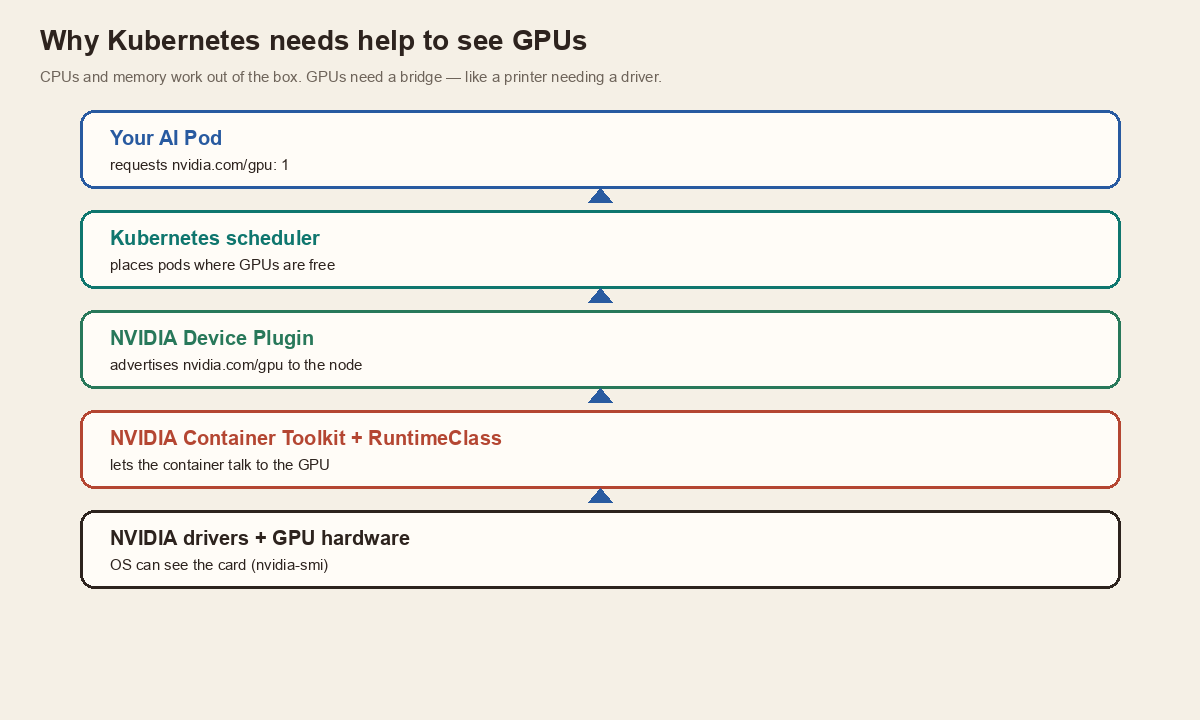
Those are standard OS and Kubernetes territory. GPUs are different. Every vendor ships its own drivers, libraries, and tools — NVIDIA, AMD, Intel. Because each stack is different, Kubernetes does not bake GPU support into the core.
Picture plugging in a new printer. The OS may notice something is connected, but until the right driver lands, you still cannot print. GPUs work the same way. Kubernetes knows the machine exists, but not whether a GPU is installed, how many there are, which pods should get them, or how apps reach them. That bridge is what NVIDIA provides with the GPU Operator and the Device Plugin.
One installer for a messy pile of GPU software
Doing this by hand means installing drivers, the NVIDIA Container Toolkit, the Device Plugin, monitoring pieces, GPU Feature Discovery, and sometimes MIG Manager — then keeping all of that healthy across dozens of nodes. That gets painful fast.
The GPU Operator automates it. You install the operator; it deploys and manages the GPU stack for you. Think of it as the installation and lifecycle manager for everything NVIDIA-GPU-related inside the cluster. After install, it keeps watching that those components stay healthy and current.
This is how Kubernetes finally sees nvidia.com/gpu
Drivers alone are not enough. The Device Plugin is a small component on every GPU node. It detects GPUs, reports them to Kubernetes, lets containers request them, and tracks allocation.
Without it, the cluster only sees CPU and memory. With it, a node might advertise:
That means four allocatable NVIDIA GPUs. Apps can request GPUs the same way they request CPU or memory — as first-class Kubernetes resources.
Having a GPU on the node is not the same as a container seeing it
By default, Kubernetes starts containers with a normal runtime built for ordinary apps. That path does not automatically expose GPUs.
The NVIDIA Container Runtime adds GPU support at container start time. A RuntimeClass tells Kubernetes which runtime to use for a pod. For GPU workloads, you want the NVIDIA runtime so the process inside the container can talk to the card. Wrong runtime, and the app may behave as if no GPU exists — even when the node has one.
One expensive card, several isolated slices
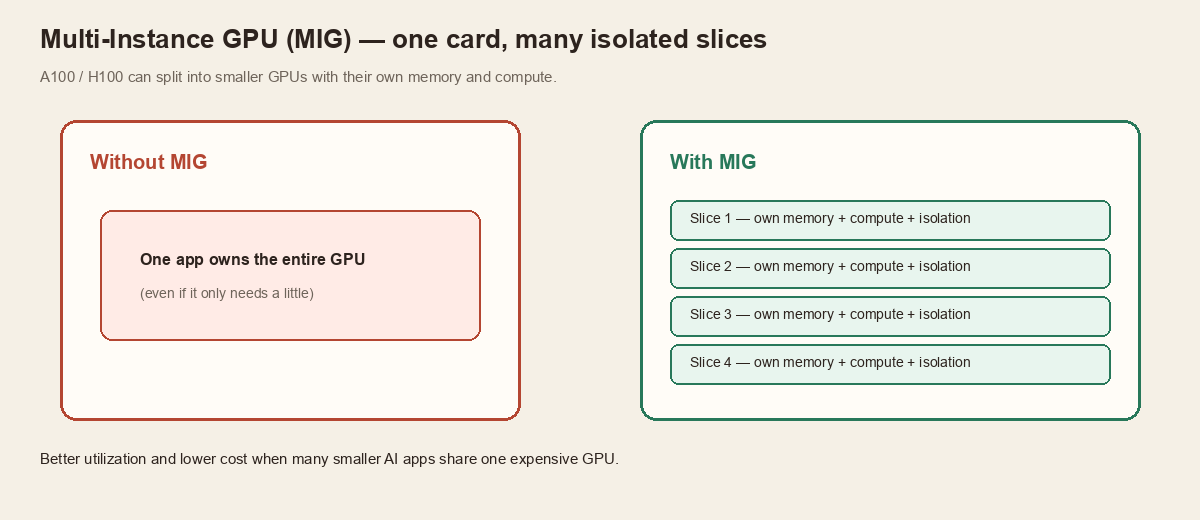
On GPUs like the A100 and H100, MIG can split one physical GPU into smaller, isolated GPUs. Each slice gets its own memory, its own compute, and hardware isolation from the others.
Without MIG, one app often owns the whole device — even if it only needs a little. With MIG, several AI apps can share the same physical GPU more safely, which usually means better utilization and lower cost.
Pending is not always broken — sometimes you are just out of GPUs
Scheduling is Kubernetes deciding where pods run. For normal apps, that is mostly CPU and memory. For AI workloads, GPU availability matters too.
Imagine three workers: Node A has no GPU, Node B has one, Node C has four. A pod that asks for one GPU will only land on B or C. If none are free, it stays Pending until capacity appears. That is intentional — GPU work should not quietly land on a CPU-only box.
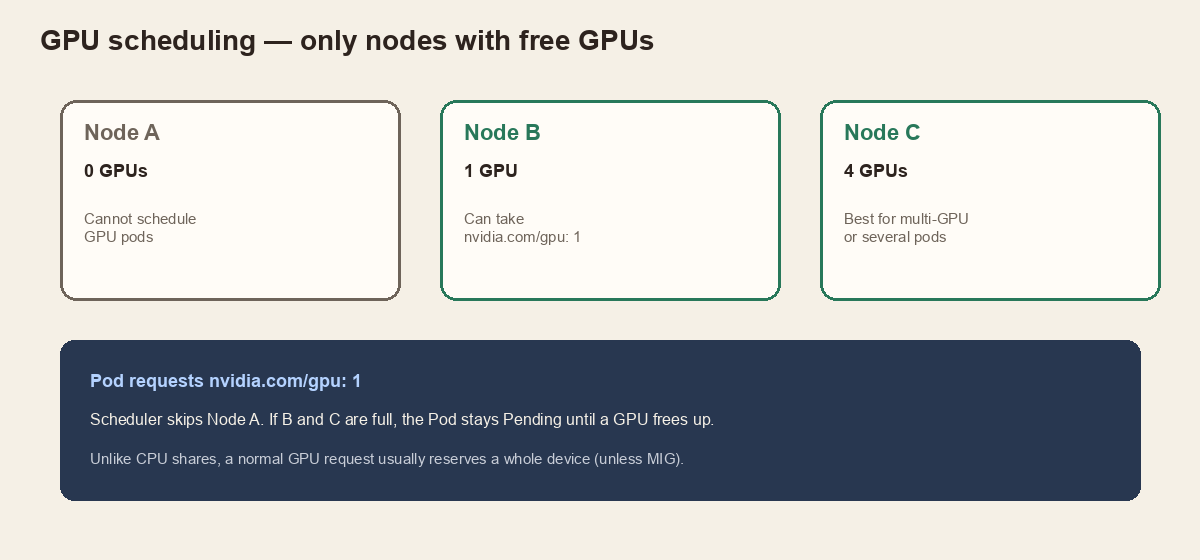
nvidia.com/gpu: 1 and the scheduler skips nodes that cannot satisfy it.Unlike CPU, GPUs are usually allocated as whole devices. Asking for one GPU typically reserves the entire GPU for that workload — unless you are using something like MIG to share more finely.
Deploy the NVIDIA GPU Operator
Once the operator is in, it pulls in drivers (when applicable), Device Plugin, Container Toolkit, Feature Discovery, and friends. After that, the cluster is much closer to running GPU AI workloads such as Ollama, vLLM, TensorFlow, and PyTorch.
To access the code for this lab — including the setup scripts and the sample gpu-pod.yaml — use the GitHub repo: ideaweaver-ai/kubernetes-genai.
Prerequisites
- A Kubernetes cluster
- A worker node with an NVIDIA GPU
- Drivers already present, or installable by the operator
kubectlpointed at the clusterhelmon your machine
Step 1 — Prove the OS can see the GPU
On the GPU node:
You should see something like an L40 (or your card), driver version, and memory. If this fails, fix the host before blaming Kubernetes.
Steps 2–4 — Helm install
Give it a few minutes. One chart deploys a lot of moving parts.
Step 5 — Pods healthy?
Expect Running pods for feature discovery, container toolkit, device plugin, driver (when managed), and the operator itself. Exact names vary by version.
Step 6 — Does Kubernetes advertise the GPU?
In Capacity / Allocatable you want a line like nvidia.com/gpu: 1 (or more). Example output:
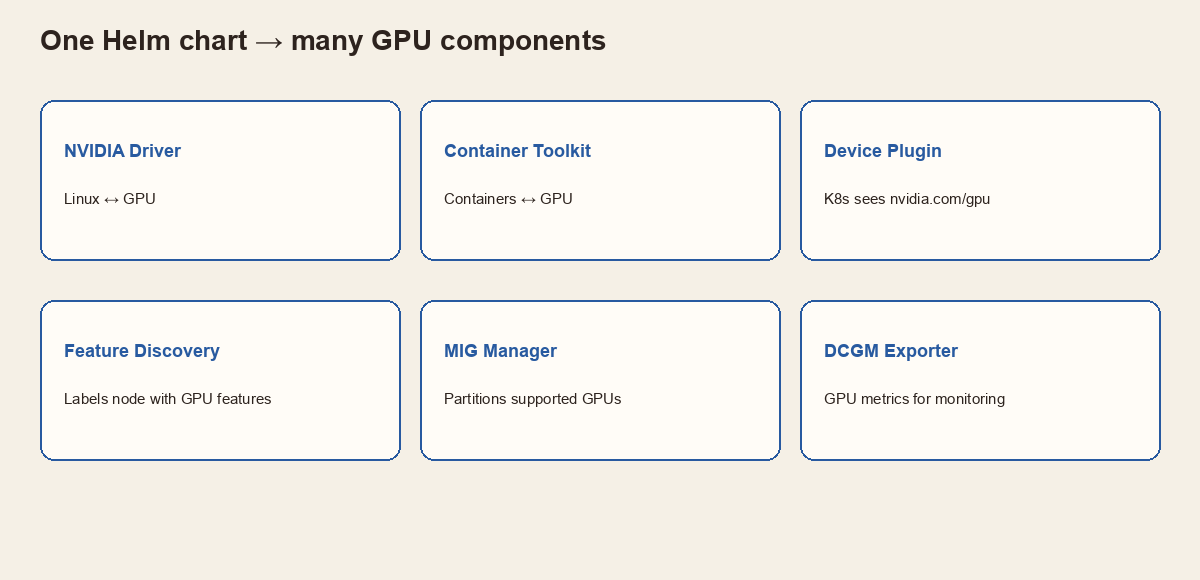
| Component | Purpose |
|---|---|
| NVIDIA Driver | Lets Linux talk to the GPU |
| Container Toolkit | Lets containers access the GPU |
| Device Plugin | Advertises nvidia.com/gpu to Kubernetes |
| GPU Feature Discovery | Detects features and labels the node |
| MIG Manager | Configures MIG on supported GPUs |
| DCGM Exporter | Exposes GPU metrics for monitoring |
Deploy your first GPU-enabled pod
Goal: run nvidia-smi inside a container. If it works, Kubernetes allocated a GPU, the container can reach it, and the NVIDIA runtime path is healthy.
Create gpu-pod.yaml (or grab it from the repo):
What matters most:
- Image — NVIDIA CUDA base image already has
nvidia-smi. - Command — print GPU info, then exit (not a long-running server).
nvidia.com/gpu: 1— “only schedule me where a free NVIDIA GPU exists.” Without this line, Kubernetes treats the pod as a normal CPU workload and will not allocate a GPU.
If you see the familiar NVIDIA-SMI table in the logs, congratulations — your cluster is no longer GPU-blind.
Five things worth carrying forward
- Kubernetes knows CPU and memory by default — not GPUs.
- GPU Operator installs and manages the NVIDIA stack; Device Plugin advertises
nvidia.com/gpu. - RuntimeClass / NVIDIA runtime is how containers actually reach the card.
- MIG can slice big GPUs; without it, one GPU request usually means the whole device.
- Always verify host
nvidia-smi, then node allocatable GPUs, then a tiny GPU pod.
Say it back to me
Tap each card. Can you remember what it means, before you flip it?
Host sees GPU → Operator + Device Plugin → node advertises nvidia.com/gpu → pod requests it → runtime exposes it.