Retrieval-Augmented Generation (RAG)
If you are learning Generative AI, one term you will hear again and again is RAG — Retrieval-Augmented Generation.
At first, the name sounds complicated. But the basic idea is surprisingly simple.
RAG solves one fundamental problem ↓
Prefer watching the video version?
How can an LLM answer questions using information that was not part of its original training data?
For a DevOps engineer, this is especially important.
Your company may have:
Kubernetes runbooks
Terraform documentation
Helm charts
Internal wikis
Incident reports
Postmortems
AWS architecture documents
GitHub repositories
Troubleshooting guides
An LLM does not automatically know all of this information.
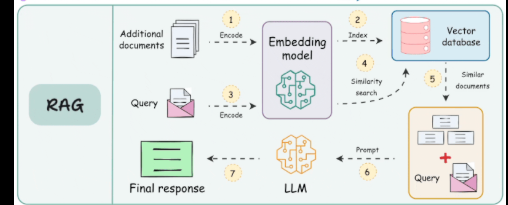
RAG gives us a way to retrieve relevant information from our own knowledge base and provide it to the LLM before it generates an answer.
1. Why do we need RAG?
Imagine you ask an LLM:
Why is our payment-api Pod restarting continuously?
The model might know Kubernetes. It probably knows what a Pod is. It may know common reasons for CrashLoopBackOff.
But it does not automatically know your environment.
It may not know:
Your Kubernetes configuration
Your internal runbooks
Yesterday's production incident
Your company's architecture
Your Terraform modules
Your internal troubleshooting procedures
Without access to that information, the model can only answer based on the information already available to it.
Conceptually:
User
 │
 │ "Why is payment-api restarting?"
 ▼
LLM
 │
 ▼
General Kubernetes answer
The answer might be useful. But it is not necessarily based on your company's actual environment.
2. What if we give the LLM our own information?
Suppose your company has an internal runbook containing this:
payment-api may enter CrashLoopBackOff when it cannot
connect to the PostgreSQL database.

Check the DATABASE_HOST environment variable and verify
that the PostgreSQL Service is reachable.
Now imagine that before asking the LLM to answer, our application searches the company's documentation and finds this paragraph.
Then we send both:
User Question:
Why is payment-api restarting continuously?

Relevant Company Documentation:
payment-api may enter CrashLoopBackOff when it cannot
connect to PostgreSQL...
to the LLM.
Now the model has much better information. It can respond:
According to the internal runbook,payment-apimay restart when it cannot connect to PostgreSQL. I would first verifyDATABASE_HOSTand check whether the PostgreSQL Service is reachable.
Notice what happened.
We did not retrain the LLM.
We simply retrieved useful information and gave that information to the model.
That is the core idea behind RAG.
3. What does RAG mean?
RAG stands for Retrieval-Augmented Generation.
Retrieval
Find information relevant to the user's question.
User:

"Why is my Pod restarting continuously?"

        ↓

Search company knowledge

        ↓

Find:

CrashLoopBackOff troubleshooting guide
Augmented Generation
Take the information we retrieved and add it to the information given to the LLM. Then ask the LLM to generate an answer using that information.
So:
Retrieve
   +
Generate
   =
RAG
Or, more accurately:
User Question
      │
      ▼
Retrieve Relevant Information
      │
      ▼
Add Information to Prompt
      │
      ▼
LLM Generates Answer
That is RAG.
4. RAG in one sentence
RAG searches your knowledge base for information relevant to the user's question and gives that information to the LLM before the LLM generates its answer.
5. A DevOps example
Imagine your organization has:
Kubernetes documentation
Runbooks
Postmortems
Incident reports
Terraform documentation
AWS architecture documents
GitHub documentation
A user asks:
Why is Pod abc failing?
A RAG application could search:
Pod runbooks
Incident history
Known issues
Troubleshooting documentation
Then retrieve the most relevant information. Then send that information to the LLM.
User
 │
 │ "Why is pod abc failing?"
 ▼
Retriever
 │
 ├── Search runbooks
 ├── Search incidents
 └── Search known issues
 │
 ▼
Relevant Information
 │
 ▼
LLM
 │
 ▼
Answer
Now the answer can be grounded in your organization's knowledge instead of relying only on general LLM knowledge.
6. RAG has two major flows
This is one of the most important concepts to understand.
A RAG system usually has two very different flows:
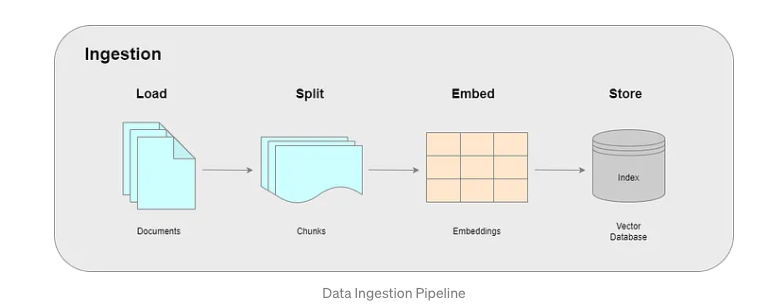
Flow 1 — Ingestion
Prepare your documents so they can be searched efficiently.
Documents
    ↓
Load
    ↓
Split
    ↓
Create Embeddings
    ↓
Store in Vector Database
Flow 2 — Retrieval and Generation
When the user asks a question:
Question
    ↓
Create Query Embedding
    ↓
Search Vector Database
    ↓
Retrieve Relevant Chunks
    ↓
Send Question + Chunks to LLM
    ↓
Generate Answer
Beginners often mix these two flows together. Keep them separate in your mind.
Ingestion happens when preparing or updating the knowledge base.
Retrieval happens when answering a question.
7. Let's start with the ingestion pipeline
Suppose your company has a 500-page Kubernetes troubleshooting manual.
You want your RAG application to answer questions using this manual.
We cannot simply throw a 500-page PDF into every LLM request.
Instead, we prepare the document.
PDF
 │
 ▼
Document Loader
 │
 ▼
Text
 │
 ▼
Chunking
 │
 ▼
Chunks
 │
 ▼
Embedding Model
 │
 ▼
Vectors
 │
 ▼
Vector Database
Let's understand every component.
8. Document loader
The first job is simply:
Read the data.
Your data can come from many places:
PDF
TXT
Markdown
CSV
Web pages
Source code
Directories
A document loader reads information from these sources and converts it into something our application can process.
For example, if we have kubernetes-runbook.pdf, a PDF loader extracts the text:
Chapter 7: CrashLoopBackOff

CrashLoopBackOff occurs when a container repeatedly
starts and crashes...
Now our application has text that it can process.
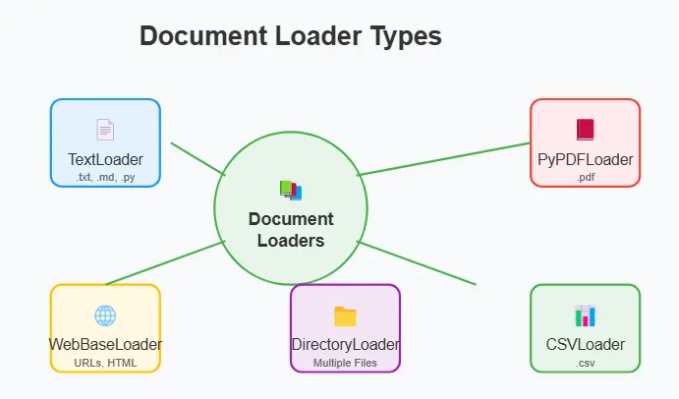
9. Different types of document loaders
Depending on the data source, different loaders can be used.
TextLoader — useful for .txt, .md, and source code.
PyPDFLoader — useful for PDF documents. It can extract text page by page.
CSVLoader — useful for structured CSV data.
DirectoryLoader — useful when you want to load many files from a directory.
WebBaseLoader — useful when information needs to be loaded from web pages.
10. What about complicated PDFs?
Not every PDF is easy to process. Some PDFs contain:
Scanned pages
Screenshots
Tables
Diagrams
Forms
Multiple columns
Complex layouts
A simple PDF text extractor may not understand all of these correctly.
For more complicated documents, advanced document-processing tools can be useful because they understand document layout and can use OCR when necessary.
If document ingestion is bad:
Bad extraction
      ↓
Bad chunks
      ↓
Bad embeddings
      ↓
Bad retrieval
      ↓
Bad LLM answer
RAG quality begins with data quality.
11. Lazy loading
Imagine your organization has 10 files. Loading everything into memory is probably fine.
But what if it has 1,000,000 documents? Loading everything simultaneously may consume huge amounts of memory.
One approach is lazy loading.
Instead of loading every document and keeping everything in memory, we can process one document at a time:
Document 1
   ↓
Process

Document 2
   ↓
Process

Document 3
   ↓
Process
This can significantly reduce memory usage for large ingestion jobs.
12. Chunking
Now we have extracted the text. But imagine our Kubernetes documentation contains 500 pages.
We normally do not want to treat those 500 pages as one giant piece of text.
Instead, we split the document into smaller pieces called chunks.
Large Kubernetes Document
          │
          ▼
        Split
          │
   ┌──────┼──────┐
   ▼      ▼      ▼
Chunk 1 Chunk 2 Chunk 3 ...
Chunk 1:
Kubernetes Pod Lifecycle

Chunk 2:
CrashLoopBackOff

Chunk 3:
ImagePullBackOff

Chunk 4:
OOMKilled
13. Why do we need chunking?
First, embedding models have limits on how much text they can process.
Second, smaller chunks make retrieval more focused.
Suppose the user asks:
Why is my Pod restarting continuously?
The relevant information might occupy only one or two paragraphs in a 500-page document.
We don't want to retrieve all 500 pages. We want something closer to:
Question
   ↓
Find relevant chunks
   ↓
CrashLoopBackOff chunk
14. Chunk size matters
Imagine we make chunks extremely small:
Chunk 1: CrashLoopBackOff
Chunk 2: occurs when
Chunk 3: a container
Chunk 4: repeatedly crashes
We have destroyed the useful context.
Now imagine the opposite: one chunk with the entire 500-page manual. That is not useful either.
We want chunks that are:
Small enough to retrieve precisely

but

Large enough to preserve useful meaning
15. Chunk overlap
Sometimes important information sits exactly between two chunks.
One common technique is chunk overlap.
Instead of completely separate chunks:
Chunk 1: A B C D
Chunk 2: E F G H
we keep some overlapping content:
Chunk 1: A B C D
Chunk 2: C D E F
Chunk 3: E F G H
This can help preserve context across chunk boundaries.
16. Different chunking strategies
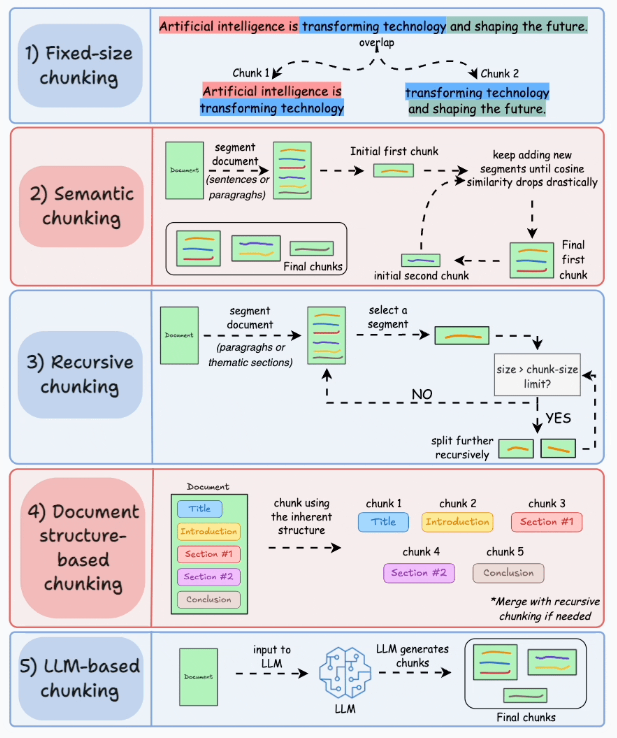
Fixed-size chunking — split after a certain number of characters or tokens. Easy, but it does not necessarily understand document structure.
Recursive chunking — try to preserve natural boundaries such as sections, paragraphs, and sentences before splitting into smaller units. Often a practical starting point.
Semantic chunking — instead of splitting purely by size, split based on meaning so related information stays together.
LLM-based chunking — an LLM analyzes a document and decides where meaningful chunk boundaries should occur. More intelligent, but more complex and costly.
17. Now we have our chunks
After chunking, our Kubernetes documentation might look like:
Chunk 1 — Kubernetes Pod Lifecycle
Chunk 2 — CrashLoopBackOff troubleshooting
Chunk 3 — ImagePullBackOff troubleshooting
Chunk 4 — OOMKilled troubleshooting
Chunk 5 — Pod networking
Now we need a way to search these chunks based on their meaning.
This brings us to embeddings.
18. Embeddings
The word embedding scares many beginners. The basic idea is actually simple.
An embedding converts text into numbers.
For example, "CrashLoopBackOff" might become something conceptually like:
[0.23, 0.11, 0.92, ...]
This list of numbers is called a vector.
The exact numbers are not important for understanding RAG.
The important part is what those numbers represent: they capture characteristics of the text's meaning in a numerical form.
19. Why convert text into numbers?
Suppose our document contains:
CrashLoopBackOff occurs when a container
repeatedly starts and crashes.
But the user asks:
Why is my Pod restarting continuously?
The user did not use the word CrashLoopBackOff.
A simple keyword search may struggle if it relies heavily on exact wording.
But semantically, these ideas are closely related. An embedding model converts both into vectors that can be close to each other because the meanings are similar.
20. Similar meaning → nearby vectors
Think of embeddings as placing meanings into a giant mathematical space.
              Kubernetes Problems

CrashLoopBackOff  ●
                  ● Pod keeps restarting


                                      ● Docker image layers


       ● PostgreSQL connection problem
Items with similar meaning tend to be closer. Items with unrelated meanings tend to be farther apart.
We can search based on meaning, not just exact words.
21. Embedding the documents
During ingestion, each chunk is sent to an embedding model.
Chunk 1 → Embedding Model → Vector 1
Chunk 2 → Embedding Model → Vector 2
Chunk 3 → Embedding Model → Vector 3
Now every document chunk has a numerical representation.
22. Where do we store all these vectors?
If you have 20 chunks, storage is easy.
But imagine a company has 100,000 PDFs, millions of documentation pages, thousands of GitHub repositories, years of incident reports, and thousands of runbooks.
After chunking, we may have millions of chunks. Each chunk has an embedding vector.
We need a system capable of efficiently storing and searching those vectors.
This is where the vector database comes in.
23. What is a vector database?
A vector database is designed to store and efficiently search vectors.
Vector Database

Chunk 1 → [0.23, 0.11, 0.92, ...]
Chunk 2 → [0.82, 0.44, 0.05, ...]
Chunk 3 → [0.18, 0.15, 0.91, ...]
Along with the vector, we normally want to keep information about the original chunk:
Vector
Original text
Document ID
Source
Page
Version
Metadata
This allows us to retrieve the actual text after finding a matching vector.
24. Why not just use SQL?
Traditional databases are excellent at exact lookups:
SELECT *
FROM incidents
WHERE pod_name = 'nginx';
But RAG often needs a different type of search.
Instead of asking "Find this exact value," we want: "Find document chunks whose meaning is most similar to this question."
That is the type of search vectors are designed to help with.
25. Our ingestion pipeline is now complete
Company Documents
       │
       ▼
Document Loader
       │
       ▼
Extracted Text
       │
       ▼
Chunking
       │
       ▼
Document Chunks
       │
       ▼
Embedding Model
       │
       ▼
Vectors
       │
       ▼
Vector Database
This happens before the user asks the question. Now let's see what happens at query time.
26. The user asks a question
The user asks:
Why is my Pod restarting continuously?
We cannot directly search the vector database using ordinary text. The database contains vectors.
Therefore, we first convert the user's question into a vector using an embedding model.
User Question
"Why is my Pod restarting continuously?"
              ↓
       Embedding Model
              ↓
[0.21, 0.13, 0.89, ...]
This is usually called the query embedding or query vector.
27. Similarity search
Now we have a query vector and millions of document vectors.
The retrieval system searches for document vectors closest to the query vector.
Question → Embedding → Query Vector → Vector Database → Similarity Search
The result might be:
96% → CrashLoopBackOff troubleshooting
94% → Container restart troubleshooting
91% → payment-api incident report
72% → Kubernetes readiness probe guide
41% → Docker image documentation
The most similar chunks are likely to contain information useful for answering the question.
28. Top-K retrieval
The vector database might find hundreds of possible matches. Should we send all of them to the LLM?
Usually, no. Sending all 200 matching chunks means more tokens, higher cost, longer response time, limited context window, more irrelevant information, and potentially worse answers.
Instead, we retrieve only the best few results. This is called Top-K Retrieval.
29. What does K mean?
K simply means: how many results should we retrieve?
Top-3 → best 3 chunks
Top-5 → best 5 chunks
Top-10 → best 10 chunks
Suppose K = 5. The remaining matches are ignored for this request.
30. Why not always use a large K?
More information is not always better.
With K = 50, many chunks may only be loosely related — higher cost, slower response, more noise, more conflicting information, reduced answer quality.
With K = 1, you may provide too little information if the guide is split across error description, root cause, and resolution chunks.
Choosing K is a trade-off. There is no universal value that is correct for every RAG application.
31. Now we have the relevant context
Suppose Top-K retrieval returns:
Chunk 1: CrashLoopBackOff occurs when the application repeatedly exits.
Chunk 2: For payment-api, verify PostgreSQL connectivity.
Chunk 3: Check DATABASE_HOST and DATABASE_PORT environment variables.
The application can construct a prompt conceptually like:
Use the following company documentation to answer the question.

Context:
1. CrashLoopBackOff occurs when the application repeatedly exits.
2. For payment-api, verify PostgreSQL connectivity.
3. Check DATABASE_HOST and DATABASE_PORT.

Question:
Why is payment-api restarting continuously?
This entire prompt goes to the LLM.
32. The LLM generates the answer
The LLM now has its general Kubernetes knowledge + the user's question + relevant company documentation.
It can generate something like:
The internal documentation indicates thatpayment-apican enterCrashLoopBackOffwhen PostgreSQL connectivity fails. Start by checkingDATABASE_HOSTandDATABASE_PORT, then verify that the PostgreSQL Service is reachable from the Pod.
And again: we did not retrain the LLM. We retrieved relevant knowledge at query time and provided it as context.
33. The complete RAG query flow
User
 │
 │ "Why is my Pod restarting?"
 ▼
RAG Application
 │
 ▼
Embedding Model
 │
 ▼
Query Vector
 │
 ▼
Vector Database
 │
 ▼
Similarity Search
 │
 ▼
Top-K Relevant Chunks
 │
 ▼
Prompt Builder
 │
 │ Question + Retrieved Context
 ▼
LLM
 │
 ▼
Answer
 │
 ▼
User
That is the basic RAG architecture.
34. Offline vs online flow
Offline / Ingestion
Documents → Load → Chunk → Embed → Store
Online / Query
Question → Embed → Search → Retrieve → Augment Prompt → LLM → Answer
A very short version:
INGESTION
Load → Split → Embed → Store

QUERY
Embed → Search → Retrieve → Generate
If you understand these two flows, you understand the foundation of RAG.
35. But what happens when documents change?
Suppose on Monday your runbook says "Restart the nginx deployment." We generate an embedding and store it.
On Tuesday, someone updates the runbook to also clear the Redis cache. But imagine our vector database still contains the old version.
The RAG system retrieves outdated instructions. The LLM is not necessarily the problem.
Our index is stale.
36. Why embeddings need to be updated
Whenever source documents change, the searchable representation should also be updated appropriately.
GitHub commit
Confluence page updated
New PDF uploaded
S3 object changed
Runbook modified
New incident report created
Document Changed
       ↓
Detect Change
       ↓
Load Document
       ↓
Chunk
       ↓
Generate Embeddings
       ↓
Update Vector Database
37. Think of RAG ingestion like CI/CD
A CI/CD pipeline might look like: Code Change → CI Pipeline → Build → Test → Deploy.
A RAG ingestion pipeline can look like:
Document Change
      ↓
Detect Change
      ↓
Load → Chunk → Embed
      ↓
Update Vector Database
Both are automation pipelines. The goal is similar: keep the production system synchronized with the latest source.
38. Event-driven index updates
Git Push
   ↓
GitHub Webhook
   ↓
Ingestion Pipeline
   ↓
Document Loader → Chunk → Embedding
   ↓
Update Vector Database
This can keep the index relatively fresh.
39. Scheduled updates
Not every knowledge base needs immediate updates. You might run hourly, nightly, daily, or weekly:
CronJob
   ↓
Check changed documents
   ↓
Re-index changed content
This is simpler but introduces a delay between document updated and document searchable.
40. Production RAG is more than embeddings
A demo RAG system might be: PDF → Chunks → Embeddings → Vector DB → LLM.
A production RAG system has many more concerns for a DevOps or SRE engineer:
What if the vector database goes down?
What if the embedding API fails?
What if the LLM times out?
What if retrieval returns nothing?
What if the index becomes stale?
What if documents are duplicated?
What if parsing fails?
How do we monitor everything?
This is where RAG becomes an infrastructure problem as much as an AI problem.
41. Failure: vector database is down
Without the vector database, the application cannot retrieve relevant context.
Vector DB unavailable
        ↓
Retry briefly
        ↓
Use replica / secondary endpoint
        ↓
Still unavailable?
        ↓
Return controlled error
Do not pretend retrieval succeeded when it did not.
A safer response might be: "The knowledge search service is temporarily unavailable. Please try again later."
42. Failure: embedding service is down
If the embedding service fails, we cannot create the query vector. Therefore similarity search cannot begin.
Embedding fails → Retry with backoff → Compatible fallback → Controlled failure
43. Be careful with fallback embedding models
Suppose the original index was created using an embedding model that generates 1536-dimensional vectors, but your fallback model generates 768-dimensional vectors.
You cannot simply send that query vector to the existing 1536-dimensional index.
A fallback embedding model must be compatible with the existing index or have its own corresponding index.
44. Failure: LLM times out
Retrieval can work perfectly and the LLM can still fail.
Instead of pretending everything failed, the application could return the retrieved sources:
I found relevant runbooks, but the answer-generation service is currently unavailable.
This is an example of graceful degradation.
45. Failure: retrieval finds nothing
This is not necessarily an infrastructure failure. Possible reasons include: knowledge base does not contain the answer, similarity threshold is too strict, unfamiliar terminology, authorization filtering, or incomplete index.
The system should not invent information.
I could not find relevant information in the authorized knowledge base.
46. Failure: stale index
Consider: runbook updated in GitHub → webhook fails → vector database still contains old chunks → RAG retrieves old instructions.
This is dangerous because the system appears healthy. Everything technically works. But the answer is stale.
Useful controls include tracking document version, checksum, source modification time, last indexed time, and synchronization lag — for example index_freshness_seconds.
47. Duplicate documents
Imagine the same runbook exists in GitHub, Confluence, and an old PDF export. Similarity search might return three nearly identical Top-K results.
This wastes context-window space and may cause the LLM to overemphasize repeated information.
Possible controls: document IDs, checksums, content hashes, version metadata, canonical source IDs, and deduplication.
48. Failure: document parsing
Parsing may fail because of corrupted PDFs, scanned documents, complex tables, unsupported formats, huge files, or invalid character encoding.
Do not silently ignore these documents.
Document → Parsing fails → Dead-letter queue → Record failure → Retry if appropriate → Alert
49. Retry strategy
Temporary failures (network errors, HTTP 429, HTTP 503, short timeouts) can often be retried.
Permanent failures (invalid credentials, unsupported file, wrong vector dimensions, malformed request, authorization denied) should not be retried endlessly.
A common strategy is exponential backoff with a maximum, otherwise an outage can create a retry storm.
50. Circuit breakers
Without protection, thousands of requests can keep hitting an already failing LLM provider.
Failures exceed threshold
          ↓
Circuit opens
          ↓
Requests fail fast or use fallback
          ↓
Provider checked periodically
          ↓
Circuit closes after recovery
51. Health checks
Liveness answers: is the application process alive? If not, Kubernetes may restart it.
Readiness answers: can this application currently accept traffic?
The RAG API process may be alive while the vector DB is unavailable — alive but not ready.
Do not make every external dependency part of a liveness check, or an external LLM outage can cause endless Pod restarts that do not solve the real problem.
52. Observability for RAG
Useful metrics include:
rag_requests_total
rag_request_errors_total
retrieval_latency_seconds
embedding_latency_seconds
llm_latency_seconds
empty_retrieval_total
index_freshness_seconds
chunking_failures_total
vector_db_errors_total
llm_timeouts_total
fallback_model_usage_total
53. Graceful degradation
A production system should decide what happens before failures occur.
Vector DB unavailable → Return controlled service error
LLM unavailable → Return retrieved sources
Primary LLM unavailable → Use secondary LLM
Cache unavailable → Continue without cache
No relevant chunks → Tell user nothing relevant was found
Ingestion delayed → Use existing index with freshness warning
Failure should be predictable and controlled.
54. Security must not disappear during failure
Imagine your normal retrieval flow applies authorization.
A terrible fallback would be: authorization failed → search everything.
A fallback should never weaken security.
If secure retrieval cannot be performed, it is better to fail safely.
55. Production RAG architecture
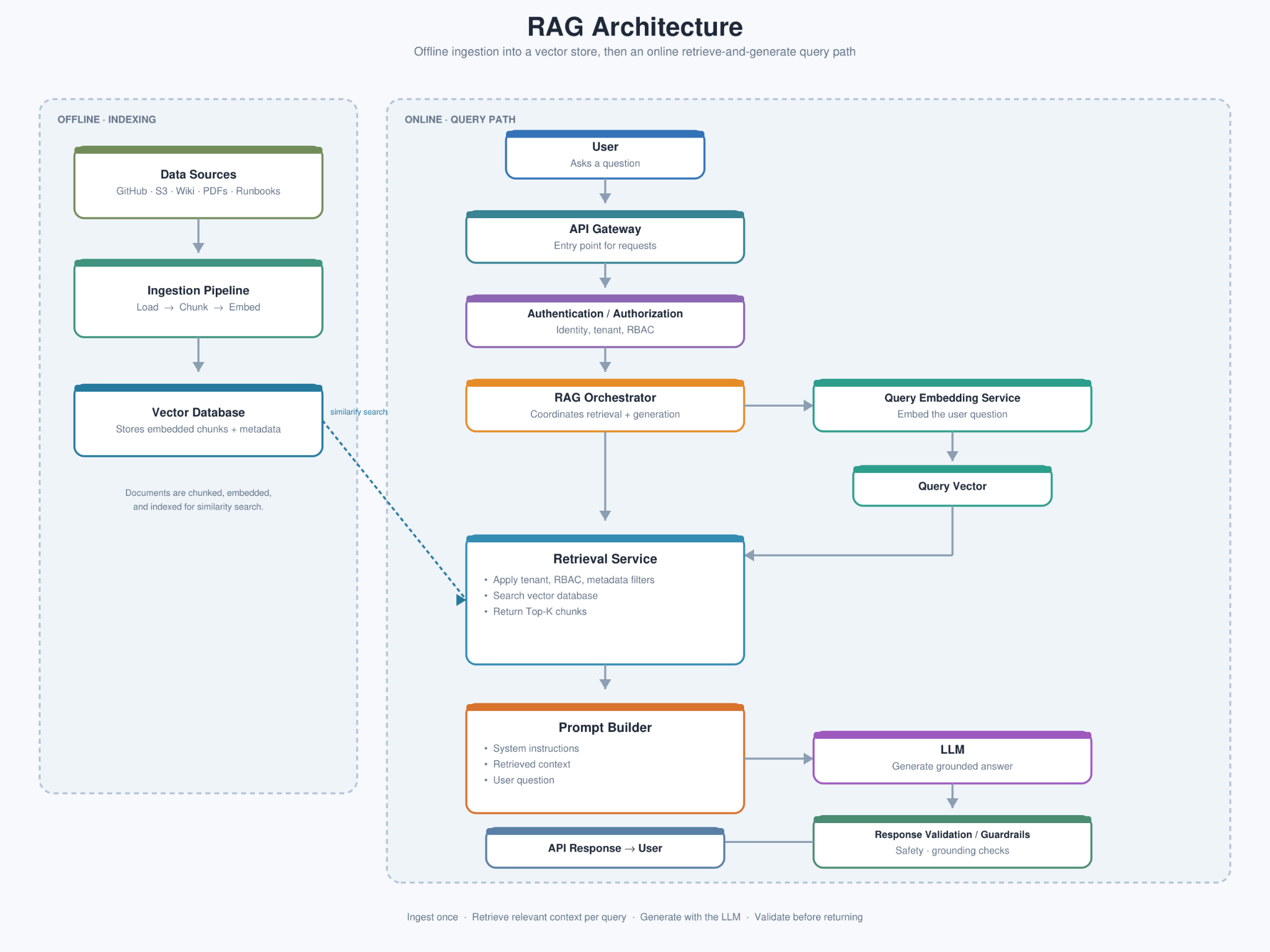
This is much closer to how a DevOps or SRE engineer should think about RAG.
It is not simply "LLM + Vector DB." It is a distributed application with multiple dependencies and failure modes.
56. RAG vs fine-tuning
One common beginner question is: why not just fine-tune the model with our documents?
These solve different problems.
With RAG, knowledge remains outside the model. At query time we search, retrieve, and give information to the LLM.
This is particularly useful for knowledge that changes frequently: runbooks, incident reports, product documentation, internal procedures, infrastructure documentation.
When the source changes, the retrieval index can be updated. You don't necessarily need to retrain the underlying LLM simply because a runbook changed.
57. The most important RAG mental model
                 PREPARE KNOWLEDGE

Documents → Load → Chunk → Embed → Store


                 ANSWER QUESTION

Question → Embed → Search → Retrieve → Add Context → LLM → Answer
That is RAG. Everything else is an improvement, optimization, or production concern around this basic flow.
58. If you remember only eight things
1. LLMs do not automatically know your private or newly created company information.
2. RAG lets us retrieve relevant external information before asking the LLM to answer.
3. Documents are loaded and split into smaller chunks.
4. An embedding model converts those chunks into vectors representing their meaning.
5. A vector database stores those vectors and lets us search for semantically similar chunks.
6. The user's question is also converted into an embedding and used for similarity search.
7. Top-K retrieval selects a small number of the most relevant chunks and sends them to the LLM as context.
8. A production RAG system also needs freshness, security, retries, monitoring, failure handling, and graceful degradation.
The shortest possible version is:
Documents → Chunk → Embed → Store

User Question → Embed → Search → Retrieve → Add Context → LLM → Answer
And that is the heart of Retrieval-Augmented Generation.