What is an AI Agent, Really?
You may have heard the term AI Agent a lot recently. It may sound complicated, but the basic idea is actually quite simple.
An AI agent is an AI model that can think, use tools, check the results, and decide what to do next.
Let’s understand how AI agents work, starting from the basics.
First, let’s look at what the early versions of ChatGPT could not do ↓
Prefer watching instead of reading? The video explains the same journey, starting with the early limitations of ChatGPT and then moving to function calling, tools, ReAct, and different agent frameworks.
ChatGPT was great at writing, but it did not know what was happening right now
When ChatGPT first became popular, many people started using it like a search engine.
They asked questions like:
- Who won the FIFA World Cup in 2022?
- What is the weather in San Francisco today?
But ChatGPT could not always answer these questions correctly.
Why?
There were two main reasons.
First, ChatGPT had a knowledge cutoff. This means its knowledge was limited to the information available during its training. If something happened after that period, ChatGPT might not know about it.
Second, ChatGPT could not directly connect to the outside world. It could not check a weather API, run kubectl commands, or search the internet. It could only understand your text and generate a text response.
So if you asked about today’s weather, early ChatGPT could not check the current weather for you.
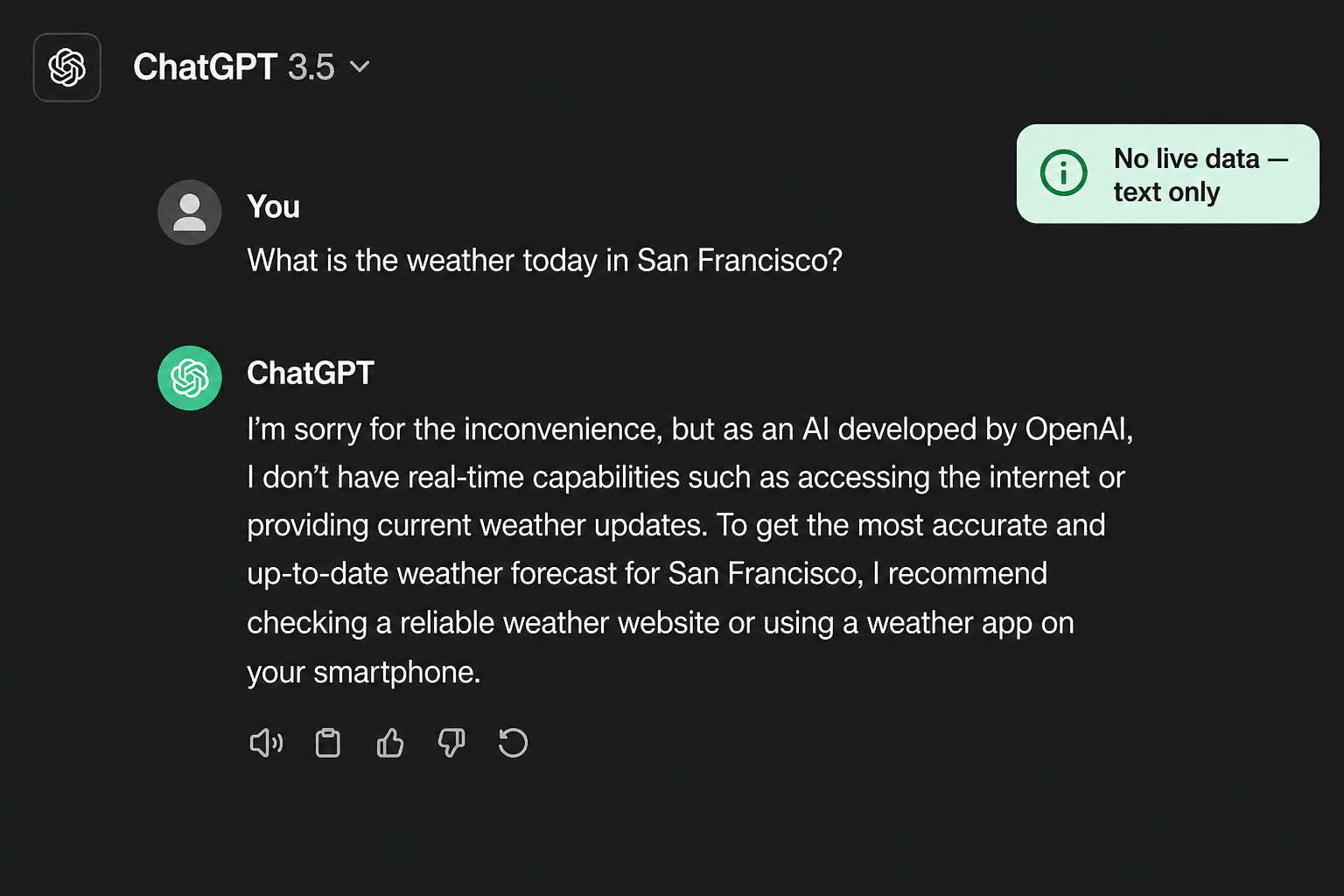
ChatGPT was publicly released by OpenAI on November 30, 2022. The original ChatGPT model had a knowledge cutoff of September 2021.
This was fine when you wanted help writing an email or understanding a concept.
But if you were a DevOps engineer handling a production issue and needed the current state of your Kubernetes cluster, this was a big limitation.
What if the model could use a function?
To solve this problem, OpenAI introduced a concept called function calling.
The idea is quite simple.
You give the model a list of functions that it is allowed to use.
For example, if you want the model to check the weather, you could provide a function called get_weather(city).
Now, when someone asks about the weather in San Francisco, the model does not try to guess the temperature.
Instead, it decides that it needs to use the get_weather function and provides San Francisco as the city.
Your application then runs the function and gets the latest information from a weather API.
The result is sent back to the model, and the model uses that information to answer the user.
The most important thing to understand is this:
The model does not actually run the function. It only decides which function to use and what information to provide to it. Your application runs the function.
So you can think of the model as the decision maker, while your application does the actual work.
Today we usually call them tools, not just functions
Function calling was an important step, but today you will often hear another term: tool calling.
The basic idea is the same, but tools can do much more than just call a function.
A tool could be a function, web search, Python, a database, Kubernetes, GitHub, or even an MCP server.
The model looks at the tools available to it and decides which one is best for the task.
For example, imagine we tell the model that it is helping us troubleshoot Kubernetes. We can also give it a list of tools and explain what each tool can do.
The model reads this information and uses it to decide which tool it should use.
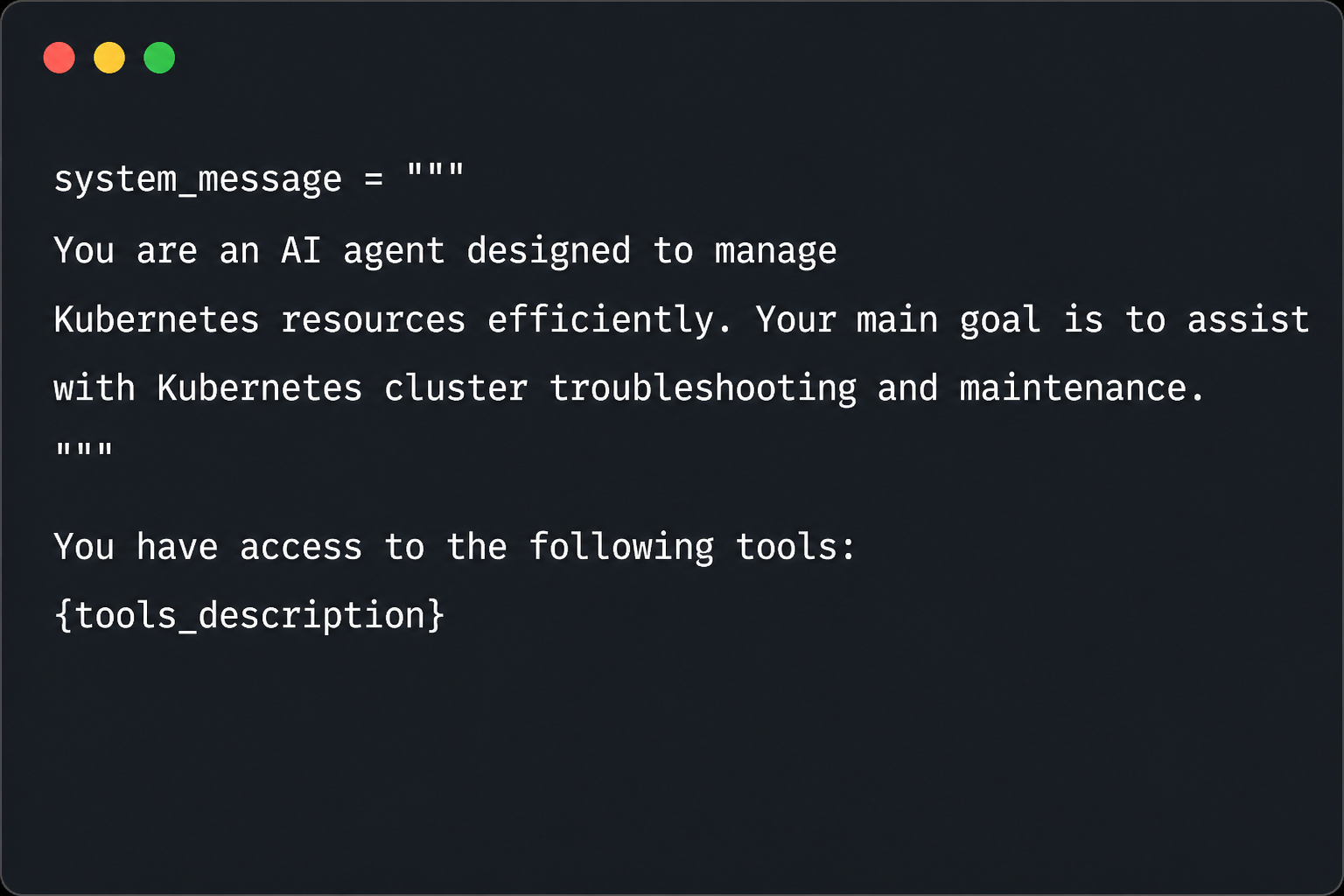
For example, if you ask about a Kubernetes Pod, it might choose a Kubernetes tool. If you ask it to search for some information online, it might choose a web search tool.
The important thing to remember is:
Function calling is a subset of tool calling.
                    LLM
                     │
                     ▼
          Decides which tool to use
                     │
                     ▼
                    Tool
                     │
        ┌────────────┼────────────┐
        │            │            │
        ▼            ▼            ▼
     Function    Web Search     Python
        │            │            │
        ▼            ▼            ▼
     Database    Kubernetes     GitHub
                                  │
                                  ▼
                              MCP Server
So function calling is one type of tool calling. Tool calling is the broader concept that allows an LLM to work with many different types of external systems.
Chain of Thought helps the model reason, but it cannot access new information
Before AI agents became popular, people found that models often performed better when they were asked to think step by step.
This is called Chain of Thought prompting.
For example, instead of asking the model to directly answer a math problem, we can ask it to solve the problem step by step.
Roger has 5 tennis balls. He buys 2 cans of tennis balls. Each can contains 3 balls.
The model can reason through the problem:
- Roger already has 5 balls.
- 2 cans contain 6 balls.
- So the total is 5 + 6 = 11 balls.
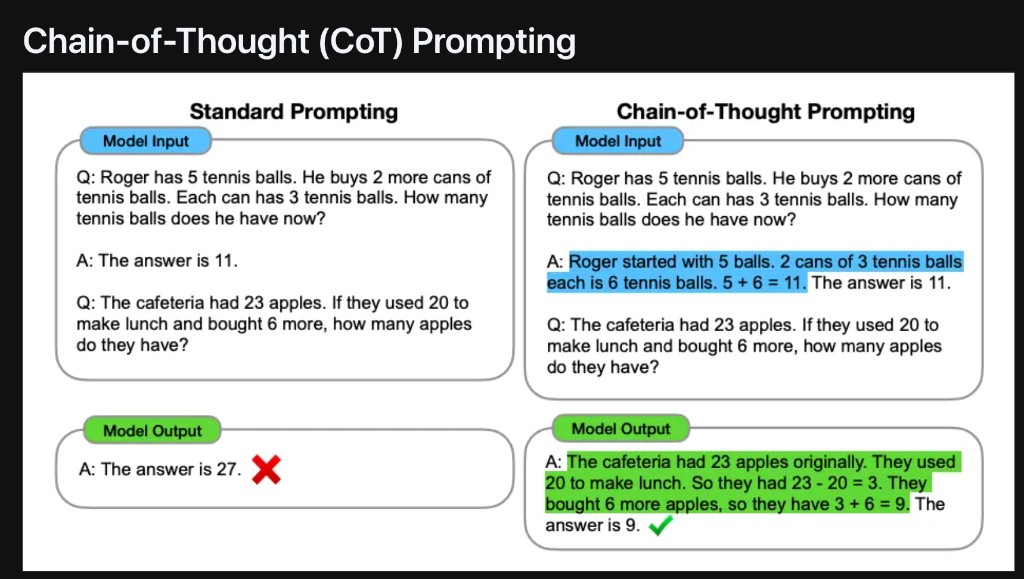
This type of reasoning can help the model solve math problems and other tasks that require multiple steps.
But there is still an important limitation.
Chain of Thought helps the model reason about the information it already has. It does not give the model access to new or current information.
For example, asking the model to think step by step will not help it find the current weather in San Francisco.
For that, the model needs access to an external tool such as a weather API.
So we needed a way to combine reasoning with tools.
Reference: Chain of Thought Prompting Elicits Reasoning in Large Language Models (arXiv:2201.11903)
Think, act, observe, and repeat
Now we have two important ideas.
The model can reason about a problem.
The model can also use tools to get information or perform an action.
But what if we combine both?
That is where ReAct comes in.
ReAct means Reason and Act.
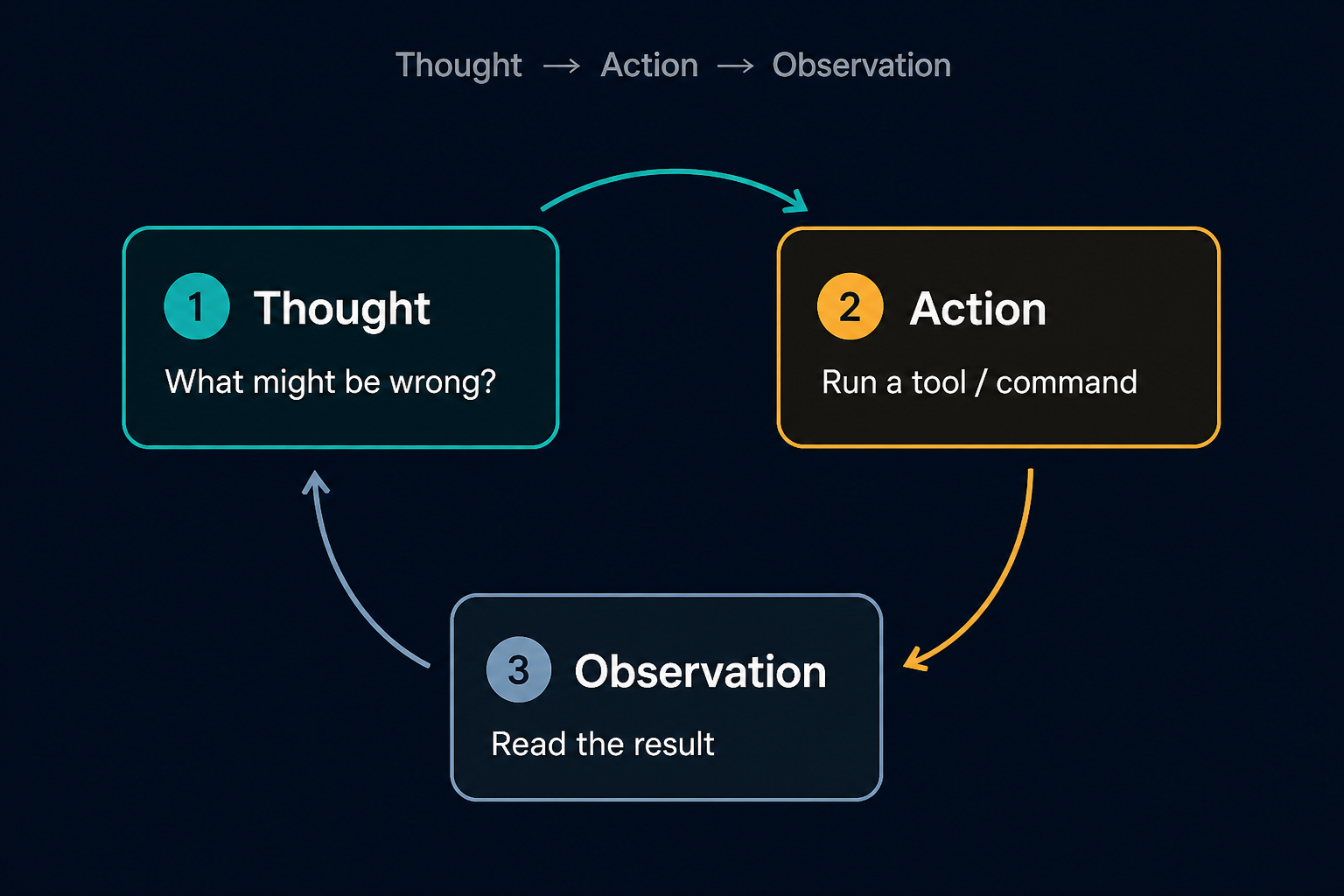
Instead of trying to solve everything at once, the model follows a simple process:
- Thought: What should I do next?
- Action: Use a tool or run a command.
- Observation: Look at the result.
- Thought: Based on the result, decide what to do next.
This process can continue until the model has enough information to solve the problem.
This is commonly called the TAO loop:
Thought → Action → Observation → Thought → Action → Observation
The important idea here is that the model does not have to solve everything in one attempt.
It can take one step, look at the result, and then decide the next step.
A simple DevOps example
Imagine you receive an alert that says:
My Kubernetes Pod is crashing.
Without tools, the model can only think about possible reasons.
Maybe it is CrashLoopBackOff.
Maybe the container ran out of memory.
Maybe there is a problem with the container image.
These are possible reasons, but the model does not have any real evidence yet.
With ReAct, the process becomes different.
Thought: I should first check what is happening with the Pod.
Action: Run kubectl describe pod <name>
Observation: The Pod shows ImagePullBackOff.
Now the model has some real information.
Thought: There seems to be a problem pulling the container image. I should check the image name and tag.
Action: Check the Pod configuration.
Observation: The image tag is incorrect.
Now the model knows the actual problem and can suggest the correct fix.
This is what makes the process powerful.
The model does not simply guess the answer.
It thinks, takes an action, looks at the result, and then decides what to do next.
That simple loop is at the heart of many AI agents today.
It also helps us understand the difference between simple automation and an AI agent.
With simple automation, we usually define the steps in advance.
With an agent, the model can decide the next step based on what it learns from the previous step.
Reference: ReAct: Synergizing Reasoning and Acting in Language Models (arXiv:2210.03629)
No code, low code, or full code?
Once you understand how an AI agent works, the next question is:
Which tool or framework should you use to build one?
A simple way to decide is to ask yourself:
How much code do I want to write?
There are generally three options.
No code: n8n
Low code: CrewAI
Full code: LangChain, LangGraph, or LlamaIndex
They can all help you build AI agents. The main difference is how much control you want and how much code you are comfortable writing.

No code or visual tools such as n8n
With tools like n8n, you build workflows visually.
For example, a user submits a form, the information goes to an AI model, and the result is sent to Slack.
You connect these steps visually instead of writing everything from scratch.
This is great when you want to build something quickly.
The limitation is that you depend on what the platform supports. If you need something that is not available, you may have to write custom code or find another solution.
Low code tools such as CrewAI
With CrewAI, you write some code, but the framework handles many parts of building the agent for you.
For example, you can define what an agent does, what its goal is, and which tools it can use.
CrewAI is also useful when you want multiple agents working together.
For example, one agent could run Kubernetes commands.
Another agent could analyze the results.
Another agent could suggest a solution.
This gives you more flexibility than a visual tool while still making agent development easier.
The limitation is that you still have to work within the structure provided by the framework.
Full code tools such as LangChain, LangGraph, and LlamaIndex
With full code frameworks, you get much more control over how your agent works.
You can control how tools are called, how errors are handled, how the agent retries tasks, how authentication works, and how the overall agent flow behaves.
But more control also means more work.
You need to write more code and be comfortable with software development.
So the choice is really about what you need.
No code gives you simplicity and speed.
Low code gives you a balance between simplicity and control.
Full code gives you maximum flexibility and control.
If you remember only five things
- Early ChatGPT could generate text, but it could not access live information or systems.
- Function calling allows the model to ask your application to run a function and return the result.
- Tools allow the model to work with external systems such as APIs, web search, databases, Kubernetes, GitHub, and more.
- Chain of Thought helps the model reason through a problem, but it does not give the model access to live information.
- ReAct combines reasoning and tools using a simple loop: Think, Act, Observe, and Repeat.
When choosing a framework, choose based on how much code you want to write.
No code is useful when you want to build something quickly.
Low code gives you a balance between simplicity and control.
Full code gives you the most flexibility and control.
The main idea is simple:
The model can think. Tools allow it to interact with the outside world. ReAct brings these two together in a loop.
What Did We Learn?
Tap a card. Try to answer before you flip it.