What's actually inside a GPU?
You've probably heard “you need a GPU to train an AI model.” Fair enough. But what is a GPU, actually? And why did a chip built for video games end up running ChatGPT? Let's open one up.
Here's where it starts, with a mistake almost everyone makes ↓
Prefer to watch this one instead of reading it? This lesson also exists as a short video, covering the same ground: why GPUs were never built for AI, and what's actually inside one.
GPUs were never built for AI
Today, whenever people talk about AI, large language models, or ChatGPT, one word keeps coming up: GPU. If you've ever tried learning AI, you've probably run into a line like “you need an NVIDIA GPU to train models.” Fair enough. But what actually is a GPU, and why did it become so important to AI?
Here's the biggest misconception: people assume GPUs were invented for AI. They weren't. A GPU, short for Graphics Processing Unit, was built for something completely different: rendering video games.
Rewind to the late 1990s and early 2000s. Games were getting more ambitious every year: detailed characters, realistic lighting, shadows, reflections, explosions, huge open worlds, all running at 60 frames a second or more. That's an enormous amount of math, and a very particular kind of math: the same handful of calculations, repeated for millions of pixels, dozens of times a second.
A CPU is great at all sorts of different jobs, but it wasn't built to do millions of near-identical calculations at once. So a new kind of chip was born. Instead of doing one complicated thing at a time, really well, a GPU does thousands of simple, similar things at the same time. For years, that was its entire job: draw the game.
Then something unexpected happened
As GPUs got more powerful, researchers noticed something odd. The math used to render a game, lots of small, repeated calculations, looked a lot like the math used in scientific computing.
Around the same time, machine learning researchers had a problem of their own. Training a neural network means running billions, even trillions, of calculations. A CPU could technically do them, just slowly. It was built to be flexible, not to repeat the same operation a million times in a row.
So researchers asked a simple question: what if we used gaming hardware to do AI math instead?
It worked. The same chip that could calculate the color of millions of pixels could also run millions of matrix multiplications, the core operation behind a neural network. That one discovery quietly changed the future of computing. Hardware built for gamers became the engine of modern AI.
The GPU sitting in a data center training a model today is a very different animal from the one that shipped in a gaming PC in 1999, but the throughline is direct. Three decades, one kind of chip, two completely different jobs. Let's walk through the key moments.
From video games to ChatGPT
Same idea as Day 1's lineage: each step exists because of what came right before it.
A few powerful workers, or thousands of simple ones?
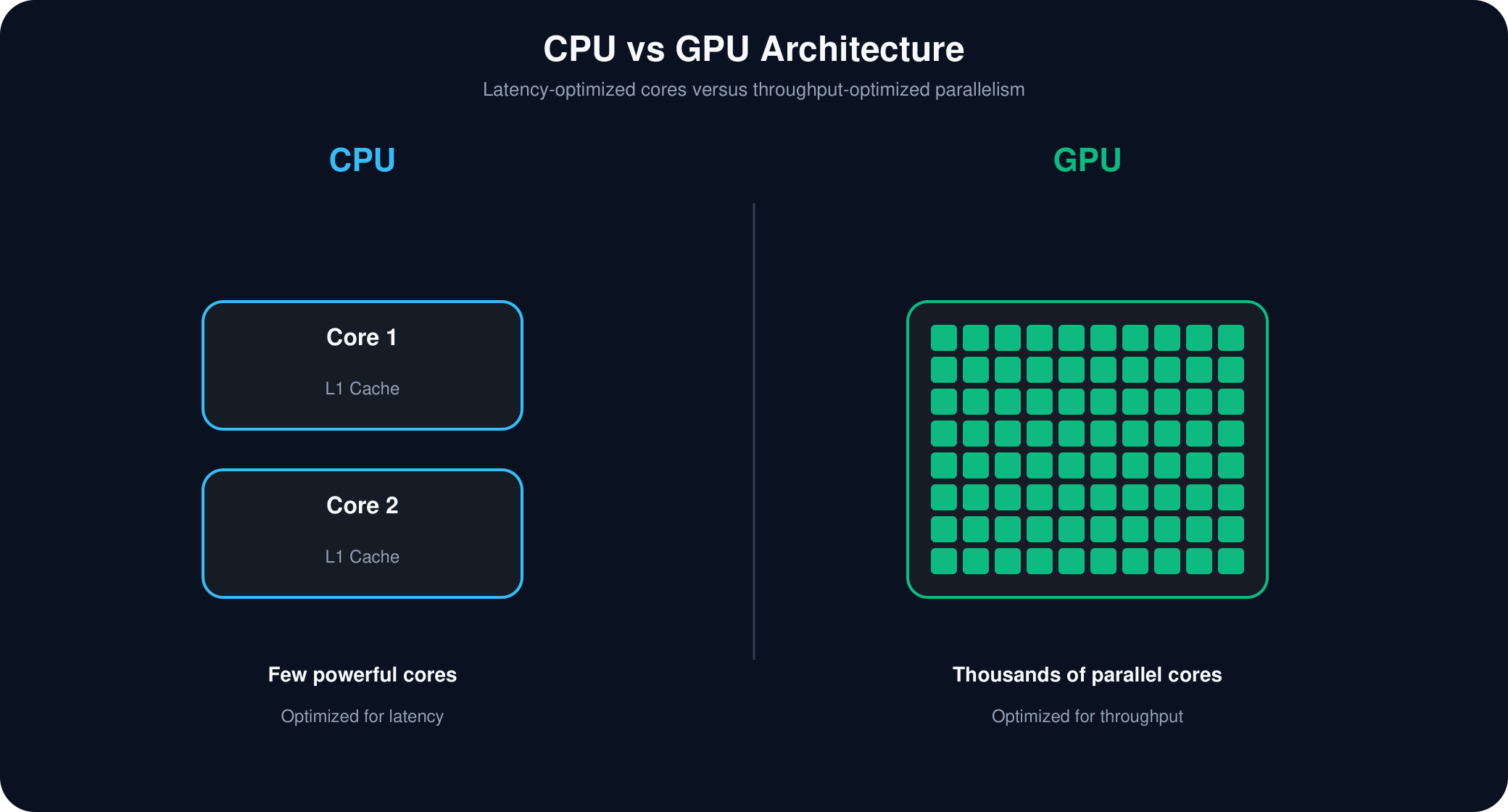
Here's the cleanest way to understand the difference. A CPU has a handful of very powerful cores, built for latency: finish one task as fast as possible. That's exactly what you want for running an operating system, a browser, or a long chain of decisions where each step depends on the last.
A GPU flips that trade-off. Instead of a few powerful cores, it has hundreds or thousands of small, simpler ones, built for throughput: not finishing one task the fastest, but finishing thousands of similar tasks at the same time.
Neither is “better.” They're built for different jobs. And a neural network, which is really just millions of small, similar calculations done over and over, happens to be exactly the kind of job a GPU was built for.
How a GPU organizes thousands of cores
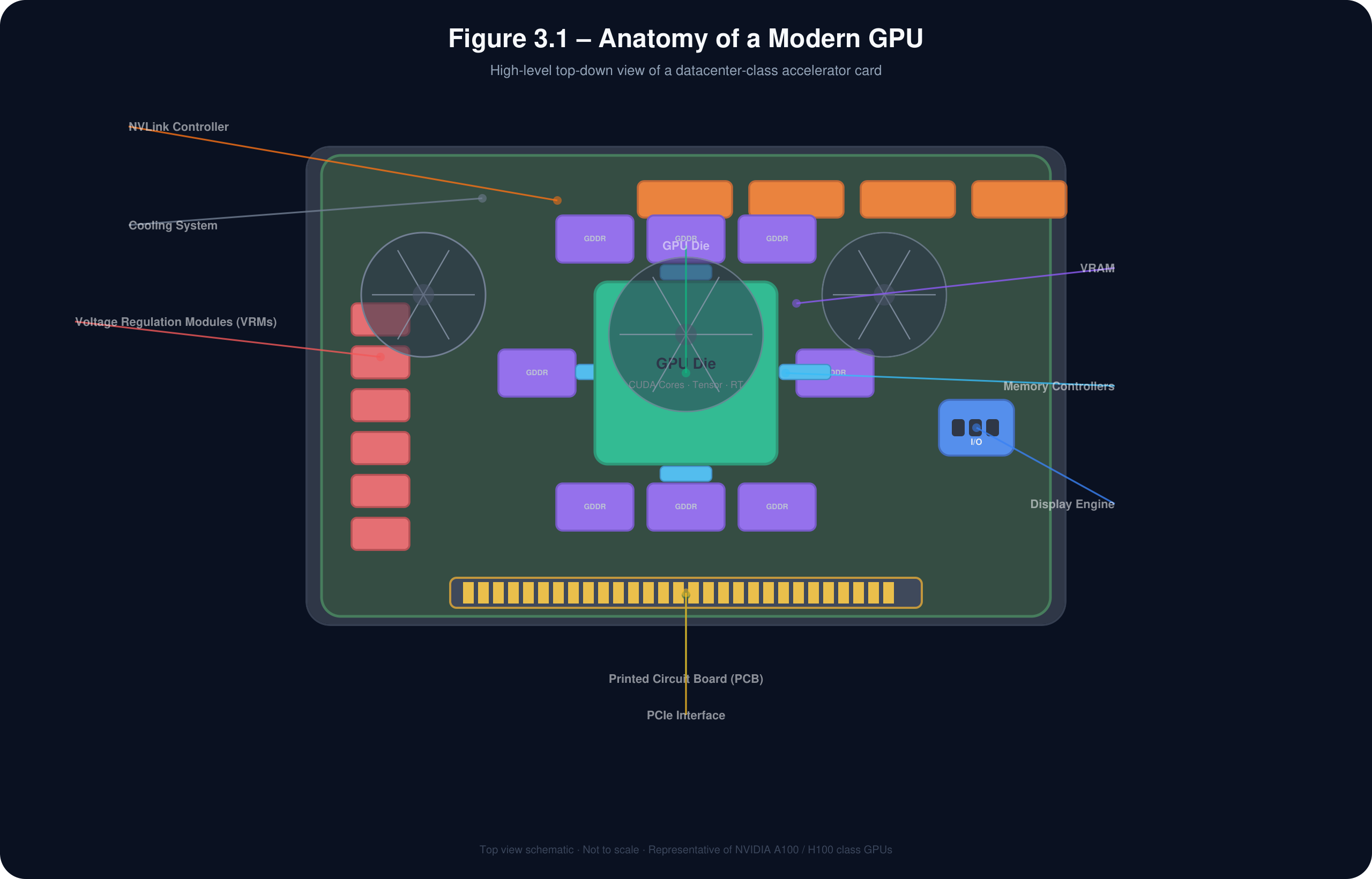
Time to open the hood. A modern GPU isn't one giant processor, it's a very deliberately organized hierarchy, more like a company than a single machine. Here's the chain of command, top to bottom: thirteen parts, each with its own job.
The tiny switch everything is built from
If the GPU die is the brain, transistors are its neurons. A transistor is just a tiny electronic switch, on or off. Line up billions of them and you get something that can add numbers, store values, and make decisions.
One transistor alone can't do much. Billions of them, working together, can render a video game, generate an AI image, or train a language model. Modern GPUs pack in a staggering number, NVIDIA's Blackwell architecture has well over 208 billion of them.
The pattern is simple: more transistors means more hardware. More hardware means more can happen in parallel. More parallel means faster AI.
| GPU | Year | Design | Transistors |
|---|---|---|---|
| GeForce RTX 3090 | 2020 | Single die | 28.3 billion |
| GeForce RTX 4090 | 2022 | Single die | 80 billion |
| GeForce RTX 5090 | 2025 | Dual die | 208 billion |
| NVIDIA Grace Hopper | 2023 | Grace CPU + GH100 GPU | 228 billion |
| NVIDIA Blackwell Ultra | 2026 | Grace CPU + Blackwell Ultra GPU | 288 billion |
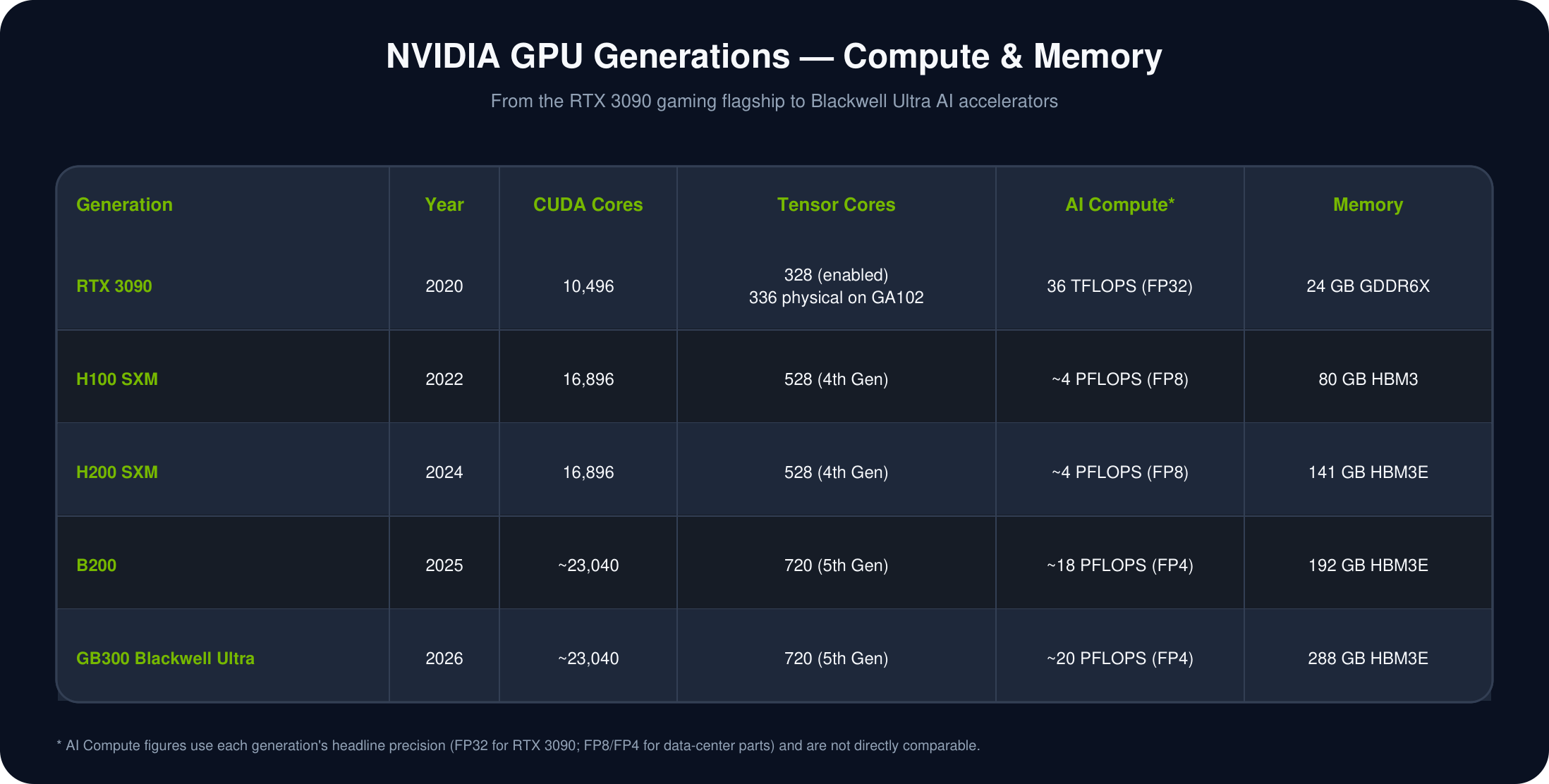
Transistor count is only part of the story. Here's how compute and memory scaled across the same generations, from a 2020 gaming flagship to a 2026 AI accelerator:
The department inside the company
A GPU isn't one giant processor, it's organized into large sections called Graphics Processing Clusters, or GPCs. Think of a GPC like a department in a big company: Engineering, Finance, Marketing. Each department has its own smaller teams.
A GPU works the same way. Each GPC contains several Streaming Multiprocessors, which we're about to meet, plus some supporting graphics hardware. Splitting work across multiple GPCs, instead of one enormous processor, is what lets a GPU scale up. For graphics, different GPCs might render different parts of a scene. For AI, they cooperate on massive numbers of matrix calculations at once.
The team inside the department
If a GPC is a department, a Streaming Multiprocessor, or SM, is one team inside it. This one's worth paying attention to, because almost all the real computation in a GPU happens inside SMs. A single GPU might have dozens, even hundreds of them, all working at once.
Picture a warehouse full of workers. Instead of one person packing every single order, you split the work across many independent teams, and thousands of packages move at once. That's an SM's job: take a small slice of the workload and process it independently, in parallel with every other SM on the chip.
An SM isn't just a processor, it's more like a small computer of its own. It has its own cores, its own scheduler, and its own fast memory, which we'll get to shortly.
An SM doesn't actually hand work straight to individual cores. It groups threads into a warp, 32 threads that all run the same instruction at the same time, on different pieces of data. NVIDIA calls this SIMT: Single Instruction, Multiple Threads. It's like a teacher giving one instruction to an entire classroom at once, instead of repeating it to each student individually. Say a GPU needs to add two lists of ten thousand numbers together: it splits that job into warps, each warp handles 32 numbers at once, and thousands of warps run across all the SMs simultaneously. That's the real source of a GPU's speed.
Inside every SM: three kinds of cores
When people compare graphics cards, the first spec they mention is usually the core count. But modern NVIDIA GPUs actually contain three different kinds of cores, each built for a different job.
CUDA Cores
The all-purpose worker. Handles basic math, add, subtract, multiply, divide, over and over, for almost everything a GPU does.
Tensor Cores
The AI specialist. Built specifically for matrix multiplication, the core operation inside every neural network. If a CUDA Core is a worker with a shovel, a Tensor Core is the bulldozer: both move sand, one moves vastly more of it per second.
RT Cores
The realism specialist. Simulates how light actually bounces around a scene, for realistic reflections and shadows in games and film. AI workloads barely touch this one.
What makes a Tensor Core so much faster at its one job? It does the multiply-and-add math for a whole chunk of a matrix in a single hardware step, instead of one multiplication at a time. It's also comfortable with lower-precision numbers, fewer decimal places, which sounds like a downside but actually means it can push through far more calculations per second without losing the accuracy that matters. A little less precision for a lot more speed: that trade is a big part of why AI training got so much faster.
The numbers a core is holding right now
Every time a CUDA Core runs a calculation, it needs somewhere to hold the numbers it's actively using. That's a register: the fastest memory on the entire chip.
Think of registers as a carpenter's hands. A carpenter building a table doesn't walk back to the toolbox every few seconds, they keep the hammer and screwdriver right there, in hand. Registers do the same job for a GPU core: keep the most-used numbers within instant reach, instead of fetching them from slower memory every single time.
The chef's countertop
Not everything gets deliberately placed in shared memory. So each SM also keeps an L1 Cache: a small, very fast memory that automatically holds whatever data was used most recently.
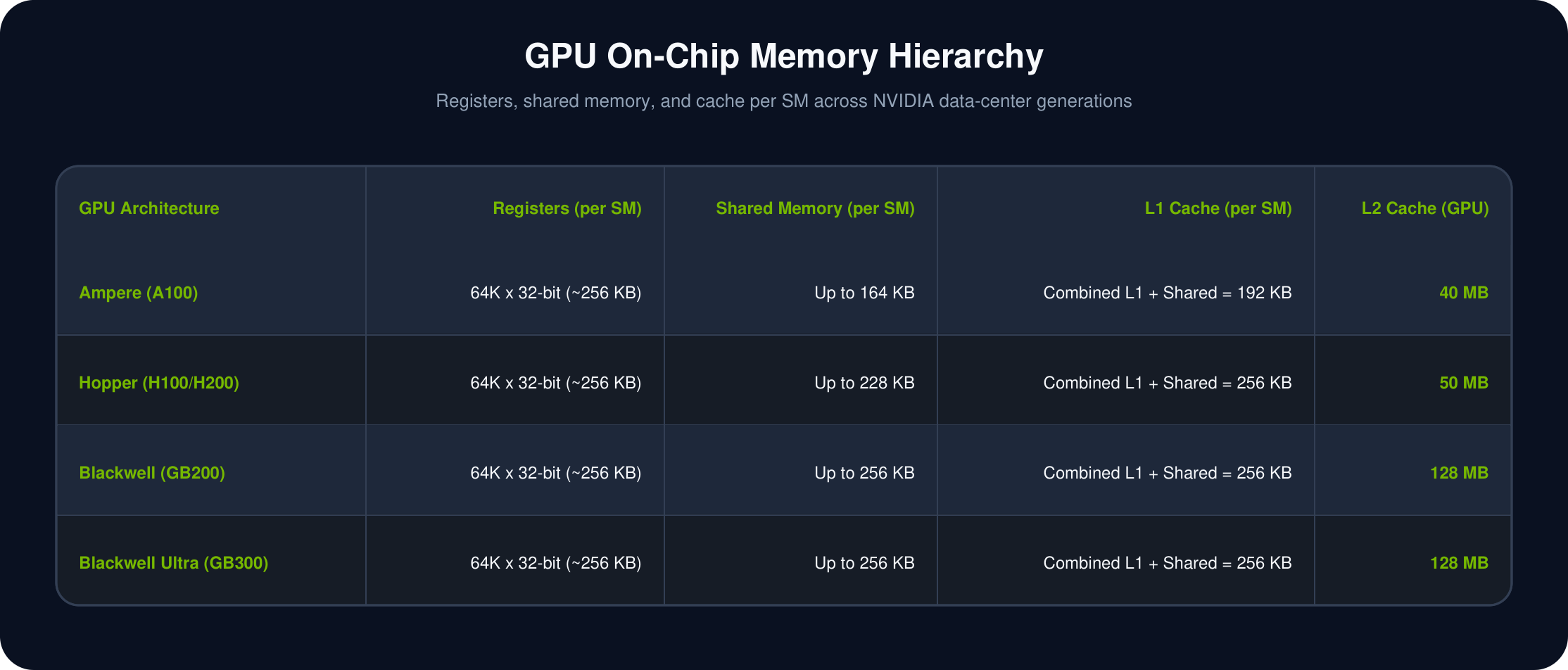
Think of a chef's kitchen counter. Salt, pepper, and oil live on the counter, not in the fridge, because the chef reaches for them constantly. If a core needs a piece of data and it's already sitting in L1, it grabs it almost instantly. If not, it has to look further away, which takes longer. L1 Cache and shared memory actually share the same small pool of physical memory on the chip, split between the two jobs depending on what a program needs.
The pantry down the hall
Every SM has its own L1 Cache, but the whole GPU also shares one much larger L2 Cache. If L1 is a chef's counter, L2 is the shared pantry down the hall, still much faster than a trip to the store.
When an SM can't find what it needs in its own L1, it checks L2 before going all the way out to VRAM, the GPU's main memory. Because L2 is shared across the whole chip, it cuts down on repeated requests for the same data. Modern GPUs pack in tens, sometimes hundreds, of megabytes of it, specifically to keep cores fed and busy instead of waiting.
Here are the real numbers behind that ladder, straight from NVIDIA's own data-center generations:
The GPU's own pantry
You've probably seen graphics cards advertised by their VRAM: 8 GB, 16 GB, 24 GB, sometimes 80 GB on data-center hardware. VRAM, Video RAM, is the GPU's own dedicated memory. It holds everything the GPU is working with: images, video, textures, and for AI, a model's parameters, plus every intermediate calculation along the way.
When you run a large language model, its parameters get loaded into VRAM so the GPU can reach them quickly. VRAM is built for a different job than your computer's regular RAM: it's optimized for bandwidth, letting thousands of cores pull data at once, which is a big part of why GPUs beat CPUs so badly at AI work.
The highway between the cores and the memory
Thousands of cores are useless if they're sitting there waiting for data. So how fast can data actually reach them?
Two numbers answer that. Memory bus width is how many bits can move between the GPU and its memory in a single trip, the number of lanes on a highway. A typical desktop CPU talks to memory over a 64-bit bus, a narrow road. A GPU built for AI, like NVIDIA's GB200, uses a bus up to 384 bits wide, a highway with far more lanes.
Memory bandwidth is how much data actually gets through per second, the number of cars that make it across that highway every second. For AI, bandwidth often matters more than raw core count. A language model is constantly pulling billions of parameters out of memory, and if they can't arrive fast enough, all those cores just sit idle.
Two ways to build that memory
VRAM is really just the general term for “the GPU's dedicated memory.” Not all of it is built the same way. Two technologies dominate.
Found in most consumer graphics cards: GeForce RTX, Radeon. GDDR chips sit around the GPU die, spread across the circuit board. A great balance of performance and cost, built for gaming budgets.
Found in high-end AI accelerators like the H100, H200, and Blackwell. Instead of sitting beside the GPU, HBM stacks memory chips vertically and places them right next to the die. That closeness delivers far higher bandwidth at lower power, exactly what massive AI models need. It's also a big reason enterprise AI GPUs cost so much more than gaming ones.
The private bridge between GPUs
As AI models grow past what a single GPU can hold, hundreds of billions of parameters, multiple GPUs have to work as a team. That raises an obvious question: how do GPUs talk to each other, fast?
That's NVLink, NVIDIA's high-speed connection that lets GPUs exchange data directly, without routing everything through the CPU first. Picture two office buildings that used to send documents by walking around the block, and now have a private bridge connecting them directly. That's the difference NVLink makes.
Worth knowing: NVLink connects GPUs within the same server or rack. Once a workload spans multiple racks or data centers, the job passes to other high-speed networking, like InfiniBand. In NVIDIA's largest systems, NVLink ties together every GPU inside one rack, and InfiniBand or Ethernet carries traffic between racks.
Keeping billions of switches from overheating
All of this, billions of transistors switching billions of times a second, generates a lot of heat. Without proper cooling, a GPU would overheat, slow itself down, or shut off entirely to protect itself. There isn't one right way to cool a GPU. It depends on the job.
Fans push air across a heatsink to carry heat away. Cheap, reliable, and easy to install. The trade-off: louder under heavy load, and it runs a bit warmer than liquid cooling.
Coolant carries heat to a radiator, away from the card entirely. Best temperatures, quietest under load, and it frees up space around the GPU. The trade-off: higher cost, a little more maintenance, and a small risk of a leak.
A large heatsink disperses heat with no fans at all. Silent, no moving parts to fail, low maintenance. The trade-off: it only works for lower-power chips, and it needs good airflow around it to work at all.
Get the temperature wrong and the GPU protects itself by slowing down, called thermal throttling. Good cooling isn't just about not breaking the hardware, it's what lets a GPU hold its top speed for the hours, sometimes days, that training a large model actually takes.
What happens when you ask it a question
Let's watch all thirteen pieces work together, for something as simple as asking, “What is Artificial Intelligence?”
A GPU can look like a mysterious slab of metal and fans. It's really a very deliberately organized team: thousands of simple workers, fast local notes, shared pantries, and a highway system to keep everyone fed, all built first for video games, and now running the biggest AI models in the world.
Say it back to me
Tap each card. Can you remember what it does, before you flip it?
A gaming chip, rebuilt by accident into the engine of modern AI.