AWS DevOps Agent: an always-on SRE teammate
Think of an experienced DevOps or SRE engineer who never sleeps. It can look at your infrastructure, monitoring, deployments, source code, and ops tools — then help answer “why is this slow?”, “what broke production?”, and “is this change ready to ship?”
Here is the problem it is trying to shrink ↓
Prefer to watch this one instead of reading it? This lesson also exists as a short video, covering the same ground: what AWS DevOps Agent is, Agent Spaces, and how an investigation actually runs.
Release readiness and incident response in one agent
AWS DevOps Agent is designed as an always-available teammate across software change and operations — on AWS, other clouds, and on-prem. Before release, it can review code for readiness and help with autonomous release testing. After deployment, it can investigate incidents, suggest root cause and mitigation, and recommend ways to stop the same failure from coming back.
It also keeps learning your environment: services, dependencies, and operational patterns. Over time, release reviews get more relevant, investigations get faster, and recommendations get sharper. The business pitch is simple: ship faster, reduce MTTR, and raise operational excellence.
Questions it is meant to help with look like this:
- Why is the application slow?
- What caused this production incident?
- Which deployment introduced the problem?
- What resources are affected?
- How can we fix it safely?
- Is this code change ready for production?
- How do we prevent the same incident again?
Modern apps force humans to play telephone between tools
A single application might depend on EC2, Lambda, Kubernetes, databases, load balancers, queues, CI/CD, GitHub, CloudWatch alarms, Datadog or Grafana, PagerDuty, and Slack — all at once.
When customers suddenly see HTTP 500s, an engineer often has to:
- Check the alert in PagerDuty.
- Open CloudWatch or Datadog.
- Search application logs.
- Check recent deployments.
- Review GitHub pull requests.
- Inspect infrastructure changes.
- Map downstream impact.
- Write a mitigation plan.
- Update the Slack incident channel.
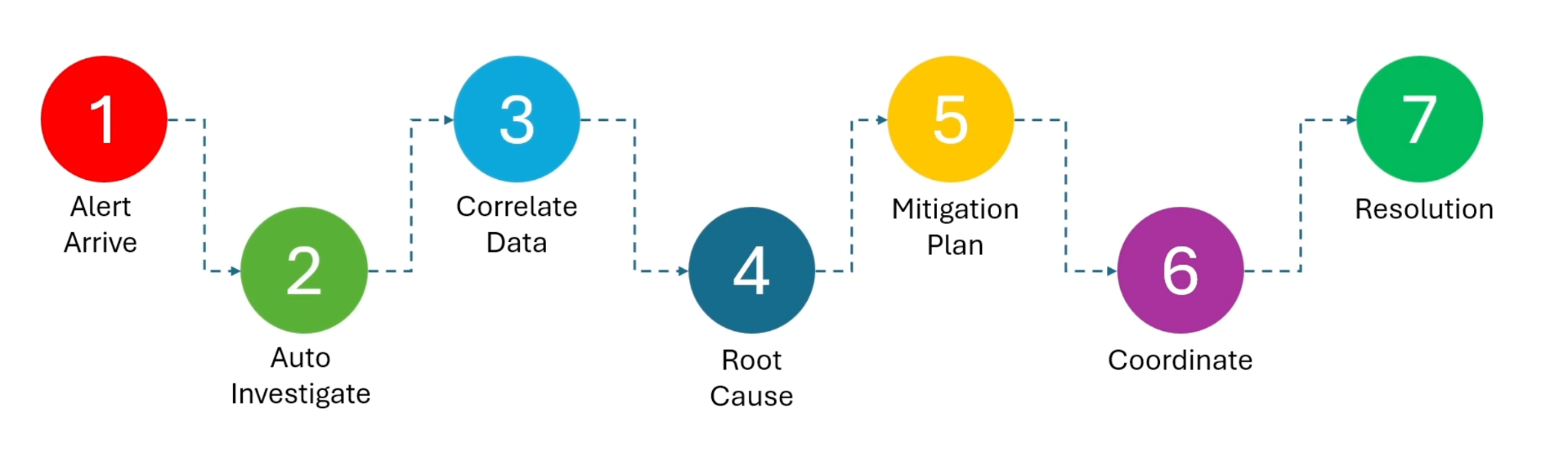
That takes time — especially when the person on call does not fully know the architecture. AWS DevOps Agent tries to pull evidence from those systems together, reason about relationships, propose a root cause, and offer a mitigation plan: what to change, how to validate, and how to roll back.
The goal is lower MTTR — Mean Time to Resolution — the gap between detecting an incident and fixing it.
Resource Explorer is a starting inventory, not magic real-time GPS
AWS Resource Explorer is a search service for finding resources across accounts and Regions without opening every console page. Create an EC2 instance, wait a bit, and it becomes searchable once the index catches up. AWS does not promise a real-time indexing SLA — the index refreshes as resources change.
Why does DevOps Agent care? Because the agent needs an environment map. Instead of asking EC2, Lambda, S3, RDS, and ECS one by one, it can query Resource Explorer for a starting inventory, then combine that with CloudFormation, tags, deployments, and observability data to build application topology.
Skills teach procedures. Memories keep what your environment taught you.
A lot of ops knowledge lives in people’s heads: noisy alarms, nightly batch spikes, weird rollback steps, expired-credential patterns. When that engineer is out, everyone restarts from zero.
Skills
Reusable procedures. Example: an RDS investigation skill that checks alarms, connections, latency, slow queries, then proposes remediation.
Memories
Learned environment facts. Example: this alarm was connection-pool exhaustion three times, or this service scales down on weekends.
Skills are how to investigate. Memories are what we already learned here. Together they stop every incident from being a cold start.
The chat box is the front door — the environment is the real workspace
A basic chatbot answers from whatever you paste into the prompt. AWS DevOps Agent is built to interact with your operational environment. Depending on permissions and integrations, that can include AWS resources, topology, monitoring, logs and metrics, code repos, CI/CD, incident tools, skills/runbooks, and historical memories.
You chat with it. Behind that UI, it uses tools and context — not only the last sentence you typed.
Everything starts with an Agent Space
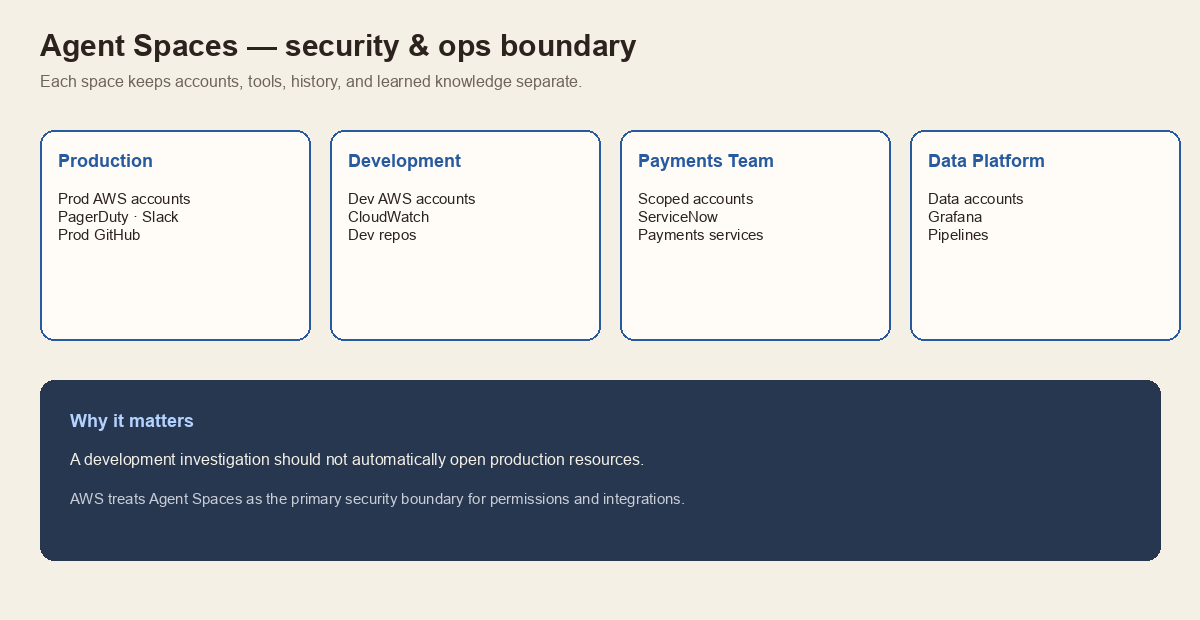
Before investigations, an administrator creates an Agent Space — the security and operational boundary for the agent. It defines which AWS accounts, resources, monitors, repos, users, and procedures the agent may use.
Spaces are isolated. Configuration, investigation history, chat history, permissions, and learned knowledge stay separate. A common pattern:
Connect the systems that hold the truth
After the Agent Space exists, you wire in operational sources. Typical buckets:
- Observability — CloudWatch, Datadog, Dynatrace, Grafana, New Relic, Splunk
- Source & CI/CD — GitHub, GitLab, Azure DevOps, CodePipeline
- Incident & chat — PagerDuty, ServiceNow, Slack, Microsoft Teams
- Extensibility — MCP servers, webhooks, remote A2A agents, private connections
Nothing is unlimited by default. An admin must configure each integration and grant permissions on purpose.
High CPU on EC2 — from alarm to learning
Here is a realistic production story the PDF walks through end to end.
CloudWatch · EC2-HighCPUUtilization · CPUUtilization > 90% for 10 minutes · current 96% · instance i-0abc…
Customers are about to feel this if the Order API keeps melting.
1–2. Trigger and triage
CloudWatch fires. An EventBridge rule plus webhook starts an investigation in DevOps Agent. The agent triages: affected EC2, Order API app, high severity, us-west-2, alarm at 14:05, CPU at 96%. Production impact looks likely, so it digs in.
3. Topology lookup
Internet → ALB → Order API (EC2) → RDS, plus SQS → worker service. From that map it learns which neighbors matter and which apps are not directly hanging off this instance.
4–5. Memories and skill selection
Past high-CPU cases included infinite loops after deploy, partner traffic spikes, and log-processing CPU hogs. Those become hypotheses — not conclusions. The agent loads a skill like ec2-high-cpu-investigation: CPU, memory, processes, logs, deployments, Auto Scaling, CloudTrail, network.
6–8. Tools, evidence, correlation
It pulls metrics, logs, CloudTrail, deploy history, Auto Scaling events, and process lists. The timeline tells the story:
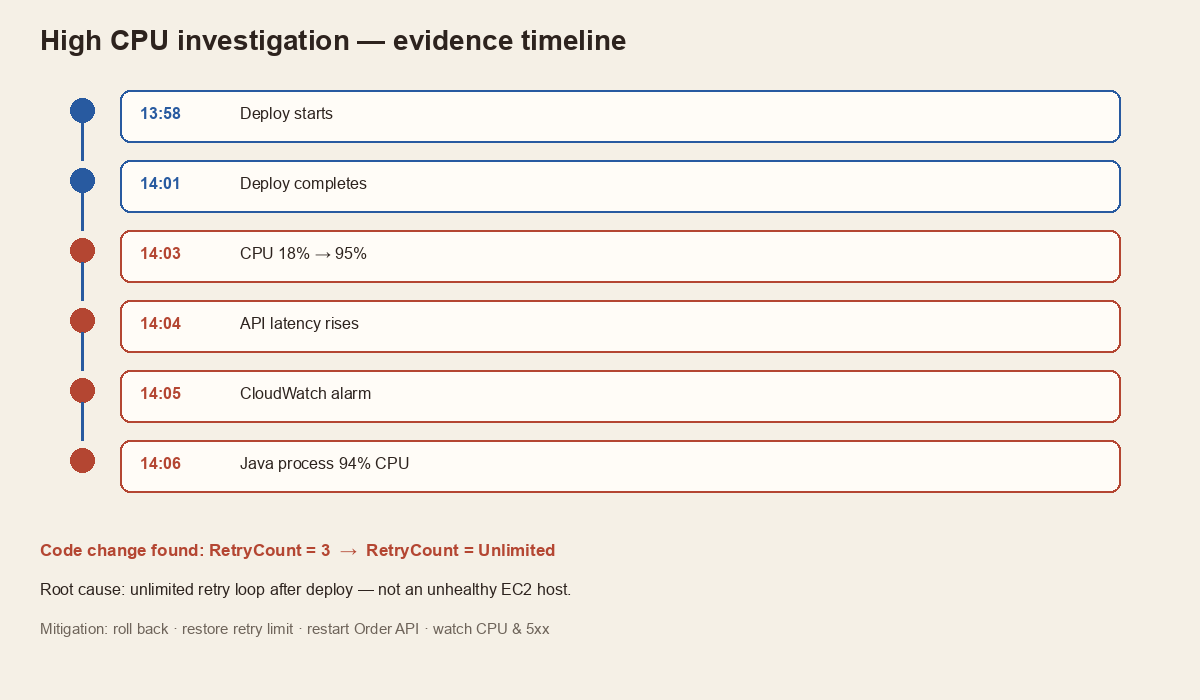
Correlation: a new deployment introduced an unlimited retry loop on inventory sync. The EC2 host itself looks healthy. This is an application bug, not “the server is dying.”
9–11. Blast radius, mitigation, validation
Affected: Order API and checkout. Indirectly delayed: background workers. Not affected: auth, catalog, payments, RDS. Mitigation: roll back the deploy, restore retry limit to 3, restart Order API, watch CPU, scale out temporarily if needed. Validation checks CPU, load average, latency, 5xx, retry spam, and alarm clear.
12. Learning
The investigation is stored: high CPU, unlimited retry after deploy, rollback fixed it, and future recommendations include retry-limit tests plus alerts when retries explode. Next time a similar alarm fires, that history is a signal — still checked against fresh evidence.
It does not guarantee the correct root cause
DevOps Agent uses generative AI plus evidence. It can still be wrong. Classic failure modes:
- Correlation mistaken for causation
- Over-weighting a recent deployment
- Missing an unavailable data source
- Grabbing the wrong historical pattern
- Misreading logs
- Incomplete mitigation
- Confident wrong hypotheses
Deploy finishes at 12:00. Database fails at 12:05. The agent may blame the deploy — while the real cause was a full storage volume at 12:04. Timing is a clue, not a conviction.
Treat it as an investigation assistant, not an unquestionable source of truth. Humans still review evidence, contradictions, confidence, timeline, actions, and rollback steps. “Autonomous” does not mean “unattended forever.” Sandbox execution for skills is also preview and limited.
Not per investigation — per active agent-second
AWS prices DevOps Agent by how long the agent is actively working — about $0.0083 per agent-second (roughly $0.50 per agent-minute). You pay while it investigates, runs evaluations, or does on-demand SRE tasks. Idle waiting is not charged.
| Example | Active time | Approx. cost |
|---|---|---|
| Typical investigation | 8 minutes | ≈ $3.98 |
| Faster investigation | 2 minutes | ≈ $1.00 |
| 100 incidents × 5 min | 500 minutes | ≈ $249 / month |
It is not billed per tool call. One investigation may hit CloudWatch, Logs Insights, CloudTrail, EC2 APIs, Auto Scaling, GitHub, and deploy history — DevOps Agent still meters active work time, not each API poke.
Watch the fine print: underlying AWS services can still bill separately (Logs Insights queries, traces, metrics, data transfer). Bedrock usage inside the agent is part of the agent story; other Bedrock usage outside it is not.
New customers may get a free trial window (AWS has described about two months with monthly caps on Agent Spaces and hours for investigations, evaluations, and on-demand SRE tasks). After limits or trial end, pay-as-you-go applies. Always confirm current numbers in the AWS pricing page — rates and trial terms can change.
Unlike many AI products that charge per token, DevOps Agent charges for agent work time. Dozens of reasoning steps and tool calls collapse into one question ops people can estimate: how many minutes did the agent spend?
Five things worth carrying forward
- DevOps Agent is an always-on release + ops teammate, not a prompt-only chatbot.
- Agent Spaces are the security boundary — isolate prod from everything else.
- Skills encode procedures; memories reuse environment-specific lessons.
- A good investigation looks like triage → topology → evidence → correlation → mitigation → learning.
- Humans still own the call. Pricing is active agent time, plus any AWS services it queried.
Say it back to me
Tap each card. Can you remember what it means, before you flip it?
Always-on teammate. Fenced Agent Spaces. Skills + memories. Evidence over vibes. Humans still decide.